⚡ Transfer Time Calculator
Calculate exact file transfer times based on bandwidth, file size, and protocol overhead
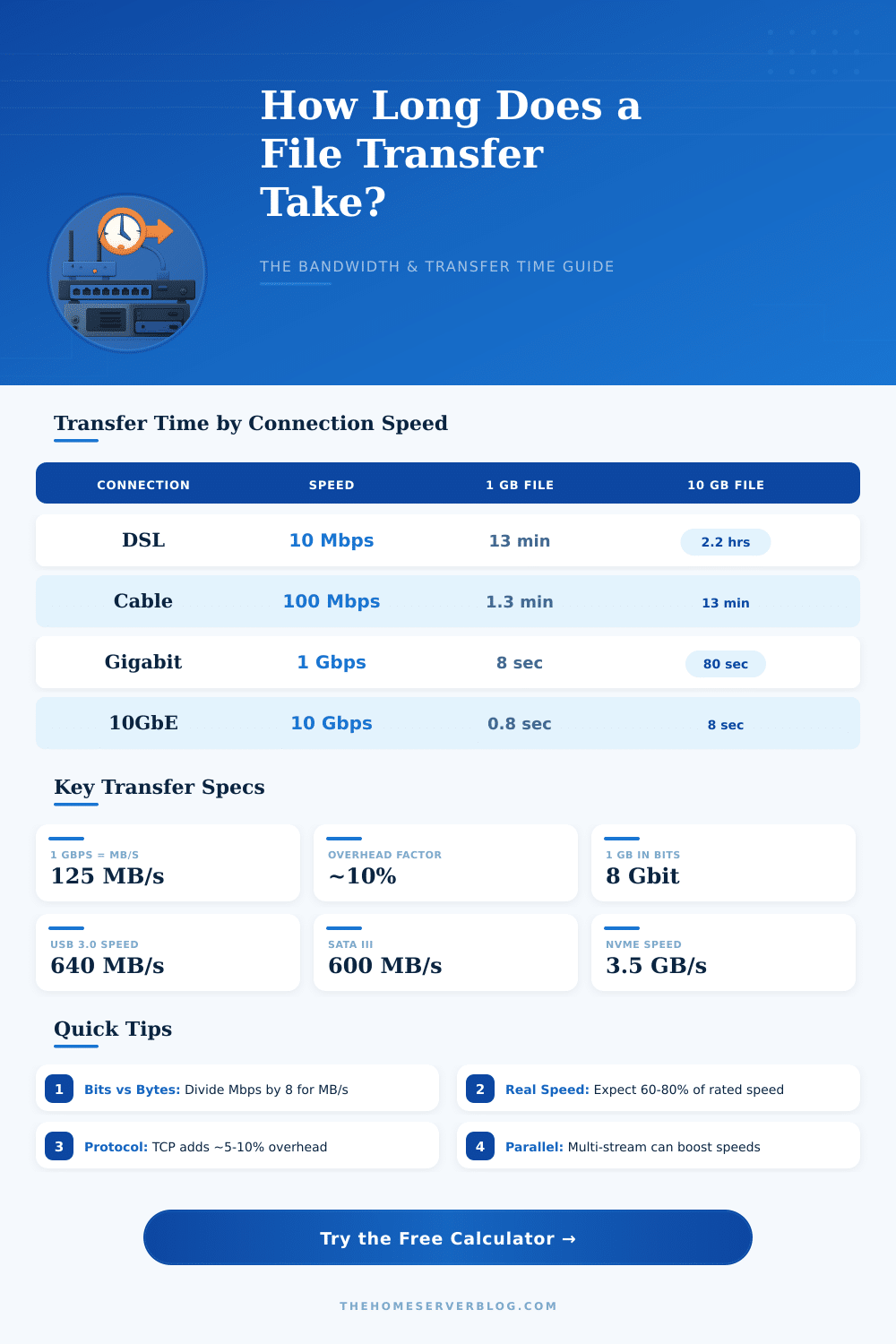
| Connection Type | Speed (Mbps) | Effective Speed | 100 MB | 1 GB | 10 GB | 1 TB |
|---|---|---|---|---|---|---|
| DSL Basic | 10 | ~8.5 Mbps | 1.6 min | 15.7 min | 2.6 hrs | 10.9 days |
| Cable / ADSL | 100 | ~85 Mbps | 9.4 sec | 1.6 min | 15.7 min | 1.1 days |
| Fast Fiber | 500 | ~425 Mbps | 1.9 sec | 18.8 sec | 3.1 min | 5.2 hrs |
| Gigabit Ethernet | 1,000 | ~850 Mbps | 0.9 sec | 9.4 sec | 1.6 min | 2.6 hrs |
| 2.5GbE | 2,500 | ~2,125 Mbps | 0.4 sec | 3.8 sec | 37.6 sec | 62.7 min |
| 10 Gigabit | 10,000 | ~8,500 Mbps | 0.09 sec | 0.9 sec | 9.4 sec | 15.7 min |
| 25 Gigabit | 25,000 | ~21,250 Mbps | 0.04 sec | 0.4 sec | 3.8 sec | 6.3 min |
| 40 Gigabit | 40,000 | ~34,000 Mbps | 0.02 sec | 0.2 sec | 2.4 sec | 3.9 min |
| Protocol | Typical Overhead | Encryption | Typical Efficiency | Best Use Case |
|---|---|---|---|---|
| Raw TCP | 2–5% | None | 90–95% | Internal LAN transfers |
| FTP | 3–7% | Optional | 88–94% | File server access |
| HTTP/HTTPS | 5–10% | TLS | 85–92% | Web / cloud download |
| SFTP / SCP | 10–20% | SSH AES | 75–88% | Secure server transfers |
| SMB v2/v3 | 5–12% | Optional | 82–92% | Windows shares / NAS |
| NFS v4 | 3–8% | Optional | 87–94% | Linux NAS / VMware |
| rsync | 5–15% | SSH | 80–90% | Backup / sync jobs |
| USB 3.x | 2–5% | None | 90–95% | Local drive copy |
| Scenario | Data Size | At 1 Gbps LAN | At 100 Mbps | At 10 Gbps |
|---|---|---|---|---|
| 4K Movie (HEVC) | 15 GB | 2.4 min | 23.5 min | 14.1 sec |
| Full Blu-ray Disc | 50 GB | 7.8 min | 1.3 hrs | 47 sec |
| OS Backup Image | 25 GB | 3.9 min | 39 min | 23.5 sec |
| VM Disk (typical) | 100 GB | 15.7 min | 2.6 hrs | 1.6 min |
| Home NAS Backup | 500 GB | 1.3 hrs | 13.1 hrs | 7.8 min |
| Full Server Backup | 2 TB | 5.2 hrs | 2.2 days | 31.4 min |
| Proxmox 3-Node | 300 GB | 47.1 min | 7.8 hrs | 4.7 min |
| Data Center Migration | 10 TB | 26.2 hrs | 10.9 days | 2.6 hrs |
| Unit | Symbol | In Bytes | In Bits |
|---|---|---|---|
| Kilobyte (decimal) | KB | 1,000 B | 8,000 bits |
| Megabyte (decimal) | MB | 1,000,000 B | 8,000,000 bits |
| Gigabyte (decimal) | GB | 1,000,000,000 B | 8,000,000,000 bits |
| Terabyte (decimal) | TB | 1,000,000,000,000 B | 8 Tbits |
| Kibibyte (binary) | KiB | 1,024 B | 8,192 bits |
| Mebibyte (binary) | MiB | 1,048,576 B | 8,388,608 bits |
| Gibibyte (binary) | GiB | 1,073,741,824 B | 8,589,934,592 bits |
| Tebibyte (binary) | TiB | 1,099,511,627,776 B | ~8.8 Tbits |
Translation happens always. When you move files between you, servers or send money. At the heart of it, deal only about estimate, how much time must pass to go from spot A to B, measured in seconds.
It sounds very simple right? Even so here it becomes messy: the real speed depends fully on that, what you move and how it is sent.
How Long Do Transfers Take?
For files, many free tools are available to give you a rough rating based on size of the file. Here the cause, they commonly are a bit too hopeful. The real factors hide everywhere.
Translation by means of USB works otherwise than online: USB has different speeds for read and write, while network moves have their download and upload. And also is the speed of the recording itself, that affects, together with everything, what limits the transfer time, that you meet.
Here it becomes truly stressful: thousands of little files can totally slow your translation. Other things add up quickly, speed of USB, hard activity of the drive, the whole set. Average move could last somewhere from four to six hours.
Even worse, many translations start out quickly, but then hit a wall in half of the way. I saw a file more than 1 GB, that started at 110 MB/s, later fell under 10 MB/s. That is tough.
The protocol, that you use, changes everything. SMB v2 or SFTP above WiFi? No hoping for more then around 3 MB/s.
Switch to Ethernet, and you reach almost 75 MB/s. But here comes the quirk… Go back to SMB v1 or FTP on same WiFi, and suddenly you again have 75 MB/s.
The difference between SMB and FTP should not be that big, which makes it a strange cause, that none truly understands.
Moving servers adds its own troubles. One good method cuts the downtime: do a quick copy of the data during quiet time of the system, push it to the new server, later close locally and sync only the changes. That cuts your bandwidth of hours to only seconds.
The choice of encryption matters more, than one thinks, translation by means of SSH burns the CPU and slow operations. One move, that I saw with Blowfish, lasted only a bit more than seven minutes. The same with Arcfour?
Under four minutes.
Translation of money follows totally other rules. Normal banking packages usually need two or three days to arrive. International translations last more, from one to five work days, based on the land, to that you send.
Big amounts above 500 dollars can stretch to six days. Even so instant payment services? They are other creatures, thatends in under thirty seconds most commonly.
The most basic core for estimate average transfer time stays always same: take the size of your file, divide it by means of the time, that the translation needed. Simple math, but results, that is tricky.