⛏️ Minecraft Server Bandwidth Calculator
Calculate exact upload & download bandwidth requirements for your Minecraft server by player count, server type, and game mode.
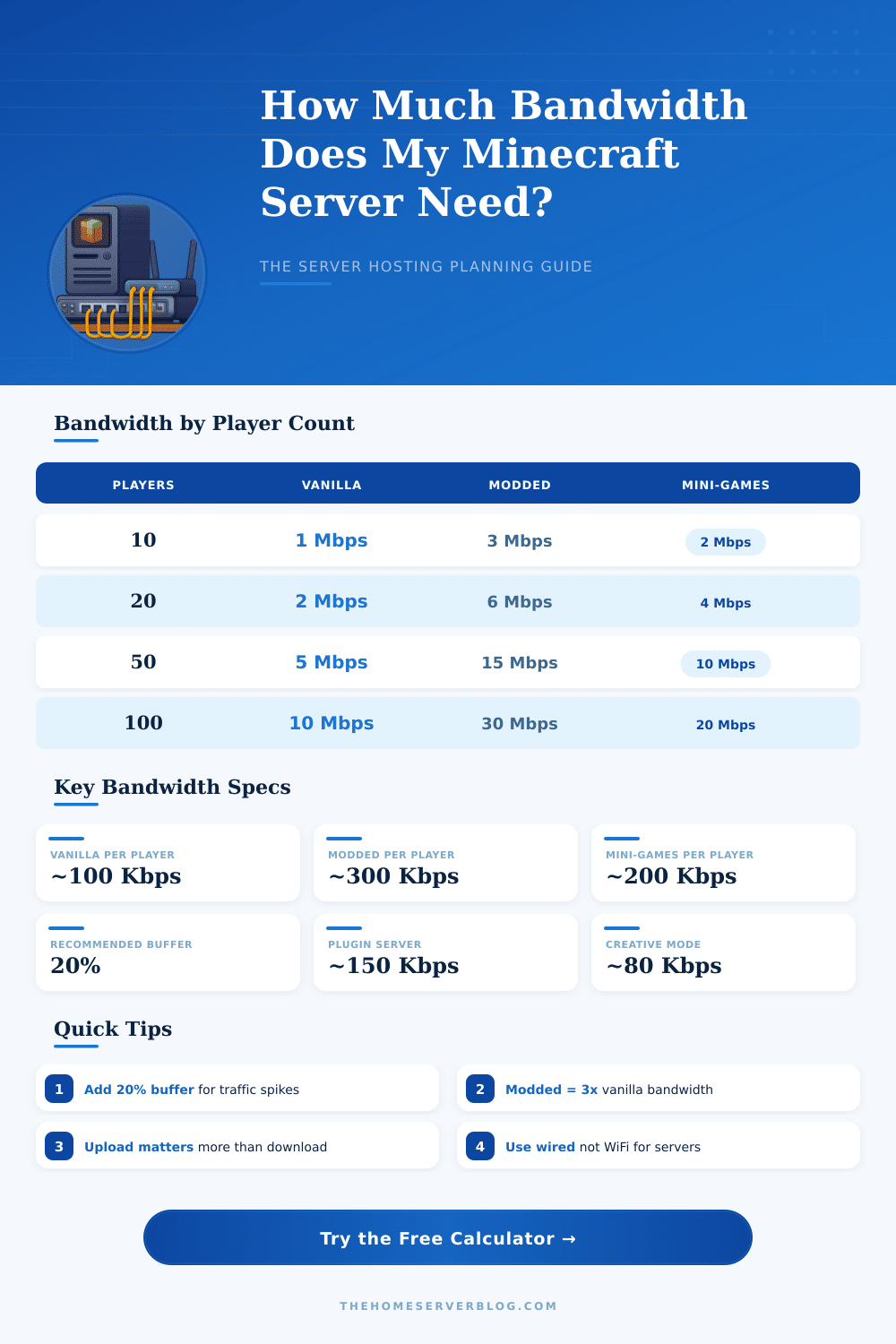
| Players | Vanilla (Mbps) | Paper/Spigot (Mbps) | Modded (Mbps) | Mini-Games (Mbps) | BungeeCord (Mbps) |
|---|---|---|---|---|---|
| 5 | 0.5 | 0.75 | 1.5 | 1.0 | 1.2 |
| 10 | 1.0 | 1.5 | 3.0 | 2.0 | 2.4 |
| 20 | 2.0 | 3.0 | 6.0 | 4.0 | 4.8 |
| 30 | 3.0 | 4.5 | 9.0 | 6.0 | 7.2 |
| 50 | 5.0 | 7.5 | 15.0 | 10.0 | 12.0 |
| 100 | 10.0 | 15.0 | 30.0 | 20.0 | 24.0 |
| 200 | 20.0 | 30.0 | 60.0 | 40.0 | 48.0 |
| 500 | 50.0 | 75.0 | 150.0 | 100.0 | 120.0 |
| Server Software | Base Kbps/Player | Peak Multiplier | Recommended Upload | Protocol |
|---|---|---|---|---|
| Vanilla Java | 80–120 | 1.5x | 1 Mbps per 10 players | TCP 25565 |
| Paper / Spigot | 100–180 | 1.8x | 1.5 Mbps per 10 players | TCP 25565 |
| Spigot Plugin-Heavy | 150–250 | 2.0x | 2 Mbps per 10 players | TCP 25565 |
| Forge Modded | 250–400 | 2.5x | 3 Mbps per 10 players | TCP 25565 |
| Fabric Modded | 200–350 | 2.2x | 2.5 Mbps per 10 players | TCP 25565 |
| BungeeCord | 180–280 | 2.0x | 2.5 Mbps per 10 players | TCP 25565 |
| Velocity Proxy | 160–250 | 1.9x | 2 Mbps per 10 players | TCP 25565 |
| Bedrock / Geyser | 50–150 | 1.6x | 1.2 Mbps per 10 players | UDP 19132 |
| Game Mode | BW Multiplier | Main Cause | Typical Kbps/Player |
|---|---|---|---|
| Survival / SMP | 1.0x (baseline) | Block updates, entity sync | 80–120 |
| Creative | 0.8x | Fewer entity interactions | 60–100 |
| Adventure / RPG | 1.2x | NPC packets, scripted events | 100–150 |
| Mini-Games / PvP | 1.5x | High movement, combat packets | 150–200 |
| Skyblock / Factions | 1.3x | Economy plugins, claim data | 110–160 |
| Large Creative Build | 1.4x | Mass block placement | 120–180 |
| Scenario | Players | Upload Needed | Download Needed | Connection Type |
|---|---|---|---|---|
| Friends LAN / Home | 1–5 | 1 Mbps | 5 Mbps | Standard Cable/DSL |
| Small Private Server | 5–15 | 5 Mbps | 10 Mbps | Cable / FTTP 25+ |
| Medium Community | 15–40 | 15 Mbps | 30 Mbps | FTTP 50+ / VPS |
| Large Community | 40–100 | 50 Mbps | 100 Mbps | FTTP 100+ / Dedicated |
| Modded Network | 20–60 | 30 Mbps | 60 Mbps | FTTP 100+ / Dedicated |
| Public Network 100+ | 100–500 | 200 Mbps | 400 Mbps | 1 Gbps Dedicated Server |
Running a Minecraft Server uses enough Bandwidth even so probably less than most folks assume. Indeed, it needs less than watching YouTube videos in 1080p. Like this, even if the other members use the net, everything usually runs flat.
For a typical vanilla Minecraft Server, one needs around 30-50 kB/s for download and 20 kB/s for upload. One player in a standard game uses rough 50-100 MB during one hour. This matches to around 0.015-0.03 Mbps for one player in active play.
How Much Bandwidth Does a Minecraft Server Need
A Server for 10 players at full capacity needs about 0.3 Mbps for upload. For 50 players, it needs around 1.5 Mbps.
The kind of game affects a lot. Exploring fresh regions, one uses the maximum Bandwidth, because the Server must deliver new info about blocks. Building, straight mining or activity with redstone use much less.
The loading of worlds is limited to 125 kB/s for every user. Some players see stable changes of 40 kB in certain places, and going past many of thoce areas, the use drops.
A home net link with 5 to 10 Mbps for upload can work for around seven players without problems. There may happen some bits of slowness during heavy exploring or when Server tasks run. At around 20 Mbps everything should go well, but if many players join at once, that can cause rubber banding and bufferbloat.
Upload Bandwidth matters more than download, and many home ISPs set strict limits for upload.
Modded Minecraft forms a totally other cause. Servers with strong automation, for instance fully automated mining and factory system in Tekkit, deliver crowds of steady updates to the players. Normal vanilla game uses around 256-650 kbps for one user.
Even at the bottom end, hosting fifty players at once needs around 128 Mbps. If one runs a medium Server all day, the Bandwidth can reach several gigabytes four one day.
About monthly limits of data, 100 GB per month could be a bit too narrow. This matches rough to 556 MB per friend each day. If the limit of Bandwidth is 1 TB, even so, there is no need to worry, because Minecraft uses genuinely little for a whole squad.
Some mods and extra programs can use Bandwidth even when the Server is idle.
One way to lower the Bandwidth is to use a proxy, that saves data about blocks. Players join through the local proxy instead of directly, and that can shrink the use by a factor of around five. Hosting the Server means delivering net data to the other players, similar to uploading in torrents.
Joining by means of internal IP on thelocal net, one skips entirely the net data, while using outside IP, one must use them.