H.264 Data Rate Calculator
Estimate AVC video bitrate, total stream rate, upload headroom, recorder storage, and monthly transfer from resolution, frame rate, scene motion, audio, and encoder profile.
▶Named H.264 presets
⚙Video and encoder inputs
Calculation breakdown
📊Encoder spec grid
📘H.264 reference tables
| Content type | BPP range | Typical use | Planning note |
|---|---|---|---|
| Slides / talking head | 0.035 to 0.065 | Lecture, meeting, webinar | Text may need sharpness boost |
| Normal camera video | 0.060 to 0.110 | Home stream, vlog, indoor camera | High profile usually saves 10% to 20% |
| Fast game or sports | 0.100 to 0.180 | Gaming, hockey, motorsport | Frame rate and motion both matter |
| Noisy night camera | 0.120 to 0.240 | Security at night, rain, foliage | Noise reduction can reduce storage |
| Resolution | Pixels/frame | 30 fps pixels/sec | Good H.264 range |
|---|---|---|---|
| 854 x 480 | 0.41 MP | 12.3 MP/s | 0.8 to 2.5 Mbps |
| 1280 x 720 | 0.92 MP | 27.6 MP/s | 2.0 to 5.0 Mbps |
| 1920 x 1080 | 2.07 MP | 62.2 MP/s | 4.0 to 10 Mbps |
| 2560 x 1440 | 3.69 MP | 110.6 MP/s | 8.0 to 18 Mbps |
| 3840 x 2160 | 8.29 MP | 248.8 MP/s | 18 to 45 Mbps |
| Profile or mode | Efficiency factor | Latency behavior | Best fit |
|---|---|---|---|
| Baseline | 1.18x bitrate | Very compatible | Old devices and WebRTC fallback |
| Main | 1.05x bitrate | Balanced | Appliances and older set-top boxes |
| High | 1.00x bitrate | Efficient | Most modern H.264 streaming |
| Hardware fast | 1.12x bitrate | Low CPU | GPU encoders and embedded devices |
| Camera SoC | 1.20x bitrate | Continuous | NVR and surveillance cameras |
| Project size | Input example | Primary result | Secondary result |
|---|---|---|---|
| Small webcam | 720p30, 1 stream | 2 to 4 Mbps | 1.0 to 1.8 GB/hr |
| Home stream | 1080p30, High | 5 to 7 Mbps | 2.4 to 3.2 GB/hr |
| Gaming upload | 1080p60, high motion | 8 to 12 Mbps | 10+ Mbps upload headroom |
| Camera system | 8 x 4MP, 24/7 | 40 to 70 Mbps | 13 to 23 TB/month |
| 4K archive | 4K30, VBR | 22 to 35 Mbps | 10 to 16 GB/hr |
💡Planning tips
When planning a video project, consideration must be given to the data requirements of that project. Data requirements relate to both the storage space of the video as well as the bandwidth that is required to deliver that video to the individuals who will view it. Furthermore, consideration must also be given to the ability of the connection to carry that data.
H.264 codec is one of the most common form of video encoding software because it balance the quality of the video relative to the size of the file that the codec creates. However, the balance of quality and size that the codec provides is only provided if the data rate of the video are set up correctly. Data rate is affected by a variety of factors.
How to Calculate Video Data and Storage Needs
The resolution of the video, the frame rate of the video, the complexity of the motion within the video, and the way that the video encoder consider the picture within each frame affects the data rate. For instance, a data rate that is calculated for a presentation of static lecture slide will contain less data than a data rate that is calculated for a presentation of sports highlights due to the fact that there is more motion within the sports videos. These variables can be entered into a calculator that can provide an approximate amount of data that the video codec will need to be transmitted.
Each of these variables impact the data rate of the video as a result of the way in which the encoder encodes the video. Furthermore, additional factors like audio tracks and data overhead can also impact the amount of data that is necessitated by the video project. Each of these factors will be represented in the calculator to provide an accurate estimation of the amount of data that will need to be transmitted by the video.
After determining the amount of data that will need to be transmitted by the video, that data can be converted into storage calculations for the video. By knowing the data rate of the video, the length of the video in hours, and the number of cameras that will be used to record the video, it is also possible to calculate the amount of data that the video project will store each day. From that daily storage calculation, it is also possible to calculate the amount of data that will be stored each month by the video.
Furthermore, the safety margin that is built into the data rate calculations can also be accounted for in these calculations to provide an accurate calculation of the amount of data that will be stored by each video project each month. It is common for individuals to make mistakes in calculating these data rates for a video project. One of the most common reason that individuals make mistakes in calculating the amount of data that will be transmitted by a video project is in the reliance upon the specification sheets that the manufacturers of the cameras that will be used to capture the video project publishes.
The specification sheets for those cameras will often indicate the maximum bitrate that the cameras will reach. However, cameras often reach those maximum rates during nighttime scenes, rainy scenes, or scenes that contain foliage due to the amount of noise that the camera introduces into the video that is captured. Thus, it is common for an individual to obtain a rate for the camera during the day, but for the same camera to reach a higher bitrate during the nighttime scenes.
Thus, an individual can obtain a data rate for a short capture of video from the camera, and use those rates to calculate the amount of data that will be transmitted by the video project. In addition to the type of video that the video project will create, there are also different calculations for live video versus recorded video. For example, variable bitrate settings are used to record video, while constant bitrate settings are used for live streaming.
The type of video project that is planned will determine which setting is used in encoding the video. For example, if the data rate is encoded with a variable bitrate, the data rate can drop below the calculated data rate during sections of the video that contain little or no motion. In contrast, constant bitrate settings will not allow the data rate to drop below the calculated data rate; the data rate will need to be set to the bitrate for the network that is being used to transmit the data to ensure that there is no dropped frame during the live stream.
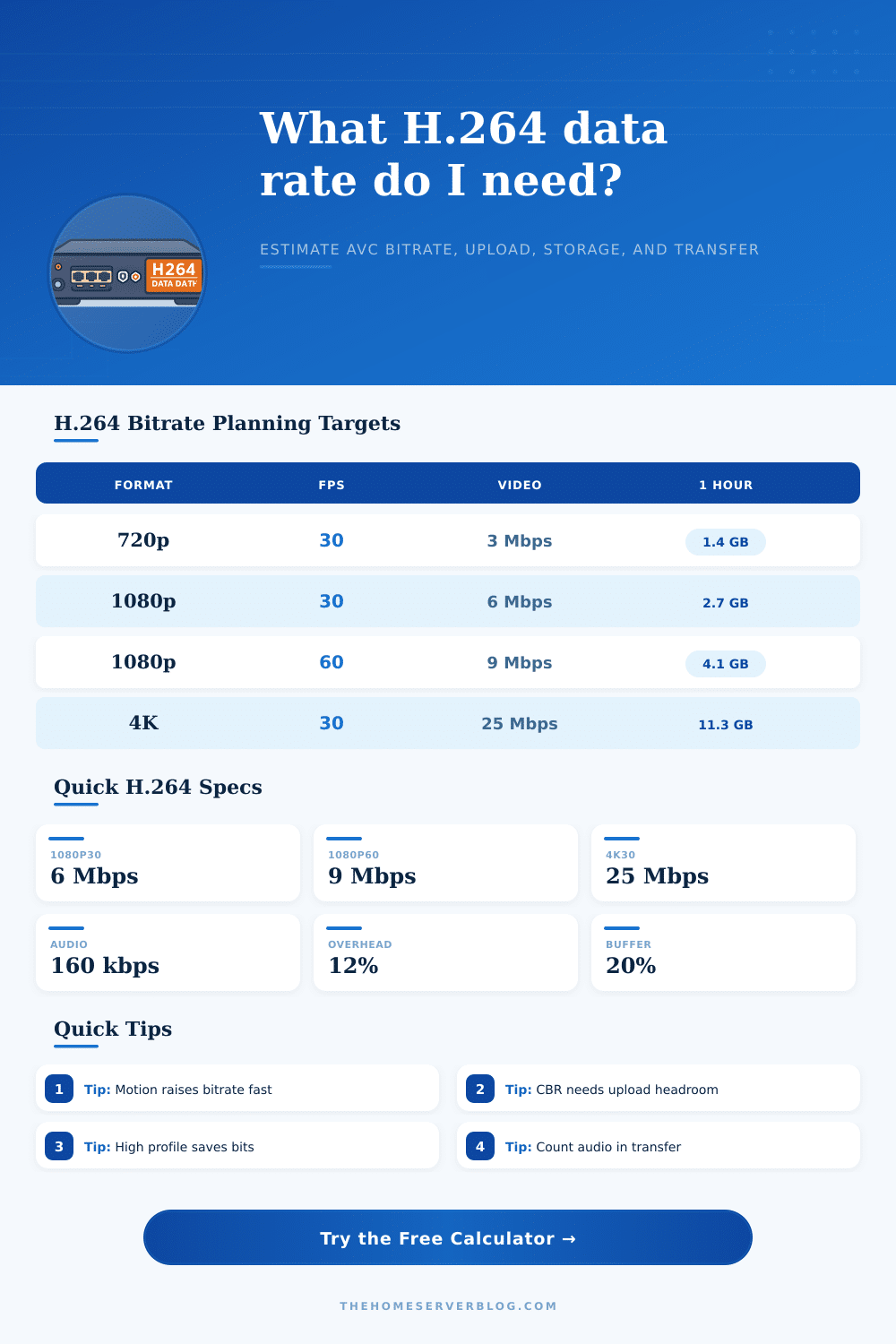
The reference tables that is provided on this page can provide a general understanding of the data rates of different types of video projects. For instance, each of the tables show the range of bits per pixel for different types of video projects. Furthermore, each of the tables also display the factors that are introduced by changing the profile of the video project.
These tables are not exact figures to the data rates that the video project will achieve. However, these tables can provide some indication of the range of the data rate that will be achieved by a video project so that an individual can ensure that the initial estimate to that data rate is within an expected range. After obtaining an initial estimate for the data rate of the video project, it is possible to make small adjustments to the video project to account for the motion of the video or to account for the amount of data overhead for that project.
By performing these calculations of the amount of data that will be transmitted by a video project, it is possible to make a variety of other decisions regarding that video project. For instance, it will be possible to determine if the individuals’ uplink connection is capable of transmitting the amount of data that is calculated for the video project. Additionally, it will also be possible to determine if the Network Attached Storage (NAS) systems that the individuals utilize to store the video project has enough free space to contain the amount of video data that the video project will create for that month.
Finally, it will be possible to determine if the addition of another camera to the project will also impact the amount of data that will be transmitted by the cameras to the individuals that will view the video. Though it may seem complex to calculate the data rate of the video project, it is actualy a helpful tool in understanding the data rate of video projects. Furthermore, the calculation of the data rate is essential for video projects; however, it is often ignored during the planning of video projects.
By spending a few minutes to accurately enter the parameters for the video project into the calculator, it is possible to ensure that the project will have a realistic understanding of the data rate of the project prior to making any purchase of video project hardware. You should of checked the data rates more thoroughy before you start. It is alot of work but its worth it for teh project.