Mailbox Size Calculator
Estimate how much storage a mailbox needs from daily messages, average message size, attachment behavior, sent mail, retention, trash, calendar data, and compression.
▣ Workload presets
▣ Mailbox inputs
Mailbox size estimate
▣ Current model snapshot
▣ Persona comparison grid
Light user
Low daily volume, few file attachments, and short retention. Often fits inside 2 GB to 10 GB quotas.
Knowledge worker
Regular replies and document exchanges. Three-year retention commonly lands near 10 GB to 25 GB.
Power mailbox
High traffic, many images or PDFs, and long retention. Plan 50 GB or archive split storage.
Shared queue
Many senders and repeated attachments. Separate mailbox quota from archive and discovery storage.
▣ Reference tables
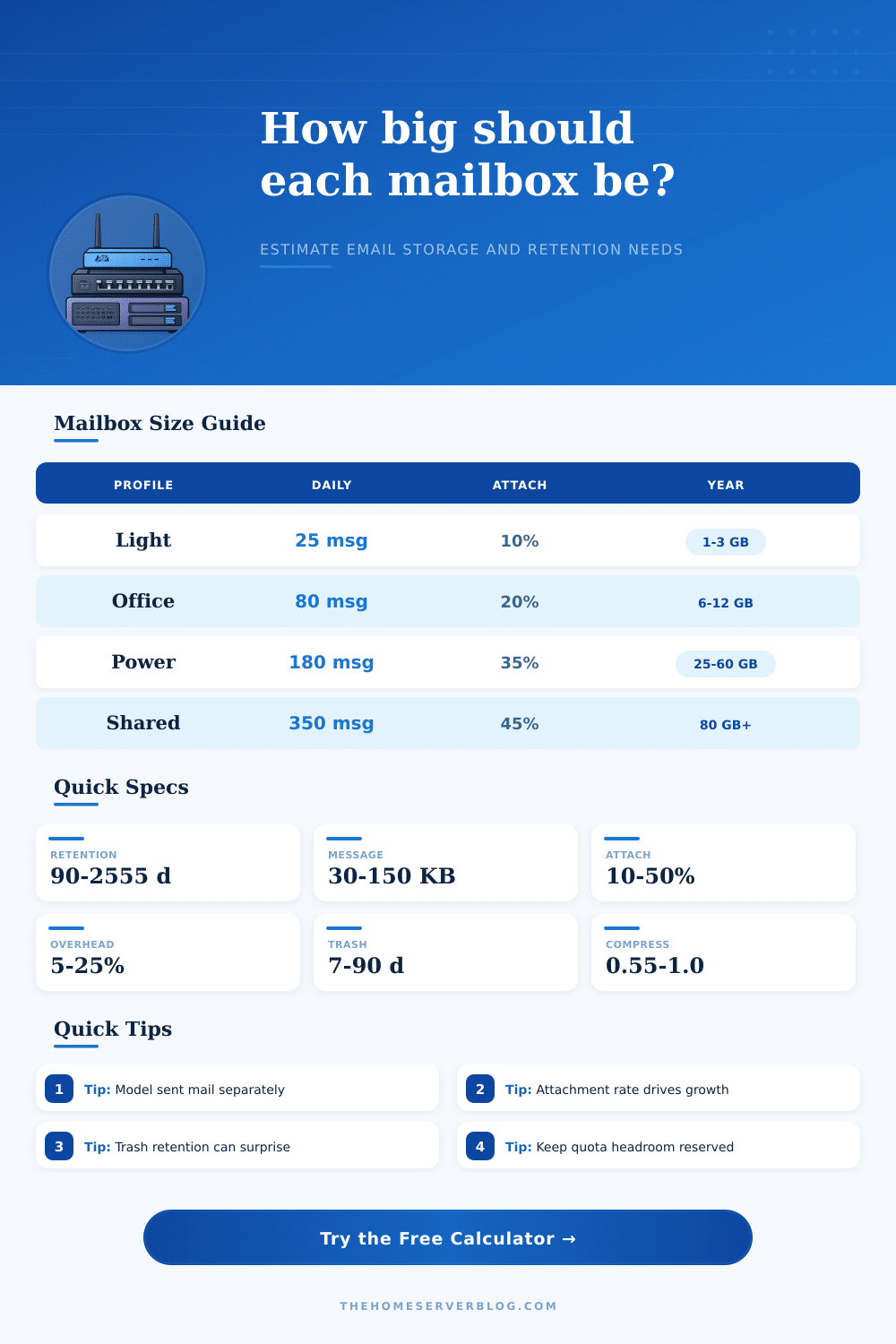
| Mailbox profile | Daily messages | Attachment pattern | Typical quota |
|---|---|---|---|
| Personal or family | 10 to 40 | Rare photos and PDFs | 2 GB to 10 GB |
| Home office | 40 to 100 | Light documents | 10 GB to 25 GB |
| Support or sales | 120 to 300 | Frequent files | 25 GB to 100 GB |
| Shared operations | 250 to 600 | Heavy repeated files | 50 GB plus archive |
| Input factor | What it affects | Normal range | Planning note |
|---|---|---|---|
| Message KB | Text and headers | 30 to 150 KB | HTML signatures raise it |
| Attachment rate | Largest growth driver | 10% to 50% | Model teams separately |
| Sent multiplier | Copies in Sent folder | 1.1x to 1.8x | Shared mailboxes vary |
| Compression | Store footprint | 0.55x to 1.0x | Already zipped files save less |
| Retention policy | Mailbox days | Trash days | Best use |
|---|---|---|---|
| Short cleanup | 90 | 7 | Aliases and alerts |
| Standard office | 365 | 30 | Most user mailboxes |
| Business archive | 1095 | 30 to 60 | Knowledge workers |
| Long hold | 2555 | 90 | Legal or finance |
| Quota tier | Usable at 20% | Approx MB | When to choose |
|---|---|---|---|
| 10 GB | 8 GB | 10,240 | Light use |
| 25 GB | 20 GB | 25,600 | Standard users |
| 50 GB | 40 GB | 51,200 | Heavy attachments |
| 100 GB | 80 GB | 102,400 | Shared or archive |
▣ Planning tips
Expect to be frustrated when your inbox approach its limit and your storage fill up. It’s like being out of gas and not making it to your destination. For many admins, mailbox storage is an afterthought and if something doesn’t grow, they expect someone at provider level to take care of it. Eventually things will fail and this calculator do it for you. However, knowing what goes into it will prevent quota surprises down the road.
Text emails themselves aren’t that big to cause storage issues from sheer message volume. By far attachments eat up space, with one bigger file taking up way more space then hundreds of plain text messages. Because it’s the ratio between attachment and total email that actualy grows, the tool needs both average attachment size and rate. Otherwise your estimate will be too low if you assume they’re all small. Support desks collect log files fast; sales teams sends out heavy presentations. A healthy mailbox can only happens with accurate rates.
How to Calculate Your Email Storage Needs
The math is one side of the equation; so is intent. Three years might make sense for keeping emails; maybe there’s a legal requirement to retain them that long. That retention period, however, adds up to a lot of data. Every day’s worth get multiplied by the retention time.
Then throw in the trash folder. Yes, we all delete email, but deleted email doesn’t vanish right away. It remains stored while it stay recoverable (thirty days? Ninety?). Leaving out this extra space reduce capacity at the very moment it’s needed.
Every time you send an email, it take up some amount of disk space (it’s a copy of sent mail). That copy stays in your Sent folder indefinitely, for whatever amount of time you have set as your rule for how long to keep it. Because sent items aren’t quite as large as received items, the tool multiply them by a certain number to compensate for the duplication. So there is this additional weight that increase proportionally with your main inbox. And you need to take this into consideration if you want to accurately estimate your own storage requirements.
For example, using compression will shrink the file size but that’s not the whole story. If you’re sending zip files, or highly-optimized images, there may be some additional compression benefit, but moddern email stores is very good at compressing the header and the body text. Using too-high a compression factor give people a false sense of confidence. Instead, consider modeling the raw data size and use compression as a small buffer. That way you keep your expectations grounded in reality instead of hoping for best case scenario.
To use these reference tables, you can compare them to a typical user profile and check if your estimates is reasonable. A light user might fit into ten gigabytes; more space are required for a power user with legal holds or media. The numbers in this table help you flag outliers early so that problems don’t arises later. So if you’re double what the table suggests for your level of use, something about your habits or inputs is probably wrong. It’s just a helpful check when you’re planning out capacity tiers.
When sizing a mailbox, anticipate the future by knowing how people uses it today. Migration spikes and day-to-day bursts requires headroom. Add some buffer to the suggested quota: When you hit full capacity, that slows down work. Be conservative with sizing; then adapt your plan as you understand how people really behave. It is better to have empty space than to watch that progress bar stall while everyone waits.
You should of prepared for it.