VXLAN MTU Overhead Calculator
Estimate tenant MTU, required underlay MTU, overlay byte overhead, jumbo frame headroom, and DF ping sizes for VXLAN home lab fabrics.
🖧Real VXLAN and Overlay Presets
⚙Overlay Inputs
The routed fabric MTU between VTEPs, not including Ethernet FCS or preamble.
The guest, VM, container, or server MTU you want to carry inside VXLAN.
VLAN tags usually do not reduce IP MTU, but they do enlarge the Ethernet frame on the wire.
Buffer is applied to calculated tenant MTU and required fabric MTU for change-control headroom.
Full MTU Breakdown
🖥Equipment and Networking Spec Comparison
📊VXLAN Overhead Reference
| Overlay Case | Path MTU Overhead | Ethernet Wire Envelope | Max Tenant on 1500 |
|---|---|---|---|
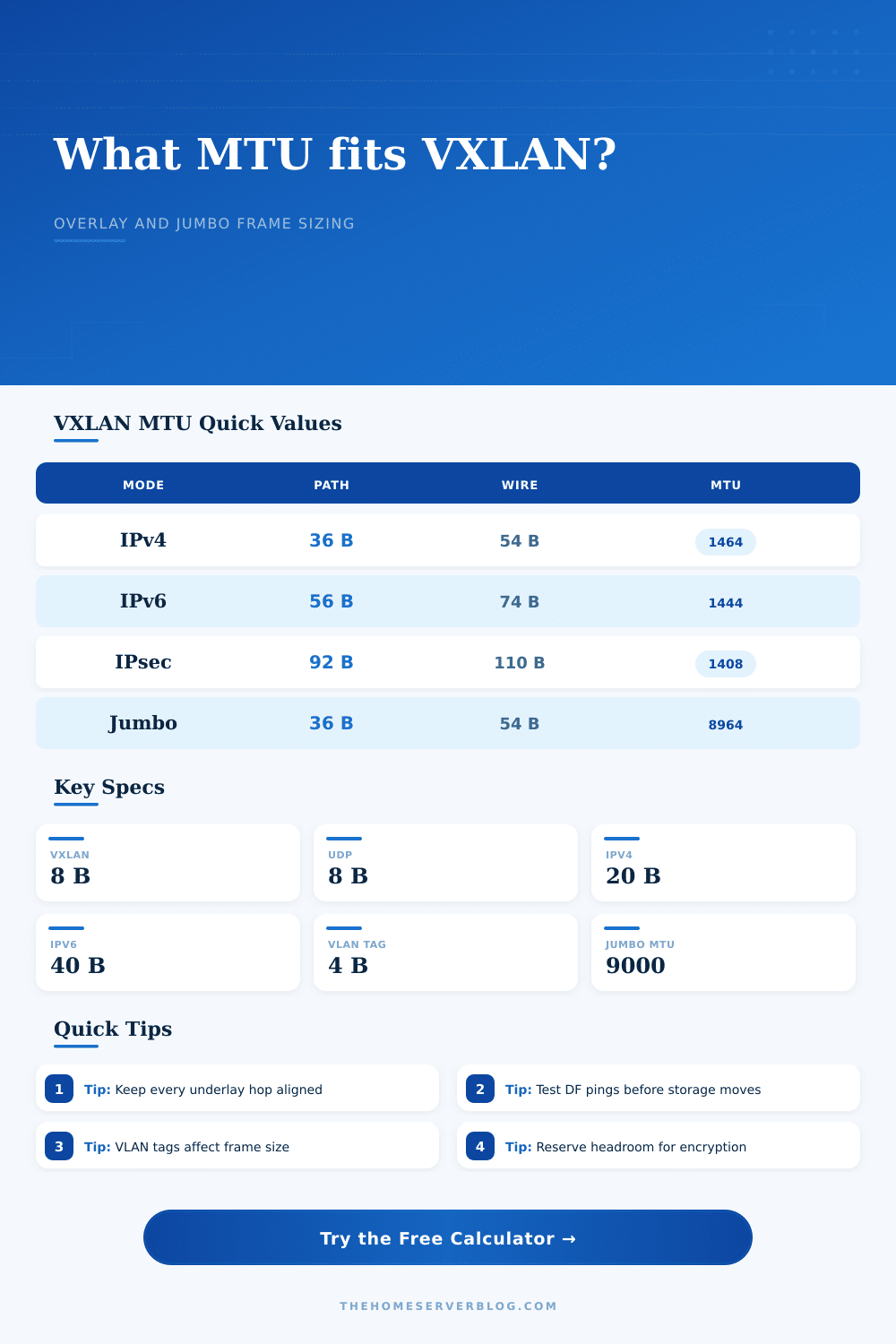
| VXLAN over IPv4 | 36 bytes: IPv4 20 + UDP 8 + VXLAN 8 | 54 bytes with outer Ethernet header and FCS | 1464 bytes before buffer |
| VXLAN over IPv6 | 56 bytes: IPv6 40 + UDP 8 + VXLAN 8 | 74 bytes with outer Ethernet header and FCS | 1444 bytes before buffer |
| VXLAN over IPv4 with IPsec estimate | 92 bytes: VXLAN 36 + ESP tunnel allowance 56 | 110 bytes before VLAN tags and preamble | 1408 bytes before buffer |
| VXLAN over PPPoE edge | 44 bytes: VXLAN 36 + PPPoE 8 | 62 bytes before VLAN tags and preamble | 1456 bytes before buffer |
🧮Capacity by Configuration
| Configuration | Common Underlay MTU | Safe Tenant MTU | Practical Use |
|---|---|---|---|
| Plain home lab VXLAN IPv4 | 1500 | 1450 to 1464 | General VM and container networks |
| IPv6 underlay VXLAN | 1500 | 1430 to 1444 | Labs where routing fabric is IPv6 only |
| Jumbo storage overlay | 9000 | 8900 to 8964 | NAS, iSCSI, NFS, and VM migration |
| Encrypted site overlay | 1500 | 1360 to 1408 | Remote lab extension with IPsec or WireGuard |
| Carrier tagged lab link | 9000 | 8900 to 8956 | Metro-E, QinQ, or nested VLAN testing |
📐Standards and Conversion Table
| Item | Bytes | Counts Against IP MTU | Calculator Treatment |
|---|---|---|---|
| VXLAN header | 8 | Yes | Always included for UDP destination port 4789 overlays. |
| UDP header | 8 | Yes | Always included between outer IP and VXLAN header. |
| Outer IPv4 header | 20 | Yes | Default underlay mode for most home lab VXLAN fabrics. |
| Outer IPv6 header | 40 | Yes | Adds 20 bytes versus IPv4 before extension headers. |
| 802.1Q VLAN tag | 4 | No, usually | Included in wire envelope and switch frame size checks. |
| Ethernet FCS | 4 | No | Included in wire envelope, not tenant MTU. |
📈Common Home Lab Project Sizes
| Project | Typical Nodes | Target Tenant MTU | Recommended Underlay |
|---|---|---|---|
| Two-node Proxmox SDN | 2 to 3 hosts | 1450 | 1500 works if every routed hop is clean. |
| Kubernetes Flannel VXLAN | 3 to 6 nodes | 1450 | 1500 underlay with pod MTU adjusted. |
| 10GbE NAS and VM migration | 2 storage paths | 8900 | 9000 underlay minimum, 9216 frame gear preferred. |
| EVPN/VXLAN lab fabric | 2 leaf switches | 9000 class | 9216 or higher switch frame ceiling. |
| Remote site lab bridge | 2 gateways | 1350 to 1400 | Measure encrypted tunnel PMTU before raising guests. |
💡MTU Planning Tips
This calculator uses practical lab estimates. Some platforms include additional offload, tunnel, or encryption bytes, so treat the result as a planning target and confirm on the actual path.
To learn about networking, you spin up your own virtualized lab, and all of a sudden, your VMs won’t talk to each other, or your containers keep timing out. In most cases, it’s not that your cables is broken, but rather that your VMs and container are sending frames in different sizes, causing them to drop when they exceed what your underlying switches can handle. Your tenant traffic are wrapped as a VXLAN packet (which is then put into a UDP packet), which then gets put into an IP packet (which rides on your physical Ethernet). Each of these layers adds bytes, and unless your overall size fits within the capabilities of your underlying switches, the resulting packets gets dropped, leading to hard-to-debug silent failures since regular ping tests typicaly send small packets that fit just fine.
With the right set of overlay parameters and network gear plugged into calculator, it does all that math for you. It takes into account the precise header overheads for IPv4 vs IPv6 and whether there is VLAN tags present. It also considers security layers like WireGuard or IPsec. This removes guesswork. The combined impact of these little bits is what most folks miss.
How to Choose the Right MTU Size
A standard Ethernet frame allow for a 1,500-byte payload, but VXLAN adds roughly 50 bytes of overhead when using IPv4. So your tenant data actualy has only 1,450 bytes available, and you think ‘that’s fine’. This changes when you want to move a big VM snapshot or run iSCSI storage. Suddenly the lack of 50 more bytes are a brick wall.
The MTU selection isn’t as simple as taking away numbers. It depends on end-to-end path. For example, with jumbo frame support on your switches in the underlay, you might want to maintain a high MTU at the tenant level. On the flip side, if a middle router or your ISP connection is strictly enforcing 1500, reduce the tenant MTU accordingly. This shows that tradeoff and lets you know what the necessary underlay MTU will be for the desired tenant size.
There’s also a buffer setting (a nice touch for those using this at home). Networks are odd in the real world, and a few percent of headroom avoids some edge case where an additional tag gets added or something adds another option header and drops packet.
New users frequentely stumble on VLAN tags. Adding a single 802.1Q tag appends four bytes to the wire; two for QinQ add eight bytes. Those bytes is added after the IP MTU and don’t necessarily impact it. However, they do impact the max frame size supported by your switch hardware. Switches may restrict themselves to handling frames no longer than 1518 bytes (for example). Tags will push what would of otherwise be a completely valid IP packet past that limit. The reference tables in the tool explain which overhead counts towards the Ethernet frame vs. Those which count towards the IP layer. Knowing the difference help you avoid setting your MTU too high and breaking things, or too low and wasting bandwidth.
The next step is encryption. Wrap that VXLAN packet inside a second layer! Both WireGuard and IPsec does this, which can add an additional 50-60 bytes of overhead. This is double-wrapping. When you’re using an overlay over top of a VPN connection, don’t expect what works locally to also work remotely… Particularly if your remote path has a different MTU than your local one. You can choose between those types of security here too, to get at the real-world cost. A little tweak in the UI now, but hours of troubleshooting fragmented packet problems later.
Finally, test it. After calculating an MTU that makes sense for you, use the Don’t Fragment flag to perform ping requests of that size. Success? Good news, you’re all set. Failure? You got me, something in the middle is dropping bigger frames. It’s a simple test that takes your theoretical numbers and proves them against real world.
That’s the nature of designing networks, it’s usually all about finding the weak link in the chain. Your blazing fast server NIC doesn’t do any good when an inexpensive access switch can only pass 1500-byte frames. Use the calculator as your blueprint and then test it yourself to be sure. Get the size correct and your lab will hum along smoothly while you tackle more interesting problems instead of hunting down dropped packets.