MTU Size Calculator
Estimate a practical interface MTU, TCP MSS clamp, encapsulation overhead, and payload efficiency for Ethernet, PPPoE, VLAN, VPN, and jumbo-frame home lab links.
⚡Home Lab Presets
🔧Link And Encapsulation Inputs
📊Equipment Spec Grid
🗂MTU Capacity By Configuration
| Configuration | Starting MTU | Typical Overhead | Inner MTU | Use Case |
|---|---|---|---|---|
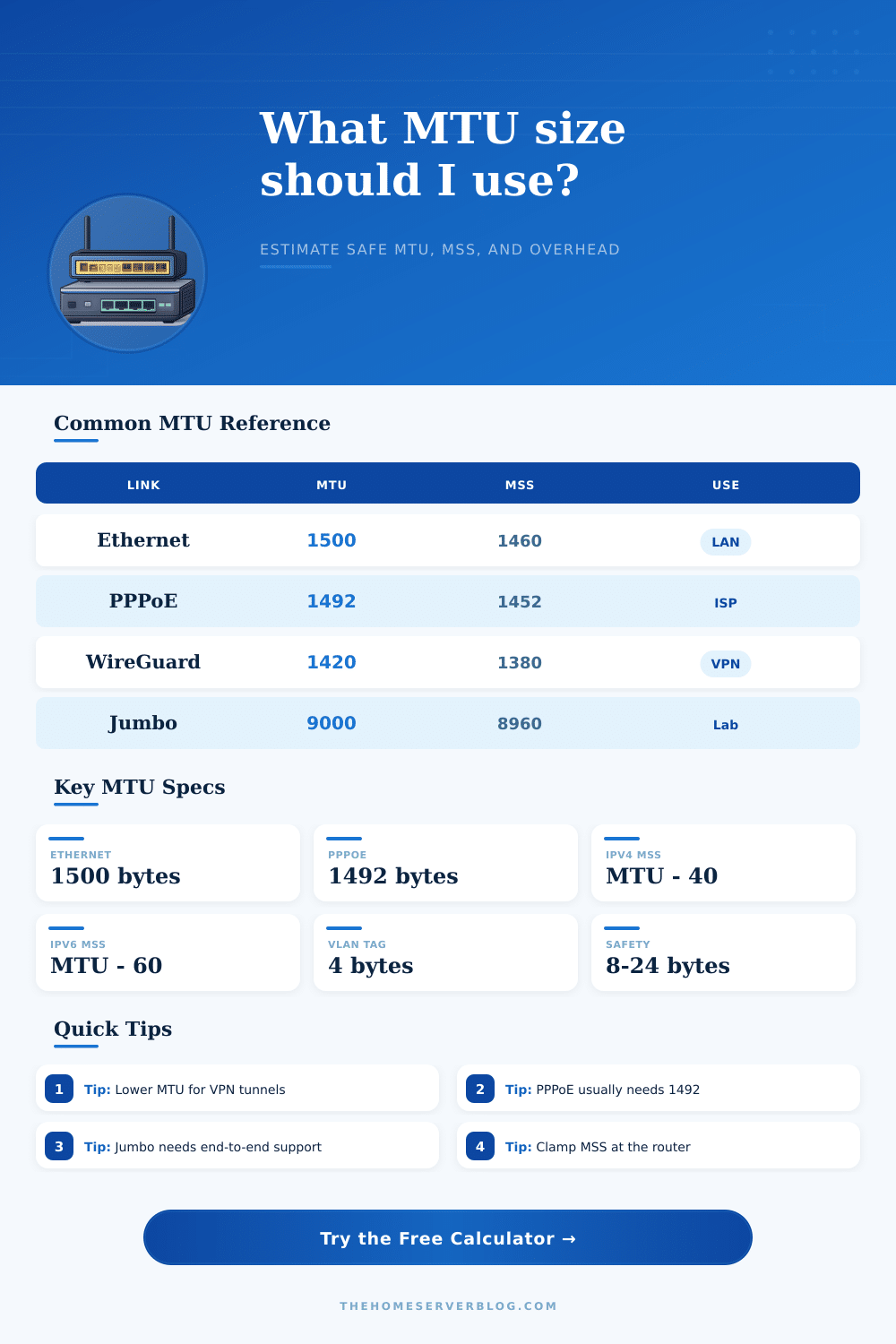
| Plain Ethernet | 1500 bytes | 0 bytes inside IP MTU | 1500 bytes | Home LAN, switch to switch, wired clients |
| PPPoE WAN | 1500 bytes | 8 bytes | 1492 bytes | Fiber or DSL ISP sessions using PPPoE |
| WireGuard VPN | 1500 bytes | 60 to 80 bytes | 1420 to 1440 bytes | Remote access, site links, travel routers |
| OpenVPN UDP | 1500 bytes | 70 to 110 bytes | 1390 to 1430 bytes | Compatibility VPNs and older appliances |
| VXLAN Overlay | 1500 bytes | 50 bytes | 1450 bytes | Virtual networks, clusters, lab fabrics |
| Jumbo Storage | 9000 bytes | 0 to 50 bytes | 8950 to 9000 bytes | NAS, iSCSI, NFS, SMB over 10G |
📐Standards And Conversion Table
| Item | Value | Formula | Practical Limit | Notes |
|---|---|---|---|---|
| IPv4 TCP MSS | MTU minus 40 | MTU - IPv4 20 - TCP 20 | 1460 at MTU 1500 | Options can reduce usable payload further |
| IPv6 TCP MSS | MTU minus 60 | MTU - IPv6 40 - TCP 20 | 1440 at MTU 1500 | IPv6 requires a minimum link MTU of 1280 |
| 802.1Q VLAN tag | 4 bytes | Tag inserted in Ethernet frame | One or two tags common | Most modern switches handle tagged frames |
| Ethernet frame | 1518 bytes | 1500 payload + 18 L2 bytes | 1522 with one VLAN tag | Preamble and inter-frame gap are not MTU |
| Jumbo frames | 9000 bytes | Vendor setting varies | 9216 often max on switches | Every hop must support the selected size |
| Safe testing | Ping DF sweep | Payload + IP/ICMP headers | 1472 ping data for MTU 1500 | Use do-not-fragment checks where possible |
🏠Common Home Network Sizes
| Project | Equipment Count | Primary Result | Secondary Result | Best Check |
|---|---|---|---|---|
| Basic wired LAN | 1 router, 1 switch | 1500 MTU | 1460 IPv4 MSS | File copy plus ping test |
| PPPoE fiber home | ONT, router, switch | 1492 MTU | 1452 IPv4 MSS | Router WAN MTU and MSS clamp |
| Remote VPN users | Router plus phones | 1380 to 1420 MTU | 1340 to 1380 MSS | Large HTTPS downloads |
| Proxmox overlay lab | 3 hosts, 1 switch | 1450 MTU or jumbo | 1410 IPv4 MSS | VM migration and cluster traffic |
| 10G NAS network | NAS, PC, 10G switch | 9000 MTU | 8960 IPv4 MSS | End-to-end jumbo ping |
💡MTU Calculation Notes
The Maximum Transmission Unit (MTU) represent the maximum size of a data packet that a network interface can send. If the data that is being sent is larger than the Maximum Transmission Unit of the specific network hop, then the network may attempt to fragment the data packet, or it may discard the data packet. If the network discard the data packet, then the connection may hang or certain website may fail to load.
An MTU mismatch is a problem because while it doesnt always break the connection entirely, it do cause packets to be dropped. The amount of overhead that is added to the data packet affects the size of the data packet. The overhead is any extra data that are added to a data packet to facilitate the networking process.
What is MTU and Why It Matters
For example, if you use a Virtual Private Network (VPN) application like WireGuard, the VPN will add a header to each data packet. Additionally, if you connect to the internet through a WAN (Wide Area Network) connection using PPPoE authentication, the WAN connection will add a header to each data packet. Each of these headers take up space within the Maximum Transmission Unit of the data packet.
For instance, if the physical link limit of the network connection is 1500 bytes, but if a VPN protocol add 60 bytes of overhead to the data packet, then only 1440 bytes is left over for the data within the data packet. Any data packet size of 1500 bytes will be fragmented by the router, or the router may drop it and the connection may fail. A calculator application can be used to determine the correct Maximum Transmission Unit size that should be used on the network.
The calculator will account for the various types of overhead that may be introduced into the data packet. For instance, the calculator can account for the size of VLAN (Virtual LAN) tags that are added to data packets on virtual LANs, or the amount of bytes that is consumed by encryption protocols. When you select the various scenarios on the calculator, it is accounting for the various types of overhead that are used on the data packet.
Using the calculator is helpful for accounting for the IP header bytes and the TCP header bytes that is added to the data packets. The TCP MSS (Maximum Segment Size) is a value that the two device that are communicating with each other use to determine the amount of actual data that can fit within the data packet. While the Maximum Transmission Unit is used to determine the size of the entire data packet, the TCP MSS is used to indicate the size of the data portion of the data packet.
The router can use the MSS clamping function to indicate to the two communicating device to reduce the size of the data packets that are sent between the two devices. MSS clamping is used with PPPoE fiber connections because the Internet Service Provider (ISP) may utilize a black-hole connection. A black-hole connection occur when the devices are able to successfully establish a connection, but when data packets of a large size are sent, they cause the connection to time out.
Jumbo frames is a process through which a network is configured so that the Maximum Transmission Unit is increased to 9000 bytes. Many people utilize jumbo frames if they are setting up a network that connects a 10G NAS (Network Attached Storage) device to another high-end switch within the network. By increasing the MTU size to 9000 bytes, the CPU processes fewer data packets.
However, jumbo frames only works if every device connected to the network support a Maximum Transmission Unit size of 9000 bytes. For instance, if one switch within the network supports 1500 bytes for the MTU, that switch will drop any data packets of 9000 bytes. The goal in tuning the Maximum Transmission Unit is to find the largest size of the data packet that can be sent across the network without causing fragmentation errors.
Finding the correct size for the Maximum Transmission Unit involves a balance between efficiency and the reliability of the network. If the size of the data packet is too low, bandwidth is wasted sending data packets with headers larger than necessary. However, if the Maximum Transmission Unit is too large, the connection may fail.
Many people use a small buffer with the Maximum Transmission Unit setting when tuning their network, espeshally if they are using mobile data connections (like LTE) or using multiple VPN connections. The best way to verify that the Maximum Transmission Unit size is correct on a network is to use a do-not-fragment ping sweep. A do-not-fragment ping sweep will allow the network administrator to send a data packet of a specific size across the network and to view whether or not the network fragments the data packet.
If the data packet of the size calculated for the network can be sent without fragmentation, the Maximum Transmission Unit has been successfully calculate. Otherwise, if the data packet is fragmented, the MTU setting for that network needs to be changed. Finding the correct Maximum Transmission Unit for a network is a process whereby any change in the Maximum Transmission Unit by a few bytes can have an impact on the performance of that network.
Its a process that should of been handled with care. Its better to check teh settings twice then once. There are alot of ways to mess up the configuration based off how the network is set up.
One should of checked the router settings too.