TCP MSS Calculator
Calculate a safe TCP MSS clamp from MTU, encapsulation overhead, IP version, TCP options, and safety margin.
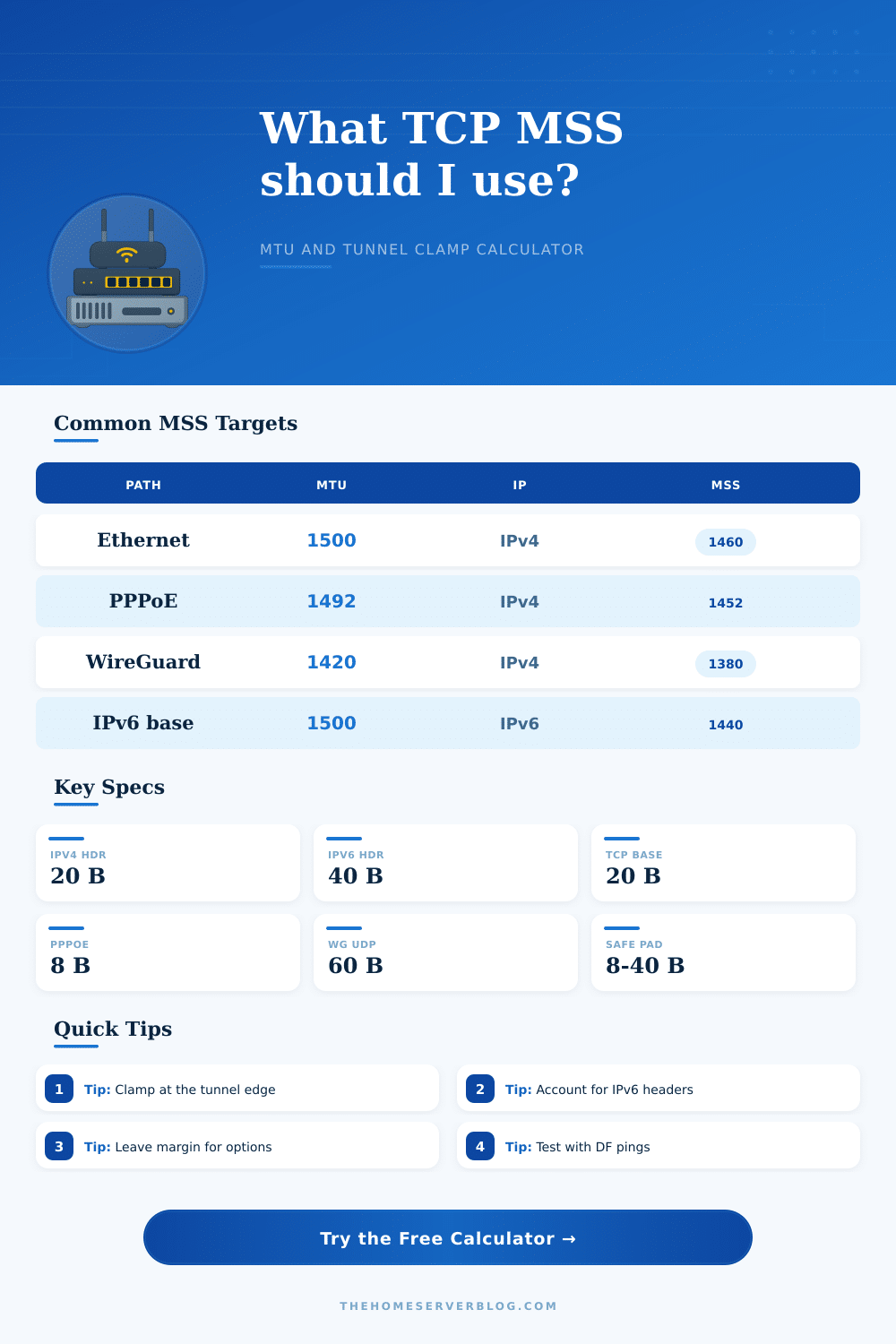
| Network path | Typical MTU | IPv4 MSS | IPv6 MSS | Practical note |
|---|---|---|---|---|
| Standard Ethernet | 1500 bytes | 1460 | 1440 | Baseline for most home LAN and routed WAN paths. |
| PPPoE access | 1492 bytes | 1452 | 1432 | Common on DSL, some fiber, and ISP handoff links. |
| WireGuard default | 1420 bytes | 1380 | 1360 | Often safe when endpoint MTU is already set to 1420. |
| IPv6 minimum link | 1280 bytes | 1240 | 1220 | Useful floor for fragile or heavily tunneled IPv6 paths. |
| Jumbo lab VLAN | 9000 bytes | 8960 | 8940 | Only works when every hop supports the larger frame size. |
| Encapsulation | Typical overhead | Use case | Calculator treatment |
|---|---|---|---|
| PPPoE | 8 bytes | Residential ISP access | Subtract from 1500 when the interface MTU is not already 1492. |
| WireGuard over IPv4 | 60 bytes | Home lab to VPS tunnel | Outer IP, UDP, and WireGuard data overhead are removed first. |
| IPsec ESP NAT-T | 74 bytes | Router to router VPN | Estimate includes UDP 4500 and common ESP padding allowance. |
| GRE over IPv4 | 24 bytes | Routing lab or provider handoff | GRE and outer IPv4 are treated as tunnel overhead. |
| VXLAN over IPv4 | 50 bytes | Overlay lab network | Outer Ethernet is excluded, routed VXLAN overhead is subtracted. |
| OpenVPN UDP | 69 bytes | Remote access VPN | Typical value; confirm with your cipher and compression settings. |
| Validation method | IPv4 command idea | IPv6 command idea | What it proves |
|---|---|---|---|
| DF ping probe | ping -f -l size host | ping -6 -l size host | Finds the largest packet that crosses without fragmentation. |
| Trace path MTU | tracepath host | tracepath6 host | Shows discovered path MTU when ICMP feedback is allowed. |
| Router clamp | mss clamping rule | mss clamping rule | Applies only to TCP SYN packets that pass through the router. |
| Packet capture | Inspect SYN MSS | Inspect SYN MSS | Confirms the advertised MSS after firewall or tunnel changes. |
| Home server scenario | Devices affected | Common clamp | Secondary result |
|---|---|---|---|
| OPNsense PPPoE WAN | Whole home LAN | 1452 IPv4 | Prevents black-hole uploads on 1492 MTU links. |
| WireGuard remote admin | Laptop to home lab | 1360 to 1380 | Leaves room for nested VPN or mobile carrier paths. |
| Cloud reverse tunnel | Proxy and origin | 1380 to 1420 | Reduces stalls during large HTTPS responses. |
| VXLAN virtualization lab | Hypervisors and routers | 1410 IPv4 | Highlights need for jumbo underlay when full 1500 is desired. |
| Storage jumbo VLAN | NAS and hypervisors | 8960 IPv4 | Only reliable when switch, NIC, and vSwitch MTUs match. |
When the data packet is to large for a specific network, an MTU mismatch occur. As a result, the packets will cause the connections to stall or hang on the network. However, if you find that the ping tests passes but the file transfer or web page fail to load, it means that the large packets are being dropped somewhere along a network tunnel.
Since the packets is too large for the tunnel, they will not be allowed through the tunnel unless they are fragment. However, many moddern router will drop fragmented packets through the network. As a result, the dropped packets will vanish from the network, creating a black hole in the network.
Why Big Packets Get Dropped and How to Fix This
The Maximum Segment Size, or MSS, are used to define the size of the data within the data packet. While the Maximum Transmission Unit define the total size of the data packet, the MSS defines the data payload size. By setting a correct value for the MSS, the packets will not get fragmented as they travel through the network.
Since the routers will drop fragmented packets, preventing fragmentation will prevent the creation of the black hole in the network. Calculating the correct value for the MSS involves calculating the overhead of the data packet. The overhead of the data packet include the IP header, which will be of a different size for IPv4 or IPv6.
In addition to the IP header, the TCP header may be larger if timestamps is used. Furthermore, if VPN protocols or other encapsulations are used in the network, each of these protocols will add to the size of the data packet. If a VPN is establish within another tunnel, the size of the overhead will be the sum of both tunnels.
Each of these components will reduce the size of the MSS. In addition to calculating each of the above components, the most restrictive bottleneck in the data path will also reduce the size of the MSS. A safety margin can be used to ensure that the MSS is conservative in its calculation of the size of the data payload.
Some data packets will be dropped by the routers if another network protocol are used that is not advertised to the devices. A safety margin can be used to account for this possibility. Using a safety margin will slightly reduce the efficiency of the data network.
However, without a safety margin, packets may be dropped by routers miles away along the path that the packets take. If the MSS is to large, the packets will stall. If the MSS is too small, to many packets will be sent through the network, which will also reduce the efficiency of the network.
The most effective way to use the correct MSS is through a process called MSS clamping. MSS clamping occur at the router. The router will intercept the TCP SYN packet and rewrite the MSS field in the packet header to the safe value.
By rewriting the MSS field, all devices connected to the network will use this safe value for the MSS. Thus, no longer will you have to individually configure each device on the network. By using MSS clamping, the devices will all agree on a safe value for the MSS.
This ensure that all devices will efficiently travel their packets through the network, creating a stable network.