Server Sizing Calculator
Estimate CPU cores, memory, usable storage, network capacity, power draw, heat load, and rack footprint for NAS builds, Proxmox hosts, media servers, NVRs, databases, and mixed home lab workloads.
Sizing Breakdown
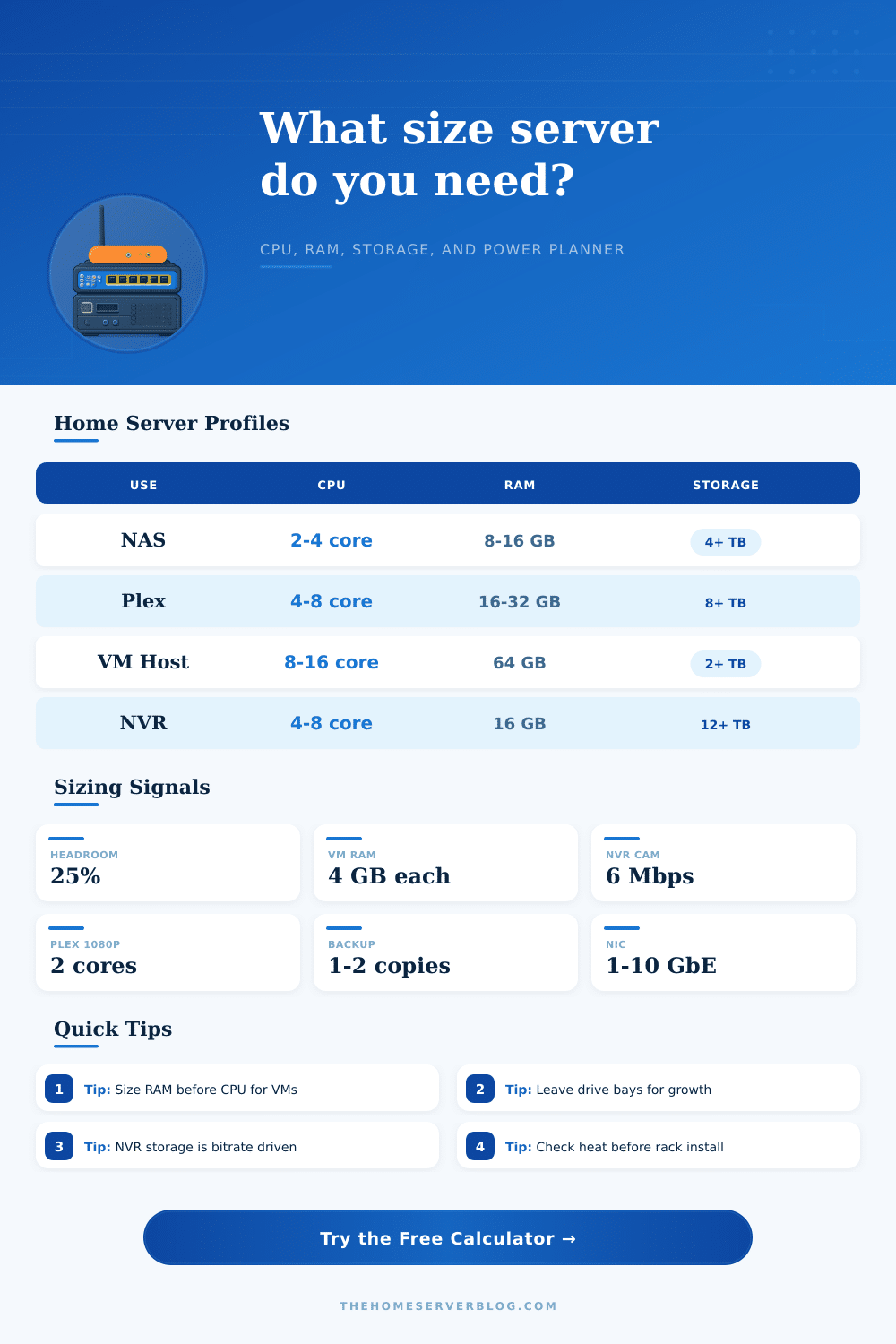
| Server role | Typical CPU target | Typical RAM target | Main sizing driver |
|---|---|---|---|
| File server or NAS | 2 to 6 efficient cores | 8 to 32 GB | Drive count, cache, snapshots, SMB users, and parity rebuild comfort |
| Plex or Jellyfin media server | 4 to 8 cores, or iGPU assist | 16 to 32 GB | Simultaneous transcodes, metadata services, and storage growth |
| Proxmox or VMware host | 8 to 24 cores | 64 to 256 GB | VM count, per-VM memory reservations, and storage latency |
| Security camera NVR | 4 to 12 cores | 16 to 64 GB | Camera bitrate, detection workload, retention days, and disk write endurance |
| Database lab server | 8 to 16 strong cores | 64 to 128 GB | Working set in RAM, SSD IOPS, WAL writes, and backup windows |
| Storage layout | Raw-to-usable rule | Best use | Planning note |
|---|---|---|---|
| Single disk or stripe | About 1.1x raw target | Scratch data, cache, disposable lab storage | Not a redundancy plan; keep separate backups |
| Mirror or RAID1 | About 2.0x raw target | Boot pools, small NAS, critical app data | Simple recovery and good read performance |
| RAIDZ1 or RAID5 | About 1.35x raw target | Small media pools with known backups | Risk rises with very large disks and long rebuilds |
| RAIDZ2 or RAID6 | About 1.6x raw target | Main home lab NAS and media pools | Good balance for four to eight large disks |
| RAID10 | About 2.0x raw target | VM storage and databases | Trades capacity for latency and rebuild speed |
| Resource | Rule of thumb | Why it matters | When to raise it |
|---|---|---|---|
| VM memory | 2 to 8 GB per general VM | Swapping ruins server responsiveness | Databases, Windows guests, and Kubernetes nodes |
| Container memory | 256 MB to 1 GB each | Many small services add up quietly | Java apps, search indexes, and observability stacks |
| Media transcode CPU | About 2 cores per 1080p software transcode | Encoding is bursty and user-visible | 4K, subtitles, tone mapping, or no hardware encoder |
| NVR storage | Mbps x days x cameras | Continuous writes dominate capacity | Higher FPS, higher resolution, or 24/7 recording |
| UPS capacity | 1.4x estimated watts | UPS VA ratings do not equal useful watts | Add disk shelves, GPUs, switches, or PoE gear |
| Example build | Input pattern | Likely result | Upgrade trigger |
|---|---|---|---|
| Quiet mini NAS | 4 users, 8 containers, 4 TB data | 4 cores, 16 to 32 GB RAM, 1 GbE acceptable | SSD pool or many simultaneous SMB users |
| Family media server | 8 users, 2 transcodes, 12 TB media | 6 to 8 cores or iGPU, 32 GB RAM, large disk pool | 4K software transcoding or remote streaming growth |
| Virtualization lab | 8 VMs, 20 containers, 2 TB fast storage | 12 to 16 cores, 96 GB RAM, SSD-backed storage | Nested labs, Kubernetes, or database guests |
| Camera NVR | 8 cameras, 6 Mbps, 30 days | 4 to 8 cores, 16 to 32 GB RAM, 16 TB usable class | AI detection, higher bitrates, or longer retention |
This calculator is an engineering planner, not a vendor requirement sheet. Validate final choices against motherboard memory limits, drive bay count, PCIe lanes, HBA support, idle power, fan noise, and exact application guidance.
Selecting the right hardware for a home lab involve more than just providing raw power to the lab machines. A sizing calculator shows how to size the hardware for a future growing lab. A sizing calculator is useful because it turns a collection of guesses at a lab’s requirements into a coherent picture of the capabilities that are required to power CPU, memory, storage, network, power, and cooling.
Using a sizing calculator means that the planning of a lab will show the requirements for CPU, memory, storage, network, power, and cooling before you spends money on hardware for the lab. Each of the inputs into the sizing calculator is important. The number of simultaneous users are one parameter that helps calculate the needs of the network and cache.
How to plan hardware for your home lab
The number of virtual machines and containers is another input that estimates memory and CPU fragmentation. The sizing calculator specifically asks for the number of virtual machines and containers because virtual machines and containers can result in memory and CPU fragmentation that may not be immediately apparent to the person setting up the lab. Transcode sessions, game server slots, and camera streams each place a load on the system that need to be accounted for in the sizing calculator.
Storage is another area of planning that people typically underestimates. However, using the sizing calculator will help to plan for storage in a lab accuratley. The sizing calculator will ask for the amount of existing data in the lab, the amount of data that will be added each year to the lab, and the planning window for the size of the storage in the lab.
Using these three pieces of information, the sizing calculator can project how much data will be in the lab in the future. The sizing calculator must consider the future capacity of the storage because this indicates how much data the lab will have in the future. Following this calculation, the sizing calculator will ask for the layout in which the data will be protected.
Using RAID10 mirrors will produce both speed and safety in data protection but will use up some of the raw disk space in the system. Using RAIDZ2 will result in more efficient use of raw disk space but with longer rebuild times for the data that is store in the system. The sizing calculator will not tell a person which layout they should use for their lab but will calculate the impact of each layout.
Finally, the sizing calculator will provide information about the power and cooling requirements for the lab servers. Power requirements are often underestimated. A server that may idle at 45 watts may draw three times that amount when the disks are spinning up and performing background tasks.
The same is true of heat load; heat load will increase with the increase in power draw. If the machine will live in a closet or in a rack where there is limited airflow, the cooling requirements must be considered. Cooling requirements can become the limit for a server that live in such an area before the limit of the CPU or RAM for that machine.
Therefore, providing such information in a sizing calculator allows a person to select the hardware that will accommodate these requirements before beginning to build the home lab. Reference tables are provided on the page to give context to the results, but those tables are not intended to replace the judgment that you bring to the sizing of your server. The tables illustrate the typical specifications for different classes of servers, and the reasons that those specifications is required for those classes of servers.
For instance, file servers typically require fewer processing power resources because the role of a file server is usually limited by the number of drive and the size of the cache in which it can hold files that might be requested by clients. Similarly, database servers require more memory resources because database servers have to load large working sets into memory; if the working sets spill to disk, the performance of the database server will be destroyed. These types of tables allow a person to recognize when a workload falls outside of the normal specifications for a server class.
Additionally, each table also helps a person to recognize when their workload will require additional resources beyond those that are provided by the class of server. Common mistakes are made in the assumptions of the hardware requirements of a server. For instance, most people will make specific assumptions about the hardware requirements of their servers; they will size the CPU first, but they will discover they are memory constraint.
People typically plan for the data that they have today in their organization, but they do not account for how fast that data can grow. Finally, redundancy on a server protects against drive failure, but it does not protect against data loss due to accidental deletion of that data or ransomware. While the sizing calculator will not prevent these mistakes, it will make them visible to a person designing the server with regard to backup capacity and data growth.
Beyond the calculations made in the sizing calculator, the individual has to also consider in what type of hardware they will build their server. A low-power mini server will limit noise and power consumption of the servers, but it will have hard limits on the amount of memory and drives that can be installed in those systems. A used workstation will offer more PCIe lanes and RAM for the server, but will have higher idle power consumption.
Finally, a dense rack node will provide headroom for the servers, but may be more than what is required for the two-drive NAS that is to be built. This fit status result will allow a person to see if the hardware classes that they have choose to use for their servers are adequate or if they are oversized relative to the sizing calculations. Finally, despite what the sizing calculator can determine for the customers about how large a server is required to meet the specifications of the workload, there are additional considerations for the specific build that will be constructed.
Limits on memory and the number of drive bays that a specific motherboard provides will impact the hardware that is purchased and built. Additionally, the physical depth of the case limits how many drives can be installed into the server. Noise levels of the server will matter if the server is to be constructed in a location where people live and work; similarly, the capacity of the UPS that will power the entire server rack will be based on the specifications of all of the hardware that will be contained within the rack.
Each of these factors will help to design the actual build of the server. Overall, the relationship between the workload and the required hardware will allow a person to understand their workload, and to ensure that the hardware that is purchased for their servers will match the type of work that they actually do.