VDI Server Sizing Calculator
Estimate physical host count, vCPU pool, RAM reserve, capacity after N+1 failover, desktop storage, boot-storm IOPS, and network load for VMware Horizon, Azure Stack HCI, Proxmox, Citrix, or similar VDI labs.
VDI Sizing Breakdown
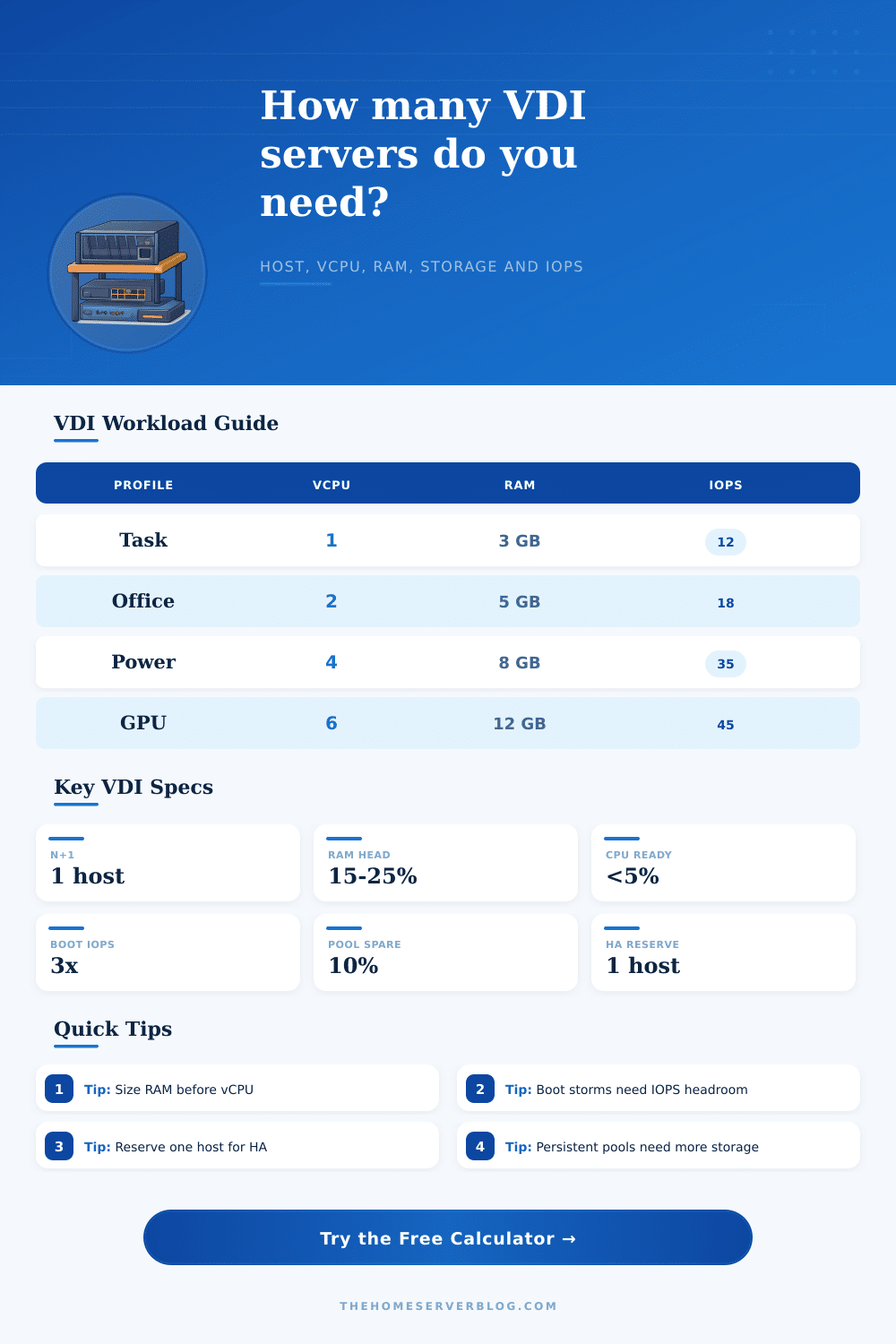
| Desktop profile | Starting vCPU | RAM per session | Steady IOPS |
|---|---|---|---|
| Task worker or kiosk desktop | 1 vCPU | 3 GB | 8-12 IOPS for light application use |
| Office knowledge worker | 2 vCPU | 5 GB | 15-20 IOPS for browser, mail, and documents |
| Power user with many apps | 4 vCPU | 8 GB | 30-40 IOPS with heavier write activity |
| Developer desktop | 4-6 vCPU | 12 GB | 35-60 IOPS before build-cache spikes |
| Light GPU or CAD viewer | 6 vCPU | 12 GB | 40-55 IOPS plus GPU scheduling limits |
| Host profile | Usable cores | Usable RAM | Best fit |
|---|---|---|---|
| Mini PC cluster node | 12 cores | 64 GB | Small lab, nested VDI, or training pools |
| Branch edge server | 16 cores | 128 GB | Small office pool with simple HA needs |
| Single socket virtualization server | 24 cores | 256 GB | Balanced home lab and SMB VDI host |
| Dual socket virtualization server | 48 cores | 512 GB | Dense office pool with room for failover |
| GPU VDI node | 40 cores | 512 GB | Graphics pool where GPU slices cap density first |
| Dense memory node | 64 cores | 768 GB | Large nonpersistent pool or profile-heavy users |
| Sizing area | Rule of thumb | Calculator use | Operational signal |
|---|---|---|---|
| CPU oversubscription | 2:1 to 6:1 | Turns physical cores into available vCPU capacity | Reduce ratio when CPU ready or latency rises |
| RAM reserve | 15% to 25% | Subtracts host headroom before desktop density is calculated | Watch ballooning, swapping, and agent growth |
| N+1 failover | One host | Adds a reserve host or reduces available cluster capacity | Run maintenance without overloading remaining hosts |
| Boot storm load | 2x to 4x | Multiplies steady-state desktop IOPS | Login waves and patch restarts expose storage weakness |
| Pool type | Storage model | Planning multiplier | Capacity note |
|---|---|---|---|
| Instant clone or nonpersistent | Shared golden image plus replica and deltas | Low base multiplier | Write cache and profile storage matter more than OS clones |
| Linked clone or differencing disk | Parent image plus child disks | Medium multiplier | Patch cycles can temporarily expand delta disks |
| Persistent full clone | Each desktop owns a full virtual disk | High multiplier | Capacity grows with every desktop and every retained snapshot |
| Pooled desktop with containers | Small clone plus profile container | Profile-heavy | User data storage and login IOPS drive design decisions |
This calculator is a planning estimate. Validate final VDI host counts with pilot measurements, user experience monitoring, storage latency, CPU ready time, GPU profile limits, and actual login patterns.
Planning a virtual desktop infrastructure require considering many different parts of the system. Planning a virtual desktop infrastructure also requires understanding how each of those parts can impact the performance of the system. The performance of a virtual desktop infrastructure can often be slowly due to hardware that was sized for average user performance instead of peak performance.
To combat this issue, there are VDI server sizing calculators that allows users to plan for the peak performance of their system. A VDI server sizing calculator can help account for how many user will be accessing the system at the same time and how the data must fail over to another server within the virtual desktop infrastructure in the case of failure of one of those servers. By using a VDI server sizing calculator, an organization can decide on what hardware it would like to purchase for its virtual desktop infrastructure prior to making any financial commitment to those purchases.
How to Size VDI Servers
Many people who begin to plan their virtual desktop infrastructure make assumptions about the number of core and RAM that their servers should have. Additionally, people also make assumptions regarding how many users will be active within the system at the same time. These types of assumptions, however, are often incorrect.
If an organization provides too little RAM for each of its users, for instance, the desktop virtualization systems CPU ready time and storage latency will increases. This increase in both of these factor can result in many users attempting to run heavy applications or logging in at the same time. A VDI server sizing calculator can automate much of the mathematical calculation required for sizing the virtual desktop infrastructure servers.
The VDI server sizing calculator calculates the oversubscription ratio of VDI servers based on the number of users that are assigned to the virtual desktop infrastructure, the percentage of concurrency of those users, and the size of the desktop profile of each of those users. Some of the factors that must be considered in a VDI server sizing calculator include the number of users who will be active at the same time, the percentage of concurrency of those users, the size of the desktop profile of each user, the type of pool of desktop that will be used within the virtual desktop infrastructure, and the profile of the host servers that will back the virtual desktop infrastructure. Each of these variables will impact the number of VDI hosts that will be required, as well as the total amount of each type of resource that will be required to support the virtual desktop environment.
Another of the factors that must be considered within the VDI server sizing calculator is the high availability of the virtual desktop infrastructure. High availability ensures that if one of the VDI hosts within a cluster fails, another VDI host within that same cluster will automatically take over the services of the failed host. High availability can reduce the usable capacity of the cluster, though, which is something that must be considered prior to deploying the VDI infrastructure.
One strategy for accounting for high availability within the virtual desktop environment is to ensure that one of the VDI servers within the cluster is reserved for failover purpose. Another is to introduce a percentage-based buffer to the capacity calculations for the cluster. This buffer will ensure that if one VDI host should fail, the remaining VDI hosts will have the resource to take over the tasks of the failed host within the cluster.
A VDI server sizing calculator that incorporates high availability calculations automatically can help to show the balance between the density of a cluster of VDI hosts and the amount of spare capacity that should be established within that cluster. Another of the factors that may require special consideration is storage and IOPS. Like CPU and memory, there will be a requirement for storage and IOPS for each user within the virtual desktop infrastructure.
However, storage and IOPS appear to be at a lower level during the operation of the VDI environment. During periods of peak hour, though, storage and IOPS will increase due to the fact that many of the users within the system will be logging in at the same time. Such an occurrence is referred to as a boot storm.
During a boot storm, each users desktop must be started up for them to access the virtual desktop environment. A VDI server sizing calculator factors in the likelihood of a boot storm by introducing a boot storm multiplier to the calculations for required IOPS. Additionally, calculations for the storage footprint of the virtual desktop infrastructure will change based on the pool type.
Another of the factors that must be considered for a VDI server sizing calculator is the amount of network capacity that is required for the virtual desktop infrastructure. The display protocol that is used to display the virtual desktops to the users, the printing system, the file sharing system, and any system that introduces video to the desktop environment all contribute to the amount of network bandwidth that is required for each of the desktop sessions. By using the average megabits per session input within a VDI server sizing calculator, an organization can determine if the uplink that is used to connect to the internet will be able to handle the amount of traffic from each desktop session.
Additionally, if the network infrastructure within the VDI environment is insufficient, that will not become visual apparent until users begin to share screens with other users within the system or exchange files of significant size. There are a variety of scenario that can be tested with a VDI server sizing calculator. For instance, the number of users can be entered into the system using the same amount of standard and conservative desktop modes.
Additionally, various profiles for the host servers can also be tested within the VDI server sizing calculator. RAM headroom, for instance, may be the limiting factor in meeting the requirements of all of the users within the VDI environment. In that case, an organization will have to purchase additional RAM for all of the desktop virtualization server within that environment.
Storage IOPS may be the limiting factor for another VDI infrastructure scenario. In this case, an organization will have to purchase storage of a higher IOPS rating then the current storage for their VDI environment. Although a VDI server sizing calculator can help to determine the sizing requirement of a virtual desktop infrastructure, the calculator does not take into account every factor that will impact the environment.
The behavior of the users within that virtual desktop infrastructure will change over time. Additionally, the applications that are used within that virtual desktop environment may change over time, which will impact the amount of resource that are required of each user within that virtual desktop. Additionally, the VDI server sizing calculator does not take into account the impact of monitoring and security agent on the VDI infrastructure.
These tools will also require some of the systems resources to function appropriately within the environment. The reference tables can be used as a starting point for sizing the VDI environment. However, these starting points should not be final measurement of the sizing requirements of the VDI infrastructure.
Instead, the virtual desktop infrastructure should be piloted with some of the actual user who will be accessing the system. Additionally, various performance indicator for the virtual desktop infrastructure should be monitored to assess whether those sizing determinations are still appropriate for the system. The main purpose of using a VDI server sizing calculator is to transform vague consideration of the requirements of a virtual desktop infrastructure into specific decisions regarding the hardware that will back that VDI environment.
Using such a VDI server sizing calculator, an organization can determine if their current VDI hosts will be able to handle the additional users that they would like to add to their virtual desktop infrastructure. Additionally, they can use the calculator to determine if they will need to purchase additional VDI hosts prior to the users beginning to arrive at the VDI environment. By planning ahead with these types of sizing calculation, an organization can create a virtual desktop infrastructure that is reliable and free from constant troubleshooting effort after the launch of that project.