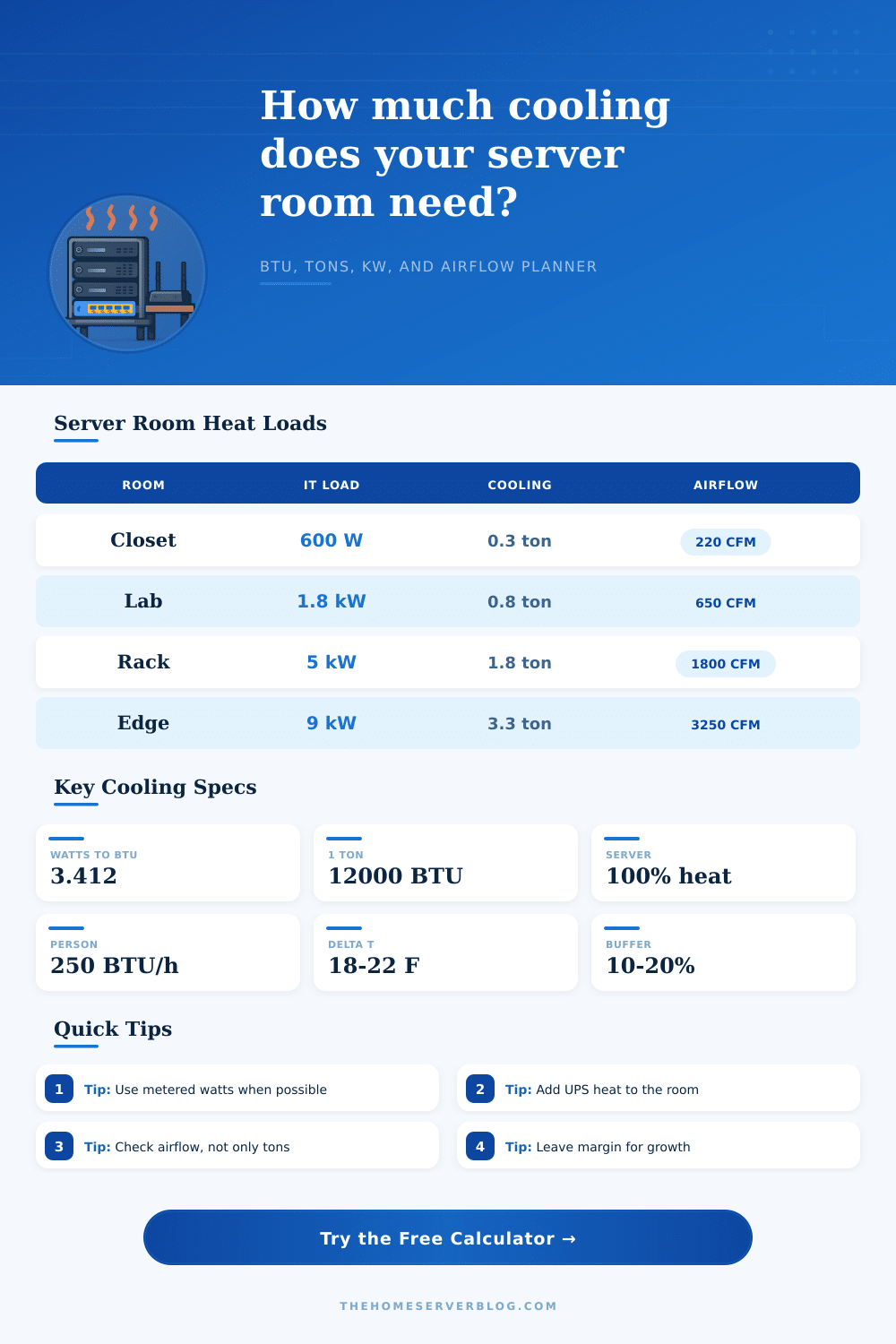
Server Room Heat Load Calculator
Estimate the cooling load for a server closet, rack room, edge node, or home lab by combining IT watts, UPS losses, lights, people, envelope gain, ventilation air, humidity allowance, and growth margin.
Formula Breakdown
| Server room scenario | Typical IT watts | Cooling result | Airflow focus |
|---|---|---|---|
| Network closet with NAS and PoE switch | 300 to 900 W | 1,000 to 3,500 BTU/hr before margin | Door grilles or transfer fans may be enough if ambient air is cool. |
| Home lab rack with virtualization nodes | 1.2 to 3.0 kW | 0.4 to 1.1 tons after allowances | Dedicated mini-split or ducted supply usually beats passive venting. |
| GPU workstation or AI test lab | 2.5 to 6.0 kW | 0.9 to 2.2 tons after allowances | Rack exhaust containment and short airflow paths become important. |
| Two-rack micro data room | 6.0 to 12.0 kW | 2.2 to 4.5 tons after allowances | Plan redundancy, condensate handling, and hot-aisle return air. |
| Heat source | Formula used | What to measure | Practical planning note |
|---|---|---|---|
| IT equipment | Watts x duty x 3.412 | Smart PDU, UPS display, or plug meter | Use measured steady load for operation and nameplate for worst case. |
| UPS and PDU losses | IT watts x loss percent x 3.412 | UPS efficiency curve or measured input/output | Battery charging after an outage can temporarily add more heat. |
| Envelope conduction | U x area x delta T | Warm wall area, ceiling area, and temperature difference | Garage walls, attic ceilings, and sun-exposed surfaces matter most. |
| Air leakage or ventilation | 1.08 x CFM x delta T | ACH estimate or known ventilation rate | Warm makeup air can overwhelm a small closet during summer. |
| Equipment profile | Watts per U guide | Diversity clue | Cooling implication |
|---|---|---|---|
| NAS and network shelf | 25 to 80 W/U | Drives spin together, PoE varies by endpoints | Often airflow-limited before tonnage-limited in tight closets. |
| Virtualization cluster | 100 to 250 W/U | CPU bursts and storage rebuilds raise peaks | Leave margin for node additions and summer ambient swing. |
| Enterprise rack servers | 250 to 500 W/U | Fans, RAM, and redundant PSUs add base heat | Front-to-back airflow and return air separation become essential. |
| GPU compute lab | 500 to 1,200 W/U | Training and rendering can hold high load for hours | Cooling should be sized from sustained metered draw, not idle watts. |
| Cooling approach | Useful range | Strength | Watch item |
|---|---|---|---|
| Transfer fan to conditioned space | Under 1,500 BTU/hr | Simple for small closets | Noise, dust, and heating the adjacent room |
| Ducted supply and return | 1,500 to 6,000 BTU/hr | Uses central HVAC capacity | Needs return path and year-round fan strategy |
| Ductless mini-split | 4,000 to 24,000 BTU/hr | Independent 24/7 cooling | Minimum modulation, condensate, and low ambient operation |
| Precision or rack cooling | Above 12,000 BTU/hr | Better control for dense racks | Power, condensate, redundancy, and service access |
This calculator is an engineering estimate for home labs and small server rooms. Final HVAC design should account for equipment manufacturer limits, local climate, condensate routing, electrical capacity, filtration, and redundancy requirements.
Server rooms emits heat as a result of the power that enters the equipment in the server room. Every watt of power that enters the equipment leaves the equipment in the server room as heat. If the heat that is create in the server room isnt removed, the equipment may overheat within the room.
Calculating the amount of heat that will be created within the server room will allow a person to determine if the cooling systems that youll install in the server room will be able to handle the amount of heat that the equipment will create. If the heat load of the server room is to high for the cooling system, the equipment in the server room may begin to fail or become unreliable. To calculate the heat load within a data center, a person must input several different variable into the heat load calculator to recieve an accurate reading of the amount of heat that will be created within a server room.
How to Calculate Heat in a Server Room
The first of these variables is the construction profile of the server room. The construction profile relate to the amount of heat that enters the data center through its walls and ceiling. Additionally, it is necessary to enter the wattage draw of the equipment within the server room.
The wattage draw of the data center are the major source of the heat within a server room. Other variables that can be entered into the calculator include the heat created by lighting within the server room, the uninterruptible power supply (UPS) that supply power to the data center, and the heat created by the people who enters the data center. Other variables relate to the influx of outside air into the data center.
Those creating the server room often overlook airflow within a data center. A cooling system may be created for the data center, but the data center can still overheat if the air within the data center is not moved correct. Air must be moved through the data center from the cooling system to the data center equipment intakes.
Additionally, the equipment must move the hot air that is created out of the data center through the equipment exhausts. If hot air is allowed to reenter the intakes of the data center equipment, the equipment will overheat. Heat load calculators convert the heat load of the data center to the amount of airflow that is required for the data center.
This will allow a person to determine if a simple fan system is required for the data center or if a more complex ducted system are required. Another important variable is that of envelope losses. Data centers often share a boundary with another area of the structure that is not temperature controlled.
These other areas can create heat that enter into the server room. The heat load calculator can include variables that allow a person to input the area of these structures and the temperature difference between these two areas to calculate the amount of heat that will enter the data center. Additionally, if the data center draws air from outside the server room, the outside air will contribute to the heat load within the data center.
The heat load calculator can calculate this variable as well. Another variable is that of the growth margin for the data center. As data centers fill with equipment, it is likely that more equipment will be added to the data center in the future.
If this additional equipment is not account for within the heat load calculations, the data center may overheat. A growth margin can be introduced to the calculations to account for the potential additional equipment in the data center in the future. Additionally, the cooling system can handle periods of high ambient temperature within the data center.
Some variables in the real world may differ from those calculated. For example, server room door may be left open to allow individuals to enter the data center. Additionally, the intake filters for cooling systems may become clogged with dust.
While the heat load calculator cannot calculate these variables, they should of been considered prior to the installation of cooling systems into the data center. Additionally, the calculated heat load can be compared to the cooling method that will be implemented in the data center. Based off this comparison, one can determine cooling methods like small split systems, ducted systems, or transfer fans.
The purpose of the heat load calculator is to provide a reasonable starting point for the cooling system for the data center. A reasonable starting point for the cooling system will allow a person to ensure that the cooling system is large enough to handle the heat load of the data center. If the cooling system is large enough to handle the heat load, the data center server will remain within there operating specifications.
Additionally, if the cooling system is large enough to handle the heat load calculations of the data center, it will not be necessary to perform emergency retrofits for the cooling system should additional server or equipment be added to the data center.