CAS Latency Calculator
Convert CAS cycles and DDR transfer rate into true nanoseconds, compare a baseline kit, and estimate first-word delay, row-miss timing, bandwidth context, and stability margin for home servers.
⚙CAS latency presets
💾Timing inputs
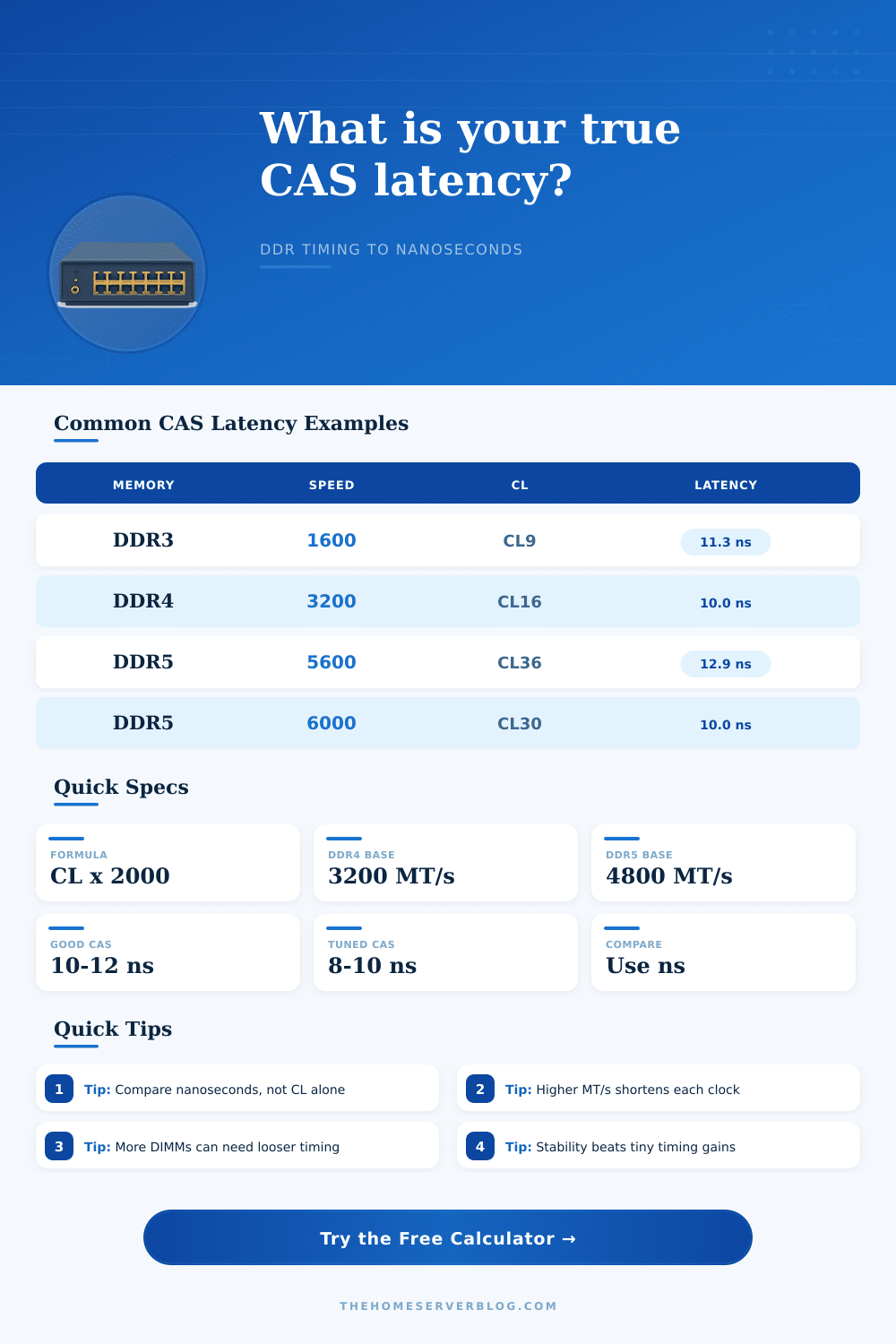
CAS latency in nanoseconds is CL x 2000 / MT/s. This tool also estimates first-word delay by adding command mode, controller profile, ECC buffering, DIMM loading, row timings, and your selected stability buffer.
Calculation breakdown
📊Live timing spec grid
📋CAS latency reference table
| Memory example | Data rate | CAS setting | True CAS latency |
|---|---|---|---|
| DDR3-1333 CL9 older server | 1333 MT/s | CL9 | 13.5 ns |
| DDR3-1600 CL9 classic home lab | 1600 MT/s | CL9 | 11.25 ns |
| DDR4-2666 CL19 ECC NAS | 2666 MT/s | CL19 | 14.25 ns |
| DDR4-3200 CL16 common XMP | 3200 MT/s | CL16 | 10.0 ns |
| DDR4-3600 CL16 tuned desktop | 3600 MT/s | CL16 | 8.89 ns |
| DDR5-4800 CL40 JEDEC | 4800 MT/s | CL40 | 16.67 ns |
| DDR5-5600 CL36 workstation | 5600 MT/s | CL36 | 12.86 ns |
| DDR5-6000 CL30 sweet spot | 6000 MT/s | CL30 | 10.0 ns |
🔧Memory type and controller table
| Configuration | CAS behavior | Bandwidth behavior | Home server note |
|---|---|---|---|
| Single-channel mini PC | Same ns formula | Half width versus dual channel | Fine for routing, light NAS, and small media boxes |
| Dual-channel DDR4 | Often lowest simple tuning risk | Good enough for most lab hosts | Compare CL16 3200 against CL18 3600 by nanoseconds |
| Dual-channel DDR5 | Higher CL can still be competitive | Much more raw throughput | DDR5 6000 CL30 is a common low-latency target |
| Four DIMM consumer board | May need looser CL or lower MT/s | Capacity rises more than speed | Best when VM capacity matters more than benchmark latency |
| Registered ECC server | Register adds small delay | Many channels hide slower per-DIMM timing | Reliability and capacity usually matter more than CAS |
| Load-reduced DIMM host | More buffering overhead | High capacity per socket | Choose for large memory footprints and dense virtualization |
🖥Workload interpretation table
| Workload | CAS sensitivity | Bandwidth sensitivity | Optimization priority |
|---|---|---|---|
| Database and metadata | High | Medium | Lower true CAS and row-miss timing first |
| ZFS NAS with ARC | Medium | Medium | ECC, capacity, and stability before aggressive CL |
| Virtual machine host | Medium | High | Enough channels and enough memory per VM |
| Game server host | High | Medium | Stable low CAS with no training errors |
| Media server | Low | Low to medium | Capacity, storage, and accelerator access first |
| Compile or compression node | Medium | High | Channel count and throughput after core count |
📐Timing formula reference table
| Timing term | Meaning | Formula in this tool | Practical use |
|---|---|---|---|
| Clock cycle | Time per memory clock | 2000 / MT/s | Foundation for every cycle-based timing |
| True CAS | Column access delay | CL x cycle ns | Best quick comparison between RAM kits |
| Row open | Activate plus column access | (CL + tRCD) x cycle ns | Useful for random memory access estimates |
| Row miss | Precharge plus activate plus CAS | (CL + tRCD + tRP) x cycle ns | Models worst common access in mixed workloads |
| Raw bandwidth | Channel width throughput | MT/s x 8 x channels / 1000 | Shows why DDR5 can help VM and compile hosts |
| First-word estimate | CAS plus platform overhead | CAS ns plus buffers and penalties | Closer to what a tuned home server feels like |
💡CAS latency planning tips
The sticker on your memory kit might reads CL16 at 3200 MT/s, but that does not mean your memory take 16 clock cycle to perform a task, it just means that it takes 16 clock cycles to perform that task at the speed that is listed on the memory kit’s sticker. The number of clock cycles translate to a time in nanoseconds, which is the true measurement of how long the data take to reach your system’s components. The calculator on this page will convert the number of clock cycles (or the CAS latency) to a time in nanoseconds, as well as add the time for the overhead of using a server board and using multiple DIMM in your system.
The clock cycles do not necessarily mean the same amount of time as other generation of DDR memory, a DDR3 memory kit with a CAS latency of CL9 might take 11 nanoseconds to complete a task, while a DDR5 memory kit with the same CAS latency of CL9 might take 12 nanoseconds to complete the same task due to the faster transfer rate of DDR5 memory. Beyond the CAS latency of the memory kit, there are additional delay that you need to account for in your system. Additionally, if you are using more than two DIMMs in your system, those DIMMs will create additional delays in your memory system.
How Memory Speed, Delay and Stability Work
For instance, if you are using eight DIMMs in your system, the DIMMs will create an additional load on the memory controller. Registered ECC DIMMs will also introduce a slight delay in the performance of the memory due to the register on the DIMM module. These factors can all be accounted for in the calculator on this page.
If you dont use this calculator, you could potentially purchase a memory kit that appear to be fast when viewed at first glance, but that is actually slow with the virtual machine or ZFS cache that you intend to run on your servers. Another factor that affects your memory timing is the fact that the CAS latency only measures how long it takes for the memory to provide data after the row has been opened. If the memory controller encounter a row miss, it will have to close the current row and open a new row to provide the data command to the memory.
The calculator on this page will display the CAS latency that you will experience in your system, as well as the additional time it will take if your memory controller encounter a row miss. For database server, for instance, the estimate for a row miss can be the limiting factor in the performance of that database. The calculator on this page will perform calculations of the bandwidth of your memory in a similar fashion to the calculations of the CAS latency of your memory.
Memory bandwidth is a measurement of how much data can pass through your memory system in a second. The raw bandwidth will be calculated from the transfer rate of memory and the number of channel your memory controller uses to access your memory. However, the effective bandwidth will be calculated with the consideration of how many channels the controller uses to access the memory, and will be weighted according to the type of tasks that will use the memory.
Another of the factors to consider with your memory kit is its stability. Memory module with low CAS latency require less voltage to operate than those with higher CAS latencies. Additionally, memory with low CAS latency will use fewer DIMMs to distribute the data.
The calculator will give you a stability score for your memory kit, based on the voltage, the speed of the memory, the number of memory rank, and the safety buffer. A stability score in the low seventies means that your memory setup will require more testing prior to being deemed safe for use. However, if the stability score is above ninety, you can be sure that your memory setup is safe to use on a daily basis without additional testing.
The platform you use will have an effect upon the performance of the memory. For instance, if you use a mini PC that has the memory soldered directly to the motherboard, the performance of your memory will be different compared to when that same memory is installed in a workstation computer that has four memory channel. These different platform will have different time measurement that will be accounted for in the calculator.
The reference table list the types of memory that are available for purchase. For instance, the tables will allow you to compare the performance of a DDR4-3200 CL16 memory kit with a DDR5-6600 CL30 memory kit by converting both memory kits to nanoseconds. These tables allow for quick access to the information that you need to make your purchase decision, but you can also use the calculator if your memory configuration are not listed in these tables.
The goal of this page and the calculators included on this page are to help you to find the best memory timing for your systems and workloads. You want your memory timing to provide enough margin for the memory controller to train your memory modules properly. The calculator will provide you with all of the information that you need to make your decision as to whether or not you should of purchase a new memory kit for your computers and server.