Video Streaming Bandwidth Calculator
Estimate encoder upload, CDN or LAN viewer delivery, adaptive bitrate ladder load, origin hit traffic, hourly data, and monthly transfer for live video streams.
▶Streaming Scenario Presets
⚙Stream Inputs
Bandwidth Estimate
📊Codec Spec Grid
Best default for mixed browsers, older smart TVs, hardware encoders, and platform ingest limits.
Often saves about 35% at similar quality, but playback support and licensing vary by device.
Strong for modern web delivery and VOD packaging, though live encoding needs newer hardware.
Adaptive ladders reduce buffering by sending each viewer the highest stable rendition they can hold.
📶Video Bitrate Reference
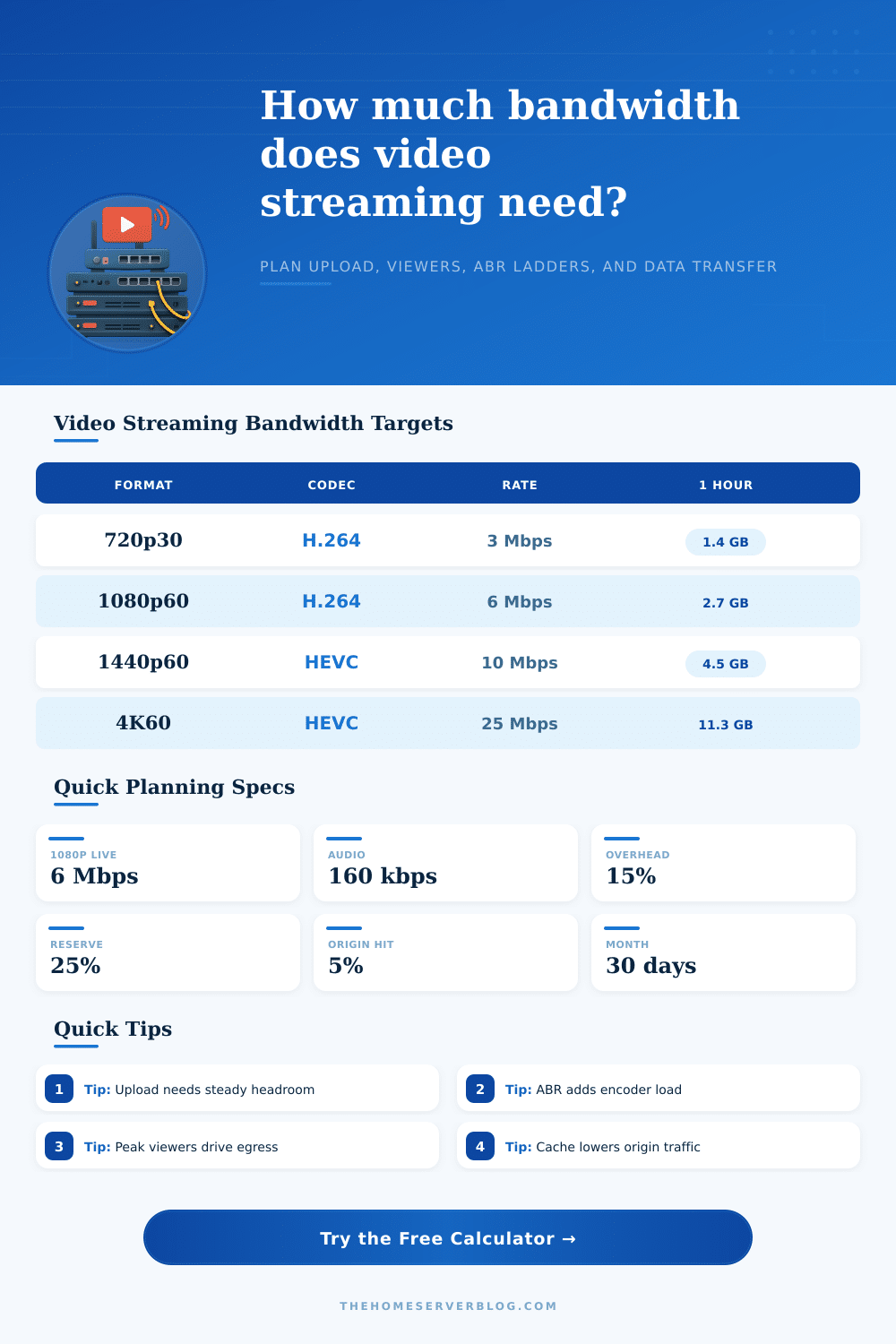
| Format | Typical H.264 Video | Efficient Codec Target | Best Use |
|---|---|---|---|
| 480p30 | 1.2 to 1.8 Mbps | 0.8 to 1.2 Mbps | Fallback rung, mobile viewers, constrained uplinks |
| 720p30 | 2.5 to 3.5 Mbps | 1.8 to 2.5 Mbps | Reliable HD for webinars, classrooms, and low-motion events |
| 1080p30 | 4.0 to 5.5 Mbps | 2.8 to 4.0 Mbps | General event streaming and polished talking-head video |
| 1080p60 | 6.0 to 8.0 Mbps | 4.2 to 5.8 Mbps | Gaming, sports, demos, and motion-heavy camera feeds |
| 1440p60 | 10 to 14 Mbps | 7 to 10 Mbps | Premium creator streams and high-detail screens |
| 4K60 | 25 to 40 Mbps | 16 to 28 Mbps | Venue production, sports, and archival-grade live streams |
🎚ABR Ladder Planning Table
| Ladder Mode | Renditions | Encoder Output | Planning Note |
|---|---|---|---|
| Single bitrate | Top stream only | 1.00x top bitrate | Simplest ingest, least resilient for mixed viewer connections |
| Compact ABR | Top, 60%, 30% | 1.90x top bitrate | Good for small events with a modest transcoder or cloud packager |
| Standard ABR | Top, 75%, 50%, 30%, 15% | 2.70x top bitrate | Balanced ladder for public streams and mixed broadband viewers |
| Full ABR | Seven quality rungs | 3.50x top bitrate | Best for large audiences, mobile networks, and quality-sensitive events |
🖧Delivery and Overhead Table
| Path | Bandwidth Driver | Typical Buffer | Practical Limit |
|---|---|---|---|
| Encoder to platform | Top stream plus audio | 20% to 30% | Uplink should avoid saturation for the full event |
| Self-hosted origin | Viewer count times average bitrate | 15% to 25% | NIC, firewall, and ISP upload become the bottleneck |
| CDN edge delivery | Total viewer egress | 10% to 20% | Origin only sees misses, repackaging, and control traffic |
| Venue LAN | Multicast or local unicast viewers | 5% to 15% | Switch fabric and Wi-Fi airtime matter more than internet speed |
📋Common Streaming Project Sizes
| Project | Top Stream | Peak Viewers | Rule of Thumb |
|---|---|---|---|
| Small webinar | 1080p30 H.264 | 50 to 150 | Plan 6 to 8 Mbps stable upload and CDN delivery |
| Creator live show | 1080p60 H.264 | 200 to 1000 | Keep top bitrate near platform limits with 25% upload reserve |
| Hybrid conference | 1080p30 HEVC or H.264 | 500 to 3000 | Use ABR and monitor origin hit ratio during keynote peaks |
| Local sports | 4K30 or 1080p60 | 1000+ | Motion complexity can raise bitrate more than resolution alone |
💡Planning Tips
Bandwidth is a measurement of the data that can be transferred over a networks. The bandwidth available to an individual who wants to create a live stream is a critical factor in whether or not that live stream is going to be succesful. If the individual dont plan for the bandwidth that is required for a live stream, the live stream may freeze when the number of viewers of that live stream increase to a high number.
Live streams may freeze due to the data that the encoder are able to push out of the encoder not matching the data requirements of the network and the number of individuals viewing that live stream. To avoid live streams freezing, the individual creating the live stream must understand the various component of live streaming that impact the bandwidth for that live stream. The bandwidth requirements of a video stream is composed of several components.
How to Calculate Bandwidth for a Live Stream
The top setting for the video stream will impact the data that is sent out with each live stream; each additional rendition of the video will increase the data that the encoder must push out. Additionally, audio will be included in each rendition of the video; higher quality audio will increase the data that is sent from the encoder. Viewers may not view the highest quality version of the live stream; the average quality of audio and video that is received from viewers will impact the amount of data that is sent from the encoder.
Additionally, there may be overhead data with live streams; data is transmitted with the containers for the video and audio files, as well as data that is retransmitted in the event that the data is lost during the live stream. The individual can calculate the bandwidth for live streams by inputting factors like resolution, codec, the number of viewers, and the length of the live stream. Using a bandwidth calculator allow the individual to avoid using separate spreadsheets to calculate bandwidth for each live stream that is to be created.
The model that is used to deliver a live stream may also impact the bandwidth that is used. With a public Content Delivery Network (CDN), the public CDN only sends request for content that the edge servers do not have to the origin server, and the video is distributed to edge servers. A self-hosted delivery system will have each viewer’s device download the video directly from the encoder; thus, self-hosted delivery requires more upload data from the encoder than a system based off a public CDN.
Additionally, if the live stream is to take place at a local venue, the network may use techniques like multicast or a switch fabric that does not utilize the public internet to distribute the video; however, the use of Wi-Fi or switching may impact the live stream. The individual can alter the settings for a live stream within the bandwidth calculator to view how each model of live stream impacts the amount of data that must be uploaded during the live stream. The complexity of the movement within the live stream will also impact the bandwidth requirements of that live stream.
Live streams with content containing little movement require less data to be transmitted than live streams that feature rapidly changing content, such as sports or gaming content. The motion selector within the bandwidth calculator will impact the amount of data that is required for live streams with different degrees of motion complexity. In addition to the factors that must be considered when determining the data rates for each component of the live stream, there are also factors related to overhead and reserve data.
The live stream can incorporate a 15% buffer to account for data loss during the live stream; however, using a 25% reserve within the upload data allows the encoder to account for drop in the quality of the internet connection. The reserve ensures that the live stream will not drop in quality. Such percentages are automatically incorporated into the bandwidth calculator to determine the live stream data with the inclusion of a buffer.
The codec that is used within the live stream will also impact the bandwidth data rates. More moddern codecs require less data to achieve the same quality as older codecs; thus, using newer codecs will reduce the amount of data that the encoder must upload and the amount of data that the viewers must download. However, the newer codecs may require the encoder to have more processing power than codecs that have been used in live streams in the past.
The bandwidth calculator will factor in the efficiency of each codec so that the individual can compare the data that is saved with using a newer codec to the processing power that is required to use that codec. In addition to data rates, the total amount of data that viewers will download during the live stream is another factor that must be considered. The data rates are calculated for each live stream; however, if an individual pays for the internet bandwidth for live streams by the gigabyte or terabyte, it is important to know the total amount of data that will be transferred.
While a single live stream event may not use much data, numerous live streams can create a high amount of data that is transferred from encoder to viewers. Thus, bandwidth calculators provide a projection of the total amount of data that will be transferred during a period of time (such as a month). This total amount of data can help the individual to create a budget for live streaming before they are provided with an invoice detailing the cost of live streaming.
The individual can use the calculated number for the amount of data that must be uploaded by the encoder to set up the live stream; however, the amount of data that is actualy uploaded during the live stream may be less than calculated. Therefore, it is recommended that a test live stream of the calculated length be performed to ensure that the internet connection will be able to handle the live stream when it occurs. By calculating all of the factors that impact the bandwidth requirements for a live stream, the individual can ensure that the bandwidth for the live stream is a known variable prior to the live stream begins.