MinIO Erasure Coding Calculator
Estimate MinIO erasure-set layout, EC parity, usable capacity, object expansion, drive loss tolerance, and healing read load for home lab and small cluster deployments.
Capacity assumes equal-size drives. With mixed disks, MinIO capacity is effectively limited by the smallest drive in each erasure set.
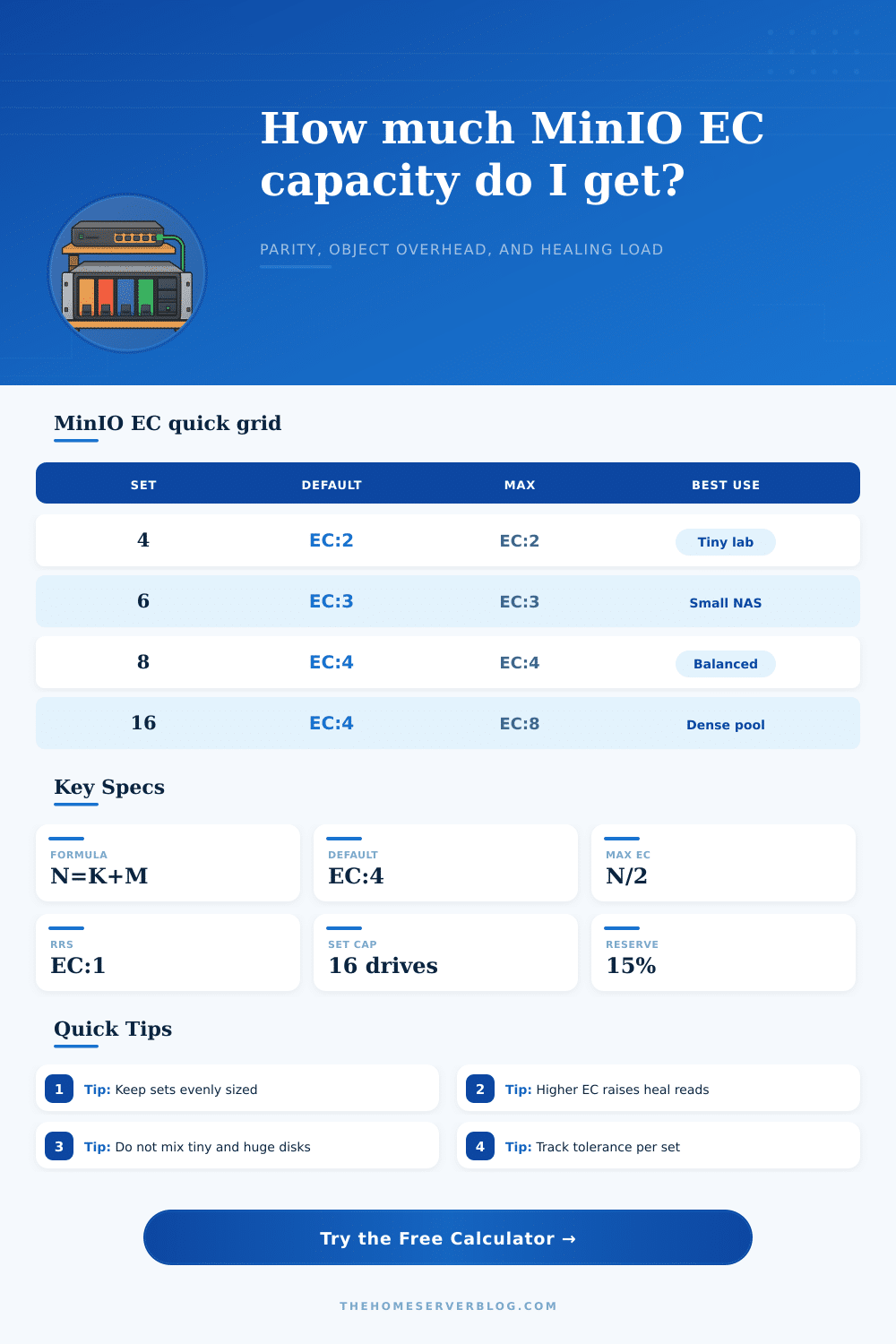
| Erasure set N | Default STANDARD | Max parity | Common EC layouts |
|---|---|---|---|
| 4 drives | EC:2 | EC:2 | 2+2, 3+1 test only |
| 6 drives | EC:3 | EC:3 | 3+3, 4+2 |
| 8 drives | EC:4 | EC:4 | 4+4, 6+2 |
| 12 drives | EC:4 | EC:6 | 8+4, 10+2, 6+6 |
| 16 drives | EC:4 | EC:8 | 12+4, 10+6, 8+8 |
| 24 to 32 drives | EC:4 typical | N/2 | Large custom sets |
| Parity M | Data K on this set | Efficiency | 100 GiB object footprint |
|---|---|---|---|
| EC:2 | 14 data | 87.5% | 114.3 GiB |
| EC:4 | 12 data | 75.0% | 133.3 GiB |
| EC:6 | 10 data | 62.5% | 160.0 GiB |
| EC:8 | 8 data | 50.0% | 200.0 GiB |
| Preset | Servers | Total drives | Typical purpose |
|---|---|---|---|
| Single Node 4-Drive Lab | 1 | 4 | Testing, not HA |
| Four Server 16-Drive Standard | 4 | 16 | Balanced home lab |
| Four Server 32-Drive Dense | 4 | 32 | Two 16-drive sets |
| Eight Server 64-Drive Rack | 8 | 64 | Rack pool with EC:4 |
| Setting | Format | Calculator effect | Operational note |
|---|---|---|---|
| STANDARD | EC:M | Sets parity drives per object | Applies to new writes |
| REDUCED | EC:M | Uses lower parity than STANDARD | Normally for replaceable data |
| Data shards | K = N - M | Controls storage efficiency | More K means less overhead |
| Max parity | M <= N/2 | Caps loss tolerance per set | Higher M increases heal reads |
When you expand your tiny home lab or small-business storage cluster past the point where losing one drive doesn’t mean losing all your data, it’s panic time. There are terabytes of backups or photos or datasets sitting over there and the math starts weighing on you.
Enter erasure coding: It’ll protect you from complete catastrophe, and do so with fewer bytes per bit than traditional replication, if you get the geometry correct. Most people screw that up but the calculator above takes the guesswork out of the planning stage by handling all the math for you after you plug in how many drives you’ve got and how much redundancy you want.
How to Balance Safety and Storage Space
That’s the heart of designing a MinIO pool: How do I balance resilience with raw capacity? On the one hand, you want to store as much data as possible, but on the other hand, you need enough parity information to recover from hardware failures and rebuild objects. Skew too high on capacity and you’ll lose data if two drives fail at once. If you go too hard on safety, you are paying for storage that doesn’t store actual files. Instead, it only stores parity blocks because you have used so many drive for protection.
The tool shows this tradeoff, allowing you to see how many drives will be used for data vs protection under your particular config. It calculates the usable capacity by taking into account operational reserves. This is important because no one designs their cluster with the expectation that they can fill every last byte.
That explains why the size of an erasure set matters. Your drives will be split up into multiple subsets called erasure sets. These sets are all part of the larger overall pool of storage. Each set determine how the whole cluster behaves. For example, having a 16-drive set is typically a nice happy medium between flexibility and performance, but there are hard rules about which drives go where when calculating parity.
There’s only so many concurrent drive failures you can handle inside a particular set before you lose data. The table on the page spells it out nicely, pairing common configurations with how much parallelism they support without losing data. It makes sense because a hardware failure isn’t some abstract concept; it occurs somewhere in the real world. If three drives fail on a single server, chances are high they’re all members of the same erasure set, so you’d better make sure your tolerances cover that clump of potential disaster.
Another thing that people forget about until it’s too late is that it takes time to heal. In the case of a drive failing, the MinIO reconstructs any lost data from across the other healthy drives. That creates a lot of read pressure on surviving drives. Running more parity shards than needed means you are reading/rewriting more data when a drive fails.
The calculator shows how much read pressure there will be when a drive fails and assumes a rebuild rate. So if your number here is high, that doesn’t mean your cluster is going to break; it just means that a drive fail will cause other things in your cluster to temporary slow down. And that’s where folks go wrong who chase theoretical efficiency at the expense of operational stability.
It’s tempting to think of mixing drive sizes as an efficient means of recycling leftover hardware, but doing so adds enough complexity that it typically isn’t worth it. The smallest drive in an erasure set limits its usable capacity. So if you mix in some eight-terabyte drives alongside some 12-terabyte ones, you’re essentially wasting space on those bigger drives; the coding scheme can only stretch as far as the shortest of its constituent shards.
Uniformity keeps things simple: it’s easy to plan for, your efficiency numbers will be consistent throughout the pool, and upgrades won’t force you to consider whether they’ll break the set boundaries. For that reason, storage classes let you dial in this tradeoff based on the type of data you’re storing. Every file isn’t equally precious. High-redundancy protection is needed for critical production databases. However, you might not care as much if temporary log files are lost, or you may be okay replacing an older copy of a dataset. With that understanding, you can stretch your storage even farther without sacrificing what’s most important.
The calculator lets you compare different configurations side-by-side and more clearly understand the true cost of added protection. You’ll soon see that every extra percent of redundancy costs you either more work during rebuilds or less available space.
All that said, constructing a tough object storage system is as much about managing expectations as it is configuring software. How much parity do I have? I don’t want too little parity that I’m losing sleep, but I also don’t want so much that I’m paying for ghost capacity. The tool includes a set of presets which cover common deployment patterns… From dense racks of servers to small lab installations. They give you some starting points and help ground your assumptions in reality instead of theory.
When you know how your drives map to sets and how those sets deal with failure, the anxiety goes away. I no longer have to guess if my cluster will survive a bad day; I could of just trusted the math that says it can.