Elasticsearch Shard Calculator
Size Elasticsearch primary shards, replica copies, tier shard density, rollover interval, and shard-size fit from index growth and retention assumptions.
Shard calculation breakdown
| Shard item | Calculated value | Why it matters | Planning check |
|---|---|---|---|
| Primary count | Run calculator | Sets shard size per rollover | Match target GB |
| Replica multiplier | Run calculator | Controls total shard count | Replicas + 1 |
| Shard density | Run calculator | Checks node shard pressure | Stay under limit |
| Rollover cadence | Run calculator | Keeps shards from growing too large | Use ILM |
| Workload type | Typical target | Rollover trigger | Shard-count note |
|---|---|---|---|
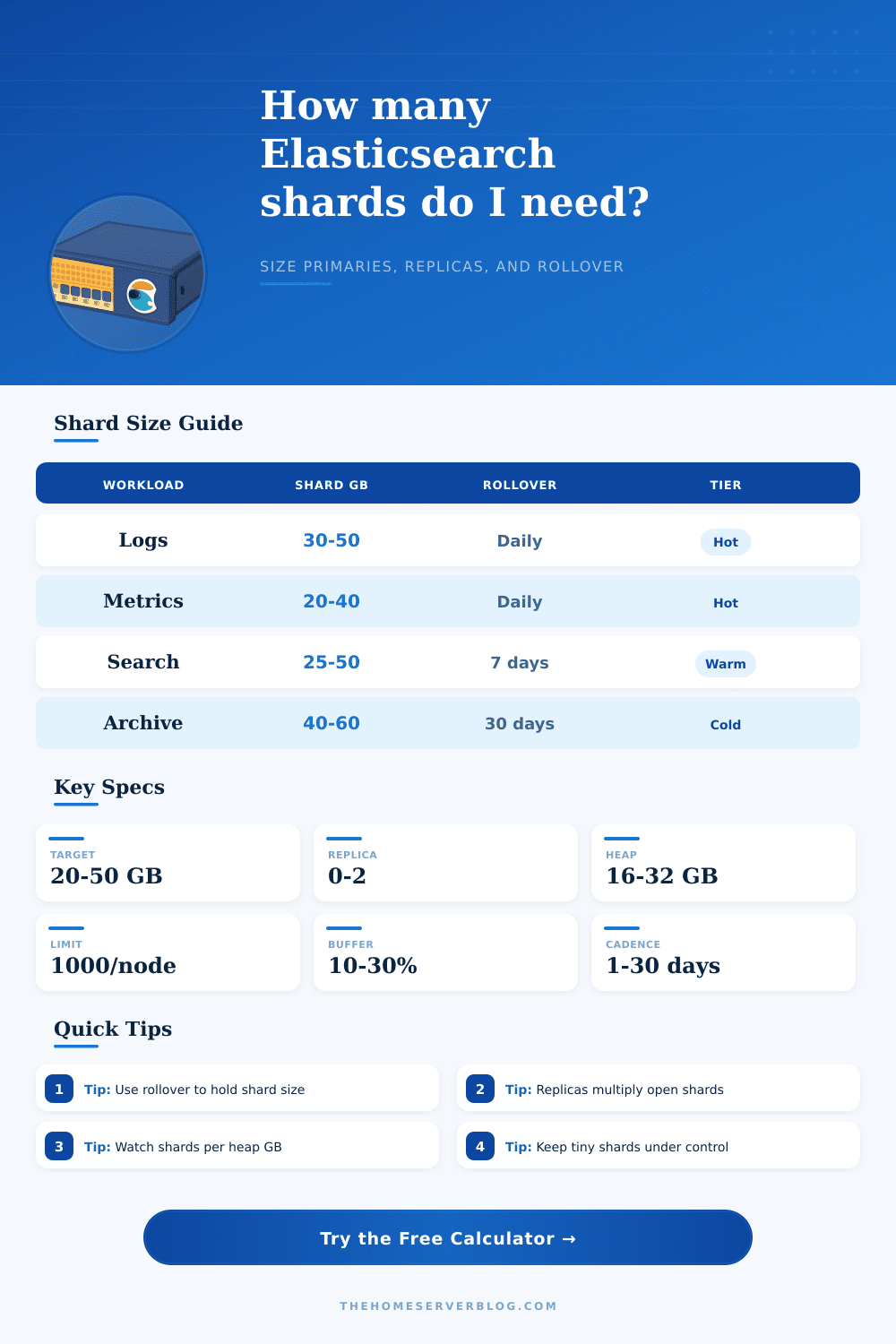
| High-ingest logs | 30 to 50 GB | max_primary_shard_size | Prefer fewer, fuller shards |
| Metrics and APM | 20 to 40 GB | size or age | Watch many small backing indices |
| Search-heavy catalog | 10 to 30 GB | manual or alias rollover | Smaller shards can improve recovery |
| Audit retention | 30 to 50 GB | age plus size | Replicas multiply long retention |
| Warm archive search | 40 to 60 GB | monthly rollover | Avoid thousands of cold shards |
| Tier pattern | Primary shard target | Node shard density | Best shard behavior |
|---|---|---|---|
| Hot only | 20 to 40 GB | Keep moderate | Fast rollover, low tiny-shard count |
| Hot to warm | 30 to 50 GB | Warm nodes carry older shards | Daily or weekly backing indices |
| Hot, warm, cold | 40 to 60 GB | Cold tier needs shard discipline | Longer rollover after hot phase |
| Cold or frozen | 50 GB+ | Use searchable snapshot limits | Minimize open tiny shards |
| Setting | Low volume | Typical time series | Large ingest |
|---|---|---|---|
| Rollover interval | 7 to 30 days | 1 to 7 days | 12 to 24 hours |
| Primary shards | 1 | 1 to 6 | 6 to 24 |
| Replica count | 0 to 1 | 1 | 1 to 2 |
| Growth buffer | 10% | 15% to 25% | 25% to 40% |
| Calculation | Formula used | Shard-sizing purpose | Common adjustment |
|---|---|---|---|
| Buffered rollover size | GB/day x interval x buffer | Measures data per backing index | Use p95 daily ingest |
| Recommended primaries | ceil(size / target GB) | Keeps shard size near target | Apply minimum spread |
| Total open shards | indices x primaries x copies | Shows metadata load | Trim retention or replicas |
| Shards per node | total shards / data nodes | Checks shard-count limit | Reduce tiny indices |
| Target cadence | target GB x primaries / GB/day | Suggests ILM rollover age | Pair with size trigger |
You do not start an Elasticsearch cluster with the right number of shards. You inherit the shard count from the default template. In 2015 they settled on five primary shards for their default template, at the time it was a good tradeoff to avoid having more shards or too few. Fast forward to today and this choice mean hundreds (if not thousands), of tiny, inefficient indices which quickly gobble up heap memory.
Hardware power isn’t everything. Getting the right shard size matter more. Adding some RAM won’t help if your shard design isn’t efficient. Here’s why: Shard count isn’t directly proportional to storage capacity. Instead, it’s related to metadata overhead. Each open shard consume some percentage of the JVM heap with circuit breakers and segment management. Too many shards means your cluster is spending more time managing containers instead of finding your data.
Why Shard Size Matters for Your Cluster
By tying shard count to retention windows and daily ingest volume, the calculator lets you stop guessing. It forces you to figure out how much data lands on each container before provisioning a node. The size of the shards. Teams typically optimize for main (primary) shard size, with 20 (50GB being common). Why? Small shards carry high overhead; big shards is hard to move when a node goes down (it’ll take hours). Based off your data’s daily flows, the tool suggest how many primaries you should of have to keep the rollover index near this sweet spot.
But most folks overlook that replicas exacerbate the issue. One single replica double the total number of open shards. Two replicas triple your metadata workload. The calc multiplies by this factor to reflect actual overhead of redundancy in terms of heap density.
Complicating things, retention does so in an easy-to-overlook way: a 30 day retention policy with daily rollovers means 30 backing indices. Each index can have multiple primaries. Soon, you’re talking about many shard. Look at the density of shards per node; Elasticsearch defaults to capping at a thousand non-frozen shards. Past that and it gets dicey. Check out this breakdown from reference tables for various types of workload. Log ingestion might be able to handle more dense shards then archive search. Match your tier strategy against your hardware constraints.
This also includes growth buffers. You might want to add another 10% or 20% to your daily ingest estimate for things like schema changes and traffic spikes. Failing to do so can result in overly aggressive rollover intervals which cause you to create shards prematurely and keep your cluster in an enlarged state. Before it divides that number by your target size, the tool add in a growth buffer as a more resilent baseline. It helps you plan ahead instead of reacting to problems later.
To conclude. All this is about making sure it’s fast but also stable. You don’t want your shards to be too big or they will take a long time to rebalance. You also don’t want them to be too small, because then it becomes a problem to operate on them if they fail or if you need to rebalance the shard. When your shard size, replica strategy, and primary count matches your data flow, your cluster can do its job well. In fact, what you decide upfront before ingesting any data is often the strongest config in Elasticsearch.