Hadoop Cluster Size Calculator
Estimate DataNodes, raw disk, usable HDFS capacity, NameNode metadata, YARN vcores, YARN memory, and ingest growth for a Hadoop or HDFS cluster.
* Hadoop presets
# HDFS storage inputs
~ NameNode and YARN inputs
HDFS and YARN breakdown
+ HDFS and YARN spec grid
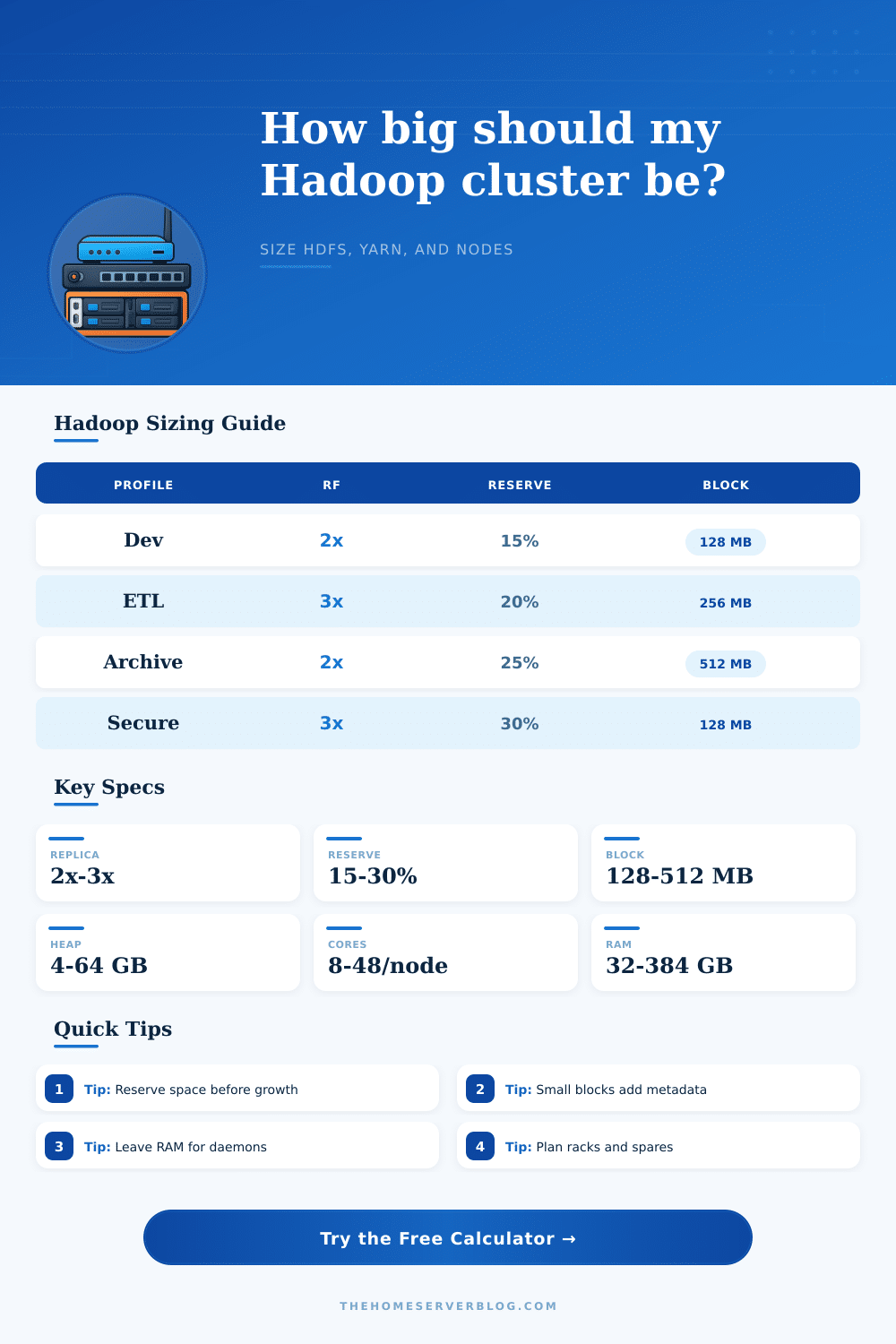
= Hadoop sizing presets table
| Preset | Best fit | HDFS pattern | YARN pattern |
|---|---|---|---|
| 3-Node Dev HDFS | Proof of concept, classroom, lab | RF2, low reserve, small disks | 8 vcores and 32 GB RAM per node |
| Daily ETL Lake | Batch ingestion and scheduled transforms | RF3, 20% reserve, 256 MB blocks | Balanced CPU and memory for Spark or MapReduce |
| Cold Archive | Log history, compliance copies, low compute | RF2 or erasure coding tier, larger blocks | Moderate cores with more disk per worker |
| Large Data Lake | Petabyte-scale HDFS with heavy analytics | RF3, rack-aware placement, large NameNode heap | High RAM nodes and many schedulable containers |
- HDFS reference table
| Setting | Common value | Why it matters | Planning note |
|---|---|---|---|
| Replication factor | 3 for production | Multiplies physical disk required | Use rack awareness before lowering RF |
| Reserved HDFS space | 15% to 30% | Allows writes, rebalancing, and node recovery | Large clusters usually need stricter headroom |
| Block size | 128 MB to 512 MB | Controls block count and NameNode metadata | Use larger blocks for large immutable files |
| NameNode heap | 4 GB to 64+ GB | Holds file, inode, and block metadata | Small files can dominate heap before data does |
| Node and workload table
| Node profile | Disk per DataNode | YARN cores | YARN RAM |
|---|---|---|---|
| Lab worker | 8 TB to 24 TB | 4 to 12 vcores | 16 GB to 64 GB |
| Balanced worker | 48 TB to 144 TB | 16 to 32 vcores | 96 GB to 256 GB |
| Dense storage worker | 180 TB to 360 TB | 16 to 48 vcores | 128 GB to 384 GB |
| Compute-heavy worker | 48 TB to 120 TB | 32 to 96 vcores | 256 GB to 768 GB |
! Sizing tips
That’s true of any Hadoop cluster planning exercise: It involves striking a balance between todays requirements versus tomorrows unknowns. You want some processing power and storage, but you must plan for the future even if it hasn’t arrived. Sizing tend to be the dividing line between a data lake that runs smoothy and one that is a storage mess. Many engineer fail to factor in metadata overhead or they don’t allow for expansion. Six months from now, this cause NameNode problems as the heap memory fills up.
So long as you know roughly how much data you have and how long you’d like to retain it, the calculator will take care of the math for you. There’s no need to figure out how many terabytes become petabytes with redundancy factored in, or to balance the diskspace available and replication factor. Just tell it what you have, how quickly it’s growing, and how long you’d like to be able to preserve that data. And then it’ll tell you exactly how many nodes you need to buy.
How to Plan Your Hadoop Cluster Size
The first big one is replication. A traditional production cluster has a replication factor of three… Each GB of actual data take up three GB on disk. That sounds wasteful… but it’s cheaper than downtime if a node fails and no other replica exist. For archival (cold) data that doesn’t move much, you may go down to a factor of two, or even to some kind of erasure coding. When you adjust this option, the raw storage value update instantaneously. It’s a tiny checkbox with a huge impact on what hardware you need to buy.
The other thing about storage is that it’s not just about the bytes on the drive, but the space you’re leaving empty. People often fill each terabyte as much as possible to make the best use of their capacity. That doesn’t give them any room to handle new data arriving faster then expected. It also leave no room for a failed disk that requires rebalancing. Typically people will reserve 20% of their HDFS space as a safety net. This lets the system shuffle blocks around and still be smooth. When you reach that point, you begin getting write failures and unhappy users. The reserve percentage in this tool ensures you have more than just enough diskspace to get by; it keeps you comfortabley instead.
Most early designs fail at step 1: the NameNode memory issue. Remember that the NameNode doesn’t hold data itself. Just the map of where the data resides. For millions of small files, that map will be big. Every file generate a block of metadata on the heap plus one inode entry. A cluster containing a terabyte of very small log files may require more memory than a cluster containing a terabyte of large video files. The block size shows how much pressure there is as larger blocks result in fewer entries to maintain. To keep the NameNode trim, you’ll want to choose a block size consistent with your average file size to avoid creating too much overhead (it’s a tradeoff between memory and granularity).
It’s the same with YARN resources, you can’t assign all the gigs of memory and all the cores to apps. There must be some breathing space for daemons like the NodeManager, the DataNode daemon and even the OS itself. Assign it all to MapReduce (or Spark), and what happens? The infrastructure is starved. Heartbeats are missed and block reads becomes slow. And the calculator automatically takes away a reserved portion from the daemons. Then it presents you with the allocatable resource… Those that really make a difference for your job.
The unpredictable factor with any plan is that data does not stand still. Data builds up. Planning for only one year of growth invites disaster because you cannot order new servers immediately. You may add two years worth of projected ingest into your equation. This will increase the number of nodes required now by maybe a couple of nodes, but it would of avoided the need to rush out and expand a rack later. The spare capacity is insurance against some unexpected spike in demand.
This is a starting point, not an end point: Your sizing may well differ over time as you learn more about how you use that data. Here are some common workload sizes (from light-weight dev environments through to large analytics warehouses), and some reference tables on the pages to help you check your plan against those. Where you find your numbers way off what looks like a comparable profile, double-check that you’ve got your inputs right.
Begin with the end in mind: First get storage right, then start at the beginning. Plan for growth and plan for failure. Expect a high cost for each piece of metadata on small files. Make mistakes costly by doing them correctly from the beginning and not having to fix them twice. Build a cluster today that supports your entire future data strategy.