GRE Tunnel Overhead Calculator
Plan Generic Routing Encapsulation overhead with outer IPv4 or IPv6, GRE key, sequence, checksum, IPsec ESP, VLAN tags, MPLS labels, original MTU, MSS clamp, and packet-rate cost.
GRE Tunnel Result
The delivery IP header that carries GRE protocol 47.
Checksum, key, and sequence fields change GRE header length.
Packet-rate bandwidth consumed by encapsulation bytes.
Compares configured TCP MSS against the recommended value.
| Field | Bytes | When Present | MTU Effect |
|---|---|---|---|
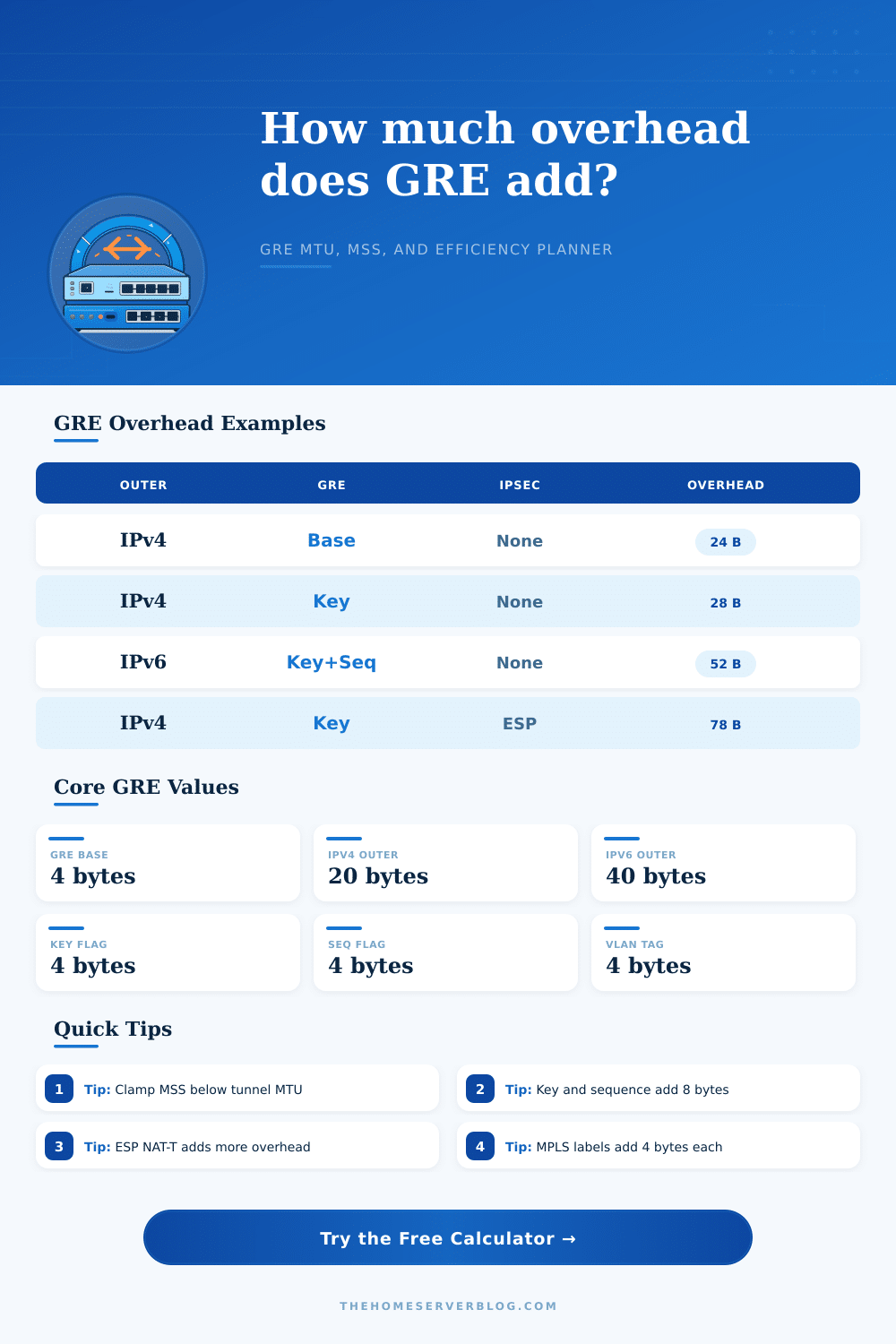
| Outer IPv4 header | 20 | GRE over IPv4 underlay | Subtracts 20 bytes from inner MTU |
| Outer IPv6 header | 40 | GRE over IPv6 underlay | Subtracts 40 bytes from inner MTU |
| GRE base header | 4 | Every GRE packet | Protocol type and flags/version field |
| GRE checksum field | 4 | Checksum flag set | Adds checksum plus reserved1 bytes |
| GRE key field | 4 | Key flag set | Common for keyed tunnel separation |
| GRE sequence field | 4 | Sequence flag set | Used when sequencing is required |
| ESP estimate | 50-74 | GRE protected by IPsec ESP | Depends on cipher, ICV, padding, and NAT-T |
| Option Stack | Typical Added Bytes | 1500 MTU Inner Limit | Best Use |
|---|---|---|---|
| IPv4 + GRE base | 24 | 1476 | Simple routed overlays and lab tunnels |
| IPv4 + GRE key | 28 | 1472 | Multi-tenant or hub tunnels needing keys |
| IPv4 + GRE key + sequence | 32 | 1468 | Ordered GRE testing or specific appliances |
| IPv6 + GRE base | 44 | 1456 | IPv6 underlay with IPv4 or IPv6 payloads |
| IPv4 + GRE key + ESP GCM | 78 | 1422 | GRE routing protected by IPsec |
| IPv4 + GRE key + ESP NAT-T | 86 | 1414 | IPsec path through NAT devices |
| IPv4 + GRE key + PPPoE | 36 | 1464 | Consumer WAN or DSL-style access |
| IPv6 + GRE key + two MPLS labels | 56 | 1444 | Provider edge lab and carrier simulations |
| Inner Payload | Recommended Formula | IPv4 TCP MSS | IPv6 TCP MSS |
|---|---|---|---|
| Plain Ethernet, no tunnel | 1500 - IP - TCP | 1460 | 1440 |
| IPv4 GRE base | 1476 - IP - TCP | 1436 | 1416 |
| IPv4 GRE key | 1472 - IP - TCP | 1432 | 1412 |
| IPv6 GRE base | 1456 - IP - TCP | 1416 | 1396 |
| GRE key over ESP GCM | 1422 - IP - TCP | 1382 | 1362 |
| Layer Item | Bytes | Common Count | Planning Note |
|---|---|---|---|
| 802.1Q VLAN tag | 4 each | 0 to 2 | Q-in-Q uses two tags on carrier handoffs |
| MPLS shim label | 4 each | 1 to 3 | Transport, VPN, and entropy labels can stack |
| PPPoE header | 8 | 0 or 1 | Often lowers IP MTU to 1492 before GRE |
| Ethernet header | 14 | Optional | Use for wire-rate efficiency, not IP MTU |
| Ethernet FCS | 4 | Optional | Useful for physical wire accounting |
| Preset | Outer | GRE Fields | Wrapper | Typical Goal |
|---|---|---|---|---|
| Plain GRE IPv4 | IPv4 | Base | None | Basic route tunnel |
| GRE Keyed Hub | IPv4 | Key | None | Hub-and-spoke separation |
| GRE Sequence Lab | IPv4 | Key, sequence | None | Appliance behavior testing |
| IPv6 Underlay | IPv6 | Key | None | Modern provider underlay |
| GRE over IPsec | IPv4 | Key | ESP | Encrypted routed overlay |
| MPLS Edge GRE | IPv6 | Key, sequence | 2 labels | Carrier lab planning |
Missing byte tunnel failure feel personal. Your policies are lined up right, your routing is correct, yet data just won’t flow. It waits in buffer or forces unwanted packet fragmentation. That’s not romantic, nor does it perform. Goodbye Generic Routing Encapsulation.
GRE is a simple concept: add a thin header to wrap around Layer 3 packets. In reality, the header gets fat quick. Plug your underlay into calculator. It’ll do the math for you, so you don’t have to guess if your route can absorbs those additional bytes. It’s just some basic math that throws off veteran engineers.
Why GRE Tunnels Fail Because of Packet Size
Take your physical interface with its default MTU of fifteen-hundred bytes. Then you remove the outer IP header. Immediately you lose twenty bytes if you’re running over IPv4. If you happen to be nested inside an IPv6 underlay then you loses forty bytes instantly. But you haven’t even begun to touch the GRE header! The bare minimum GRE header add another four bytes for flags and protocol type. That’s a large total of twenty-four to forty-four bytes lost to headroom before you’ve even sent any useful payload.
And this is where folks go wrong. They set up their tunnel and think their MTU hasn’t changed from fifteen hundred. And then they ask why huge packets is dropping silently on their ingress interface.
Throw in optional fields and it gets a lot tighter. In many of these hub-and-spoke designs, you have to send a unique value like the GRE key field. This differentiates one tunnel from another between the same pair of IP addresses. That’s an additional four bytes. Want sequence numbers? Add another four. Need checksums? None of these are free; each takes away from your overall maximum transmission unit.
As you can see on the reference table, a keyed IPv4 tunnel drop the inner limit down to just 1,472 bytes. Seems small, but remember: TCP segments themselves has their own headers that also want space. Which brings us to the Maximum Segment Size clamp. Instruct your edge devices to reduce the size of the TCP window. Wrap it all up with a TCP header, an IPv4 header, and a GRE header. This must not exceeds the physical MTU. If you don’t clamp the MSS, your hosts will send out packets that are fifteen-hundred bytes long. These arrive at the tunnel interface which attempts to wrap them in a GRE header and ship them off. But it’s too big; it exceeds fifteen hundred, and it drops/fragments the thing. Fragments is bad for throughput. Worse, they’re bad if you’re using an encrypted tunnel. You cannot even fragment these things.
What’s the magic MSS? That depends on exactly how much stuff sits on top of your payload. A simple IPv4 GRE tunnel should of use 1,436 as a safe target. Stick IPsec ESP encryption on there and the number get smaller still: IPsec has headers of its own to add.
There’s also efficiency in sending lots of packets: Four-bytes doesn’t sound like much when you’re sending millions of packets per second. But that overhead consumes real CPU cycles and bandwidth at line rate. The fixed part of the header is a bigger percentage of the frame, which hurts small packets more than big ones. And it will severely impact the effective throughput if your application produces lots of small flows. Per-packet overhead, as well as MTU limits, must be considered for planning. This packet-rate cost is estimated by the tool to help you determine whether the hardware can handle the tax before deployment.
And lastly, think about all the other details of underlay that don’t play in the IP stack. Each additional VLAN tag tacks on an additional four bytes. Each MPLS label adds another four. Every PPPoE packet add eight. All this impacts the size of the actual frame going over the wire. And then there’s the whole tunneling/PPP/Q-in-Q tagging thing, which eats away at the remaining space even more.
Your payload sits on top of a growing stack of headers that starts with the Ethernet frame and goes all the way back to your payload. It’s not so much about getting connected as it is getting connected efficienty. Proper alignment of MTU and MSS clamp settings with what’s actualy happening out on the wire helps prevent those silent failures. It is a little thing, but it counts.