HomeServerBlog virtualization planner
Memory Ballooning Calculator
Estimate safe VM memory overcommit, balloon reclaim targets, host RAM headroom, and pressure risk for Proxmox, ESXi, Hyper-V, KVM, Unraid, TrueNAS SCALE, XCP-ng, and nested lab hosts.
Full memory pressure breakdown
Proxmox VE / KVM
virtioLinux guests use virtio-balloon; KSM can deduplicate similar pages but should be monitored on CPU-limited mini PCs.
VMware ESXi
vmmemctlVMware Tools provides ballooning, with transparent page sharing mostly limited by modern security defaults.
Hyper-V
DynamicDynamic Memory uses startup, minimum, maximum, and buffer settings instead of a classic manual balloon target.
XCP-ng / Xen
DynamicXen tools allow dynamic min and max memory ranges; pin critical appliances near their normal working set.
Unraid KVM
MixedVM reclaim shares the host with filesystem cache and containers, so keep a larger reserve on NAS-heavy systems.
TrueNAS SCALE
ARC firstZFS ARC can release memory, but storage workloads still deserve a bigger host reserve than generic compute nodes.
VirtualBox
LimitedDesktop labs have less predictable reclaim behavior and are better sized with conservative overcommit.
Nested Labs
LayeredNested ESXi, Proxmox, or OpenStack tests multiply caches and schedulers, so avoid aggressive ballooning.
| Platform | Guest component | Planning strength | Home lab caution |
|---|---|---|---|
| Proxmox VE / QEMU KVM | virtio-balloon driver, usually via guest tools | Good for Linux utility VMs and light Windows services | Watch KSM CPU use and avoid reclaiming ZFS-heavy guests too hard |
| VMware ESXi | VMware Tools memory control driver | Mature telemetry and predictable host pressure behavior | Guest swapping can hide inside the VM before host swap is obvious |
| Microsoft Hyper-V | Dynamic Memory integration services | Good when min, startup, max, and buffer are intentionally set | Startup RAM must still cover boot spikes for Windows guests |
| XCP-ng / Citrix Hypervisor | Xen guest tools dynamic memory | Useful for pools with dynamic min and max memory ranges | Some appliances expect fixed RAM and dislike changing memory online |
| Unraid KVM | virtio drivers with host cache sharing | Works for utility VMs on NAS hosts with generous reserve | Parity checks, Docker apps, and filesystem cache need their own RAM |
| VirtualBox | Guest Additions, limited host-side balloon planning | Fine for desktop test labs and short-lived training VMs | Size conservatively because desktop memory pressure competes with apps |
| Workload mix | Typical working set | Safe reclaim style | What to monitor |
|---|---|---|---|
| Idle Linux services | 45% to 65% of assigned RAM | Moderate ballooning usually works well | Host free memory, guest cache, and service latency |
| Mixed home lab | 60% to 75% of assigned RAM | Use normal buffer and trim oversized VMs first | Balloon size, host swap-in rate, and backup windows |
| Windows desktops | 70% to 85% of assigned RAM | Keep more headroom for logon and update spikes | Guest commit charge and disk queue depth |
| Kubernetes nodes | 65% to 90% of assigned RAM | Prefer pod limits over depending on balloon reclaim | Node pressure, eviction thresholds, and container OOMs |
| Databases and ZFS guests | 80% to 100% of assigned RAM | Minimal ballooning; give these guests stable memory | Cache hit ratio, guest swap, ARC, and database latency |
| Nested hypervisors | 75% to 95% of assigned RAM | Use conservative ratios because two schedulers are involved | Both host layers, nested guest swap, and lab boot storms |
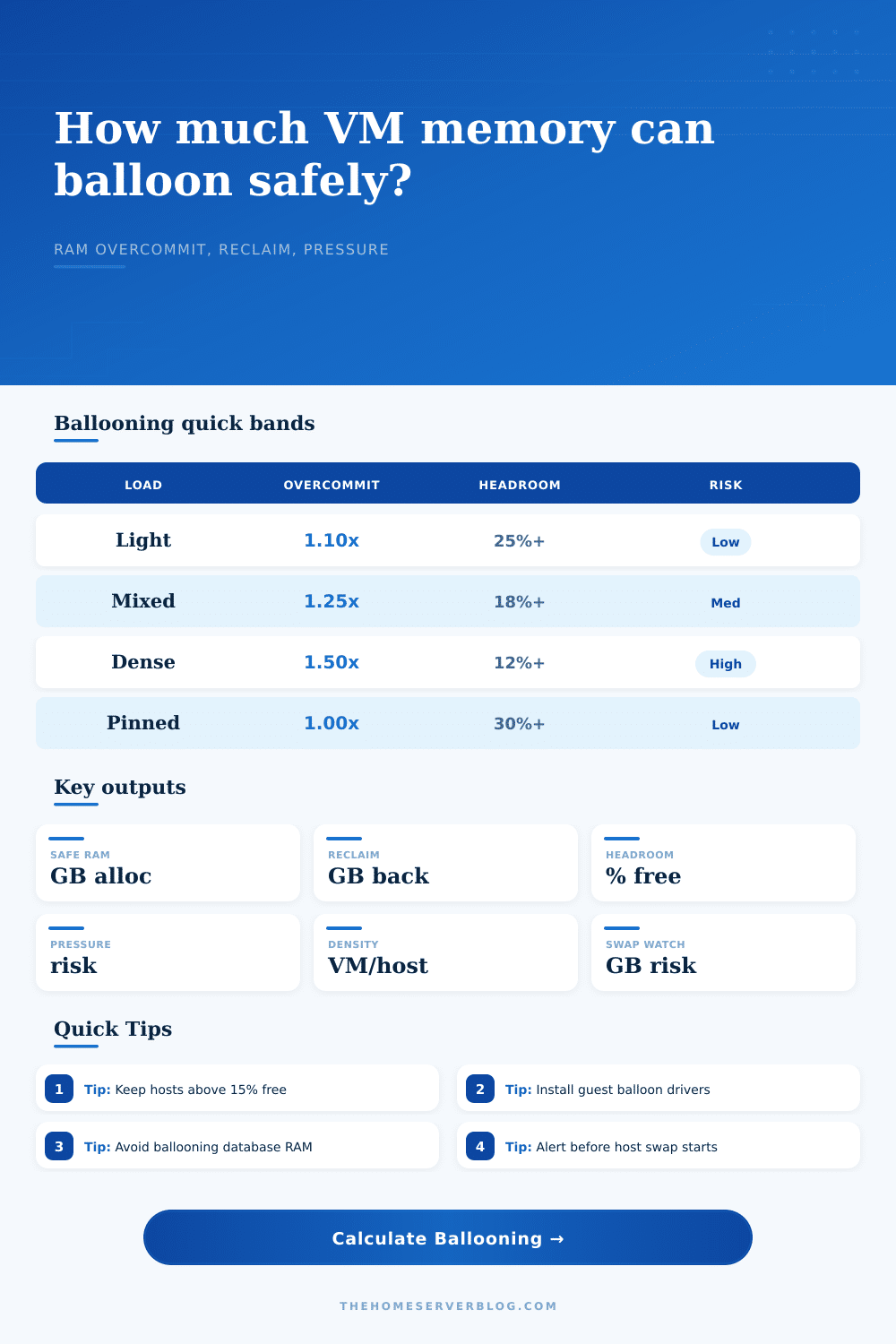
| Band | Overcommit ratio | Headroom after load | Recommended action |
|---|---|---|---|
| Conservative | 1.00x to 1.15x assigned vs usable RAM | 25% or more free host memory | Good for storage hosts, databases, and production-like appliances |
| Balanced | 1.15x to 1.35x assigned vs usable RAM | 15% to 25% free host memory | Normal home lab range when tools are installed and alerts are active |
| Dense | 1.35x to 1.60x assigned vs usable RAM | 8% to 15% free host memory | Use only for non-critical labs with staggered workload peaks |
| Danger | Above 1.60x assigned vs usable RAM | Below 8% free host memory | Reduce VM maximums, add RAM, migrate guests, or power off idle VMs |
| Scenario | Host RAM | Assigned VM RAM | Practical notes |
|---|---|---|---|
| Mini PC Proxmox node | 32 GB | 36 to 44 GB | Good for Linux services, Home Assistant, DNS, and a small Docker VM |
| 64 GB mixed lab server | 64 GB | 72 to 88 GB | Balanced if Windows guests are not all busy during backups |
| NAS plus VM host | 64 GB | 48 to 70 GB | Reserve more memory for filesystem cache and storage services |
| 128 GB nested lab | 128 GB | 140 to 165 GB | Nested clusters need extra slack for simultaneous boot and control planes |
| Desktop VirtualBox lab | 32 GB | 24 to 34 GB | Leave enough memory for the desktop OS, browser, IDE, and build tools |
Calculator estimates are planning values. For final host limits, validate with real workload peaks, backup jobs, patch windows, boot storms, and dashboard alerts from your hypervisor.
The math doesn’t work anymore. You’re limited by something: the amount of physical RAM on the server which you installed the hypervisor onto. And now your virtual machine need one hundred gigabytes total (for a handful of Docker containers, a test database, and your home automation stack), but you only have sixty-four gigs of physical RAM.
It’s like some sort of physics trick, but nope, it’s called memory ballooning, an old virtualization trick to let you allocate more virtual memory than you actualy have. By taking back unused pages of the guest OSes, it give you more virtual memory. How much can you shove into there? That’s the question, because once you start swapping it all out to disk, it freeze itself solid.
How to Balance Memory Safety and Capacity
Overcommit means most folks who go down this path believe they can run twenty VMs on thirty-two gigabytes of hardware without any penalty whatsoever. That’s where folks go astray. There’s no need to run the math for yourself (the calculator above will do it for you) but you should understands the inputs so your system doesn’t crash during next backup window.
First up, define how much memory you’re keeping exclusively for the host: the filesystem cache, the hypervisor itself, and some breathing room for emergencies when you log into a shell. On a box with sixty-four gigabytes, leaving four gigabytes for the host might buys you more space for your VMs, but it leaves the host gasping for air as soon as you start a large file transfer. If you’re using Unraid or TrueNAS, you’ll want to be aggressive here since parity calculation process or the ZFS ARC will gobble up the reserved space the moment you touch a file.
The second important piece is guest demand, which is expected peak memory consumption by each VM (how much RAM it’s actually using at its busiest time). For example, idle Linux servers may only access half of the RAM youve provisioned them with, leaving lots of extra space to balloon out. On the flip side, things like databases and Windows desktops typically has high working sets and are more inclined to cache aggressively. Even though they appear idle, their working set remain high. If you’ve got guests running heavy caches and told the tool your demand is low, the resulting headroom percentage will be misleading. Be honest about workload peaks, particularly if you’re running updates or backups that spike demand in parallel.
This page spells it out nicely in reference table to show how each platform deals with reclaim. For KVM and Proxmox it’s via the virtio-balloon driver which is fine for Linux guests but needs some care on Windows. VMware ESXi has its own tools, but these tools are mature and can mask guest swapping until it’s too late. Hyper-v has dynamic memory with startup and minimum thresholds, adding another layer of complexity.
When guest internal swapping combines with increasing host swap, you get a feedback loop between the two layers. Both layers scrambles for resources, and the risk escalates fast. It’s not like you only have one pool of memory to manage anymore. You’ve got two schedulers that want the same resource at the same time.
Another surprise is ballooning efficiency. Because no driver is perfect, sometimes when host tries to reclaim ten gigabytes, the guest operating system won’t let go of some of those pages, either because they’re pinned or because the guest OS thinks they’re dirty. You can use this tool to tweak the efficiency percentage. If you’re running complex apps that don’t play nice with memory pressure, or if you have older OS versions, you’ll want to dial this number down a bit. Reasonable baseline for a mixed load is about seventy percent efficiency. You could of find yourself tuning this down if you see latency spikes in your logs.
So in short, there’s always a tradeoff between stability and memory density. Yes, you can squeeze more VMs into a system, but at the cost of reducing your safety margin by another gigabyte of overcommit. At some point, if you reduce your headroom to less than fifteen percent, you’re in the danger zone where one memory spike will trigger a cascading series of page faults.
You don’t want to jam every last byte of RAM onto your host… Instead, you want to arrive at that sweet spot where your VMs are never hitting disk, and your lab still feels snappy. Be conservative, keep an eye on your swap use, and raise your overcommit ratio only after confirming that all that idle memory is truly disposable. It is a small detail but it makes a difference.