Generator Fuel Consumption Calculator
Estimate backup fuel for a home server rack, network closet, NAS stack, or small server room using load, runtime, generator size, and reserve margin.
Generator Fuel Plan
Best for a NAS, router, modem, small PoE switch, and short overnight runtime.
Fits a compact rack, firewall, storage box, and modest fan or small AC support load.
Useful when propane storage matters and PoE camera or AP loads need more headroom.
Good match for a small server room with controlled cooling and longer test windows.
Supports network closets plus essential household circuits when transfer gear is sized.
Handles heavier lab loads, mini split startup, and fuller UPS recharge events.
Appropriate for high-density compute, storage arrays, and larger cooling equipment.
Battery ride-through lets the generator stabilize before server PSUs see transfer load.
| Fuel Type | Energy Basis | Imperial Result | Metric Result |
|---|---|---|---|
| Gasoline | About 33.7 kWh per gallon | Gallons | Liters |
| Diesel | About 37.8 kWh per gallon | Gallons | Liters |
| Propane | About 24.8 kWh per gallon | Gallons | Liters |
| Natural gas | About 29.3 kWh per therm | Therms | Cubic meters |
| Load Band | Typical Behavior | Server Room Concern | Planning Note |
|---|---|---|---|
| Under 30% | Lower fuel efficiency | Wet stacking risk on some diesel sets | Add load or use a smaller unit |
| 30% to 50% | Light but workable | Good for NAS and network-only backups | Verify voltage stability |
| 50% to 80% | Preferred steady range | Good balance for server racks | Leave surge and cooling headroom |
| Over 80% | High continuous load | Little room for compressor startup | Reduce load or upsize generator |
| Project | Typical Equipment | Load Range | Generator Match |
|---|---|---|---|
| NAS closet | NAS, router, modem, small switch | 150 to 400 watts | 2 kW inverter |
| Home office rack | Firewall, APs, NVR, storage | 500 to 1,200 watts | 3.5 to 6.5 kW portable |
| Mini cluster | Three nodes, NAS, 10 GbE switch | 1,000 to 2,500 watts | 5 to 10 kW generator |
| 42U lab rack | Compute, storage, PoE, cooling | 5,000 to 10,000 watts | 20 to 30 kW set |
| Runtime Goal | Reserve | Watch Item | Best Practice |
|---|---|---|---|
| 2 to 6 hours | 5% to 10% | Startup load | Start cooling after voltage settles |
| 8 to 12 hours | 10% to 15% | Fuel variance | Measure burn during a test run |
| 24 hours | 15% to 20% | Oil and service intervals | Follow the generator manual |
| 48 hours plus | 20% plus | Storage and ventilation | Plan staged shutdown tiers |
The utility light dims. Your home server continue to run. You get a little nervous. Twenty minutes go by. Forty minutes go by. Then you pull the plug and boot up the generator. That’s fine until you remember to buy fuel, then you cross your fingers.
Wrong answer. It’s expensive and it puts data at risk. You must ask the right question: What’s the load? What is the tank size? How much power are you drawing from the system? How long will the machine be running? What’s the margin in case of bad weather? This is where the calculator comes into play.
How to Calculate Generator Needs
Plug in your server wattage and add in the cooling overhead. Tell it how much fuel you want to carry. And it tells you what’s realistic. Feed it honest numbers.
The largest trap is feeding it nameplate rating of your stuff. Maximum draw is on the nameplate, not average usage. While your Proxmox node might have a four-hundred-watt rating, when it’s idle, it’s probably pulling a hundred watts. During backups, it spike. But if you measure your real-world draw over an average night, the tool takes that into account. Check your PDU telemetry, use a power meter. You might underestimate your load. When it matters most, you’ll starve the engine. Overestimate it? You’ll buy too much fuel.
And then there’s heat. Every watt your servers use as electricity converts to heat inside your closet. Three thousand four-hundred BTUs per hour equals one kilowatt of load. That’s a lot! Large fans (or even a mini-split) used to cool down the room is also part of the generator’s task. This is based off the support load. Why? Because many people fail to account for AC draw. This leads to a generator running hot and inefficient because it is working harder then planned. This factor is included in the calculator so you can get an idea of what full load is on the system.
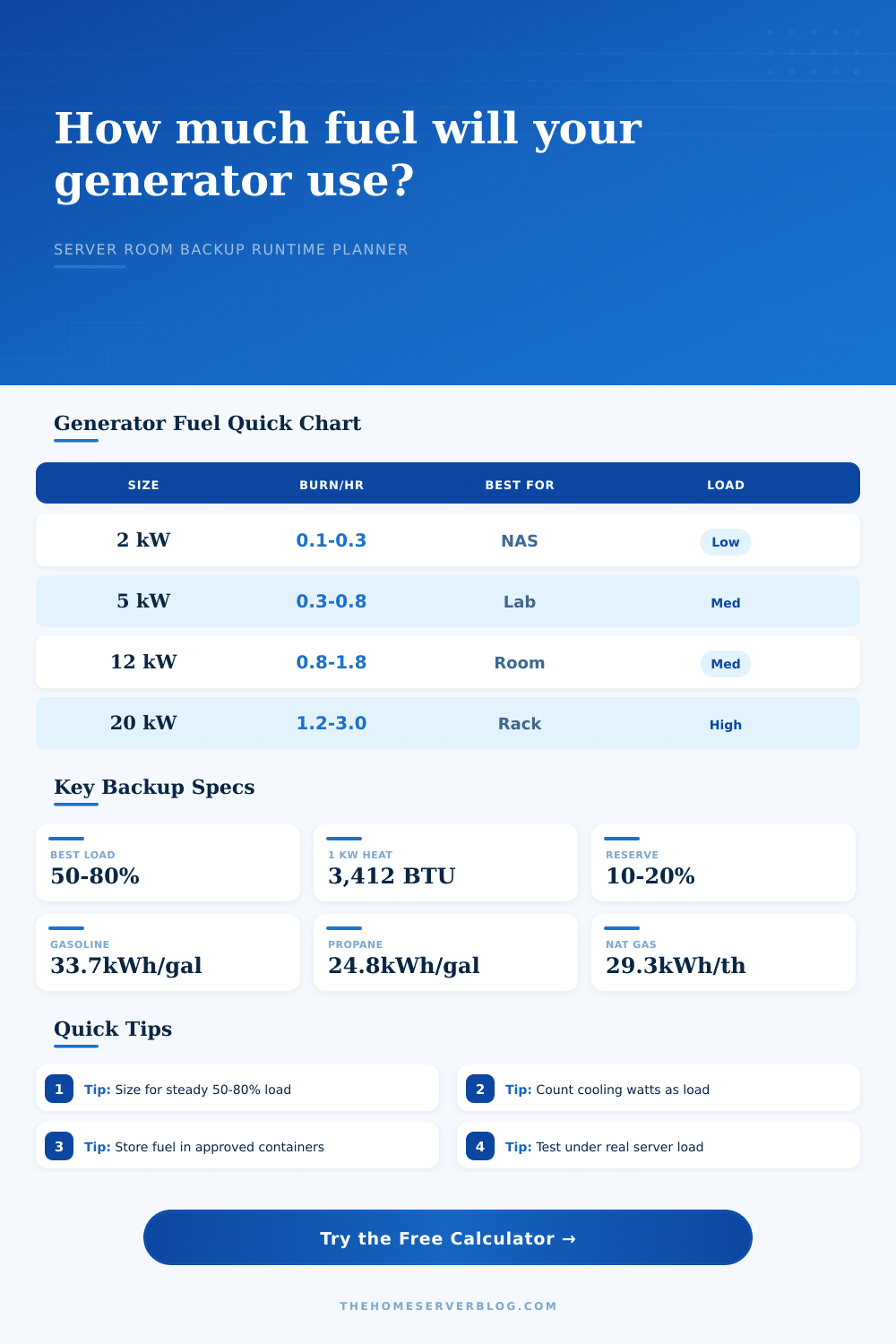
It’s a storage issue. Each fuel have advantages and disadvantages. Gasoline contains a lot of energy (about 33 kilowatt-hours per gallon), but it deteriorates rapidly. Propane is nice and clean but needs heavy, cumbersome tanks that may not even fit in your garage. Diesel is stable but weighs a ton. Propane has only about 24 kilowatt-hours per gallon; that’s why you must either carry a bigger tank or keep refilling your tank more often. The table on the left shows how metric and imperial units change when you switch fuels.
You’ll have to select a fuel based off how much time you want between fill-ups and where you store it. For example, if you want forty-eight hours of run-time you can’t use gas unless you stabilize it, which may reduce its shelf-life.
Another layer here is loading the generator properly. A ten-kilowatt set at only twenty percent are inefficient. Not only will it foul out the spark plugs in a gasoline engine, but it will create wet stacking in a diesel engine. You want to run the generator from fifty to eighty percent of its rated capacity. In this way, you have plenty of headroom for surges and compressor startups while not running the risk of starving the engine. The tool will show you how much you are using so you can go back and adjust your targeted generator size if it’s too high or too low.
It’s all about balance. Too little load and you’re wearing down the engine and wasting fuel. Too heavy and AC trips in because you blew the breaker. Allow for a margin of error. Expect 10-20% buffer for filter dirt, age and altitude. Test the setup under real load before the storm hits. Filters plug up, fuel gets old. Maintenance makes the math.
Stash the fuel and do the math right. You should of prepared when lights go out you’ll be sleeping well.