TCP Handshake Latency Calculator
Estimate connection startup delay across WAN paths, TLS modes, redirects, packet loss, and app request round trips before the first useful response arrives.
Handshake Latency Results
| Protocol Stack | TCP Flights | Secure Flights | Best Use In A Home Lab |
|---|---|---|---|
| Plain TCP HTTP/1.1 | 1 RTT | 0 RTT | Trusted internal reverse proxy checks only. |
| SSH admin session | 1 RTT | Protocol key exchange | NAS, hypervisor, and firewall management. |
| HTTPS TLS 1.3 full | 1 RTT | 1 RTT | Default for dashboards and remote services. |
| HTTPS TLS 1.2 full | 1 RTT | 2 RTT | Legacy appliances or older enterprise clients. |
| Mutual TLS 1.3 API | 1 RTT | 1.5 RTT | Cluster APIs, service mesh, and private control planes. |
| WAN Path | Typical RTT | TCP Open Cost | Planning Note |
|---|---|---|---|
| Same rack or same switch | 0.2-1 ms | About 1 ms | Server think time usually dominates. |
| Home LAN Wi-Fi to server | 2-8 ms | 2-8 ms | Watch retransmits on weak wireless links. |
| Regional ISP to cloud zone | 20-45 ms | 20-45 ms | Good target for remote dashboards. |
| US coast-to-coast | 65-85 ms | 65-85 ms | Each redirect becomes noticeable. |
| North America to Europe | 70-110 ms | 70-110 ms | TLS 1.2 hurts login-heavy pages. |
| GEO satellite backup | 550-700 ms | 550-700 ms | Prefer persistent tunnels and caches. |
| Application Pattern | Extra RTTs | Example | Latency Risk |
|---|---|---|---|
| Single request after connect | 1 | Simple health check | Low if keep-alive is enabled. |
| HTTP redirect to canonical host | 1 | HTTP to HTTPS or bare domain | Medium on WAN links. |
| SSO or OAuth challenge | 2-4 | Identity provider handoff | High for remote admin pages. |
| CORS preflight plus API call | 2 | Browser to API gateway | Medium for chatty dashboards. |
| WebSocket upgrade | 1 | Console, terminal, telemetry | Low after the socket stays open. |
| Planned Startup | User Feel | Timeout Floor | Home Lab Action |
|---|---|---|---|
| Under 100 ms | Instant | 500 ms | Keep the current design. |
| 100-300 ms | Responsive | 1 s | Trim redirects and DNS misses. |
| 300-800 ms | Noticeable | 2 s | Prefer session reuse and regional ingress. |
| 800-2000 ms | Slow | 5 s | Pool connections and reduce auth round trips. |
| Over 2000 ms | Painful | 10 s+ | Use persistent tunnels, CDN, or closer hosting. |
When your browsing feels sluggish, don’t assume it’s because of your capped bandwidth. Often it has nothing to do with that but rather hidden latency. Latency is time it takes from when you make a request until the server responds. That means from typing in a url, hitting enter, your machine do a bunch of handshakes (multi step) before it sends anything.
For wide area network links, this is where delay hides. The calculator will help estimate the startup delay on home lab WAN services. It accounts for DNS, TCP, TLS, authentication, packet loss, and server processing.
Why Your Internet Feels Slow: It Is Not About Speed
DNS is almost always first thing. That’s because if your resolver has to ask three other servers where the host lives, you are adding round trips before the connection even begins. You have to add round trips before you even get started.
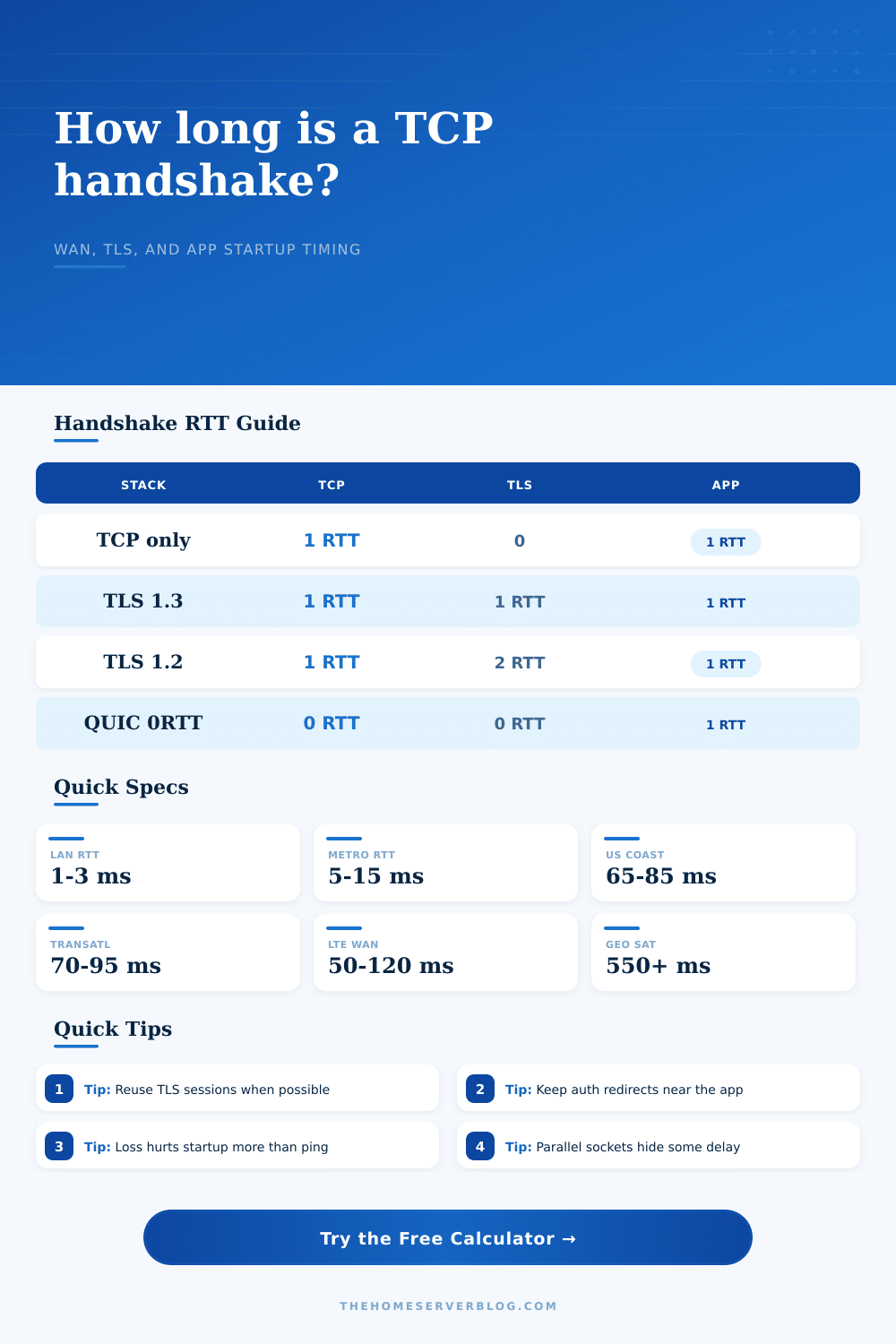
The next topic is TCP. This will always cost one round trip. Before you can start sending data over the internet, you need a path to do so. You send a SYN; they respond with a SYN-ACK; then you respond with an ACK. It is one flight of packets. Sounds quick? A round trip across the Atlantic take about eighty milliseconds. Multiply this by three (for TLS 1.2) and you’ve wasted a quarter of a second before the browser has any idea whether or not it is safe to load the page.
Which is where people err. “Oh, it’s slow because the bandwidth sucks!” No. It’s slow because of latency, pure and simple. Doubling your bandwidth, from fifty megabits to one gigabit (will do nothing for the handshake time). But switching to TLS 1.3 cuts that secure handshake down to just one round trip instead of two. On a US coast-to-coast connection, that can save up to forty milliseconds. To you, it feels instant even though it didn’t make any difference to the physics of the cable. Switching protocols can directly lead to saving wall-clock time, as demonstrated in the reference table on the page.
And it’s all made worse when packets go missing. Sending one lost SYN packet again can take hundreds of milliseconds. Yes, this happens even though you didn’t notice the packet was dropped. Your connection noticed. It waits idly, expecting a response that will never arrive, then it must try again. That’s what causes satellite links to feel slow, even with their high throughput. This happens because it takes more than half a second just to get light up to a geostationary orbit and back. Multiply that by the number of times your browser need to perform handshakes for TLS, TCP, DNS, etc., along with an authentication redirect. Suddenly, you are looking at a three-second loading screen.
To account for those layers, it lets you stack their costs. Plug in the server processing delay, how many parallel connections your app opens, and what its round trip time is (measure it!). Then, add a bit more to account for any jitter in the network. There’s no such thing as a perfectly smooth network. Then you’ll find out that most of the time it isn’t the server processing time that counts but the number of round trips. Even a speedy server on a slow connection is going to feel slow. A slow server on a local network would of felt instant. This also requires improving your connection. It is not so much about the speed, but about how you connect.
The largest gain is session reuse. By leaving the TLS and TCP sessions alive in your browser or app, subsequent requests won’t need to go through the handshake at all. Connection pooling, HTTP keep-alive, and long-lived WebSocket sessions does just that. It transforms a long string of expensive introductions into a running conversation. In your home lab, make sure your clients support connection reuse, and configure your reverse proxy to keep its upstream connections open.
So when you’re building a service where instant feels right for your remote user, count the round trips. A round trip is any redirect. Any uncached DNS lookup. Any TLS handshake. Light speed does not negotiate. The math does not forgive. If you want to move faster, then talk less until you get there. Get fewer flights in the air establishing trust, and spend less time waiting for the door to open. It gets better as the silence fades, less talking, more doing.