GENEVE Overhead Calculator
Estimate overlay bytes, inner MTU, TCP MSS clamp, option TLV impact, and per-workload encapsulation overhead for GENEVE fabrics.
Detailed Breakdown
| Underlay | Outer IP | Options | Overlay Overhead | Inner MTU |
|---|---|---|---|---|
| 1500 byte Ethernet | IPv4 | 0 B | 36 B | 1464 B |
| 1500 byte Ethernet | IPv4 | 16 B | 52 B | 1448 B |
| 1500 byte Ethernet | IPv6 | 0 B | 56 B | 1444 B |
| 1500 byte Ethernet | IPv6 | 32 B | 88 B | 1412 B |
| 9000 byte jumbo | IPv4 | 32 B | 68 B | 8932 B |
| Option Use | Typical Bytes | Alignment | MTU Impact | Where Seen |
|---|---|---|---|---|
| No metadata options | 0 B | Already aligned | Lowest overhead | Simple lab tunnels |
| Tenant or policy ID | 8 to 16 B | 4 byte words | Moderate | OVN, private cloud |
| Trace or diagnostics | 16 to 32 B | 4 byte words | Higher | Debug fabrics |
| Security metadata | 24 to 64 B | 4 byte words | High | NSX-style policy |
| Controller extensions | 32 B plus | 4 byte words | Plan margin | Custom controllers |
| Overlay | Transport | Base Overhead IPv4 | Metadata Model | Home Lab Note |
|---|---|---|---|---|
| VXLAN | UDP 4789 | 50 B with Ethernet | 24 bit VNI | Predictable and widely offloaded |
| NVGRE | GRE protocol | 42 B with Ethernet | GRE key | Older Hyper-V focused overlay |
| GENEVE | UDP 6081 | 50 B with Ethernet | Extensible TLVs | Best when metadata needs room |
| GENEVE plus TLVs | UDP 6081 | 66 B to 114 B | Variable options | Verify MTU per fabric policy |
| Scenario | MTU Target | Option Budget | Suggested Margin | Operational Check |
|---|---|---|---|---|
| OVN home lab | 1400 to 1450 | 8 to 16 B | 16 B | Check pod to VM paths |
| Kubernetes CNI | 1400 to 1440 | 16 B | 24 B | Validate node MTU and MSS |
| NSX overlay | 1600 plus preferred | 24 to 64 B | 32 B | Review edge transport MTU |
| Private cloud | 9000 if available | 16 to 32 B | 32 B | Probe every routed hop |
| WAN DCI overlay | Conservative 1300 | 8 to 24 B | 64 B | Expect hidden carrier tags |
Congratulations! You’ve set up a home lab with enough virtual machine that it feels like a proper private cloud, only now your file transfers is stalling and your video calls lag. And no, it’s not usually the server. It’s the overlay network you wrapped around it, and it carries an invisible weight. Older protocols offer little flexibility, and that’s why GENEVE has it, but header tax required for that flexibility eats up your payload as soon as it leaves host. Ignore this tax and your packets fragment, your throughput collapses, and for hours you chase ghost problems when they turn out to be simple arithmetic errors.
Now that you know what options and underlay MTU you need to support, plugging those numbers into the calculator above does all the work for you (you don’t have to guess if fabric can handle it).
Why You Need to Check Your MTU
First thing’s first: you need to respect the underlay MTU. This is the maximum packet size your routers and switches can take, without chopping it up. For most small office/home lab environments, that’s 1500 bytes. That’s the ceiling. Everything you add as an outer IP header, UDP wrapper or GENEVE metadata take away from amount of space available for real user data.
The beauty of GENEVE is also its weakness: it’s extensible. This means you can define your own optional Type-Length-Value (TLV) fields for various uses like telemetry, policy enforcement, or tenant ID. However, unlike VXLAN which has a fixed overhead, each TLV take up extra bytes. The tool will let you define your option space exactly. Leave it as zero to have the minimum overhead. However, you won’t gain any of the metadata benefits that make GENEVE useful for complex multi-tenant scenario. A couple of bytes for policies or VNI tags are probably needed for most deployments, and those bytes add up fast.
Looking inward at the results, the MTU should be thought of as largest size (packet) that can safely go through a hop originating from a container or VM. Because TCP operate in segments, the smaller the MTU the longer it takes to negotiate them which impacts TCP performance.
Equally critical is the TCP MSS clamp value. This is the number you configure on your gateway or edge router to prevent fragmentation. If you use a wrong setting, packets will drop without warning, leaving only timeout issues that are very hard to track down. Your config will match the physical wire that your traffic travels on. The tool calculate this clamp based off your selected TCP header and inner IP profiles.
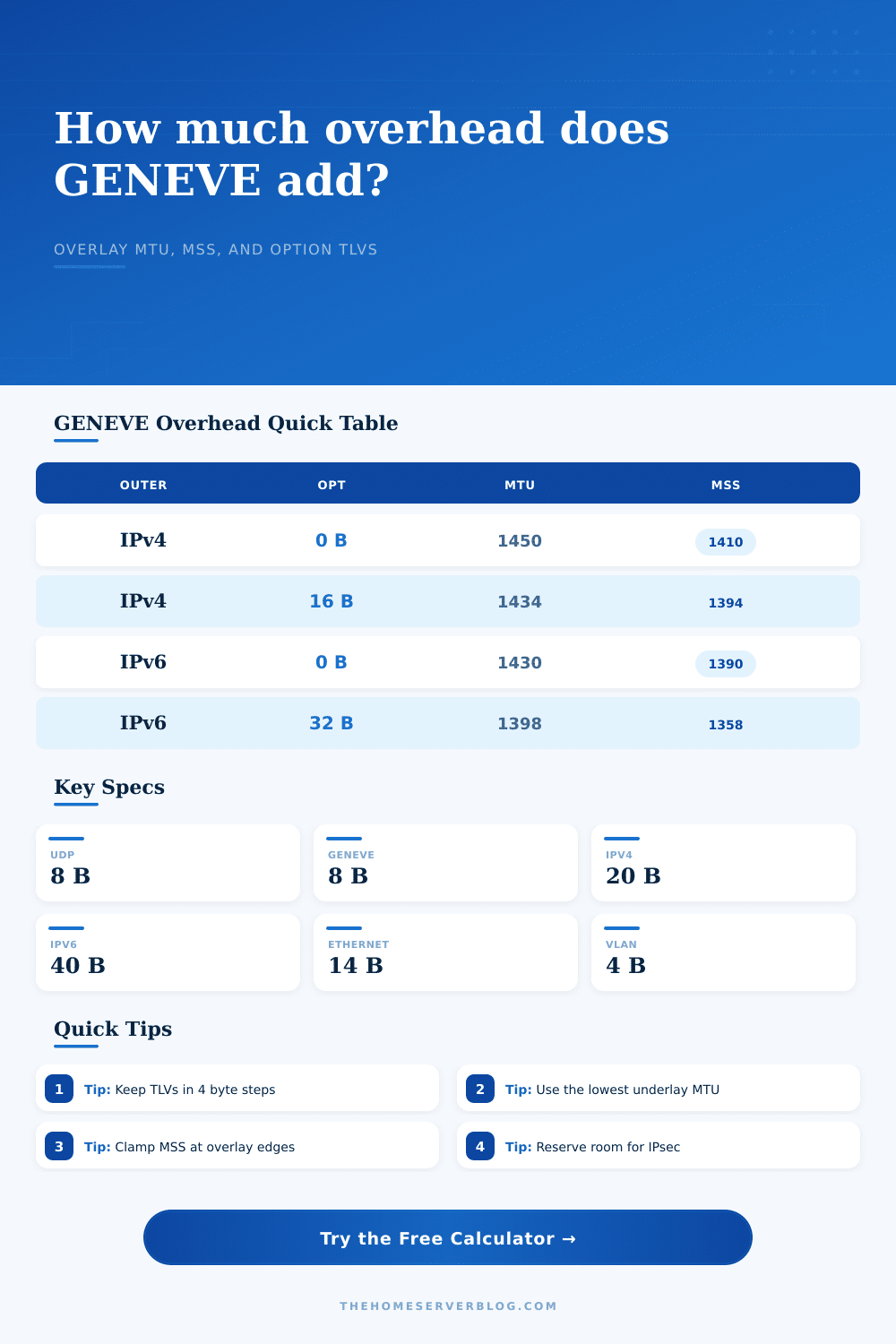
The rubber hits the road with Option TLVs. These won’t be relevant at first, but they start appearing when you start adding security policies and controllers. Reference tables on the page show how setting a 16-byte option set reduce your inner MTU from 1450 down to 1434 in an IPv4 environment. That doesn’t sound like much, but it does matter if you have a high throughput scenario. What the bandwidth column flags is another hidden cost, headers consume bandwidth. And if you’re pushing terabytes of traffic, the aggregate overhead of encapsulation can represent a meaningful portion of your total link use.
One thing people get wrong: Jumbo doesn’t fix everything by itself. It does if all of the hops along the way support it. You may have a 9000 MTU underlay and still keep a high inner MTU with lots of options. But if one of those switches is only 1500 or you’re limited to 1500 across the internet, then the jumbo frame no longer helps. That’s where this calculator becomes useful because you can turn on/off jumbo underlay, and quickly see what difference is to your payload space.
A safety margin is worth its weight. Things can change on the network. Someone else might add a VLAN tag downstream. Encryption (IPsec) may be required for security. A little buffer of maybe 24 bytes never hurts. It’s better to leave a few bytes unused than to discover you’ve hit a fragmentation wall once it’s deployed. That’s why the tool should of adds this margin to its calculation for the safe inner MTU. This is the actual realistic number to use instead of a theoretical max.
In the end, overlay networking is about balancing raw efficiency with feature richness. GENEVE provides the features. The rest is up to you: managing for efficiency. Knowing what kind of overhead you are introducing lets you stop guessing and start engineering. It prevents the silent failures that haunt a network not sized correctly. The packet gets there intact, the connection remains fast, and you retain your sanity. The right MTU is the foundation.