NVGRE Overhead Calculator
Estimate overlay MTU headroom, packet efficiency, and wire load for Hyper-V Network Virtualization and similar GRE-based lab fabrics.
| Component | Bytes | Where It Applies | Planning Note |
|---|---|---|---|
| Outer Ethernet header | 14 | Every Ethernet underlay frame | Usually excluded from IP MTU, but included for wire efficiency. |
| Outer IPv4 header | 20 | Provider address path for common NVGRE deployments | IPv6 provider networks use 40 bytes instead. |
| GRE / NVGRE header | 8 | GRE with key field carrying virtual subnet identifier | The typical added MTU tax is 42 bytes on IPv4 Ethernet. |
| 802.1Q provider tag | 4 | Tagged trunks between host NICs and top-of-rack switching | Add one tag for VLAN, two for QinQ service hand-off. |
| Ethernet FCS | 4 | Physical wire accounting | Useful for line-rate efficiency, not usually configured as MTU. |
| Preamble and inter-frame gap | 20 | Physical serialization overhead | Matters most for small packets and high packet-per-second tests. |
| Profile | MTU Overhead | Wire Overhead | Best Fit |
|---|---|---|---|
| NVGRE over IPv4 Ethernet | 42 bytes | 66 bytes with FCS and gap | Basic Hyper-V Network Virtualization lab path. |
| NVGRE over IPv4 with VLAN | 46 bytes | 70 bytes with physical wire allowance | Tagged host uplinks and top-of-rack trunks. |
| NVGRE over IPv4 with QinQ | 50 bytes | 74 bytes with physical wire allowance | Provider bridge or lab service hand-off tests. |
| NVGRE over IPv6 Ethernet | 62 bytes | 86 bytes with FCS and gap | Provider address fabrics using IPv6 underlay routing. |
| NVGRE plus ESP allowance | 88 bytes | 112 bytes before padding variance | Gateway path planning where security headers may appear. |
| VXLAN IPv4 comparison | 50 bytes | 74 bytes with physical wire allowance | Comparing NVGRE with UDP-based overlays in the same lab. |
| Underlay MTU | NVGRE IPv4 Safe Tenant MTU | IPv4 + VLAN Safe Tenant MTU | Practical Home Lab Use |
|---|---|---|---|
| 1500 | 1458 | 1454 | Works if VM MTU is reduced and every path honors the setting. |
| 1600 | 1558 | 1554 | Common minimum target for carrying 1500 byte tenant packets. |
| 2000 | 1958 | 1954 | Comfortable margin for tags and modest tunnel variations. |
| 9000 | 8958 | 8954 | Jumbo fabric with ample room for overlay and storage separation. |
| 9216 | 9174 | 9170 | Switch maximum often seen on compact lab and data center gear. |
| Scenario | Fabric Speed | MTU Target | Overlay Concern |
|---|---|---|---|
| Two-node Hyper-V test bench | 1GbE or 10GbE | 1458 to 1500 tenant MTU | Basic fragmentation checks and tenant reachability. |
| SCVMM tenant network lab | 10GbE | 1500 tenant on 1600+ underlay | Provider address routing and trunk consistency. |
| Azure Stack HCI style cluster | 25GbE | 1500 tenant on jumbo underlay | East-west traffic, storage, and live migration sharing hosts. |
| Gateway or remote access path | 10GbE or 25GbE | Reduced tenant MTU | Extra security, routing, and NAT headers on boundary paths. |
Ping your VM from another host and you often experience packet loss in your home lab. You’ve verified the IP addresses, checked the cables and even rebooted your switches, yet the packets just dissapears.
Typically the cause is an effective maximum transmission unit size reduced by encapsulation headers. Generic Routing Encapsulation Network Virtualization add overhead which you need to account for otherwise your packets will be fragmented (or dropped altogether). It is a small detail, but it matter. So what’s up?
Why Packets Get Lost in Your Home Lab
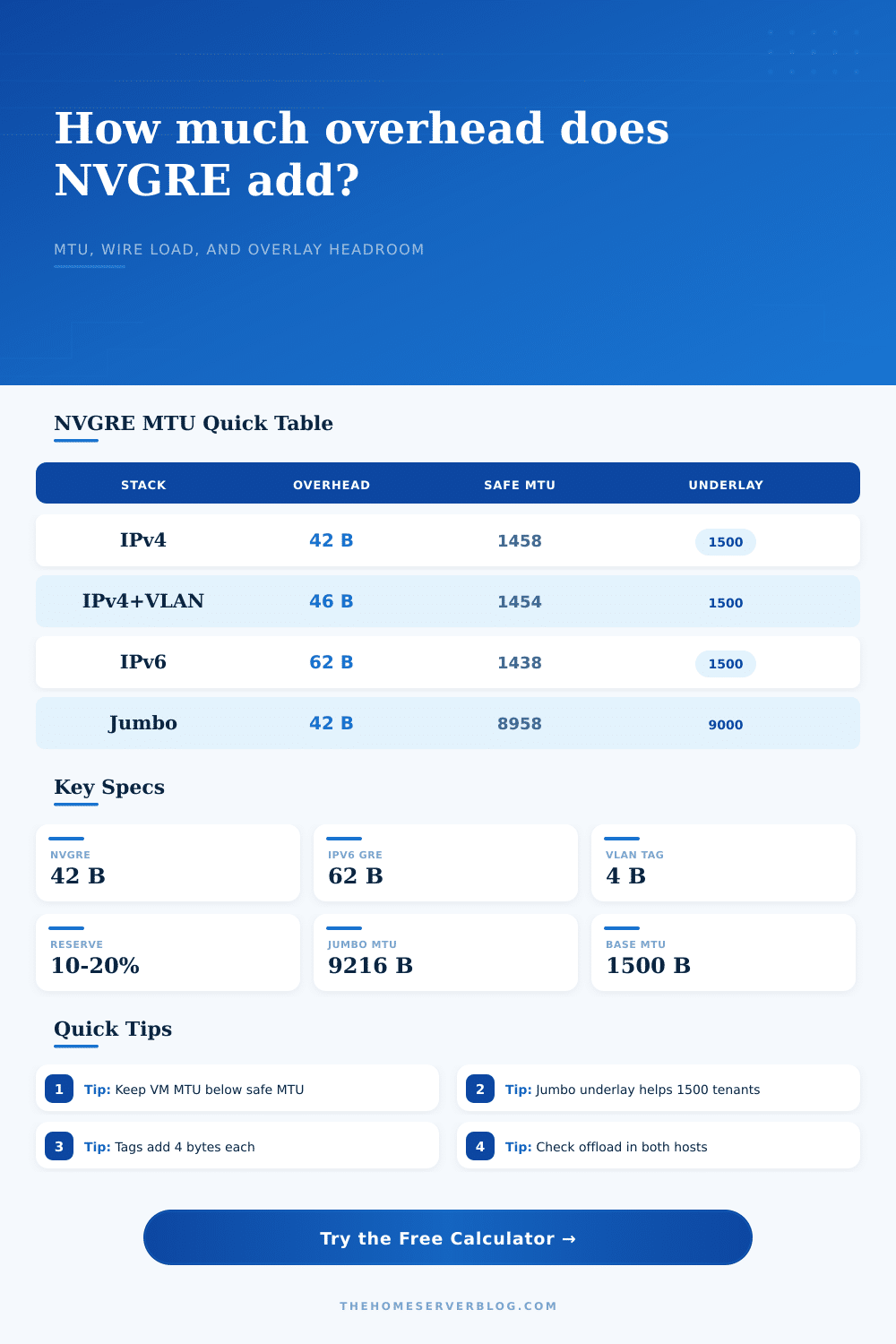
It comes down to how big data gets. In traditional Ethernet, the pipe is usually 1500 bytes. Now you want to send some packets with a bunch of stuff in front of them, specifically, you’re sending a packet for a tenant and you have provider headers to add. A GRE + outer IPv4 header (NVGRE) are 42 bytes of overhead on a simple IPv4 path. Your tenant VM is configured for 1500, but now you’ve got more than the underlay can carry.
The switch or router along the way look at this packet that’s too big and drops it because it has the don’t-fragment bit on. The calculator above will do math for you… Deduct the header costs against your underlay MTU, and tell you what you can safely use as your tenant network.
Typically, most lab builders begin by using 10GbE or 1GbE connections which adhere to the traditional 1500 byte maximum. This means you has to trim your tenant MTU down to 1458 bytes. Reducing the size of your VMs sounds odd, but this is how you maintain flow without issues.
You add another layer, like adding VLAN tags to isolate your management traffic from your tenant traffic. Lose four additional bytes. Your new safe MTU becomes 1454. And these aren’t some theoretical numbers. This is the difference between a fluid cluster more different than a stuttery mess.
It’s primarily about knowing what exactly you’re measuring before you ever modify any configuration files. At the other end of the spectrum, some fans leap to use jumbo frames (MTU of 9000 bytes) for underlay. Great, so long as absolutely everything in the chain agree to support it. All your devices (hosts, switches, cables, etc.) must support it, even intermediary gateways. You know what happens when one switch says “I’ll only do 1500”, your jumbo frames is going to be chopped up.
It’s easy to see from the reference table on the page: using an underlay of 9000 bytes lets you have loads of headroom, so tenants can continue to run standard 1500 MTU but still have plenty of room. However, you trade that convenience for the need to check that your entire physical infrastructure match.
Another hidden stressor is packet rate. As more packets arrives at the host, more interrupts occur on the CPU. The CPU also has to deal with more headers relative to the payload. This means smaller packets generates more interrupts. Encapsulation using NVGRE makes the packet a little bigger, so it’s more efficient. But it still incurs the cost of processing headers. So if you’re running workloads that push lots of traffic through the network, you may reach the limits of the CPU before reaching the limit of the network link.
That’s why knowing what your NICs has in terms of offload capabilities is important. It allows the CPU to be left alone to do the work of the virtual machine, while hardware acceleration handles the encapsulation work.
A margin of error. Whenever possible, plan for expansion. Save yourself a minimum of 10% of your MTU for the day something different comes along. For instance, you put a security tag on it. Or you use QoS marking which also means adding bytes. There’s nothing worse than having no wiggle room when it comes to config. This reserve will be accounted for by the tool and provide a cautious estimate, not a theoretical max. Better to have excess headroom then to troubleshoot fragmentation in the wee hours of the morning.
Finally, this means that visibility matters when it comes to networking in a lab. What you don’t see can’t be fixed. If you calculate your overhead explicitly then you stop guessing: now you know how much of your network is taken up by the tunnel and how much remains for your own data. Knowing that makes an otherwise frustrating black box something you could of manage. You will spend less time debugging and more time building. There are fewer missing packets.