PPPoE MTU Calculator
Calculate WAN MTU, TCP MSS clamp, tunnel payload, and Ethernet frame size for PPPoE links, VLAN trunks, VPN overlays, and home server routers.
Full MTU Breakdown
| Preset | Link MTU | WAN IP MTU | Typical MSS | Where It Fits |
|---|---|---|---|---|
| Standard PPPoE | 1500 | 1492 | 1452 IPv4 | Most DSL and fiber PPPoE services |
| PPPoE over VLAN | 1500 | 1492 | 1452 IPv4 | Fiber ONT handoffs using an ISP VLAN ID |
| RFC 4638 Baby Jumbo | 1508 | 1500 | 1460 IPv4 | Routers, switches, and ONT all accept 1508 payload |
| Q-in-Q Double Tag | 1500 | 1492 | 1452 IPv4 | Provider bridging or lab carrier VLAN simulation |
| Conservative ISP Path | 1500 | 1480 | 1440 IPv4 | When path MTU discovery is unreliable |
| WireGuard over PPPoE | 1500 | 1432 | 1392 IPv4 | Site-to-site tunnel inside a PPPoE WAN |
| IPsec NAT-T over PPPoE | 1500 | 1412 | 1372 IPv4 | Encrypted branch or remote access tunnel |
| OpenVPN UDP over PPPoE | 1500 | 1428 | 1388 IPv4 | User VPN or privacy tunnel at the edge |
| DS-Lite or IPv6 Tunnel | 1500 | 1452 | 1392 IPv6 | IPv6 transition tunnel over PPPoE |
| Firewall MSS Clamp | 1500 | 1492 | 1452 IPv4 | Keep MTU standard while preventing TCP black holes |
| Layer or Tunnel | Common Overhead | MTU Impact | MSS Rule | Practical Note |
|---|---|---|---|---|
| PPPoE Session | 8 bytes | 1500 becomes 1492 | MTU minus TCP/IP | Core reason PPPoE needs a smaller WAN MTU |
| 802.1Q VLAN Tag | 4 bytes on wire | No IP MTU change when supported | No MSS change by itself | Switch ports must accept the larger tagged frame |
| IPv4 TCP | 40 bytes | None beyond MTU | 1492 gives 1452 MSS | Most PPPoE clamp examples target IPv4 TCP |
| IPv6 TCP | 60 bytes | None beyond MTU | 1492 gives 1432 MSS | Use a lower clamp for mixed IPv6-heavy paths |
| WireGuard IPv4 UDP | 60 bytes typical | 1492 tunnel becomes 1432 | Tunnel MTU minus TCP/IP | Often stable at 1420 to 1432 on PPPoE |
| IPsec ESP NAT-T | 80 bytes typical | 1492 tunnel becomes 1412 | Tunnel MTU minus TCP/IP | Exact value varies with cipher and padding |
| Device Type | PPPoE Handling | Baby Jumbo Readiness | Best MTU Control | Home Lab Use Case |
|---|---|---|---|---|
| x86 OpenWrt or pfSense mini PC | CPU routing with strong headroom | Usually excellent with Intel NICs | Interface MTU plus MSS clamp | Gigabit and multi-gig PPPoE edge |
| MikroTik hEX S or RB5009 | FastPath or hardware assist varies by config | Good when bridge and ports allow it | PPP profile MRU and firewall mangle | Compact routed fiber handoff |
| Ubiquiti UniFi Gateway | Integrated gateway policy stack | Model and firmware dependent | WAN MTU and MSS clamping rule | Managed home network with VLANs |
| Consumer Wi-Fi Router | Often hardware NAT until advanced features | Often limited or hidden | WAN MTU field and automatic MSS | Simple PPPoE broadband service |
| ISP ONT Bridge | Passes PPPoE discovery and session frames | Must support 1508 for 1500 IP MTU | Provider handoff profile | Fiber service terminating on your router |
| Linux Server Router | Kernel PPP plus nftables or iptables | Excellent with capable NIC and switch | ip link MTU and TCPMSS target | Lab edge, Proxmox, or container router |
| Symptom | Likely MTU Cause | Calculator Field to Adjust | First Test | Stable Setting to Try |
|---|---|---|---|---|
| Some sites load, others stall | TCP black-hole from oversized packets | Safety headroom or MSS profile | Ping with do-not-fragment payload | 1492 MTU with 1452 MSS |
| VPN connects but transfers hang | Tunnel overhead not subtracted | Overlay or tunnel inside PPPoE | Lower tunnel MTU by 20 bytes | WireGuard 1420 or IPsec 1412 |
| 1500 MTU works only sometimes | Baby jumbo path incomplete | Ethernet payload MTU | Check router, switch, and ONT frame support | Fall back to 1492 WAN MTU |
| IPv6 has more issues than IPv4 | IPv6 header makes MSS too high | Traffic profile for MSS clamp | Try IPv6 TCP MSS below 1432 | Mixed profile or IPv6 MSS clamp |
| Router CPU spikes at line rate | Small frames raise packet rate | WAN speed and planning buffer | Watch CPU while running throughput test | Add buffer or reduce overlay overhead |
Your home lab rack is built out. Your fiber ONT is connected and working. The switch is up and running. The router is configured. The cable is plugged in. You entered credentials for your PPPoE account. The link is engaged. The connection is established. Speed test runs at full bandwidth.
But some websites don’t work. Streaming services won’t stop buffering. Maybe even video calls disconnects. No, you’re not being hacked and yes, your DNS are working as intended. What’s happening? You’ve run into Maximum Transmission Unit limits.
Why Your Internet is Slow Even Though It Works
Don’t believe me? This is a very common problem and why so many people think their ISP sucks. ISPs aren’t the issue here. It’s math: header math.
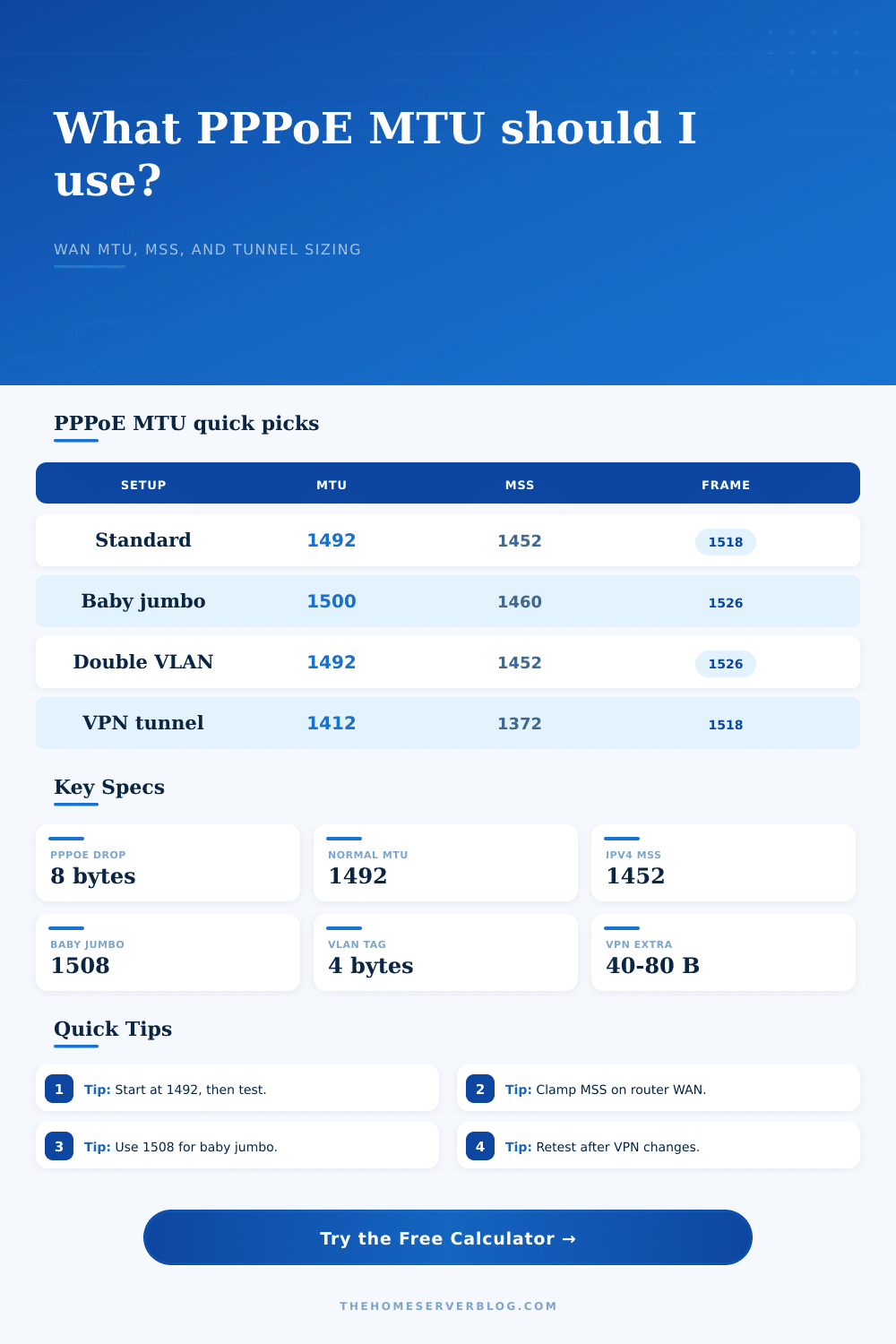
A standard Ethernet frame carries 1500 bytes of payload. That’s the default. Then PPPoE encapsulates each packet with an additional eight bytes of overhead. It use two bytes for the protocol ID and six more bytes for the session header. Your effective MTU drop down to 1492. And if your router is still trying to pack 1500-byte chunks, it’ll try to cram them into undersized frames. You end up with dropped or fragmented packets. Connection stalls follow.
The page’s calculator do that math for you. It accounts for all layers of overhead and eliminates any guesswork.
This gets trickier once you bring VLANs into the equation. Some ISPs (many fiber ISPs) require you to tag their traffic with some set vlan id. That adds an additional four bytes to the frame on the wire. It doesn’t actualy shrink the IP MTU, but it expands the actual frame size. Those tagged packets might get dropped by switches/ONTs that don’t support slightly bigger frames, called baby jumbo frames. Check if your whole chain of equipment from the wall jack to your router NIC supports 1508-byte frames. If not, then you’ll have to drop the MTU to make up for it.
There’s also complication of tunnels. You may be running a VPN like IPsec or WireGuard over that PPPoE connection. That means you’re putting packets within packets. And each layer has a header. Eighty-plus bytes is not uncommon with IPsec NAT traversal. Your usable tunnel MTU could drop from a standard 1492 down to something like 1412. Because your TCP Maximum Segment Size hasn’t been lowered, the inner packets will be larger then the capacity of the tunnel. They’ll break into fragments, causing latency spikes for TCP connections and harming the performance of UDP-based ones.
The page’s reference table describes these losses in typical configurations. It clearly explains how much space encapsulation and encryption take away.
So, the thing to remember about all of this: What are you measuring? MTU is the largest packet size allowed for passage without fragmentation. And, MSS refers to the payload size that TCP permit within that packet. So, you want to clamp the MSS so as to fit everything (including the TCP and IP header) within the MTU. It’s a tiny tweak, but it counts. Get it wrong, and when your router starts trying to send packets back and forth, it will negotiate smaller packet sizes over and over. This wastes time, causes delays, and puts more load on CPU.
Plug in the numbers, but don’t do it blindly. Consider where you’re going. Is it a standard DSL line? Use 1492. Do you have fiber with VLAN tagging? Your equipment may support baby jumbo frames. Are you running a VPN? Subtract another forty or eighty bytes. That’s why we built the calculator: so you can determine where you get enough speed without losing too much reliability.
So many ping tests, so little time. Avoid the frustration of a mismatch in expectations. When a smooth connection is made, it’s like magic; it dissapears. There are no stalled downloads, no buffered streams, no dropped calls. It just works. You’re not battling with overhead and headers anymore. You should of got it right the first time and now you can get back to doing whatever it is you do with your life. Math? Just the cost of entry.