IPsec Transport Mode Overhead Calculator
Estimate ESP transport bytes, safe payload MTU, packet efficiency, and bandwidth consumed by VPN encapsulation on home lab and site-to-site links.
⚙Real IPsec Transport Presets
🔒Transport Mode Inputs
🖧Equipment And Network Spec Comparison
📊Reference Tables
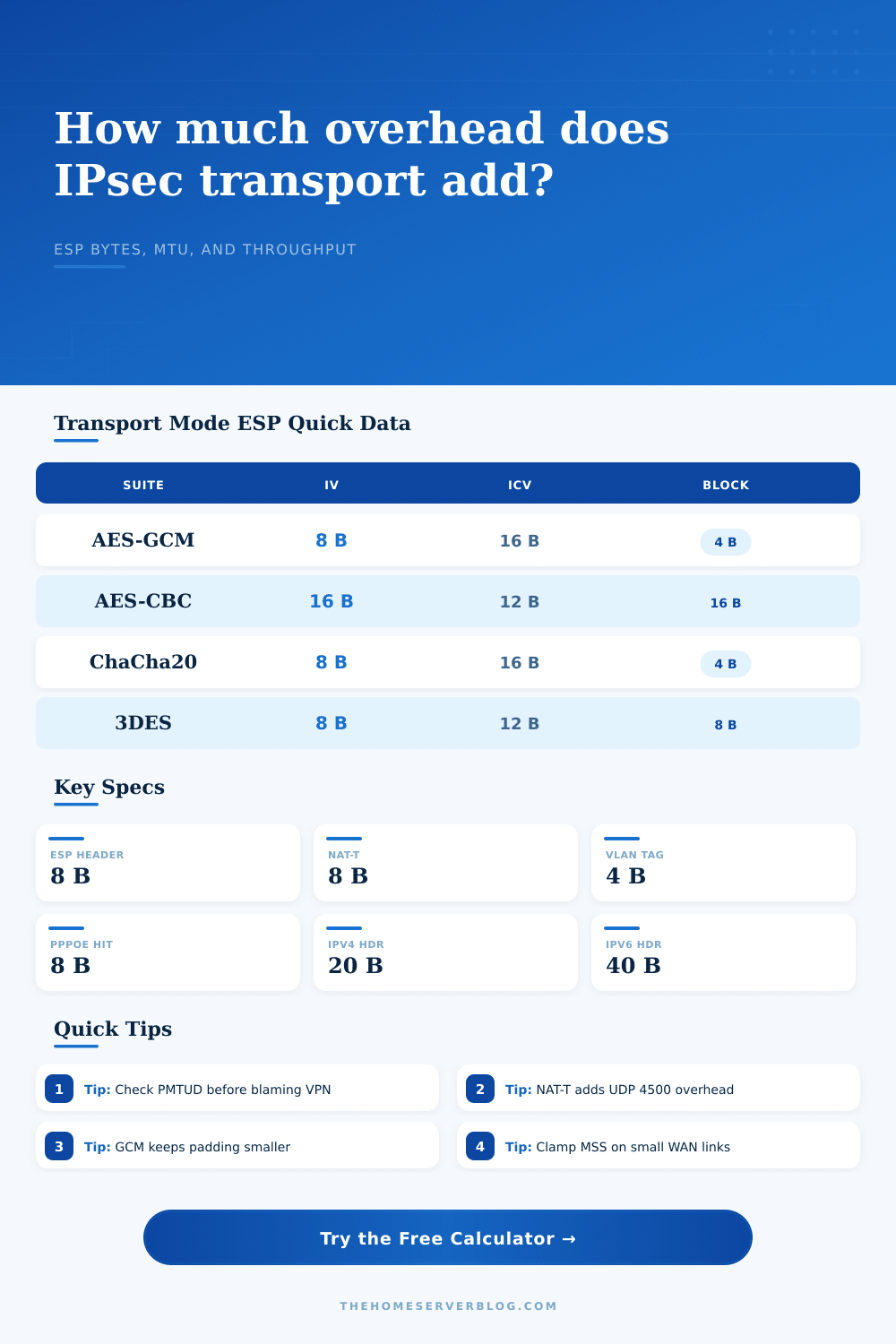
| ESP Suite | Explicit IV | ICV Or Tag | Alignment | Typical Transport Use |
|---|---|---|---|---|
| AES-GCM-128/256 | 8 bytes | 16 bytes | 4 bytes | Modern router and firewall tunnels |
| AES-GCM with 96-bit tag | 8 bytes | 12 bytes | 4 bytes | Lower tag size policies where supported |
| AES-CBC + HMAC-SHA1-96 | 16 bytes | 12 bytes | 16 bytes | Older Cisco, pfSense, and appliance profiles |
| ChaCha20-Poly1305 | 8 bytes | 16 bytes | 4 bytes | Software routers without AES acceleration |
| 3DES-CBC + HMAC-SHA1-96 | 8 bytes | 12 bytes | 8 bytes | Legacy interop only |
| Access Or Tag | Planning Hit | Where It Appears | Calculator Treatment |
|---|---|---|---|
| Native ESP | 0 bytes | Protocol 50 across routed path | No UDP encapsulation added |
| NAT-T UDP/4500 | 8 bytes | Home NAT, CGNAT, branch routers | Added to per-packet overhead |
| 802.1Q VLAN | 4 bytes | Tagged switch trunks and hypervisor uplinks | Subtracted from practical headroom |
| PPPoE | 8 bytes | Many fiber and DSL WAN handoffs | Subtracted before safe MTU search |
| Q-in-Q or PPPoE + VLAN | 12 bytes | Provider access and tagged WAN designs | Modeled as access overhead |
| Common Scenario | Starting MTU | Suite | NAT-T | Typical Action |
|---|---|---|---|---|
| Home lab site-to-site | 1500 | AES-GCM | Often off | Verify PMTUD and leave 10% buffer |
| Remote user behind NAT | 1500 | AES-GCM | Usually on | Clamp MSS near calculated TCP value |
| PPPoE fiber WAN | 1492 | AES-GCM | Often on | Account for both PPPoE and UDP/4500 |
| Voice over VPN | 1500 | AES-GCM | Maybe on | Watch overhead percent on small RTP packets |
| Jumbo NAS replication | 9000 | GCM or ChaCha20 | Usually off | Confirm every switch and NIC supports jumbo |
| Planning Metric | IPv4 Rule Of Thumb | IPv6 Rule Of Thumb | Why It Matters |
|---|---|---|---|
| Original IP header | 20 bytes without options | 40 bytes base header | Transport ESP protects the payload after this header |
| TCP MSS estimate | Safe payload minus 20 | Safe payload minus 20 | MSS is TCP payload after the TCP header |
| Fragment risk | High when headroom is negative | High when headroom is negative | Encrypted fragments can damage throughput and latency |
| Packet efficiency | Payload divided by secure size | Payload divided by secure size | Small packets pay the overhead more often |
💡Calculation Notes
You spend hours tweaking firewall rules and picking a good encryption suite. And then you try to shove a big file across the link and… nothing happens. Weak security isn’t often the problem. Rather, it’s the sum of all the overhead that take away from your available bandwidth.
In theory, IPsec transport mode is good because it preserves the original IP header, making it efficient. But, in practice, if you don’t remember that each byte of encapsulation steal one from your payload, it becomes inefficient. After you select a suite and type in your path MTU, the calculator do the work for you. No need to guess which combination of VLAN tagging, NAT traversal and IPv4/IPv6 will squeeze into a normal-sized frame.
Why Your Network is Slow
Most folks think encryption comes for free; it doesn’t. An encrypted packet has an eight-byte ESP header. It also has an explicit initialization vector that add even more bytes. If you’re using AES-GCM, it also adds a sixteen-byte tag. Oh, and if you’re using AES-GCM, you have an eight-byte IV plus a sixteen-byte tag. This is before any padding. If you move to AES-CBC, then you’re dealing with blocks whose size mean your padding will vary widely based on the size of your payload. One suite’s a moving target, one is not.
What about NAT traversal? Many home routers block protocol fifty but keep it turned on to make things easy to use. And what’s the price of that convenince? Every packet is wrapped in an extra eight byte UDP header when sent through NAT-T. Eight bytes isn’t much on a high-speed link streaming giant files. But it can be a substantial part of the overall transfer on a link pushing lots of small packets (e.g., DNS queries, VoIP). You can turn this option off/on to view how this affects your traffic pattern.
That’s where most configs go wrong: the MTU of your path. Most people have a standard ethernet connection that has an MTU of 1500 bytes. But maybe you’re using a WAN link, like PPPoE, which deducts another eight bytes from your packet. Or perhaps your ISP tags your packets in a VLAN, which takes away four more. So now your ceiling starts out smaller. And if you don’t reduce your payload accordingly it won’t fit and get dropped or fragmented. Fragmented packets are really terrible for IPsec; its encryption process doesn’t deal with broken packet very well. More often than not, this results in a total connection drop instead of slow performance.
You also get to select a safety buffer here in case PMTUD doesn’t work. This is a percentage margin that you can apply to adjust for PMTUD failures. When using path MTU discovery, your router will send out an oversized packet and then wait for a message from the other side informing it of the packet size that won’t fit. By default, many firewalls are configured to block this type of ICMP message. In this scenario, your router never gets notified, so it continues trying to send oversized packets until the other end simply drops them in silence. For most home lab configurations, 10% buffer seems like a good compromise. Even with aggressive filtering of the discovery protocol, your packets should still fit.
The reference table spells out the tradeoff between the moddern and legacy suites. The legacy suites (e.g., 3DES) have a lot of overhead and do a bunch of computation. By contrast, the modern AEAD suites (AES-GCM, ChaCha20-Poly1305) is leaner. They perform both authentication and encryption in a single pass. This makes the packet size smaller and lowers the computing burden on your router’s CPU. That makes all the difference for someone with a Raspberry Pi VPN server; the difference is stark between a slow connection and a silky-smooth connection.
At low packet rates, this number might seem trivial. Or you may think it’s small because it’s an overhead bandwidth figure, which means part of your pipe is taken up by something other than content itself. For example, if you’re pushing gigabits per second, then even a two percent overhead waste is a meaningful chunk of throughput. That’s why understanding these numbers will help you know when to adjust your encryption profile or to clamp the TCP MSS. This makes an odd performance drop become a solvable engineering problem.
You can control the variables. Now you just have to measure them correctly. In the end, it’s all about not exceeding the physical bounds of the wire itself. Your data will be protected in transit by the encryption, but that doesn’t mean anything if the framing blows up so much it won’t arrive. Identify the sweet spot where efficiency and security meet. That is the middle ground that ensures your network runs smoothly.