ESP Padding Size Calculator
Calculate IPsec ESP padding, encrypted payload size, tunnel MTU, TCP MSS, NAT-T overhead, and final wire frame size for home lab VPN links.
Packet math stays in bytes; this only changes line-rate length display.
Use for GRE inside ESP, extension headers, or unusual encapsulation.
Optional TFC-style bytes added before ESP alignment padding.
Formula breakdown
| ESP transform | Alignment | Explicit IV or nonce | Integrity check value |
|---|---|---|---|
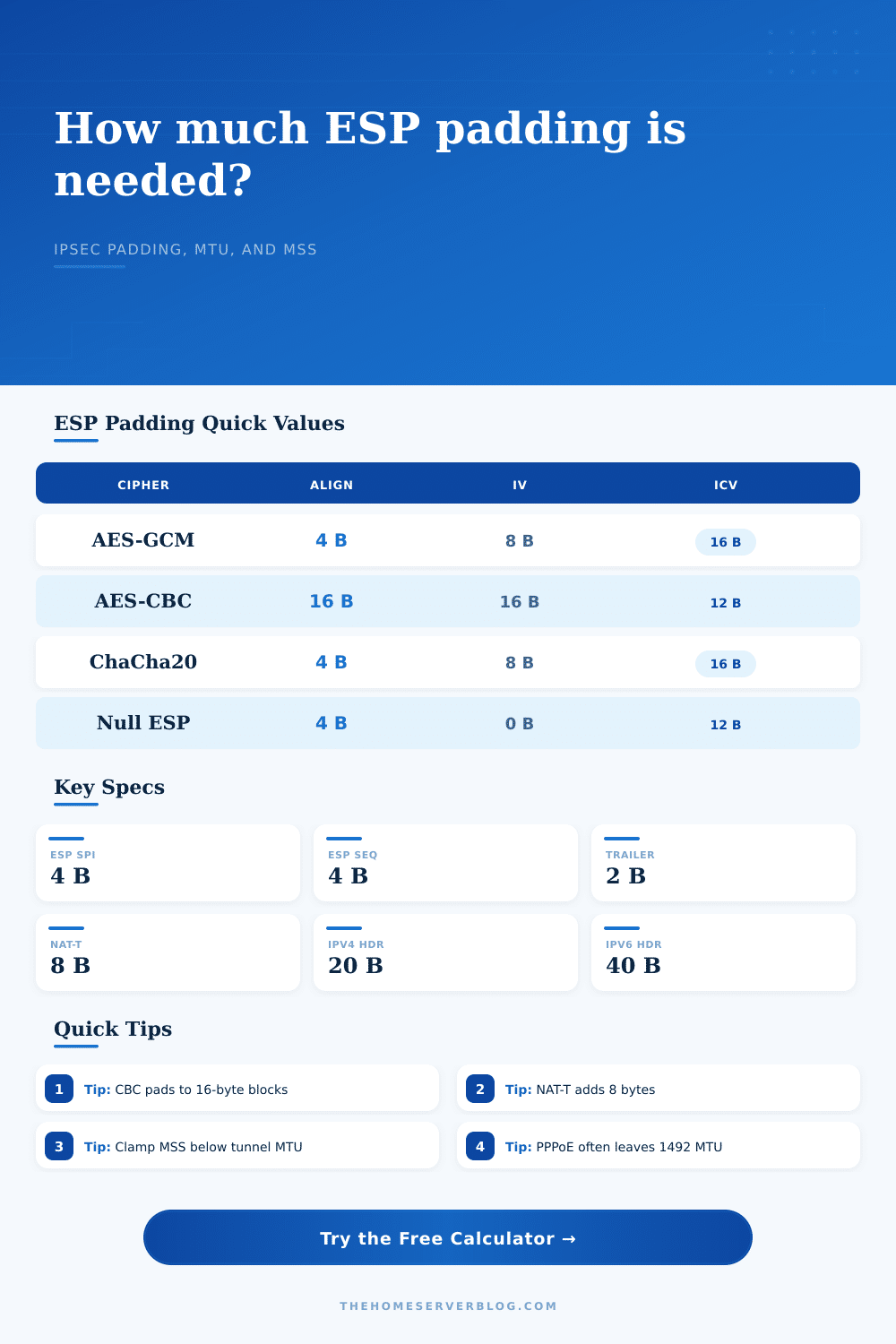
| AES-GCM-128 or AES-GCM-256 | 4 bytes | 8 bytes | 16 byte tag |
| AES-CBC with HMAC-SHA1-96 | 16 bytes | 16 bytes | 12 byte truncated ICV |
| AES-CBC with HMAC-SHA256-128 | 16 bytes | 16 bytes | 16 byte truncated ICV |
| ChaCha20-Poly1305 | 4 bytes | 8 bytes | 16 byte tag |
| Null ESP with HMAC-SHA1-96 | 4 bytes | 0 bytes | 12 byte truncated ICV |
| Configuration | Typical added headers | Padding behavior | Practical check |
|---|---|---|---|
| Tunnel mode, IPv4 outer | 20 byte outer IP plus ESP | Protects full inner IP packet | Clamp MSS below calculated inner MTU |
| Transport mode, IPv4 | Outer IP remains original IP header | Protects L4 payload section | Useful for host-to-host or L2TP/IPsec |
| NAT-T over UDP 4500 | 8 byte UDP header before ESP | Same ESP padding formula | Expect lower MSS than direct ESP |
| IPv6 outer tunnel | 40 byte outer IP header | Same transform alignment | Watch minimum 1280 byte IPv6 paths |
| Access link | Base MTU | Common ESP result | Notes |
|---|---|---|---|
| Standard Ethernet | 1500 bytes | About 1400 to 1438 MSS | Depends on cipher, NAT-T, and padding boundary |
| PPPoE fiber or DSL | 1492 bytes | About 1392 to 1430 MSS | Subtract PPPoE before IPsec overhead |
| IPv6 minimum path | 1280 bytes | About 1180 to 1218 MSS | Avoid assuming 1500 on remote access links |
| Jumbo lab backbone | 9000 bytes | Large inner packets possible | Every hop must support the frame size |
| Project size | Example payload | What to verify | Good safety margin |
|---|---|---|---|
| Home office VPN | TCP web and SSH | MSS clamp applies to both peers | 5% to 10% |
| Proxmox cluster admin | TCP console and API | No fragmentation on management VLAN | 10% |
| NAS replication tunnel | Large TCP streams | Jumbo or MSS value matches storage path | 10% to 15% |
| Mobile IPsec client | Mixed UDP and TCP | NAT-T and IPv6 path constraints | 15% to 20% |
A perfect IPsec tunnel configuration was builded. Throughput goes down. Don’t blame encryption. It’s never the bottleneck. Blame packet size.
A data packet gets padded and has headers added until it is too big to fit on network. It either gets dropped or fragment. A typical user think a standard 1500-byte Ethernet frame means they can send 1500 bytes of payload. They can’t. Overhead adds up.
Why Your IPsec Tunnel Is Slow
So here’s how it works: Plug in your access link and tunnel mode constraints. Plug in your cipher. The calculator does the rest, it saves you from making guesses about conversions and coefficients. You want to know why it gives you that TCP MSS value.
So what’s IPsec adding? It doesn’t just add your data. It also adds an outer header, an integrity check, an IV, a sequence number, and an SPI, then it pads it out. That padding isn’t wasted space. That’s part of the requirements of the cipher block.
If you use AES-CBC then your payload need to be 16 byte aligned. That means your payload may require as much as 15 additional bytes of space to fit. If you’re using AES-GCM it’s a bit more flexable. It usually only requires 4 byte alignment. That makes a difference in the effective capacity of your tunnel.
This presents a choice between these ciphers. You are trading off wire efficiency vs. Security properties. On a constrained link such as PPPoE, where your base MTU is already limited down to 1492 bytes, every byte of overhead count. The calculator takes that into account.
You can turn on the PPPoE reduction option to reduce by another 8 bytes. Also NAT-T adds an additional 8 bytes, by wrapping the ESP packet in a UDP header. Another 8 bytes doesn’t seem like much. But it will exceed the MTU limit, and then create fragmentation which kills performance on IPsec. Each fragment has to be decrypted and processed separately.
As you can see in the reference table, various transforms affect the frame size differentally. Header overhead will affect your tunnel more if you’re using IPv6 instead of IPv4. These are IPv4 tunnels. The IPv4 header is only 20 bytes whereas the IPv6 header is 40 byte.
If you have a site-to-site tunnel, that additional weight come right out of your MSS. It doesn’t seem like much but it affects the ratio of overhead to payload which adds up during high volume replication tasks.
But many folks don’t follow the tool’s TCP MSS recommendation. Instead they go with the default setting. Then when they try to download a webpage, their session stalls. Or they open an SSH session but it stutter along.
What does that mean? It means that the MSS (maximum segment size), which is how much data TCP will send per segment, are set too high. Because of the IPsec overhead on top, that makes the overall IP packet too big. It gets dropped on the path.
The tool does some math to determine this: Path MTU minus all those headers outside the ESP (ICV, IV, SPI, padding); then outputs a safe MSS value. Add a little planning buffer onto this value. For links with variable latency (or mobile clients) a 10 percent buffer are wise.
IPsec is about honoring the physical constraints of the wire. Think of it like this: You’re wrapping a present and you need the box to go through the door. There’s only so big the box can be. Either shrink the gift or break the box if you can’t fit it. That’s what the box size tells you based off the calculator.
How do you know how much gift to put in? How fast do you want to go? What trade-off of security vs. Throughput are you willing to make? You should of used that to figure out the right compromise.
Don’t forget to count the padding; it’s part of your limit. Know what the numbers mean, then once they line up, the tunnel will behave as expected. You’ll see the speed you expect without it dissapears strangely. It is a little thing, but it is important.