IPsec Tunnel MTU Calculator
Calculate ESP tunnel overhead, safe inner MTU, TCP MSS clamp, and payload efficiency for route-based or policy-based VPN links.
IPsec MTU result
| Transform suite | ESP IV or nonce | ICV or tag | Padding alignment | Typical tunnel overhead on IPv4 |
|---|---|---|---|---|
| AES-GCM-128 or AES-GCM-256 | 8 bytes explicit IV | 16 bytes | 4 byte alignment | 54 to 57 bytes before NAT-T |
| AES-CBC with HMAC-SHA1-96 | 16 bytes IV | 12 bytes | 16 byte block | 58 to 73 bytes before NAT-T |
| AES-CBC with HMAC-SHA256-128 | 16 bytes IV | 16 bytes | 16 byte block | 62 to 77 bytes before NAT-T |
| ChaCha20-Poly1305 | 8 bytes nonce | 16 bytes | 4 byte alignment | 54 to 57 bytes before NAT-T |
| 3DES-CBC with HMAC-SHA1-96 | 8 bytes IV | 12 bytes | 8 byte block | 50 to 57 bytes before NAT-T |
| Access type | Usual IP MTU | Why it changes | IPsec planning note |
|---|---|---|---|
| Standard Ethernet WAN | 1500 bytes | No customer PPPoE overhead | AES-GCM tunnel MTU often lands near 1426 bytes. |
| PPPoE broadband | 1492 bytes | 8 byte PPPoE and PPP header | Clamp MSS lower or enable MSS adjust on the firewall. |
| Cellular or CGNAT | 1420 to 1460 bytes | Carrier tunnels and middleboxes | Measure PMTU because advertised values vary by carrier. |
| MPLS or Metro-E | 1500 or baby giant | Labels may need extra frame room | Ask whether label overhead is outside the customer MTU. |
| Jumbo lab backbone | 9000 bytes | Switch and NIC jumbo support | Verify every hop, including virtual switches and firewalls. |
| Inner traffic | IP header | TCP base header | Common formula | When to reduce further |
|---|---|---|---|---|
| IPv4 TCP | 20 bytes | 20 bytes | MSS = tunnel MTU - 40 | TCP timestamps, tunnels inside tunnels, broken PMTUD. |
| IPv6 TCP | 40 bytes | 20 bytes | MSS = tunnel MTU - 60 | Extension headers or low cellular path MTU. |
| GRE inside IPsec | 20 or 40 bytes | 20 bytes | Subtract GRE before MSS | Route-based GRE designs over broadband. |
| Storage replication | 20 or 40 bytes | 20 bytes | Use exact MTU, then test | Large sequential streams reveal black-hole MTU faster. |
| Platform or design | Common IPsec mode | MSS control | MTU planning behavior | Best use in home lab |
|---|---|---|---|---|
| pfSense or OPNsense | Route-based VTI or policy | Interface MSS clamp | Strong for PPPoE and NAT-T edge cases | Firewall-to-firewall site tunnel |
| Linux strongSwan | XFRM or VTI | iptables or nft TCPMSS | Flexible, but you must set MTU routes cleanly | Lab routers, containers, and cloud nodes |
| MikroTik RouterOS | Policy or IPsec profile | Mangle change-mss | Often needs explicit clamp on PPPoE links | Low-power home gateway |
| Cisco IOS or ASA | Crypto map or VTI | ip tcp adjust-mss | Predictable if transform and NAT-T are known | Branch router practice lab |
| Ubiquiti EdgeOS or UniFi | Site-to-site IPsec | Firewall modify rules | Check offload and PMTUD behavior per model | Home office VPN to cloud or family site |
| Cloud VPN gateway | IKEv2 tunnel | Route or VM clamp | Provider MTU may be lower than Ethernet | AWS, Azure, GCP, or VPS lab tunnel |
| GRE over IPsec | GRE payload protected by ESP | Clamp on GRE interface | Subtract GRE before ESP and MSS | Dynamic routing across IPsec |
| ESP with NAT-T | UDP 4500 encapsulated ESP | Clamp at both peers | Add 8 bytes for UDP on every data packet | Broadband behind ISP router or CGNAT |
| Scenario | Outer path | Transform | Typical safe MTU | Typical MSS clamp |
|---|---|---|---|---|
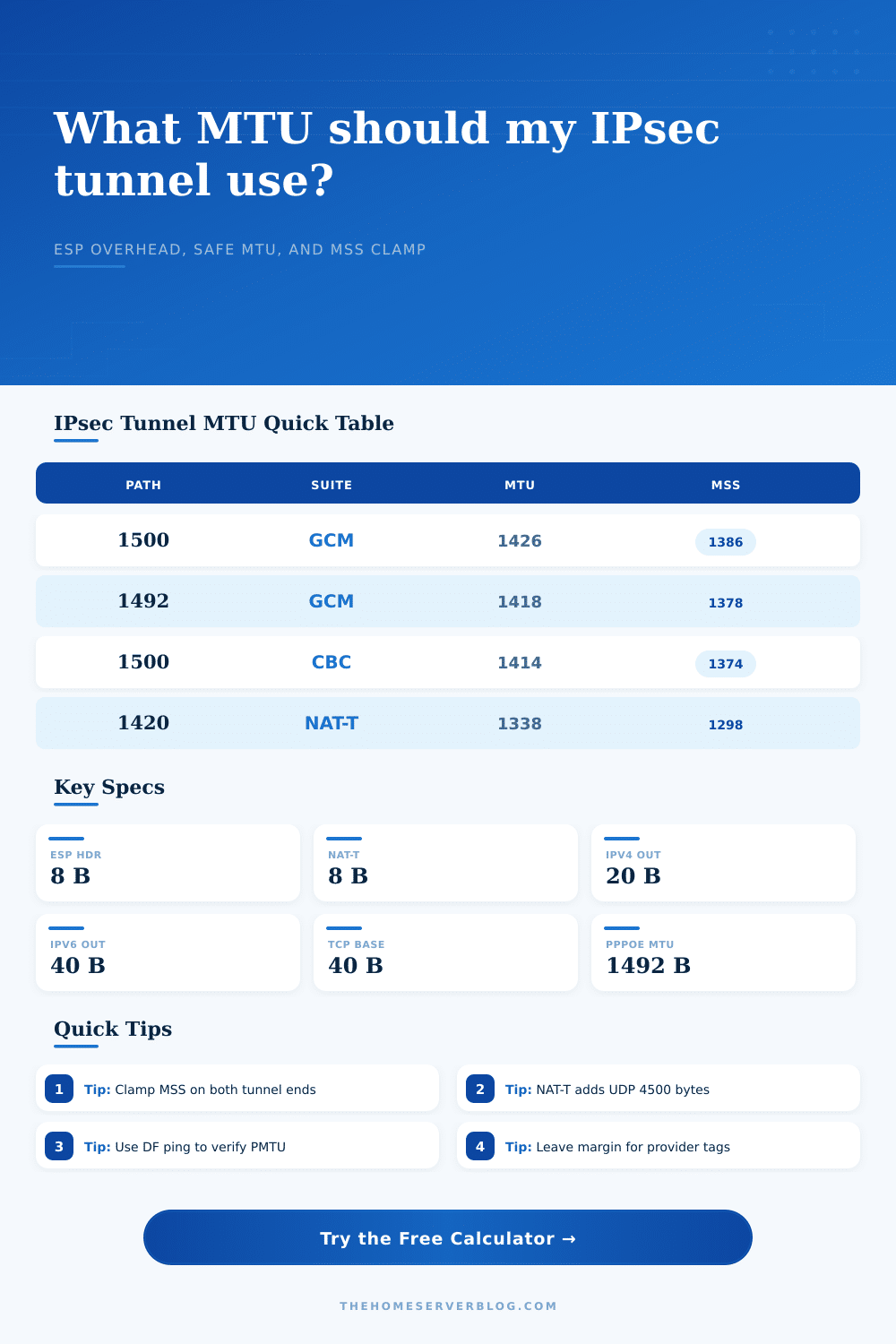
| Small home lab over fiber | 1500 IPv4 | AES-GCM | 1426 bytes | 1386 bytes |
| PPPoE FTTH firewall pair | 1492 IPv4 | AES-GCM NAT-T | 1418 bytes | 1378 bytes |
| IPv6 underlay branch | 1500 IPv6 | AES-GCM | 1406 bytes | 1366 bytes |
| LTE failover tunnel | 1420 IPv4 | AES-GCM NAT-T | 1338 bytes | 1298 bytes |
| Jumbo lab backbone | 9000 IPv4 | AES-CBC | 8918 bytes | 8878 bytes |
Sometimes you try to load a website only for it to fail halfway through. Your connection reaches some kind of invisible wall; ping works, SSH connects just fine, but big downloads gets stuck. It’s rarely because of bandwidth. In nearly all cases, it’s MTU.
There is mismatch between the size of packets your firewall believes it can send and how much the encrypted tunnel will actualy transport. The invisible baggage: IPsec encrypts your data using ESP header. It also adds padding, an IV, authentication tag and more. NAT traversal? Add yet another UDP header to the mix. This overhead consume some of the space available for your payloads.
Why Your VPN Gets Stuck and How to Fix It
A tunnel MTU that’s too large results in the outer packet being larger than the underlying internet connection’s path MTU. The end result is either fragmentation (no good) or a silent drop if DF is enabled on the packet.
Plug in your path constraints and transform suite and the above calculator does math for you. It spares you from the usual trial and error that affects most new VPN setups.
Common sense says “start with 1500” (the typical Ethernet MTU). Okay, sure, in the world of pure IP, fine. But throw IPsec into the mix and all bets are off. For example: if you use the super-efficient cipher AES-GCM, then there’s a mandatory authentication tag plus an explicit IV. That’s another 54 or so bytes of overhead, before you factor in the outer IPv4 header.
And then, if your home router do NAT, you need to tack on another 8 bytes for the UDP 4500 encapsulation. Tiny! But it’s what separates a big packet being sent into the black hole from a big packet getting through intact. To clarify this, here’s a chart from the page that lays it out for typical use cases.
Here we have a PPPoE link whose baseline MTU is 1492, so every byte matters. You’re tempted to set the tunnel MTU to 1500 and let path MTU discovery take care of it. That should of worked in theory. In reality, it often fails.
Many middleboxes will drop ICMP fragmentation-needed messages along the way. If your hosts never recieve these signals, they’ll continue to send giant frames which is then silently dropped. The connection appears to have packet loss. What it actualy has is a sizing problem.
Enter the TCP MSS clamp (your best friend). MSS = Maximum Segment Size. So the MSS will tell the other side how large a segment you can receive over TCP. When clamped on the tunnel interface, the MSS forces the endpoints to agree on a smaller size from the very beginning during their initial hand shake. No more oversized packets even enter the tunnel. It is a proactive fix, not a reactive fix.
The calculator gives you a safe clamp value which takes into account your chosen path MTU, transform, and the inner TCP/IP header. Generally speaking you want to set this on both ends of the tunnel. This is especially important if you’re using the link for site-to-site traffic, with traffic flowing in both directions.
Beyond security strength, the choice of transform suite also has an impact on overhead. For example, older suites such as AES-CBC with HMAC-SHA1 needs to perform a separate integrity check. That involves additional bytes in the trailer. More moddern AEAD suites (e.g., AES-GCM or ChaCha20-Poly1305) does both encryption and authentication. As such they maintain tighter overhead. That can matter if you’re on a low-bandwidth link, such as LTE or a congested broadband connection. Each byte of overhead is one less byte of actual data.
Consider what kind of traffic you’re shoveling around as well. Email and web surfing will be mostly untroubled by an occasional MTU hiccup since the segment sizes are small by nature. VoIP, database replication and large file transfer isnt resilient. They scream “MTU problem!” at the first opportunity.
And if you’re doing storage traffic, maybe you want jumbo frames. This means you must check that each hop can handle the bigger packet. This includes cloud gateways and virtual switches.
How do you configure your IPsec tunnel? At its heart, selecting a strong cipher isnt merely about cipher strength. You need to know the underlying protocol and physical layer below it. Ping your route with the “Don’t Fragment” bit set to measure your path MTU. Use this tool to determine your safe limits. Clamp your MSS accordingly. Once you size things properly, that invisible wall goes away. Your data flows freely, as if it weren’t encrypted at all.