Data Migration Time Calculator
Estimate seed copy, delta catch-up, validation, retries, parallel streams, and cutover fit for NAS, VM, cloud, and rack migration projects.
Migration estimate
| Migration type | Typical efficiency | Validation pattern | Home lab note |
|---|---|---|---|
| File copy / NAS rsync | 72-88% | Checksum or sample | Many small files reduce throughput |
| VM image transfer | 78-92% | Image hash plus boot test | Large files fill links well |
| Database logical dump | 55-75% | Row counts and checksums | Export speed may cap transfer |
| Block replication | 82-94% | Block compare or snapshot | Good for VM and SAN moves |
| Object storage / cloud sync | 45-70% | ETag or object inventory | WAN latency changes stream needs |
| Backup restore workflow | 50-80% | Restore verification | Target write speed often dominates |
| Link or path | Line rate | Realistic payload | 8 TB seed copy |
|---|---|---|---|
| 1GbE LAN | 1 Gbps | 0.75-0.90 Gbps | 20-24 hours |
| 2.5GbE LAN | 2.5 Gbps | 1.8-2.2 Gbps | 8-10 hours |
| 10GbE LAN | 10 Gbps | 6.5-9.0 Gbps | 2-3 hours |
| Home WAN upload | 40 Mbps | 25-35 Mbps | 22-30 days |
| Fast WAN / VPN | 500 Mbps | 250-400 Mbps | 45-72 hours |
| Data profile | Compression | Delta rate | Retry pad |
|---|---|---|---|
| Media library | 0-5% | 0.2-2% per day | 3-8% |
| VM datastore | 10-35% | 2-10% per day | 5-15% |
| Documents and code | 25-60% | 1-8% per day | 5-10% |
| Database dump | 35-75% | 5-25% per day | 10-25% |
| Backup repository | 0-20% | 1-6% per day | 8-20% |
| Project size | Data range | Suggested streams | Planning focus |
|---|---|---|---|
| Small home NAS | 1-6 TB | 2-4 | Simple validation and permissions |
| Lab VM cluster | 4-20 TB | 4-8 | Snapshots and boot checks |
| Media archive | 10-80 TB | 3-6 | Long seed copy and low delta |
| Cloud migration | 2-50 TB | 8-24 | WAN throttles and retries |
| Database cutover | 100 GB-8 TB | 2-8 | Final delta and app freeze |
Saturday morning, you set out with good intentions to move terabytes of data. On Tuesday, your patience thins and your coffee goes cold as you anxiously wait for progress bar. That’s what happens when you try to use a home server. And it’s not typically because off the hardware. Changes that builds up during the copy, scattered file metadata, and protocol overhead are the hidden costs.
Migrating without doing the math is like driving across the country without checking gas gauge. Sure, you’ll get there, but it will be a stressful drive and would of ruin your weekend. That’s what the tool we’ve embedded here breaks out into something that can be calculated and dealt with.
How to Calculate Data Transfer Time Accurately
In particular, it splits off the first part (the initial seed copy) from second part (cutover to final), which is where most project fail. They think once those files is on the new drive, they’re done. Then they overlook running a checksum pass over several terabytes of data, which will take just as long or even more longer than copying them. So if you don’t factor in verification step, you may end up finding some chunks has gone missing once you point your DNS records at the new server, leading to an unnecessarily long Tuesday afternoon.
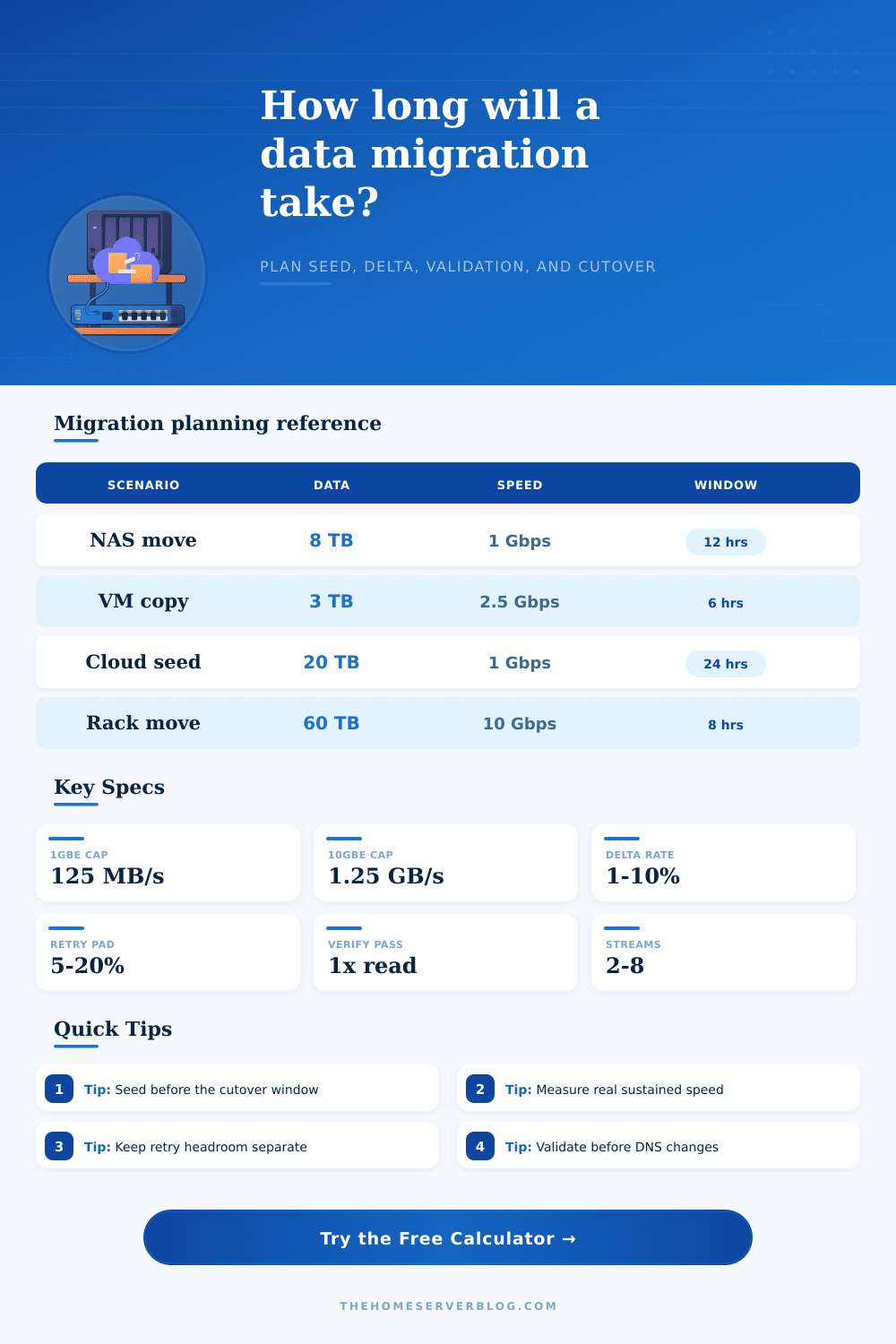
The key to sanity is to enter reasonable speeds as input. The page includes some reference tables which show an important point: there’s a difference between payload throughput and line rate. While 10 gigs might sound snappy, don’t expect to ever experience its full theoretical potential due to protocol chatter, disk write limits and TCP overhead. Plugging in the raw port speed for an estimate will make your timeline too optimistic. Running a test copy and measuring sustained throughput will give you a number based off reality… I.e., what happens when thousands of little files hits the wire. That’s the measured speed the calculator plugs in to predict how long it’ll take to get to the seed phase in actual time.
And then there’s the change. Once you start copying virtual machines or your media library, data doesn’t stay that way. Emails keep coming in, pictures are uploaded, logs grows. That change rate increases the tail end of your migration window. On eight terabytes at one percent per day, that sounds like little, it’s only eighty gigabytes more data to sync while you’re frozen out. But the tool takes that drift into account when calculating the final cutover time. It will tell you whether your scheduled maintenance window is long enough to catch up with the change or if you must lengthen your downtime.
For example, do you know that compression matters? A lot? If you’re transferring code repos or other text heavy databases, yes! Structured data tend to compress well, while binary files like media don’t tend to compress so well. Enabling compression on an already compressed video file is a waste of CPU cycles… And turning off compression when your transfer protocol can absorbs it means a longer timeline than required. The calculator’s preset profiles can help with this as they applies reasonable defaults depending on what kind of data you are transferring.
Another quiet assassin: retry overhead. There will be network blips. There will be a momentary disk stall, a dropped packet, and retries which pad the overall time by a significant amount. Have some error percentage padding (e.g., a nice modest percent to handle errors), so that minor glitches don’t cause the plan to collapse into unrealistic estimates based on ideal conditions.
Don’t forget parallel streams. They do a better job of saturating the link if you have lots of little file. Too few streams waste bandwidth, too many incur management overhead which negates their benefit.
What this means is that we’re no longer interested in moving things; we’re interested in moving them confidently. Because, if you can look at the total elapsed time estimate and have it fit inside your window, then you don’t need to guess anymore. You begin copying on Saturday, know precisely when you’ll be validated, and have confidence you can cut over when you are. This turns what was once a disaster into a simple task. And it keeps your coffee warmer because you naturaly are done by lunchtime.