HomeServerBlog IPv6 prefix planner
IPv6 Subnet Split Calculator
Split an ISP, tunnel, or lab IPv6 delegation into /64 LANs, VLAN blocks, VPN pools, routed lab segments, and reserved growth space using exact IPv6 prefix math.
Full split breakdown
| Slot | Child prefix | Suggested use | Planning note |
|---|---|---|---|
| 1 | 2001:db8:1200::/64 | Core LAN | First subnet is calculated after pressing the button. |
OPNsense / pfSense
DHCPv6-PD Router advertisementsStrong fit for /56 and /60 home delegations, prefix tracking, VLAN interfaces, firewall rules, and ULA plus GUA dual addressing.
UniFi Gateway
/64 VLANs Controller managedGood for standard LAN, guest, IoT, and camera VLANs when the ISP provides enough delegated prefixes for each network.
MikroTik RouterOS
Route Scale Advanced policyFlexible for routed lab blocks, static prefix assignment, BGP experiments, DHCPv6 client prefixes, and multi-site tunnels.
OpenWrt Edge
odhcpd Small routerWorks well for compact home networks, delegated-prefix hinting, RA modes, and lightweight VLAN splits on supported hardware.
| Delegation | /64 LANs | Typical source | Planning use |
|---|---|---|---|
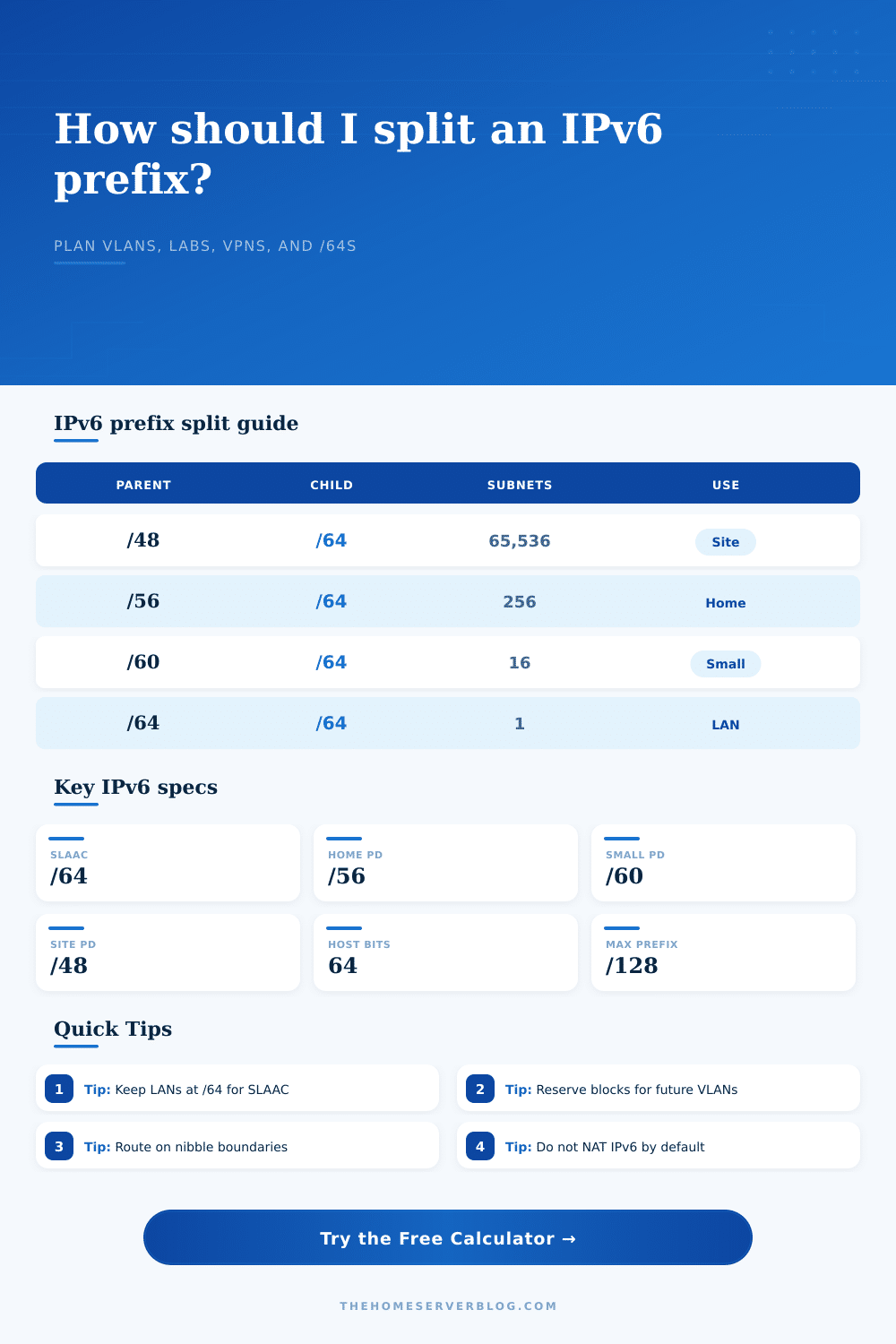
/48 | 65,536 | Site, tunnel, business, lab ISP | Assign /56 or /60 blocks per building, rack, lab zone, or remote site. |
/52 | 4,096 | Generous residential or lab allocation | Enough for separate summary blocks by trust zone, environment, or site. |
/56 | 256 | Common residential DHCPv6-PD | Ideal home target: many /64 VLANs while keeping clear hex boundaries. |
/60 | 16 | Smaller residential DHCPv6-PD | Enough for core LAN, guest, IoT, cameras, lab, VPN, and reserves. |
/62 | 4 | Constrained ISP delegation | Usable but tight; reserve carefully and avoid one-off test networks. |
/64 | 1 | Single LAN or tunnel link | No normal LAN splitting left if SLAAC compatibility must be preserved. |
| Item | Value | Why it matters | Home lab note |
|---|---|---|---|
| SLAAC subnet size | /64 | IPv6 stateless autoconfiguration expects a 64-bit interface identifier. | Keep user LANs, Wi-Fi, and IoT VLANs at /64 unless you know every host stack. |
| Nibble boundary | 4 bits | IPv6 hex digits map cleanly to 4-bit prefix changes. | /48, /52, /56, /60, and /64 are easier to route and document. |
| Host route | /128 | Single IPv6 address route, similar to a host route in IPv4. | Use for loopbacks, service VIPs, and firewall object definitions. |
| Point-to-point | /127 | RFC 6164 supports /127 on router links. | Useful for router-to-router lab links, but not for normal LAN clients. |
| Link-local | fe80::/10 | Required for neighbor discovery and next-hop routing. | Do not remove link-local addressing from interfaces or routed links. |
| ULA private block | fc00::/7 | Unique local addresses can provide stable internal addressing. | Pair ULA with global prefixes when ISP delegated prefixes change often. |
| Project | Recommended child | Typical count | Secondary result |
|---|---|---|---|
| Core LAN, guest, IoT, cameras | /64 each | 4 to 6 VLANs | Works from a /61 or larger, with /60 preferred. |
| Proxmox or hypervisor lab | /64 per bridge | 3 to 8 networks | Separate management, storage, VM, DMZ, and backup paths. |
| WireGuard remote access | /64 pool | 1 to 2 prefixes | Route a dedicated prefix instead of borrowing from a LAN segment. |
| Kubernetes dual-stack lab | /64 to /56 | 2 to 20 networks | Separate node, service, pod, ingress, and storage fabrics. |
| Multi-site routed homelab | /56 per site | 2 to 8 sites | Works cleanly when the upstream allocation is /48 or /52. |
| Router-to-router transit | /127 | 1 per link | Use only for routed point links, not client LANs. |
This calculator focuses on prefix planning and does not recommend NAT66 by default. Most IPv6 home lab designs should route global prefixes with firewall policy instead.
The hard part of splitting up IPv6 prefixes is realizing that each prefix is an address space, and you need to understand its shape to split it apart. That geometry define firewall zones. It determines whether work laptops can coexist with IoT devices. It defines how router advertisement operate. It creates a layered routing structure.
And squeezing those addresses into tiny subnets is an IPv4 instinct. If you do that in IPv6, you’ll break your network. It might happen even before you complete the first VLAN.
How to Plan Your IPv6 Network
When you define your constraints, the tool does the math. It prevents human error in converting between binary.
How many subnet do you get? Most residential ISPs provide a /56 or /60 prefix. A /56 provides two hundred and fifty-six /64 subnets. A /60 provides sixteen. Sixteen vs two-hundred and fifty-six. That’s huge when you’re trying to plan.
If you go with a /60, then you don’t leave yourself any wiggle room to experiment. You have to immediately assign the core LAN. You have to immediately assign guest Wi-Fi. You have to immediately assign cameras, IoT devices, and a management segment. You can’t waste half the block on nothing. You have to carefully reserve space.
With a /48 from a business plan, you get six thousand subnets. You has enough to give each device its own /64. You would not do that, but the capacity changes how you think about security zones. But it changes how you think about security zones because you have the capacity.
The child length is usually 64, and there is a good reason for this. The IPv6 spec requires a 64-bit interface identifier for link-layer addresses. A fixed interface ID size are an absolute requirement for stateless address auto-configuration. Carving a /64 into smaller chunks breaks SLAAC. It also breaks privacy extensions. Many recent operating systems rejects such configurations. They see a non-64-length prefix. They recognize a problem and act to match it.
The calculator will show you how many 64-bit pieces fits within the parent block. It removes any desire to save space. It substitutes in the need for structural integrity.
There’s also a place to choose reservation strategies. Hexadecimal. That’s why it aligns nibbles in IP v4 and IPv6 addresses. Each nibble (hex digit) maps 4 bits of address space. Subnetting on those bounds make the address space easier to read. It’s easier to say `::1000::/64` than one that starts with `::0FFF::/64`. And it helps you route sumarize it too. If you want to summarize routes in your firewall, aligned prefixes do so cleanly. Routes that don’t align makes for longer routing tables. They lead to more complicated firewall rules.
You can see the initial set of subnets in the preview. You get a visual sense of how the hex digits change. It gives you visual feedback when picking an easy-to-manage scheme.
People often forget about growth. Today your home lab is just a simple LAN. Tomorrow it’s a Kubernetes cluster. It has a separate node, pod and service networks. Next, you toss in a WireGuard remote access network. After that, you put a DMZ on your public services. Every one of these require their own /64.
There’s a place to define a buffer percentage. A /56 isn’t expensive when added at 10%. It costs you zero except some unused prefixes. When you run out, you have to renumber the whole thing. Renumbering sucks. Updating static leases. You have to change DNS records. Fixing firewall rules. Planning for growth is cheaper than having a tight network and fixing it later.
The equipment profile matters less than the prefix length, but it does influence the advice. It still affects the recommendation. Certain routers can manage complex DHCPv6-PD setups better. Large routing tables is better suited for other firewalls. Understanding your hardware constraints allows you to determine granularity. If your router can only handle twenty VLANs, don’t plan for fifty. Don’t get a router that supports only twenty. Your hardware + your prefix size = the tool. The tool tells you exactly what’s feasible. It prevents you from designing a network that looks good on paper but crashes your router in real life.
First, look at the big picture. What parts is critical? Which ones come next? The core LAN, management, and guest isolation are non-negotiable. Next, labs and tests. Fill these out from there.
There is reserved space for everything else. Don’t touch this now. Keep it there. Use it when you have a new project to add. Value the reserved prefixes then.
IPv6 has an unforgiving structure. It’s a sixty-four bit world. Honor that sixty-four bit boundary. Align on those nibbles. Make room to breathe. You’ll thank yourself later for the clarity.