HomeServerBlog IPv6 transition planner
NAT64 Address Calculator
Synthesize NAT64 IPv6 addresses from IPv4 destinations, validate RFC 6052 prefix layouts, and estimate DNS64 TTL, translator state, bandwidth, and MTU headroom for home lab deployments.
Full NAT64 breakdown
Linux Jool
1 GbpsKernel-space NAT64/SIIT lab gateway with about 100k practical states on modest x86 hardware.
TAYGA VM
250 MbpsUser-space NAT64 that is simple for small labs, VPN pools, and test networks.
OPNsense/pf
600 MbpsFirewall-hosted translation profile with useful logging, rules, and monitoring hooks.
MikroTik CHR
500 MbpsRouter appliance style deployment where NAT64 shares resources with routing and firewalling.
VyOS Router
800 MbpsGood fit for a routed home lab edge with policy routing and FRR-based route control.
Hardware Edge
5 GbpsRouter or firewall appliance profile for large routed NSPs and many concurrent sessions.
DNS64 Only
0 statesResolver synthesis only; it still needs a reachable NAT64 translator elsewhere.
Cloud NAT64
VariesManaged or upstream translation where local planning focuses on DNS scope and routes.
| Prefix length | IPv4 bit placement | Example layout | Home lab note |
|---|---|---|---|
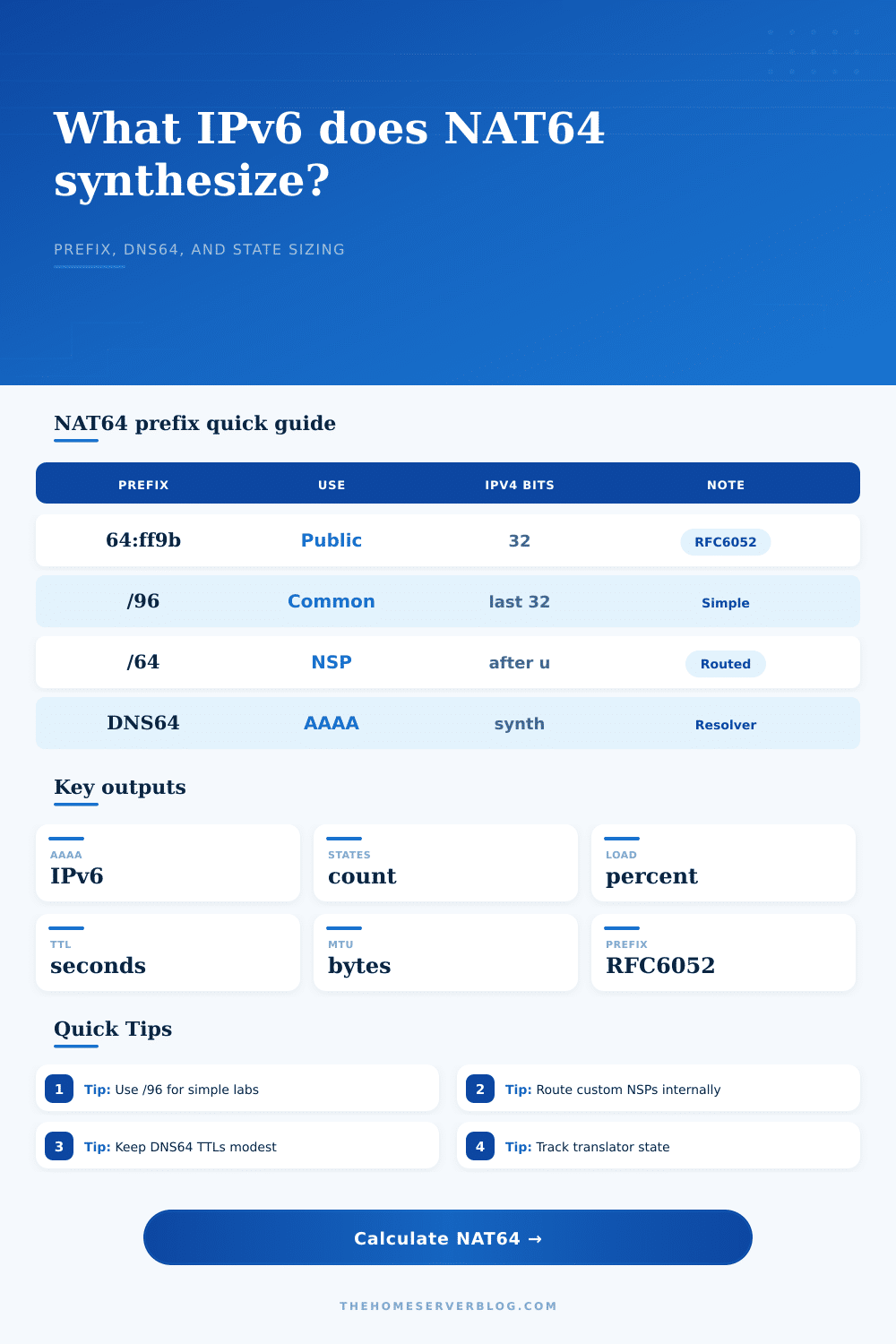
| /32 | 24 bits, u octet, 8 bits | Prefix32:V4a:V4b:V4c:00:V4d:: | Large network-specific prefixes, usually routed by an upstream or core router. |
| /40 | 16 bits, u octet, 16 bits | Prefix40:V4a:V4b:00:V4c:V4d:: | Useful when address plan reserves more NAT64 space than a single /96. |
| /48 | 8 bits, u octet, 24 bits | Prefix48:V4a:00:V4b:V4c:V4d:: | Common organizational boundary; easy to route internally by site. |
| /56 | u octet, then 32 bits | Prefix56:00:V4a:V4b:V4c:V4d:: | Practical for a delegated residential /56 when one subnet is reserved for NAT64. |
| /64 | u octet, then 32 bits | Prefix64:00:V4a:V4b:V4c:V4d:0 | Works, but routing and ACLs need care because IPv4 bits do not start at bit 64. |
| /96 | Last 32 bits | 64:ff9b::c000:221 | Most readable and the usual choice for lab testing and DNS64 troubleshooting. |
| Mode | What it does | Best fit | Watch item |
|---|---|---|---|
| Recursive DNS64 | Synthesizes AAAA when a name has A records but no real AAAA record. | IPv6-only LAN, lab VLAN, or test SSID. | Do not serve it broadly to dual-stack clients unless intended. |
| Split DNS64 | Applies synthesis only to selected zones, clients, or views. | Home lab domains, Kubernetes namespaces, or staging networks. | Document which resolver view owns synthesis. |
| Forwarder DNS64 | Forwards to an upstream resolver that performs synthesis. | Lightweight routers and simple edge devices. | Make sure upstream prefix matches your translator route. |
| Static AAAA | Publishes specific synthesized AAAA records without dynamic DNS64. | Known IPv4-only services or controlled migration testing. | Records become stale when IPv4 targets move. |
| No DNS64 | Clients must use literal synthesized IPv6 addresses or app config. | Firewall tests, packet captures, and one-off validation. | Normal hostname access will not work for IPv4-only sites. |
| Project | Clients | Peak states | Suggested platform |
|---|---|---|---|
| IPv6-only test laptop VLAN | 1 to 5 | 100 to 1,000 | TAYGA VM, Jool, or firewall plugin. |
| Home lab server VLAN | 10 to 40 | 1,000 to 8,000 | Jool, OPNsense, VyOS, or pfSense on x86. |
| IoT island with IPv4 cloud APIs | 20 to 120 | 2,000 to 18,000 | Firewall NAT64 with strict egress policy and logs. |
| Kubernetes IPv6-only egress | 50 to 500 | 10,000 to 150,000 | Jool on dedicated Linux node or hardware edge. |
| Training lab or classroom | 80 to 300 | 20,000 to 120,000 | Dedicated translator with monitoring and route control. |
| Platform profile | Throughput assumption | State table assumption | Planning note |
|---|---|---|---|
| Linux Jool SIIT/NAT64 | 1,000 Mbps | 100,000 states | Strong lab default; pair with route monitoring and conntrack visibility. |
| TAYGA user-space NAT64 | 250 Mbps | 25,000 states | Easy to understand, but less comfortable under many short-lived flows. |
| OPNsense or FreeBSD pf | 600 Mbps | 80,000 states | Good when firewall rules, logs, and dashboards matter more than raw speed. |
| MikroTik or VyOS edge | 500 to 800 Mbps | 60,000 to 90,000 states | Route-first deployments need clear prefix advertisement and ACL ownership. |
| Hardware router/firewall | 5,000 Mbps | 500,000 states | Capacity depends on model, licensing, feature set, and logging overhead. |
This calculator uses RFC 6052 address embedding for supported NAT64 prefix lengths. Real platform limits vary with CPU, offload, firewall logging, conntrack settings, packet size, and concurrent connection patterns.
If you’re building a serious home lab, there’s a good chance your smart thermostat won’t be able to connect to the cloud once you’ve switched over to an IPv6 only home network. What’s happening is that most of the internet still speaks IPv4, so your new shiny IPv6 world needs to get bridged through translator called NAT64. Getting it right takes more than just installing a package; you’ll also have to know how addresses are synthesized, where you want to direct all the traffic (hint: you’ll probably need to configure your DNS), and how much state your router can handle.
But what’s it do? The underlying mechanism is pretty straightforward and yet somehow hard to grasp. A DNS64 resolver step in when an IPv6-only client requests a domain name for a website that has no IPv6 addresses, but only IPv4 ones. In this case, it will attempt to find a legitimate IPv6 address for the requested name. If none exists, it will create one itself by using known prefix along with actual IPv4 destination as base of new IPv6 address. That’s the magic trick right there, and this page contains a handy calculator that lets you enter any IPv4 address and then visualizes exactly how it would be translated into an IPv6 address. You type the IPv4 destination into the box and watch the IPv6 address come up immediately.
How to Plan Your NAT64 Setup
Because if your chosen NAT64 prefix isn’t getting routed correctly, then that synthesized address simply points nowhere. And yes, that goes for both a custom (network-specific) prefix and for the default well-known prefix.
But NAT64 deployments has another common issue: capacity. Because each connected client gets translated from an IPv4 address back to an IPv6 one, it requires a state entry in the translator’s tables, which eats up CPU and consumes memory. Run enough devices on a machine (IoT devices, dozens of containers) and you’ll run out of memory sooner then you think. With this tool, you can enter how many clients you expect and their average number of simultaneous connections to estimate the maximum number of sessions you could reach.
This can help you decide whether to use a heavier solution such as Jool (kernel space), or something lighter (user space) like TAYGA. A few devices? No problem with TAYGA. Thousands of concurrent flows? Try Jool.
The other thing that gets folks is the variable of DNS behavior. Synthesized records has a Time To Live (TTL) setting, which has an opposite relationship with server load and response time. Short TTL causes clients to re-query often. It ensures they have fresh routing data but places a higher load on your resolver. Long TTL lowers query rate, but also runs the risk of sending the client to an old IP address. For most home labs, sweet spot is somewhere in the five minute range. You can tweak this setting using the calculator and view its effects on your estimated DNS infrastructure’s query pressure.
You should also keep in mind the actual route the data takes. More headers are carried by IPv6 packets compared to IPv4 and this consumes some of your payload. If you’re tunneling IPv6 through a provider that does not support jumbo frames, you may encounter Maximum Transmission Unit problems. This results in broken connections and slow downloads. Avoid unnecessary fragmentation of large files by checking your IPv4 TCP MSS against your path MTU.
Creating an IPv6-only network isn’t so much about performance as it is about plumbing. You’re building a custom gateway that can talk in two tongues. Your job is to hide that translation. Don’t fall into the trap of oversizing your state table or letting your DNS64 logic leak outside the set of clients that require it. Avoid bloated memory use and broken connectivity. Know your capacity constraints, know how many synthetic addresses you’ll be making, and let that guide your work. A little goes a long way; start with a small prefix, route it out, then scale up.
You should of considered naturaly the ways to manage this. It can be difficultly if you don’t plan ahead. The moddern approach is better than the old one. Don’t let the process dissapears from your mind.