Verizon Data Usage Calculator
Estimate monthly GB for Verizon hotspot, 5G Home, Home Internet Lite, streaming, gaming, work calls, backups, and multi-device households.
Verizon Data Forecast
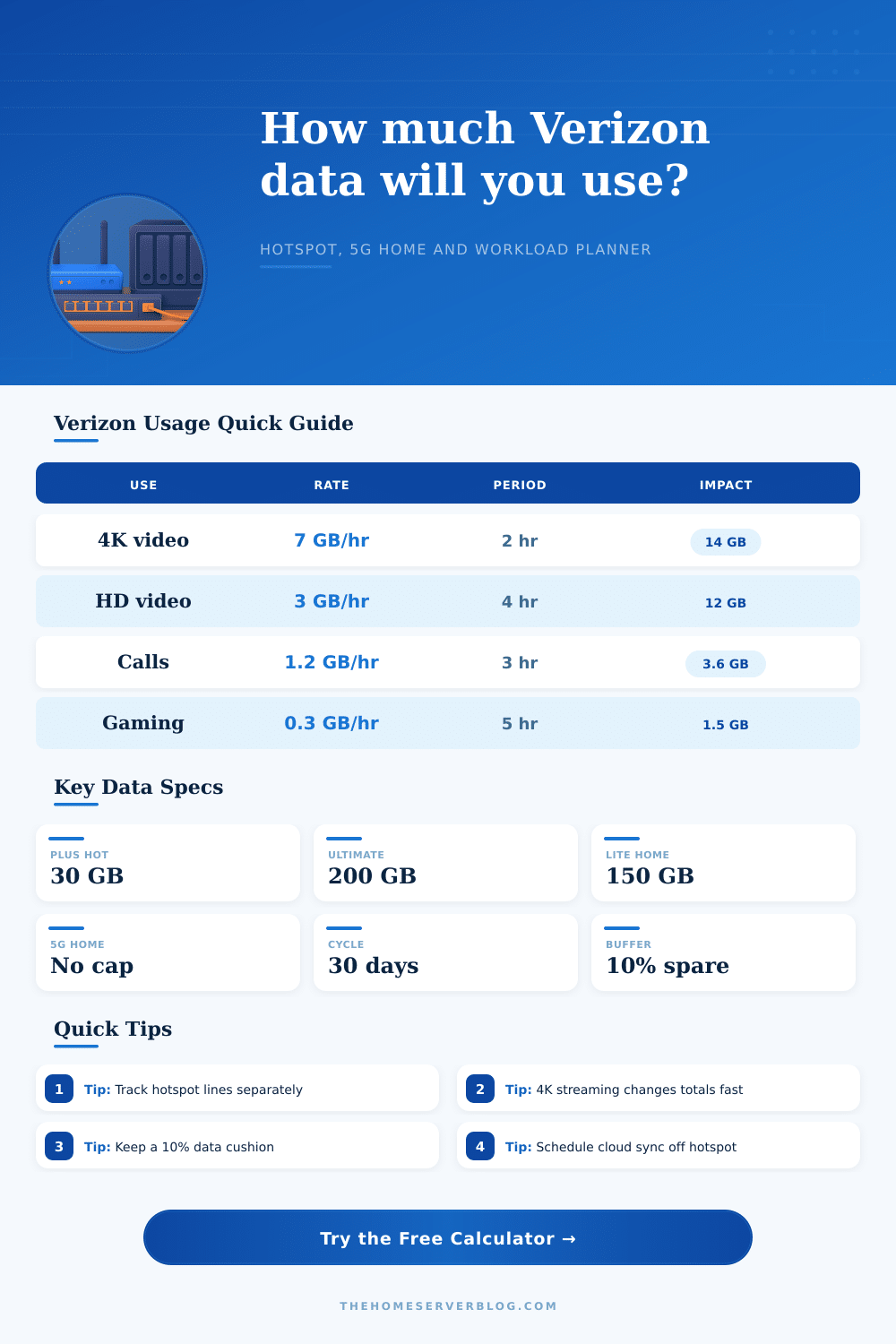
Use this table to pick the right planning bucket inside the calculator.
| Verizon Use Case | Planning Allowance | Best For | Calculator Treatment |
|---|---|---|---|
| Unlimited Plus hotspot | 30 GB premium hotspot | Laptop days, travel browsing, short trips | Flags overage pressure against 30 GB |
| Unlimited Ultimate hotspot | 200 GB premium hotspot | Remote work, RV weeks, heavy hotspot users | Flags overage pressure against 200 GB |
| Hotspot add-on bucket | 100 GB planning bucket | Phone or tablet hotspot sharing | Tests whether the add-on bucket survives |
| Small hotspot device bucket | 15 GB planning bucket | IoT, tablets, emergency use, road kits | Useful for low-usage connected devices |
| Home Internet Lite | 150 GB threshold | Light home internet or backup connection | Shows pace to the threshold |
| 5G Home Internet | No data limit selected | Primary home internet, streaming, family use | Shows heavy-use projection, not cap pressure |
Activity data rates used by the forecast.
| Activity | Rate Used | Monthly Example | Planning Note |
|---|---|---|---|
| SD streaming | 0.7 GB per hour | 21 GB for 1 hr daily | Good for hotspot conservation |
| HD streaming | 3 GB per hour | 90 GB for 1 hr daily | Can consume small hotspot buckets quickly |
| 4K streaming | 7 GB per hour | 210 GB for 1 hr daily | Better suited to home internet than hotspot |
| Online gaming play | 0.3 GB per hour | 9 GB for 1 hr daily | Downloads matter more than play traffic |
| HD video meetings | 1.2 GB per hour | 36 GB for 1 hr daily | Important for remote work hotspot math |
| Background device data | 0.15 GB per device/day | 27 GB for 6 devices | Includes browsing, sync, updates, and apps |
Preset workload map for Verizon-style planning.
| Preset | Plan Bucket | Main Driver | Risk Signal |
|---|---|---|---|
| Unlimited Plus Laptop Week | 30 GB | Calls plus browsing | Watch HD meetings |
| Unlimited Ultimate RV Office | 200 GB | Work calls and streaming | Download control helps |
| Home Internet Lite Apartment | 150 GB | HD streaming | 4K can exceed threshold |
| 5G Home Family Streaming | No cap | Multi-device streaming | Use for load awareness |
| Mobile Gamer Download Month | 200 GB | Game downloads | Updates dominate usage |
| Cabin Camera Hotspot | 15 GB | Background and camera sync | Limit cloud uploads |
Device planning examples for routers, hotspots, and 5G Home gateways.
| Device Group | Typical Count | Data Pattern | Verizon Planning Move |
|---|---|---|---|
| Phones and tablets | 2 to 6 | Short bursts, app sync, video clips | Keep background data in the estimate |
| Laptops | 1 to 4 | Meetings, browsers, cloud docs | Separate work calls from browsing |
| Streaming TVs | 1 to 3 | HD and 4K traffic spikes | Set resolution before hotspot trips |
| Game consoles | 1 to 2 | Low play traffic, huge updates | Manually enter expected downloads |
| Security cameras | 1 to 8 | Continuous upload or cloud clips | Use a custom bucket for camera routers |
| Smart home devices | 5 to 30 | Small but constant background traffic | Add devices even when they feel idle |
A data usage calculator allow people to estimate how much data they will use in a specific period. A data usage calculator helps to turn the vague idea of data use into a specific mathematician picture. Additionally, a data usage calculator allows people to plan for there data needs so that they dont run out of data unexpectedaly.
To use a data usage calculator, a person must provide several specific input. The first input a person must provide is the device count. Every device will use data in the background of a person’s smart devices.
How to Use a Data Usage Calculator
The second specific input that a person must provide is the streaming hour. Streaming data use a significant amount of data compared to other data uses. For instance, watching videos on a screen in 4K use more data in two hours than many people use for browsing the internet in an entire day.
The third specific input that a person must provide is the amount of time they play games and the data used to download games. Data used while playing games is small, but the data used for game updates are large. Additionally, a person must provide the number of work calls and the amount of data used for backing up their data to a cloud.
The next field is for provide a safety margin for data use. Data use is not even throughout the month, and there are times when a person will use more data than others does. When a person is providing a safety margin, they are providing space for data use increases due to travel or numerous people using the data for streaming video at the same time.
The data usage calculator also include a field for the number of active days a person uses the hotspot. A person can use this field to provide an estimate for how many day in a month that they need the hotspot to remain active. By being honest with these two field, the data use calculator will provide a more accurate forecast for the number of days that a person will use their data.
The data usage calculator will provide several data use for a person. First, the data use calculator will provide the number of megabytes that a person will use daily. It will also show how much data a person has left in their data plan (headroom).
For 5G Home customers, the data use calculator will provide information on whether the data use is light enough to avoid network congestion and whether the internet data will feel slow during peak hour when many others are using the internet. When people estimate the data that they will use, they often make mistake. One of the most common mistakes is to assume that the data from their hotspot is the same as their phone data.
Verizon plans separately tracks hotspot and phone data. Thus, it is possible for a person to have a limit on their hotspot data even if they have plenty of data for their phone. Another common mistake is to ignore the amount of background data that their devices use.
When you multiply that data by the number of devices and the number of days that they use the data, that use becomes a more significant amount of data. The data use calculator prevents this mistake by including background data as a line item. This data use calculator is useful for people to run different scenario in the data plan before the beginning of the current month.
For example, a person can use the data calculator to determine how much data they will use if they watch high-definition video more frequent or if they get a security camera and need more devices to add to their data plan. Additionally, people can use this calculator to compare the features of different data plan. This information will allow a person to decide if they need a data plan with a larger data bucket.
The main goal of this data calculator is to allow a person to have a forecast for their data use for the coming month so that they will not be surprised when they reach their data limit. This calculator will allow a person to decide whether they need to change their data usage habit or if they have enough data for the current month to relax.