UDP Throughput Calculator
Estimate real payload throughput, packet rate, protocol overhead, fragmentation risk, and a practical test target for UDP workloads in home labs and small networks.
⚙Common UDP Scenarios
📶Link And Protocol Inputs
🖥Current Spec Snapshot
📊UDP Header And MTU Reference
| Stack | Header Bytes | Typical Max UDP Payload | Practical Note |
|---|---|---|---|
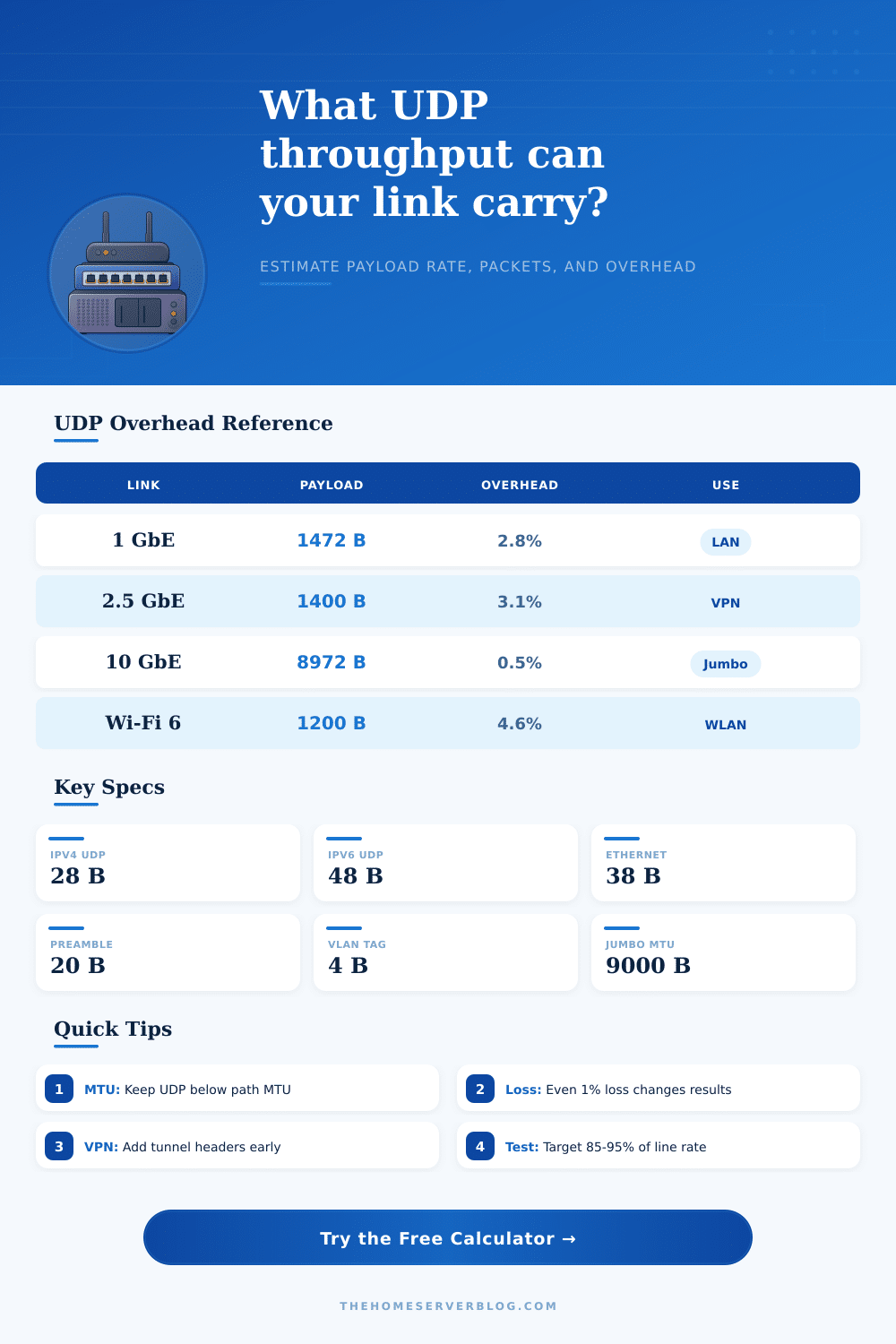
| IPv4 UDP on 1500 MTU | 20 IP + 8 UDP | 1472 bytes | Common iperf3 LAN datagram size without fragmentation. |
| IPv6 UDP on 1500 MTU | 40 IP + 8 UDP | 1452 bytes | Lower payload because the base IPv6 header is larger. |
| WireGuard over IPv4 | About 60 outer bytes | 1412 bytes or less | Often paired with 1420 tunnel MTU on Ethernet paths. |
| Jumbo 9000 MTU IPv4 | 20 IP + 8 UDP | 8972 bytes | Great for storage VLANs when every hop supports jumbo frames. |
🧮Capacity By Link Type
| Configuration | Line Rate | Realistic UDP Target | Packet Rate Clue |
|---|---|---|---|
| Gigabit home switch | 1 Gb/s | 930 to 950 Mb/s | About 80 kpps at 1472 byte payload. |
| 2.5 GbE desktop NIC | 2.5 Gb/s | 2.30 to 2.38 Gb/s | Interrupt moderation matters above 180 kpps. |
| 10 GbE storage VLAN | 10 Gb/s | 9.4 to 9.8 Gb/s | Jumbo frames cut packet rate dramatically. |
| VPN over fiber WAN | 1 Gb/s | 700 to 930 Mb/s | CPU crypto and tunnel MTU usually dominate. |
🛠Common UDP Project Sizes
| Project | Payload Size | Primary Result | Secondary Result |
|---|---|---|---|
| iperf3 switch validation | 1472 bytes | Line-rate UDP | Loss should stay near zero. |
| NAS replication over VPN | 1280 to 1412 bytes | MTU-safe stream | Lower packet loss than oversized datagrams. |
| VoIP or game packets | 80 to 240 bytes | High packet rate | Latency budget is more important than bulk speed. |
| Telemetry collector | 32 to 256 bytes | Low bandwidth | Packets per second drives CPU cost. |
When performing a speed test on a network, the results will typicaly be lower then the theoretical maximum speed of the hardware being used. A speed test may reveal a result that is slightly below the expected data transfer rate of a gigabit network, which can lead to the assumption that the network hardware are bad or failing. However, the data from speed tests is typically lower than the theoretical maximum speed due to network overhead and how it reduce the amount of data that can be transmitted across the network wire.
In order to understand why network overhead reduce network throughput, it is first necessary to understand the difference between the line rate of the network and the payload size. The line rate is the theoretical maximum data transfer speed of the copper or fiber network hardware, while the payload are the amount of data that an application sends. All data except for the payload is considered to be overhead.
Why network speed tests are lower than expected
For instance, data such as the Ethernet preamble and the IP header is examples of network overhead. Additionally, if the data that an application sends consist of tiny packets, such as data that voice over IP (VoIP) software or gaming software sends, then the amount of overhead will be a larger percentage of the total data that is sent. Furthermore, if the data that an application sends are tiny packets, the data overhead will consume a larger portion of the total available bandwidth.
The Maximum Transmission Unit (MTU) for most networks is 1500 byte of data. While this is the limit for the IP packet, the additional size of the UDP header and the IP header will reduce the amount of data that the application can send to the MTU limit. Therefore, if an application attempt to send data that is larger than the size of the MTU, the data packet will be fragmented into smaller data packets.
Data fragmentation is the process of splitting a data packet into two or more data packets. Fragmentation increase the amount of overhead data for the network. As a result of the fragmentation of data, data streams may stutter.
Virtual Private Network (VPN) tunnels and network tunnels creates additional overhead data. For instance, if IP packets passes through a WireGuard tunnel or an OpenVPN tunnel, the headers that are used to describe the data packet create data overhead. Such overhead data reduces the amount of data that can be sent within the 1500 byte MTU limit.
Furthermore, if an application does not account for the size of data that is used for the VPN tunnel, data fragmentation will occur across the wide area network (WAN) link. Fragmentation across the WAN link will lead to a decrease of the data throughput of the network. By using data tables to determine the amount of data that a VPN tunnel will use, network administrators can understand why a VPN connection may be slower than the standard network connection.
Additionally, other factors that may contribute to a reduction of data speed include hardware limitations to the network and the processing efficiency of the host. For instance, network switches are not perfect in their transmission of data, but are instead computers that manage data queues. The processing efficiency of the host system is crucial to the data transfer rate of the network, as the CPU must handle every packet that is recieved at the network interface controller (NIC).
If an application is sending data in the form of a massive amount of tiny data packets, it is possible that the CPU will reach its limit before the data link reach its limit. Because the CPU must process every packet at a high rate, high data rates can lead to dropped packets. Therefore, the packet rate (in thousands of packets per second) is typically a more important metric than the megabits per second data transfer rate.
Finally, network designers should also account for packet loss in the data rate targets that are set for a network. In an ideal network, packet loss would be 0%. However, packet loss will occur in real world networks and systems.
For data packets that use User Datagram Protocol (UDP), there is no built-in retransmission protocol for lost data packets. If a packet is lost, it is lost forever. Therefore, when creating streams of data, such as media streams, it is not necessary for the stream to reach 100% of the theoretical maximum line rate of the network.
Furthermore, targeting the theoretical maximum rate of a network is a mistake for network designers. If network designers target 100% of the theoretical line rate of the data link, there is no data for “bursts” of data. Therefore, by accounting for data overhead, tunneling protocols, CPU limits, and packet loss, network designers can appropriately set data rate targets for their iperf3 test.