Channel Capacity Calculator
Estimate theoretical Shannon capacity, practical coded throughput, spectral efficiency, and link headroom from bandwidth, SNR, modulation, coding rate, MIMO streams, and overhead.
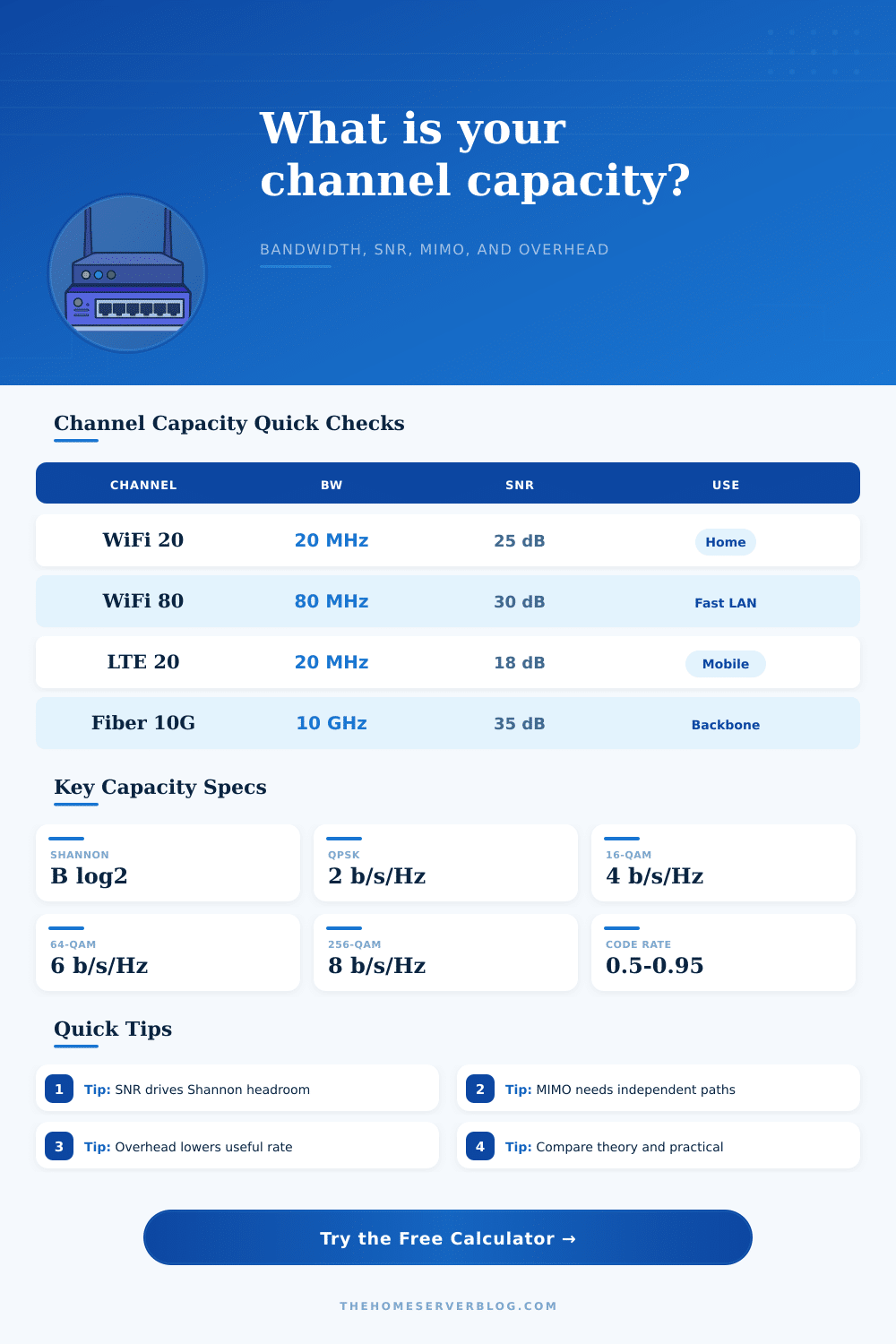
| Modulation | Raw bits/s/Hz | Typical clean SNR | Planning note |
|---|---|---|---|
| BPSK | 1 | 6-9 dB | Very robust links, low throughput, long range telemetry. |
| QPSK | 2 | 9-12 dB | Stable mobile, IoT, low-rate OFDM, or weak WiFi edges. |
| 16-QAM | 4 | 15-18 dB | Moderate broadband channels with reasonable signal margin. |
| 64-QAM | 6 | 21-24 dB | Common WiFi, cable, and fixed wireless planning midpoint. |
| 256-QAM | 8 | 27-30 dB | High-rate links with clean RF or well-equalized wired channels. |
| 1024-QAM | 10 | 33-36 dB | Short-range WiFi and high-quality coax or fixed links. |
| 4096-QAM | 12 | 38-42 dB | Very clean channels; overhead and implementation margin matter. |
| Configuration | Bandwidth | Practical range | Metric equivalent |
|---|---|---|---|
| WiFi 20 MHz single stream | 20 MHz | 60-160 Mbps | 3-8 bits/s/Hz before overhead. |
| WiFi 80 MHz 2x2 | 80 MHz | 500-1200 Mbps | Useful gigabit class near the AP. |
| WiFi 160 MHz 2x2 | 160 MHz | 1.1-2.4 Gbps | Needs clean 5 or 6 GHz spectrum. |
| 5G NR mid-band 100 MHz | 100 MHz | 400-1500 Mbps | Depends heavily on MIMO rank and scheduling. |
| DOCSIS OFDM block | 192 MHz | 1-2 Gbps | High QAM plus forward error correction. |
| Optical 10G lane | 10 GHz | 8-10 Gbps | Line coding and FEC define payload rate. |
| Reference | Value | Where used | Practical limit |
|---|---|---|---|
| SNR linear | 10^(dB/10) | Shannon capacity | Every 3 dB roughly doubles SNR. |
| Shannon capacity | B log2(1+SNR) | Theoretical ceiling | Does not include protocol overhead. |
| Spectral efficiency | Rate / Hz | Channel comparison | Practical values sit below Shannon. |
| Coding rate | Payload / coded | FEC penalty | Robust coding trades speed for errors. |
| MIMO rank | Streams | Spatial reuse | Correlation lowers the multiplier. |
| Overhead factor | 1 - overhead | Payload throughput | Wireless contention can dominate. |
| Project | Starting channel | Primary result | Second check |
|---|---|---|---|
| Home lab WiFi upgrade | 80 MHz, 2x2 | Gigabit-class PHY | Check airtime and client count. |
| Point-to-point bridge | 40 MHz, high SNR | Stable mid-rate link | Fade margin matters more than peak QAM. |
| Cellular backup WAN | 20-100 MHz | Variable capacity | MIMO rank can change hour by hour. |
| Coax broadband segment | 96-192 MHz | High shared capacity | Noise floor and plant quality set QAM. |
| Fiber handoff model | 1-10 GHz lane | Predictable throughput | Line coding and FEC set payload. |
A channel capacity calculator is a tool that can help you to calculate the actual throughput of your link. The advertised throughput of links is often more significantally higher than the actual throughput that is experienced when using those links. A channel capacity calculator can help you to calculate the theoretical maximum throughput of a link given the characteristics of that link.
Furthermore, a channel capacity calculator can help you to test whether your link will meet your throughput requirement or whether you will have to change your communication plan. One of the main factors that impact the throughput of a link is the bandwidth of that link. The bandwidth of a link is the amount of data that can pass through the link each second.
How to Use a Channel Capacity Calculator
For links that use radio frequencies, the bandwidth can be measured in Hertz (Hz). The wider of the link’s channel, the more data per second that can pass through the link. However, wider channels requires more spectrum, filtering, and transmitting power.
The value of the channel’s bandwidth that you should use in the channel capacity calculator is the occupied bandwidth of the link; this is the portion of the link’s bandwidth that is used by the radio technology. Given the bandwidth and the signal-to-noise ratio of the link, the channel capacity calculator can calculate the theoretical maximum throughput of the link. The theoretical maximum throughput will increase with an increase in the bandwidth and signal-to-noise ratio of the link; however, these theoretical calculations do not account for the error and noise that typically occur within a link.
Signal quality is another main factor that will reduce the throughput of a link. Signal quality is typically represented in terms of the signal-to-noise ratio of the link. The higher the signal-to-noise ratio of a link, the more high data throughput that that link can achieve.
The channel capacity calculator can ask for the modulation technology of the link; alternatively, you can manually enter the throughput efficiency of the link. Furthermore, the link will also have a coding rate; the channel capacity calculator implements this to account for forward error correction of the link. Higher coding rates will increase the data throughput of the link; however, higher coding rate will also introduce errors in the data through that link.
Conversely, links with lower coding rates will experience fewer error; however, there will be fewer data bits travelling through the link each second. Another factor that can impact the throughput of a link is the number of antennas that is coupled to the link. Links with multiple antennas use a technology called MIMO to increase the data throughput of those links.
MIMO technologies only work when the receiving device are able to separate the data streams from each antenna; a factor that is entered into the channel capacity calculator represents the independence of the antennas from each other. In an indoor environment with little radio signal obstruction, the antennas may be 85% or more independent of each other. However, in a metal building or outdoors over a significant distance, the independence factor will be lower.
The channel capacity calculator calculates the throughput of the link as a multiplication of the independence factor and the number of antennas to which the link is connected; this prevents the channel capacity calculator from providing overly optimistic projections of that link’s throughput. Another main factor that will impact the throughput of a link is the overhead technology for that link. Factors like guard intervals, pilot tones, preambles, contention windows, and retransmissions are all aspects of the overhead of a link.
These factors prevent data from actualy reaching its intended application on the network. Furthermore, their inclusion within the link will also impact the throughput of the link; the channel capacity calculator will include a factor that represents the overhead of the link. Furthermore, there will also be a separate guard and duplex factor within the link.
The throughput of the link that the channel capacity calculator calculates is the throughput that will be experienced by the users of that link. Thus, the overhead of the link impacts the throughput that will be experienced by the users of that link. Furthermore, changing the overhead by as little as ten percentage point will significantly impact the throughput calculation of the link; therefore, overhead is also a component of the link budget for that link.
Furthermore, the channel capacity calculator can be used to compare the throughput of different link technology. For instance, you can compare links that have different channel bandwidths, data rates, MIMO ranks, and contention technologies. Each comparison will provide insight into how the links should be managed to meet the requirements of the network or the data applications that is to be used.
For instance, if you compare an LTE link to a Wi-Fi link of the same bandwidth and signal quality, the throughput will be different due to the different MIMO ranks and contention technologies of those links. Furthermore, you can compare the calculated throughput of each technology to the theoretical maximum throughput of that technology; this will help to determine if the throughput that is calculated for that link is realistic. Another use of the channel capacity calculator is to test the link under a variety of scenarios.
Links can experience a variety of changes over time; for instance, the temperature of the link, the number of obstacle between the link’s antennas, and the data traffic through the link will change over time. Thus, you can enter a variety of scenarios into the link calculator to determine how the link will change over time. For instance, it is possible to calculate the throughput of a link at peak signal strength and average signal strength; the comparison between these two throughput results will help to determine whether the link is operating within its designed limit.
Furthermore, the channel capacity calculator can also be used to test whether the calculated throughput of the link is within expected ranges. Reference tables can be used to determine the throughput that is typically achieved by links of a certain bandwidth and signal strength. These throughput tables can be used to verify that the throughput that the link calculator calculates is realistic; if the calculated throughput is significantly higher or lower than the throughput ranges that are represented in these tables, then the link has either unusually high or low parameters.
The figure that the channel capacity calculator represents is the theoretical maximum throughput that is possible for a link of that signal strength, bandwidth, and technology. Thus, the theoretical throughput value that the channel calculator represents is always the throughput of a single-stream link prior to the data throughput is increased through the use of MIMO technology. Thus, the theoretical throughput of the link can be represented as a single value; it is then possible to enter additional variable into the calculator, such as the number of spatial streams of the link and the coding rate to determine the throughput that will be experienced by the users of that link.
Furthermore, the ratio of the throughput of the link to the theoretical throughput of the link can also provide insight into the link’s performance. For instance, if the throughput of the link is 70% or above the theoretical throughput of that link, the link is functioning near its theoretical best. However, if the throughput of the link is 40% or below the throughput of that link, there may be an issue with the overhead of that link or the modulation technology of that link.
Overall, the channel capacity calculator is a tool that can be used to state the various assumptions that are made about a link. For instance, you can state the bandwidth, signal-to-noise ratio, modulation, coding rate, overhead, and a variety of other factor within the link calculator. Furthermore, the link calculator can also allow you to view the trade-offs of one factor relative to another; for instance, it is possible to enter different coding rates into the calculator to determine the link throughput with each coding rate.
Thus, you can use the link calculator to determine whether you should increase the bandwidth of the link, change the placement of the antennas, or change the coding rate of the link.