Deduplication Compression Ratio Calculator
Estimate backup stored size, total reduction, metadata overhead, changed block impact, effective logical capacity, and remaining appliance headroom.
💾Backup and Storage Presets
⚙Data Reduction Inputs
📊Data Reduction Grid
🗂Current Calculation Table
| Stage | Formula | Result | Planning Meaning |
|---|---|---|---|
| Logical footprint | Source x restore points | 0 TB | Total restore views |
| Dedupe output | Max of ratio and changed floor | 0 TB | Unique chunks |
| Compression output | Unique / adjusted compression | 0 TB | Payload blocks |
| Stored size | Payload + metadata | 0 TB | Physical usage |
📚Backup Workload Reference
| Workload | Typical Dedupe | Typical Compression | Notes |
|---|---|---|---|
| VM image backups | 4:1 to 8:1 | 1.3:1 to 2:1 | Many repeated OS and application blocks. |
| User file shares | 2:1 to 4:1 | 1.2:1 to 1.8:1 | Office documents dedupe better than media folders. |
| Database dumps | 1.5:1 to 3:1 | 1.8:1 to 3:1 | Text-heavy dumps compress well; binary databases vary. |
| Source code and builds | 3:1 to 7:1 | 1.6:1 to 3:1 | Repeated libraries and artifacts can reduce strongly. |
| Photos and video | 1:1 to 1.4:1 | 1:1 to 1.1:1 | Most camera formats are already compressed. |
| Encrypted backups | 1:1 to 1.2:1 | 1:1 to 1.05:1 | Encrypt after reduction when the platform supports it. |
📈Retention and Change Rate Guide
| Scenario | Changed Data | Metadata Range | Reserve Target |
|---|---|---|---|
| Home NAS snapshots | 1% to 4% | 2% to 5% | 10% to 15% |
| VM lab backups | 3% to 8% | 3% to 6% | 15% to 20% |
| Database log-heavy set | 8% to 20% | 2% to 5% | 20% to 25% |
| Media archive | 0.5% to 2% | 1% to 3% | 10% to 15% |
| Long retention vault | 2% to 6% | 4% to 8% | 20% to 25% |
🧮Example Capacity Outcomes
| Project Size | Logical Plan | Reduction Assumption | Stored Estimate |
|---|---|---|---|
| Small home lab | 4 TB x 14 points | 5:1 dedupe, 1.5:1 comp | About 8 TB |
| NAS user shares | 10 TB x 30 points | 3:1 dedupe, 1.4:1 comp | About 71 TB |
| VM cluster | 25 TB x 21 points | 7:1 dedupe, 1.7:1 comp | About 44 TB |
| Camera archive | 40 TB x 7 points | 1.2:1 dedupe, 1.05:1 comp | About 222 TB |
💡Planning Tips
That’s why you purchase an external backup drive (usually a big one), yet it always seems to run out of space sooner then expected. This happens because humans tend to mistake logical data size for physical storage requirement. Perhaps you have 10 TB of content, and maybe you want to back it up several times. That doesn’t mean you multiply by the number of times.
In fact, most backups is redundant copies of what was already there. Enter your size and policy into the calculator above, and it figures all this out for you so you don’t overprovision hardware in the worst case scenario that never happen.
How to Save Space on Your Backup Drive
That’s where deduplication comes in. By scanning for identical chunk of data, or data blocks as they’re called; you can write those once and reference them from wherever else they might be used. For example, if there are twenty virtual machines that all run Windows, then their operating system files won’t change. They’ll all point to the same Windows install. Deduplication will only keeps one copy of the files.
Then, what’s left over (the bits that didn’t get compressed) will be compressed. It’s like taking out extra lines or cutting fat off the file so it gets smaller. Between both of these you can dramatically reduce the amount of storage space you need.
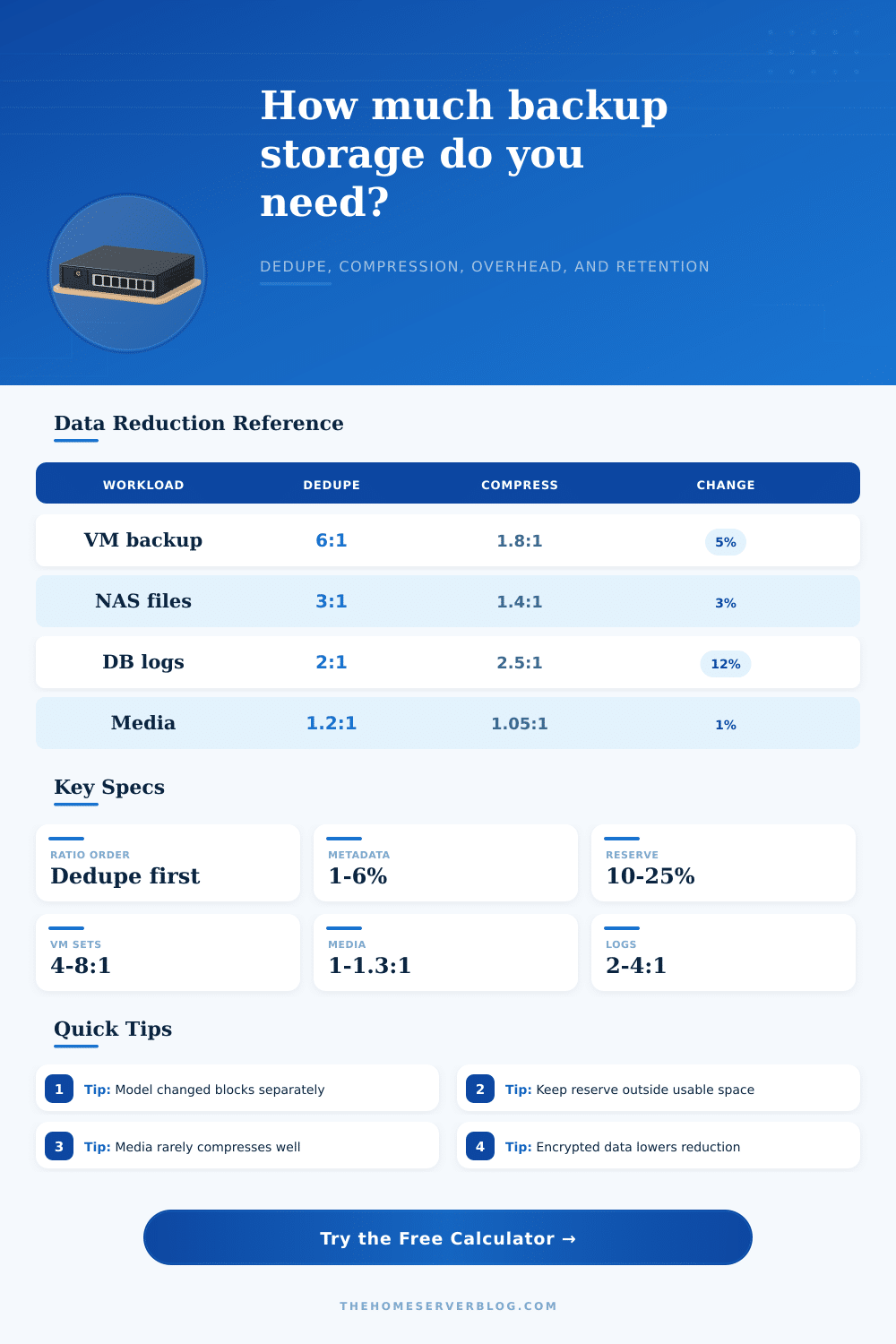
In fact, on average, the storage footprint shrinks by a factor of twelve for virtual machine backups, with deduplication providing about a six-to-one ratio and compression providing almost a two-to-one ratio. So you end up reducing size of your actual data by a factor of twelve before it even hits disk.
The culprit is usualy metadata. Even with all that, people still run out of room. Remember that each piece of data needs a catalog entry (to reconstruct it), plus its own hash and address. That overhead sound minor, but at petabyte scale, it’s millions of dollars’ worth of unused hardware.
Don’t forget about change rate. If 5 percent of the data changes in a day, you store only the changes instead of a complete backup. Database logs are an example of a high-churn environment; a photo archive is low churn.
This all goes out the window with encrypted data. With encryption, the content is scrambled into a meaningless set of random data. Taking away any pattern that a compression algorithm would be able to use. It also renders each block as unique to deduplication engines. So if you’re backing up and your system first encrypts the data and then attempts to run dedupe on it, expect to get ratios approaching 1:1. That’s the give-and-take of data security versus storage savings.
Enterprise systems generally use transparent encryption keys, where the backup appliance will reduce down size of the plain text data before transmitting the resulting encrypted version offsite.
The second commonly overlooked topic is reserve capacity. Storage controllers performs compaction and garbage collection as background jobs that merge fragmented pieces into a single chunk and delete unreferenced blocks over time. Those tasks would of been blocked if they don’t have space to work with. This slows down writes and can eventually halt backups altogether.
Fifteen or twenty percent free in your physical pool is not wasteful. This is insurance against reality, the way storage controllers manages the life of your data. Consider your backup plan as if you’re packing a vehicle for travel: you don’t pack it all the way to the brim because there’s no space to rearrange things inside. Likewise, it makes sense to leave some extra space in your system for efficient data movement.
The calculator assist in determining when to reach that sweet spot, maximizing use without capping performance. It translates these abstractions of ratios into concrete terabytes, enabling purchases based off actual needs rather than perceived ones.
When it comes to storage planning, telling the difference between the unique and the duplicated (the signal from the noise)… Matters. Storing bytes that are identical doesn’t save any space; it’s a waste of effort. Without knowing what the data looks like, you can’t compress it. Knowing how often things change and which bits will be retained allows you to model growth correctly and avoid both over-providing capacity as well as under-estimating requirements.
Data tells you how it behaves through the numbers. Listening to those numbers help you save more than just disk space, it spares you from heart attacks over backup jobs completing with “low-capacity” error messages.