Reseller Hosting Profit Calculator
Model account revenue, wholesale platform fees, support load, overage exposure, processing fees, churn, reserves, and safety margin before you scale a reseller hosting book.
📌 Named Reseller Scenarios
📊 Monthly Profit Inputs
Profitability Results
🗂 Plan and Account Density Comparison
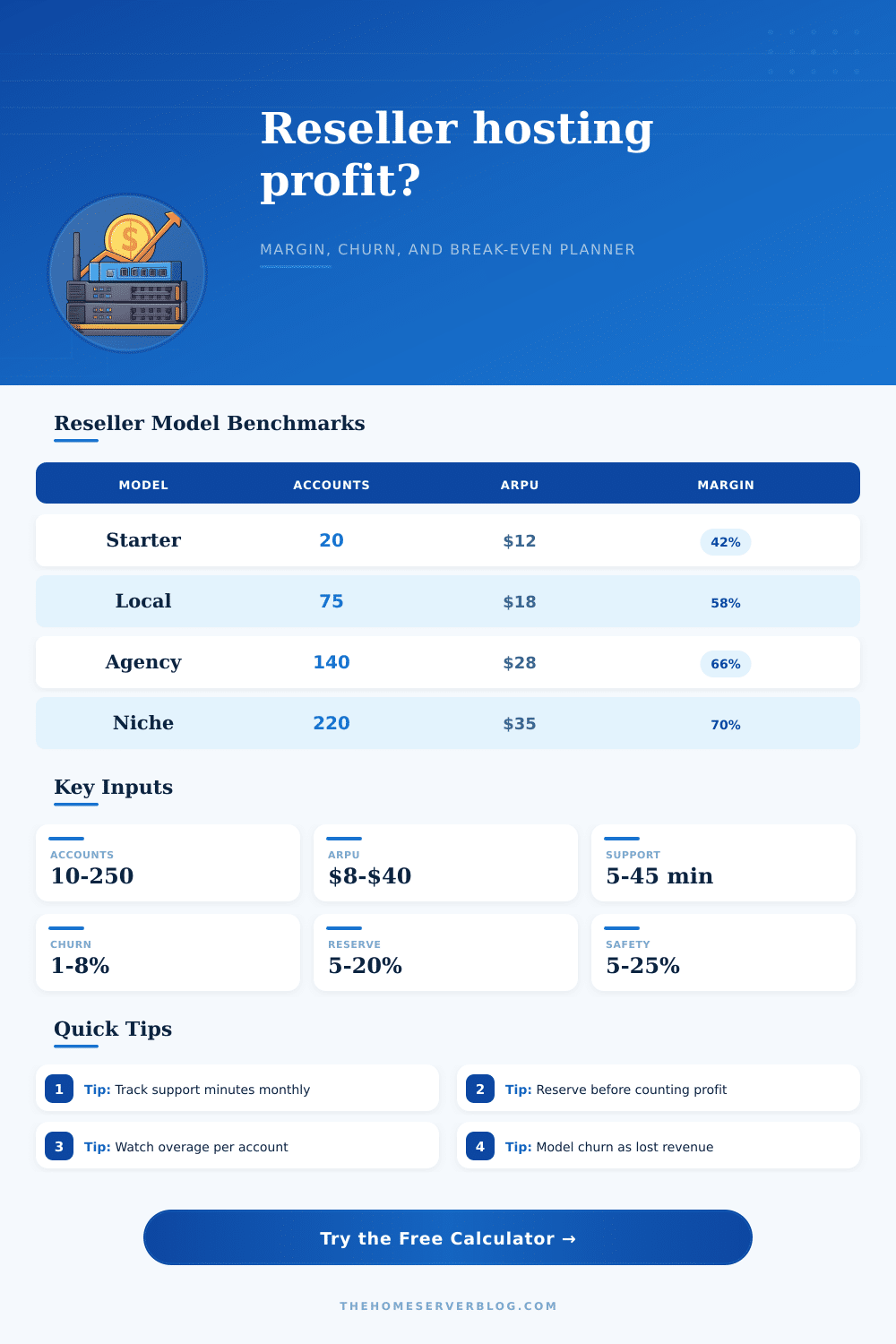
📘 Reference Table: Reseller Scenario Benchmarks
| Scenario | Typical Accounts | Monthly ARPU | Support Minutes | Margin Watch Item |
|---|---|---|---|---|
| Starter cPanel Micro | 10 to 30 | $8 to $14 | 6 to 12 | Fixed platform fee dominates |
| Local Agency Bundle | 40 to 120 | $15 to $25 | 10 to 18 | Support queue discipline |
| Managed WordPress Niche | 35 to 100 | $28 to $55 | 18 to 35 | Plugin update workload |
| VPS Reseller Stack | 15 to 70 | $45 to $120 | 20 to 50 | Provisioning and escalation time |
💾 Reference Table: Account Density by Plan Type
| Plan Type | Account Density | Support Intensity | Overage Risk | Best Fit |
|---|---|---|---|---|
| Budget shared accounts | High | Low to medium | Medium | Simple brochure sites |
| Balanced agency plans | Medium | Medium | Medium | Retainer clients |
| Managed WordPress plans | Medium low | High | Medium | Care plan bundles |
| Commerce and client care | Low | High | High | Stores and priority support |
| VPS and semi-dedicated resale | Low | High | High | Technical clients |
💳 Reference Table: Fee and Reserve Planning
| Line Item | Common Range | Calculator Input | Why It Matters |
|---|---|---|---|
| Payment processing | 2.6% to 3.5% | Processing % | Moves with revenue volume |
| Tax and fee reserve | 5% to 20% | Reserve % | Separates obligations from profit |
| Safety margin | 5% to 25% | Safety % | Protects against support spikes |
| Storage overage | $0 to $3 per account | Storage overage | Flags oversized mailboxes and media |
| Bandwidth overage | $0 to $5 per account | Bandwidth overage | Captures traffic-heavy accounts |
📈 Reference Table: Margin Health Signals
| Signal | Weak | Healthy | Strong | Action |
|---|---|---|---|---|
| Gross margin | Under 35% | 45% to 60% | Over 65% | Raise ARPU or reduce support load |
| Support minutes | Over 35 | 12 to 25 | Under 10 | Template replies and tighten scope |
| Monthly churn | Over 6% | 2% to 4% | Under 2% | Improve onboarding and billing reminders |
| Break-even buffer | Under 10% | 20% to 40% | Over 50% | Delay platform upgrades until demand is clear |
💡 Operating Tips
Don’t make the rookie mistake of doing quickie mental math, you know, look at the wholesale price, slap a margin on top, and think about how much money you’ll make. Sounds easy enough … until month one arrives. The reality sinks in when you log into your bank account and realize something’s different.
Hosts don’t just rely on gross markup to get their profits; they also need to consider reserve planning, churn control and support efficiency. Before you grow that client book, look closely at business model. When you input your revenue assumptions and number of accounts, the calculator do the math for you. This prevents you from underestimating hidden costs. It makes you consider inputs that hurt most small hosting business: monthly client loss, payment processing fees and labor hours.
Why Simple Math Fails in Hosting Business
Labor hours is something most beginners overlook because it appears abstract at first. When you charge fifteen bucks per month on a plan, what you’re doing is selling someone access to your time for plugin updates, DNS fixes etc. And if each account require twelve minutes of your day, the cost starts to add up fast. This tool will convert those minutes into dollars. Then you’ll be able to see exactly how much margin you has left after paying for all the labor needed to maintain service for customers.
Few people get this right: Churn is a huge margin drain. If you’re losing 3% of customers each month, then you have a leaky bucket. You need to keep replacing that money every single month, and that’s assuming you don’t want to grow! It shows you a churn-adjusted number in the calculator. How long until you’ll be half the size? That’s how long your existing set of clients has to run. That’s important information when predicting cash flows.
It also flags how dangerous overages are. Certain services cap storage and/or bandwidth for a reason. When those caps is hit by a client, they pay more money (which comes out of your pocket) unless you price it into your product. Unless you’re watching per-account exposure numbers, a little bit more media use can wipe away profits on budget accounts.
The page also includes reference tables that illustrate the impact of various plan types on support load and density: Shared accounts appear at first glance to be great volume drivers for budget plans, but they tend to take up a disproportionate amount of time different than the revenue they produce. Managed WordPress plans drive more revenue. And extra revenue helps compensate for their greater support burden.
Strive to strike a balance between both: Keep your workday manageable and maintain healthy gross margin. Create a mix that makes you money (high-touch clients paying enough to subsidize lower-effort customers). Avoid drowning in support requests for pennies on the dollar.
Reserves and safety margins set disciplined operators apart from the rest. You might be tempted to spend every dime of profit right away on disposable income. There will be unexpected support spikes, tax time, and changing processing fees. Reserve 10-20% of your revenue pre-net profit. That way, when bad months hit, you have a cushion to get by. This isn’t pessimistic. It’s insurance. Without it, one bad billing cycle can wipe out all your hard work in just a few weeks. You should of planned for this.
And that’s how you scale: it isn’t by scaling accounts; it’s by changing mindset from a reactive fix-it approach to a proactive plan-it approach. You think about retention strategies. You also considers automating some of your documentation to lighten the support load. You try to build something that makes your business less reliant on you having to intervene every time someone has a small problem. That’s when you’re creating an asset. If it doesn’t work, then what you’ve got is free tech support for others, which is volunteering your services to help with their technical issues.
In this space, margin health is the only thing that matters. The margin is the efficient system by which you deliver said margin. Build the structure before filling it with clients. Get your inputs right early on, so you don’t have to scramble to cut costs or raise prices later when you’re already overloaded. Focus on cash comfort as well as margin health. Top line revenue is irrelevent unless you can keep it healthy over time. Most people get this part wrong, yet it is the only thing that matters in the long run. Actualy, it should of been obvious from the start.