HTTP Header Size Calculator
Estimate request header bytes from cookies, authorization tokens, user agents, and custom fields before a proxy returns 431 Request Header Fields Too Large.
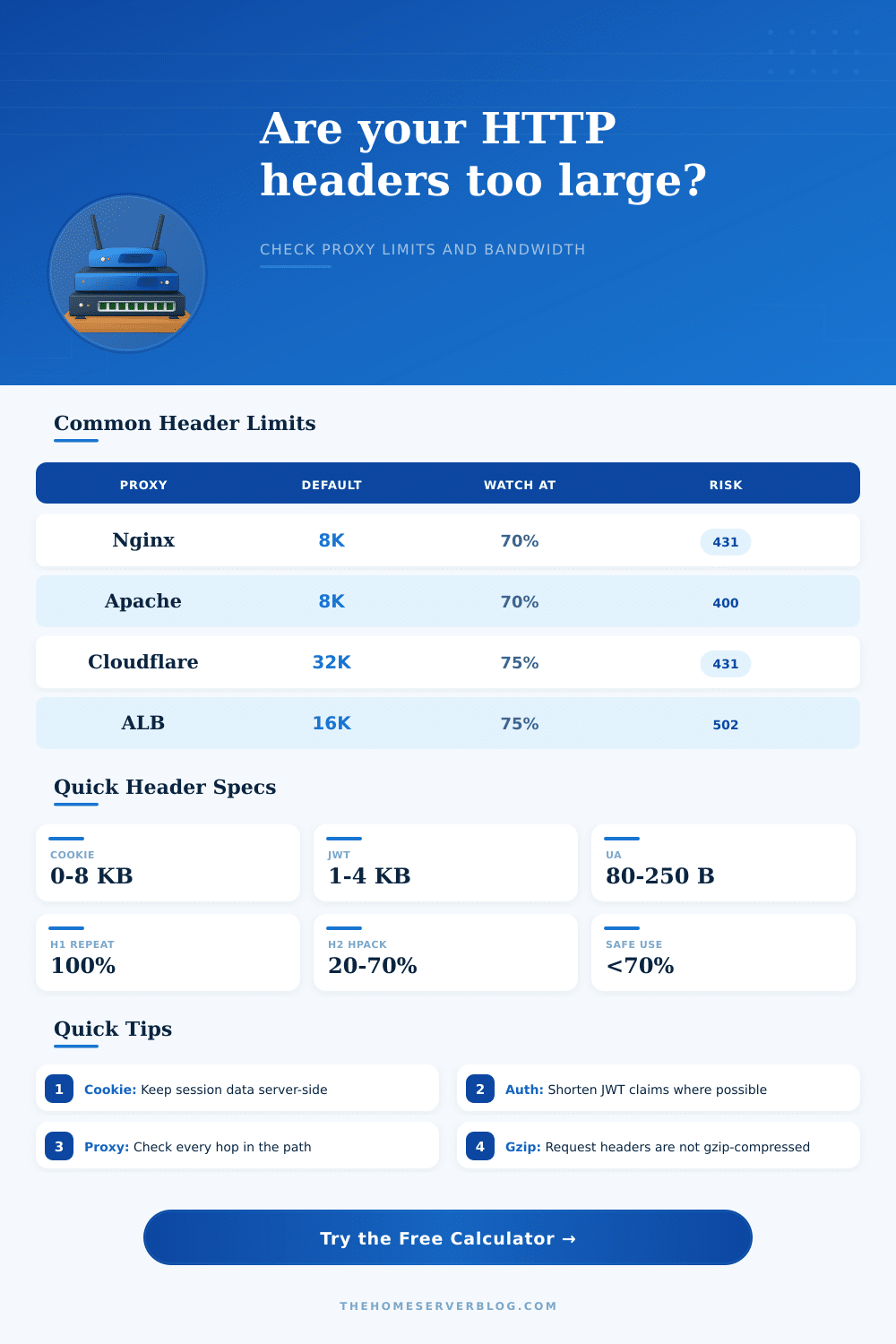
| Layer or server | Common default | What it usually counts | Practical warning point |
|---|---|---|---|
| Nginx reverse proxy | 8 KB per buffer is common | Request line and header fields, depending on buffer directives | Keep routine traffic below 5-6 KB unless buffers are deliberately tuned. |
| Apache HTTP Server | 8 KB field size default | Individual header field size and request-line constraints | Large Cookie or Authorization values should be trimmed before 6 KB. |
| AWS Application Load Balancer | 16 KB request header limit | Total request headers handled by the load balancer | Start investigating above 12 KB, especially with multiple cookies. |
| Cloudflare edge | 32 KB request header limit | Total incoming request headers at the edge | Leave room for CDN-added fields and security products. |
| Envoy / service mesh | 60 KB is a common tuned ceiling | Aggregated request headers after mesh and tracing additions | Trace baggage can grow quickly across internal hops. |
| Node.js application | Often 16 KB in modern runtimes | Total parsed HTTP headers before the app receives the request | Do not assume the app limit is higher than the proxy limit. |
| Path example | Smallest hop | Recommended cap | Best fix when exceeded |
|---|---|---|---|
| Browser to Nginx to PHP app | Nginx 8 KB | 5.5 KB before buffer | Reduce Cookie payload and store session state server-side. |
| Browser to CDN to ALB to app | ALB 16 KB | 11-12 KB before buffer | Audit analytics cookies, feature flags, and JWT length. |
| Mobile API to gateway to service mesh | Gateway policy | 8-10 KB if unknown | Move large context out of headers into request body or lookup keys. |
| Internal service to Envoy sidecar | Mesh max headers | 50% of tuned mesh limit | Control tracing baggage and do not forward user cookies internally. |
| SSO portal behind enterprise proxy | Enterprise proxy | 6-8 KB unless documented | Shorten SSO cookies and split apps onto distinct cookie domains. |
| Named scenario | Typical header drivers | Likely raw size | Operational note |
|---|---|---|---|
| Static Site | Host, Accept, User-Agent | 0.5-1 KB | Usually safe unless third-party cookies are broad. |
| Login Session | Session cookie and CSRF token | 2-4 KB | Watch cookie domain and path scope. |
| JWT API | Bearer token and trace IDs | 2-5 KB | JWT claims are often the biggest contributor. |
| Analytics Heavy | Multiple tracking cookies | 4-8 KB | Can break older 8 KB proxy defaults. |
| SSO Portal | Identity cookies and auth assertions | 5-10 KB | Confirm the smallest enterprise proxy hop. |
| Microservice Trace | traceparent, baggage, forwarding headers | 3-9 KB | Repeated internal forwarding can amplify size. |
| Mobile App | Auth token, app version, device headers | 1.5-4 KB | Usually predictable, but token refresh can spike. |
| CDN Edge | Geo, bot, cache, forwarded headers | 2-6 KB | Edge products may add fields before origin. |
| Legacy Cookie Stack | Old experiments and stale cookies | 6-12 KB | Expires cleanup is often the fastest win. |
| Near Proxy Limit | Large cookies plus long JWT | 8-16 KB | Expect intermittent 431/400 errors by path. |
I’m sure you’ve experienced it, your perfectly functional site has become a digital ghost town because… what was that error message again? Oh yeah, it was a strange 502 Bad Gateway or maybe a 431 Request Header Fields Too Large. The server wasn’t down. Your code wasn’t broken. You simply stuffed too much baggage in the envelope.
A web request’s HTTP headers should be a simple set of instructions on how to deal with the message’s body. Lightweight metadata. But somewhere along the way from an overly ambitious identity provider to a sprawling analytics platform, those headers balloon until they snaps against the wire.
Why Your Website Headers Are Too Big
If you know your numbers, use the calculator up top; it’ll run the math for you. But more importantly: where does that bloat come from? Where does this bloat comes from? Most developers think about page content when they think “data transfer,” rather than the overhead preceding it. They’ll spend hours optimizing an image into a different file format that saves them twenty kilobytes and pat themselves on the back, without realizing they’ve got one cookie header adding three kilobytes to each and every request.
This kind of inefficiency compounds. It slows down time-to-first-byte, it consumes bandwidth on mobile connections, and finally it trips the safety wires on your infrastructure. The trick is to understand what exactly you’re measuring. Browsers and proxies counts bytes differently than you do when you look at them in your text editor.
Typically, it’s cookies. By default, they’ll stick around with each request unless you scope them different. One thing is a session token. Another is a legacy cookie. It contains abandoned cart data, experiment flags, and user preferences dating back three years. Take a look at these inputs on this tool. See how fast that number spikes as you expand your authorization bearer token length and add some custom headers.
The convenience of JWTs; no need to hit the DB to check state, is offset by their tendency to bloat by about thirty-three percent in base64, which blows up a binary value. And that’s where folks go wrong: they think their little JSON payload will remain little in transit. It won’t.
And then there’s the layer of the protocol itself. HTTP/2 offers header compression via HPACK, a method that shrinks down repeated field names and values across persistent connections. The calculator assumes that if you’re using HTTP/2, you’re already doing this. However, the first request sent over a newly established connection will still send everything raw. Depending on how many following requests are sent over that same connection, they may end up being leaner; however, that initial hit contributes to performance metrics. For users with mostly spotty cellular network connectivity, those cold starts compound.
Just having compression isn’t enough to save you from a poorly designed header strategy. It is one reason why it works, but it is not a cure-all. The tool’s reference tables also call out the importance of context. Sure, Cloudflare‘s edge will happily slurp down thirty-two kilobytes of headers. But maybe you’re running behind an Nginx reverse proxy, which has been tuned with an eight-kilobyte buffer. Now request dies before it ever reaches your code. The weak spot in the chain is always the bottleneck.
Audit each hop from the browser to the origin server. That includes any CDN you’re using, your load balancer, and even your internal service mesh. These are all places where additional tracing headers might be injected. While they’re invaluable when it comes time to debug something, they also use up space. You might have a distributed trace ID here or a baggage context there. Suddenly, at peak traffic, you’ve pushed a healthy request past the limit.
But increasing the proxy limits isn’t always the answer (in fact it’s often not). The problem is that increasing buffer sizes only masks your design debt. Every server node will now has more memory pressure. And while you’ll delay that crash, eventually you’ll be right back there again.
What you want to do instead is see what really needs to go in the headers. That big piece of profile data? Put it in the body of the request. Want to get rid of some of that session state? Store it on the server and put a small identifier in the cookie. Those are architectural choices that result in speed and stability.
And finally there’s the matter of how large you make headers, which isn’t so much a question of counting bytes as it is a question of discipline. Ask yourself: does this bit of data really need to come along for every single trip down the wire? Keep the envelope light, and the message goes through fast. Get the message through and everybody wins. Avoid the ghost town of error pages, no more users hitting a wall they can’t explain, just users getting through. You should of kept things simpler from the start. It is much more comfortabley to manage small requests than large ones. The modern approach must handle this better then before.