Home lab RPO and retention planning
Snapshot Frequency Calculator
Estimate a practical snapshot interval from daily data change, RPO target, snapshot runtime, retention count, delta growth, storage cap, verification cadence, and failure probability.
ZFS dataset snapshots
Near-instant block-reference snapshots with send or receive support. Watch deleted-file retention and recordsize effects.
Best: files, NAS, configsLVM thin snapshots
Useful for Linux volumes and VM hosts. Thin-pool metadata and merge operations need headroom.
Best: block volumesqcow2 or hypervisor snaps
Convenient before VM changes, but long chains can hurt I/O and backup consistency.
Best: short VM rollbackCSI volume snapshots
Kubernetes snapshot classes vary by driver. Test restore to a fresh PVC, not only snapshot creation.
Best: PVC recovery| RPO band | Typical interval | Good fit | Watch point |
|---|---|---|---|
| Critical | 5 to 15 minutes | Config stores, auth, small databases | Runtime and verification must be very low. |
| Operational | 30 to 60 minutes | VM disks, app data, Git services | Delta growth after updates can fill the cap. |
| Convenience | 2 to 6 hours | Home shares, media libraries, lab systems | Users may notice larger rollback gaps. |
| Archive | 12 to 24 hours | Photo vaults and cold datasets | Daily mistakes can sit until the next run. |
| Retention count | At 15 min | At 1 hour | At 6 hours |
|---|---|---|---|
| 24 snapshots | 6 hours | 1 day | 6 days |
| 48 snapshots | 12 hours | 2 days | 12 days |
| 96 snapshots | 1 day | 4 days | 24 days |
| 168 snapshots | 42 hours | 7 days | 42 days |
| Verification cadence | Risk weight | Use when | Practical check |
|---|---|---|---|
| Every snapshot | Low | Small deltas and critical RPO | Mount or list recent snapshot metadata. |
| Every 4 snapshots | Moderate | Hourly VM or dataset plans | Run restore smoke tests several times daily. |
| Daily | Medium | NAS shares and media datasets | Validate last good point before pruning. |
| Manual only | High | Cold archives with separate backups | Schedule calendar restore drills. |
| Failure probability | Planning signal | Likely source | Adjustment |
|---|---|---|---|
| 0 to 1% | Clean automation | Stable scripts, healthy disks | Use normal RPO buffer. |
| 1 to 5% | Minor risk | Occasional lock or send timeout | Leave 10 to 20% RPO margin. |
| 5 to 15% | Unstable schedule | Long freezes, busy pools, guest agent gaps | Shorten interval or fix failure source. |
| Over 15% | Do not trust | Broken quiesce or overloaded storage | Repair before relying on snapshots. |
Snapshot Snapshots is treated as magic wands by most home lab admins. Snap a picture of your VM before that update, if it breaks, wave the wand and go back to perfect. It’s nice having that confidence…until the day when it stops working.
Snapshots are managed between three competing forces. You must consider how fast you need to restore in a disaster, how much storage you can afford for all these copies, and how much data change from one day to the next. With your RPO and churn per day, calculator on top does the rest for you. No need to guess at storage estimates and coefficients. Instead, real effort comes in understanding what all those numbers mean.
How to Plan Your Snapshot Strategy
The first thing is how much the data changes. It is not the total amount of stuff on your drive. It’s how much change logically over a typical day. For example, maybe you have a database which write out new index files every hour. In that case, your daily rate might be half of your data set. Or perhaps you’re archiving photos and never touch them again, in that case your daily rate might be under one percent. Guess wrong here, and every other calculation are meaningless. That’s where folks go astray. Because the file doesn’t move, they think delta must be tiny. They forget about metadata shifts and background updates.
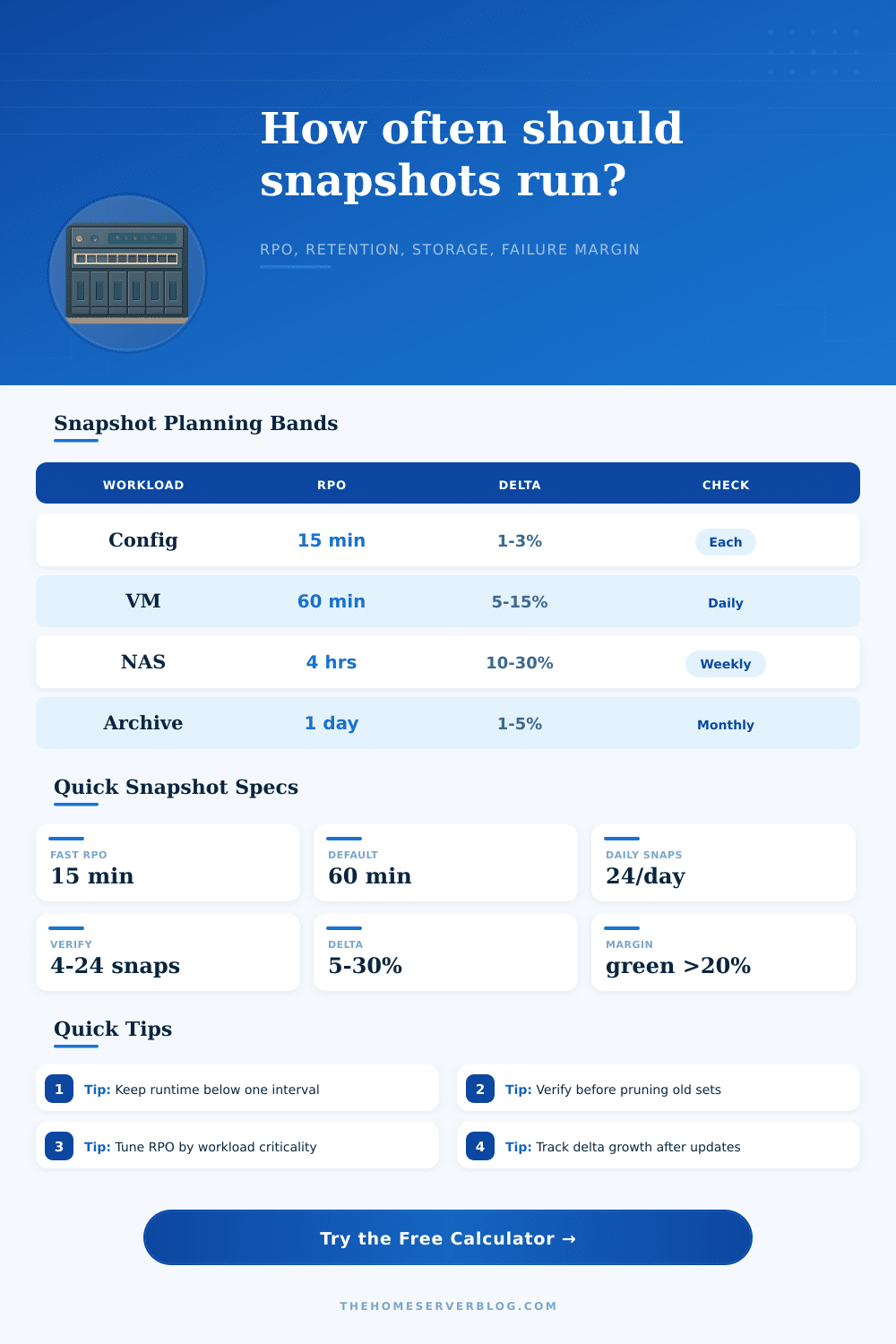
And now, next step: your Recovery Point Objective, or RPO, which is to say how old you’re okay with your data being when it’s lost. Fifteen minutes might be tolerable for a critical configuration store. For a personal media library, losing twenty-four hours of downloads is hardly worth the storage cost. Because of how much time your snapshots take (the longer they take, the fewer you can reasonably create in a given period), tool will tell you what an achievable interval is. A snapshot that requires a lot of I/O or overhead to quiesce may simply not be able to run every five minutes without queueing backlogs. It makes you face reality of hardware you’re using.
The other limit is storage space. Each snapshot you retain take up space for its changed data. So if you have a lot of churn and retain forty-eight hourly snapshots, that’s going to add up quickly. By estimating how much it thinks you can compress and share blocks, the calculator tells you whether or not your selected number of snapshots will fit in your storage cap before you commit to that retention schedule. You don’t want new snapshots to fail to fit and cause older ones to be automatically removed. This will leave you with a shorter recovery window different than you planned on.
One variable that gets ignored when considering lab schedules is verification frequency. It’s nice to have a list of 24 points per day on your management console, but it stinks when you find yourself in a crisis and realize half of those was silent failures. This is where we account for verification frequency. Your schedule has some amount of risk margin which you want to balance against the importance of testing a restore from the most recent good point. Every few days are much better than relying on a long string of untouched backups. Trust but verify.
Realistic planning also takes into account failure probability. Automation isn’t magic. Agents will occasionally miss their check, scripts will timeout, and locks will clash. You should acknowledge that there’s a bit of a failure rate, and incorporate some margin into your RPO calculation. Maybe you have a 2% job failure rate; your actual recovery point might be a little further back than your ideal interval implies. Accepting a certain amount of imperfection avoids panicking over minor glitches, it converts error logs into expected noise instead of an emergency.
Fortunately, the tool comes with a set of reference tables that provide some useful benchmarks for different workload types. The tighter the interval, the better. Do this regularly for critical configs. You can afford to do it every day (and check it manually) for archive data. Align your schedule based off the true cost of your data instead of under-protecting valuable systems or over-engineering trivial ones. Match your strategy to what actualy matters, instead of just filling space.
In the end, snapshot planning is a matter of setting expectations. There’s no such thing as “zero” storage cost + “instant” recovery + “infinite” retention. Choose any two. With this tool, you can quantify the tradeoffs to help you consciously decide instead of crossing your fingers. Begin with those workloads you consider essential. Figure out which data losses are truly damaging. Trust the math to determine how often to do it. This isn’t about perfect protection. It’s about tough planning that would of withstood the gritty details of day-to-day ops.