Home Lab Cooling Tool
Server Heat Output Calculator
Estimate how much heat your servers, switches, storage, UPS, and rack gear add to a room, then translate that load into BTU/hr, tons of cooling, kilowatts, and airflow.
⚡Real Server and Cooling Presets
🔧Server Heat Inputs
Full Heat Load Breakdown
🖥Equipment and Spec Comparison Grid
Mini PC / NUC Node
18-65 W
Typical active draw
- 0U shelf or 1U tray
- Quiet, dense compute
- Good for Proxmox clusters
NAS Storage Appliance
70-180 W
6 to 12 disk home NAS
- Drive count dominates heat
- Spin-up can spike draw
- Add 10GbE switch load
1U Rack Server
180-450 W
Xeon or EPYC edge server
- High fan pressure
- Hot aisle path matters
- Often loud in closets
2U Virtualization Host
300-700 W
Dual CPU plus memory
- More RAM means more watts
- Room cooling often required
- Plan rack exhaust path
GPU Compute Server
650-1600 W
AI, rendering, or CUDA node
- Use measured peak load
- Needs direct exhaust
- Can exceed closet HVAC
PoE Switch Stack
80-500 W
Switch plus delivered PoE
- PoE becomes heat too
- APs heat remote rooms
- Budget switch fan heat
UPS and Inverter Loss
20-150 W
Loss above IT load
- Battery charging adds heat
- Online UPS is warmer
- Keep vents unobstructed
Disk Shelf / JBOD
120-550 W
HDD shelf and fans
- HDDs run 5-12 W each
- Dense shelves need airflow
- Watch inlet drive temps
📊Heat Conversion Reference Tables
| Electrical Load | Heat Output | Cooling Tons | Typical Use |
|---|---|---|---|
| 50 W | 171 BTU/hr | 0.014 tons | Single router or mini firewall |
| 150 W | 512 BTU/hr | 0.043 tons | NAS plus small switch |
| 500 W | 1,706 BTU/hr | 0.142 tons | One rack server at active load |
| 1,000 W | 3,412 BTU/hr | 0.284 tons | Dense compute shelf or small rack |
| 3,500 W | 11,942 BTU/hr | 0.995 tons | Near one ton of sensible cooling |
| Cooling Context | Suggested Buffer | Airflow Target | Practical Limit |
|---|---|---|---|
| Open rack in office | 5-10% | Natural room mixing | Comfort noise and heat |
| Network closet | 15-20% | Door grille or exhaust fan | Small air volume warms fast |
| Enclosed rack | 20-25% | Front inlet and rear exhaust | Recirculation at blank panels |
| Garage utility rack | 20%+ | Seasonal ventilation | Summer ambient temperature |
| Dedicated server room | 10-15% | Return path to HVAC | Available breaker and ducting |
| Airflow Formula | Value | Use Case | Note |
|---|---|---|---|
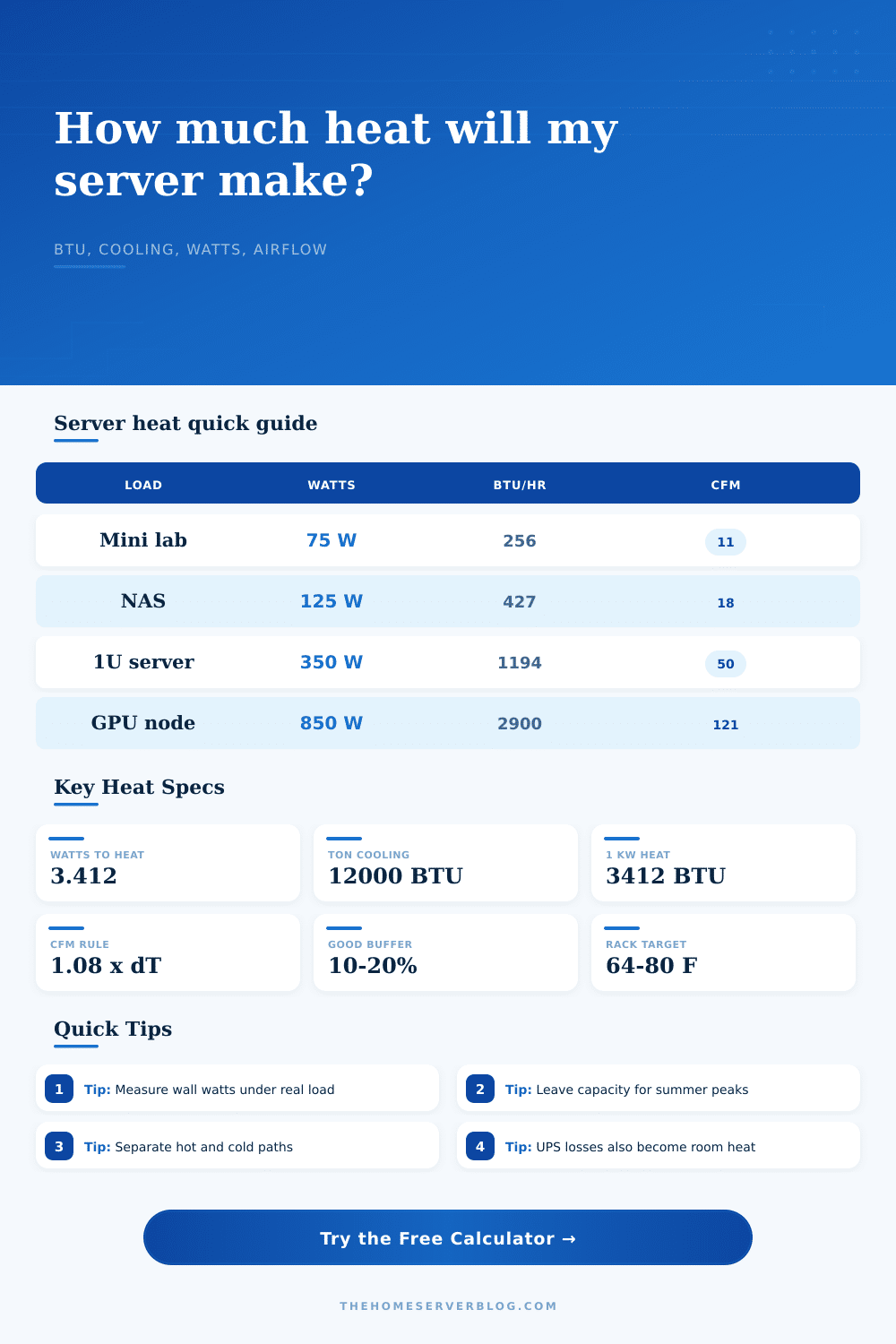
| BTU/hr = W x 3.412 | 3.412 | IT heat conversion | Nearly all server power becomes heat |
| Cooling ton | 12,000 BTU/hr | AC sizing reference | Use sensible capacity where available |
| CFM = BTU/hr / (1.08 x dT) | 1.08 | Imperial airflow | dT is allowed Fahrenheit rise |
| m³/h = CFM x 1.699 | 1.699 | Metric airflow | Useful for inline fan specs |
| kW heat = BTU/hr / 3412 | 3412 | Cooling capacity | Compare to mini split ratings |
| Common Project Size | Equipment Count | Primary Result | Secondary Result |
|---|---|---|---|
| Firewall closet | 3 devices | 250-500 BTU/hr | 15-35 CFM exhaust |
| Mini PC cluster | 3-5 nodes | 450-1,100 BTU/hr | 0.04-0.09 tons |
| NAS plus 10GbE | 2-4 devices | 700-1,600 BTU/hr | 30-75 CFM |
| Single rack host | 1 server | 1,200-2,400 BTU/hr | 50-110 CFM |
| Half rack lab | 8-14 devices | 3,500-8,000 BTU/hr | 0.3-0.7 tons |
💡Cooling Planning Tips
There are two things you have to know: 1) computers create heat, and 2) heat obeys laws of thermodynamics. When devices draw power from the wall, each watt of electricity is converted to heat. Because even one or two server in an enclosed area can produce dangerous temperatures very fast.
To calculate how much heat you’re dealing with, simply enter number of devices and their approximate power usage into calculator here. It do all the unit conversion and coefficient guessing for you. I see far too many people base everything based off the power supply, as if a 700 watt power supply mean it will consume 700 watts of power. A database server may only use two hundred watts when performing its job, yet you’ve sized your cooling for worst case scenario, which never realy happens.
How to Calculate Your Server Heat and Cooling Needs
You can’t just say “oh I have X wattage” because that’s what you need to idle with. You want to know how much power does my system uses when doing backup/whatever? Get yourself a plug strip meter, crank up your normal workload, then take note of what the watts are. That’s your benchmark.
From there, the math is simple. Multiply your base by 3.412. (British Thermal Units, per hour.) This is measured in British Thermal Units per hour. When you realize that every ton of air conditioning capacity equal twelve thousand BTU per hour, that figure comes into focus. If a single desktop server pulls a hundred watts, it’s creating more than three-hundred-forty BTU per hour. Add three servers, a NAS, and a switch, and suddenly you’ve exceed the load of a typical window unit.
As you add more gear, the numbers increases. And while the tool prompts for a peak load multiplier, yes, servers don’t consume power constantly. Updates, backups, video encoding all spike the energy draw. These spikes matter; if you cool down at wrong time, you’ll find yourself overheated. To account for this variability (and also inefficiency in space), you have safety overhead set.
Why? If you’re in a tiny network closet that warms quicker than a garage, it’s because there isn’t enough air to start with. Cool air needs to flow in, pick up heat, then leave. Think of it like pathway instead of a fan alone. Hot air rises; if blocked, hot air remains. Cooling is also about airflow. It doesn’t matter how big an air conditioner you get; if the warm air recycles back into your server intakes, it won’t be cool.
The calculator find the minimum cubic feet per minute needed for your desired temperature rise. The less you allow the temperature to rise, the greater need for airflow. For data centers, they employ hot/cold aisles so that intake is separated from the exhaust. In a home lab, you might not be able to do this but at least you can control it.
Make sure you keep the rear of your rack open and install blanking panels to prevent warm air from circulating back around. Also don’t measure average room temperature, measure what hits the server fans. If it’s hot when it reach the server fans, the server will throttle back or shut off.
Other extra gear like access points, switches and uninterruptable power supplies needs consideration too. They are inefficient and produce waste heat. While individually those losses might be tiny; the loss of a thirty watt UPS for example, they accumulates over time and add to thermal load. The calculator has fields for those extras. Because they does add up over time. Over 24 hours, a little bit starts to become something meaningful. And then it’s part of that overall energy you should of removed from your space each day.
Cooling isn’t about getting the biggest unit out there. It’s about fitting right amount of cooling to real world demand. Get some measurement data, add a buffer for the summer and make sure you get enough airflow in the space. View heat as design constraint instead of an afterthought. Your lab will hum quietly and consistently if you do so. In fact, you’ll eliminate overheating altogether.