Teredo Address Calculator
Encode or decode a Teredo IPv6 transition address from the server IPv4, mapped client IPv4, UDP port, and RFC 4380/RFC 5991 flag fields.
📌Teredo and IPv6 Transition Presets
⚙Calculator Inputs
Used in decode mode. Shortened IPv6 text with :: is accepted when it expands to eight hextets.
🖧Transition Method Spec Comparison
📚Teredo Address Field Reference
| Address segment | Bits | Calculator source | Formula | Practical check |
|---|---|---|---|---|
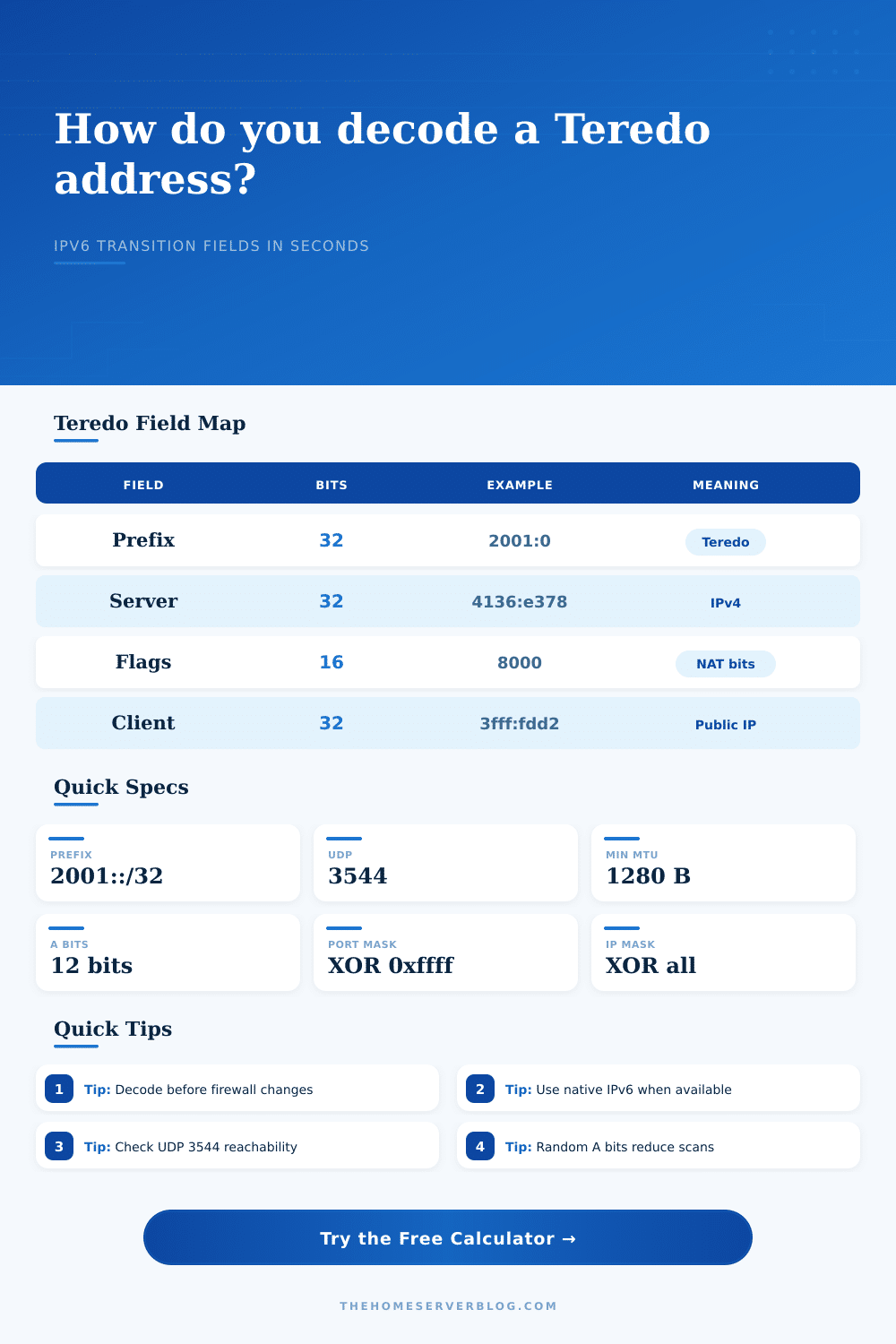
| Teredo prefix | 0-31 | Fixed field | 2001:0000 | Address should begin with 2001:0 for Teredo. |
| Server IPv4 | 32-63 | Teredo server IPv4 | Each octet converted to hexadecimal. | Example 65.54.227.120 becomes 4136:e378. |
| Flags | 64-79 | Flag policy, cone bit, A bits, or manual flags | C bit plus RFC 5991 A-bit placement. | 0x8000 is a legacy cone signal; randomized flags are common. |
| Mapped UDP port | 80-95 | External UDP port | 65535 minus mapped port. | Port 40000 becomes 0x63bf. |
| Client public IPv4 | 96-127 | Mapped public IPv4 | Invert every IPv4 octet. | 192.0.2.45 becomes 3fff:fdd2. |
🛡Flag and NAT Interpretation Table
| Flag profile | Typical hex pattern | What it signals | Use in calculator | Home lab note |
|---|---|---|---|---|
| RFC 4380 non-cone | 0x0000 | C bit clear, reserved bits clear | Select all-zero flags. | Simple for reproducing legacy documentation. |
| RFC 4380 cone | 0x8000 | C bit set for cone NAT | Select legacy cone flag and check the cone source box. | Useful when decoding older Windows examples. |
| RFC 5991 randomized | 0x0000-0x3fff without U/G | C clear with 12 randomized A bits | Enter a three-digit A-bit value. | Reduces predictability during address scans. |
| Manual capture | Any 16-bit hex | Preserves packet-capture fields exactly | Choose manual flags. | Best for firewall logs and support tickets. |
📶IPv6 Transition Capacity and Limit Table
| Method | IPv4 dependency | NAT fit | Packet overhead | Operational limit |
|---|---|---|---|---|
| Teredo | UDP over IPv4 | Works through many non-symmetric NATs | IPv4 header plus UDP header | Relay quality and UDP filtering can dominate performance. |
| 6to4 | Public IPv4 and protocol 41 | Poor behind typical consumer NAT | IPv4 protocol 41 wrapper | Requires routable 6to4 relay behavior. |
| NAT64/DNS64 | Provider or local translator | Designed for IPv6-only client networks | Translator state and DNS synthesis | Needs DNS64-aware name resolution. |
| Manual tunnel | Static endpoint or broker | Usually needs explicit router support | Depends on tunnel type | Predictable, but more setup and firewall care. |
| Native IPv6 | No IPv4 transition dependency | Best long-term design | No transition wrapper | Prefer this once the ISP or upstream router supports it. |
📋Common Home Server Scenarios
| Scenario | Server IPv4 | Mapped client IPv4 | UDP port | Flag profile |
|---|---|---|---|---|
| Xbox Home NAT Check | 65.55.158.118 | 198.51.100.34 | 56123 | RFC 5991 randomized |
| Miredo Linux Lab | 203.0.113.1 | 198.51.100.77 | 3545 | All-zero legacy |
| Windows Legacy Cone | 65.54.227.120 | 192.0.2.45 | 40000 | 0x8000 cone example |
| Firewall Rule Decode | 157.56.149.60 | 203.0.113.204 | 49152 | Manual packet capture |
💡Practical Calculation Tips
What’s my Teredo Address? The long string of hexadecimal numbers in your network logs has you stumped.
Until now, those teredo addresses seemed odd. But once you understand there internal structure, they make sense. Those are basically IPv4 packets masquerading as IPv6. Computers can use them to access the broader internet even when located behind rigid firewalls. This requires no help from your ISP… No handing out of actual IPv6 connection.
What is a Teredo Address?
This page will explain it all. It will split that one address back into its parts. It will tell you what server handles your traffic. It will show what your external-facing IP appears to be. It will tell you which specific UDP port your system rely on to maintain the tunnel.
As a hack, yes. In those early days of IPv6 adoption, most home users found themselves with their network address translation (NAT) router between them and the wider Internet. That router was preventing the direct protocol switch required for native connection. Teredo got around that issue by hiding IPv6 within regular old UDP packets. The traffic is normaly destined for port 3544. It slips past firewalls that allow general UDP traffic but block the new protocol entirely.
And the address? Well, it’s a map of the process. The first thirty-two bits are a constant prefix that tells other nodes this traffic is using Teredo. Next comes the remaining thirty-two bits, which contain the IPv4 address of the relay server your client talks to. If you spot an unknown server IP, have a look at your routing table. Next up is the flags field in the middle of the address. That field tell you about behavior of your NAT device. Is it a cone, is it symmetric? Both are important if you play games online or use VoIP app.
And that’s where the calculator kicks in: It understands those bits, which you don’t need to count on your own by hand. Just enter an address that you know works, then let the calculator tell you what the flags tell you about your network setup. If some app doesn’t work but another does, this lets you dig a little deeper and find out why. It makes a black box readable as a troubleshooting tool.
This second part is what holds your client info, but it’s obscured. Its one’s complement are used for the mapped UDP port. Using the calculator, we’ll subtract that port number from sixty-five thousand five-hundred-thirty-five. Their public IPv4 address is also inverted via one’s complement. (Again, this was done to prevent simple scanning attacks). To anyone who might glance at a packet capture, it appears to be a random address. But a network admin can’t instantly identify their own source IP just by looking at it.
To invert the math, you have to use a tool, and that’s where the calculator comes in. By using it, it reverses the math for you and spits out both original port number and the clean IPv4 address all at once.
At the time Teredo was a brilliant piece of engineering. But today it’s basically a legacy technology. Most moddern networks prefer native IPv6 connections. They may also use more reliable tunneling solutions, such as manual tunnels or 6to4. Public relay servers used by Teredo can be slow and unreliable. Also, Teredo adds a lot of overhead to each packet. Each IPv6 packet gets wrapped in a UDP header and an IPv4 header. That increases latency and eats up bandwidth. Compare the overheads in the reference tables on the page. If you’re still seeing lots of Teredo traffic, you should of investigated why your system doesn’t have native IPv6.
To use the tool properly, you need to know what all the inputs mean. The client IP is your public-facing address that your router shows on the internet. The server IP is the relay you’re connecting through. The UDP port is the channel your device connects via.
If you’re troubleshooting connection problems, begin by decoding one of your most recent addresses. Is the server IP as expected? Are the flags revealing a different NAT type for some reason? And does the client IP look right (not reassigned by your ISP)? It is a small step but it helps clarify a confusing situation.
The truth is, Teredo is a holdover from the old days of network transition. It did what it was supposed to do: fill in the gap between one generation of protocols and another. Now it’s mostly a band-aid for stubborn networks and a useful diagnostic tool. But that’s where the value of this calculator lies. It reveals the underlying process; it makes unclear text meaningful. Whether you’re reading firewall logs or troubleshooting your own home lab, understanding what these addresses represent puts you in charge. You will no longer have to guess; instead, you will have knowledge. It brings some sense to the messiness of transition technologies.