HomeServerBlog DNS lab tool
EDNS Buffer Size Calculator
Size a DNS resolver or authoritative server EDNS UDP payload for DNSSEC, MTU limits, tunnels, and truncation behavior before fragmented packets make troubleshooting miserable.
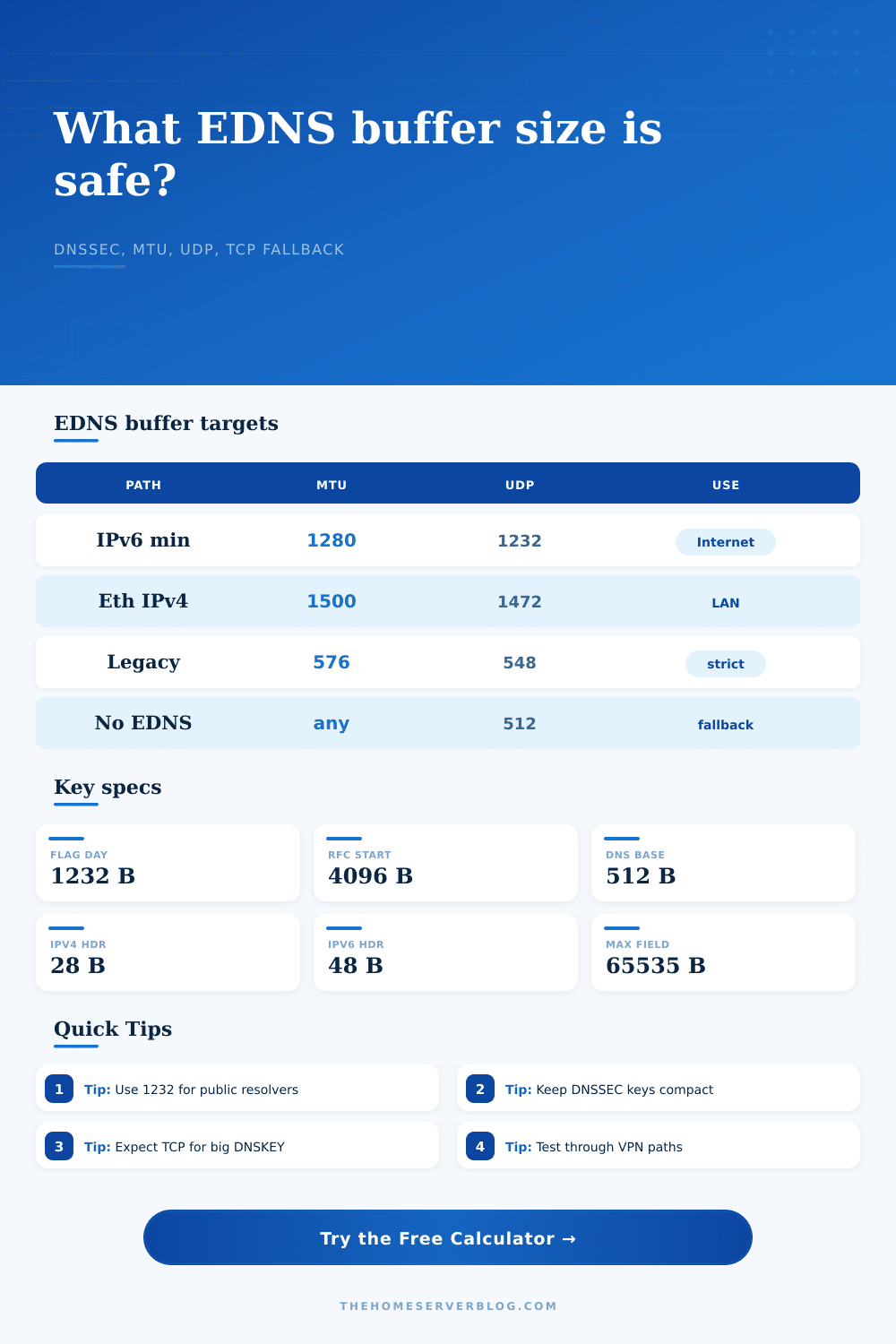
1280 MTU minus IPv6 and UDP headers; the common public Internet target.
1500 MTU minus IPv4 and UDP headers; useful on verified LAN paths.
1500 MTU minus IPv6 and UDP headers; still often capped to 1232 externally.
Large EDNS value for fallback probing or controlled networks with working fragments.
Works through strict middleboxes but forces more DNSSEC answers to TCP.
Reduces a 1500-byte access link to a typical 1492-byte payload MTU.
Plan extra room when recursive DNS crosses a site-to-site tunnel.
ESP over UDP can make a conservative EDNS value more reliable.
| EDNS target | Payload bytes | Where it fits | Operational note |
|---|---|---|---|
| No EDNS fallback | 512 | Very old DNS or strict firewall paths | Expect frequent truncation for DNSSEC and large TXT responses. |
| DNS Flag Day 2020 | 1232 | Public Internet resolvers and authoritative servers | Avoids IPv6 minimum-MTU fragmentation by using 1280 minus 48 header bytes. |
| Ethernet IPv4 ceiling | 1472 | Known 1500 MTU IPv4 LAN paths | 1500 minus 20-byte IPv4 header and 8-byte UDP header. |
| Ethernet IPv6 ceiling | 1452 | Known 1500 MTU IPv6 LAN paths | 1500 minus 40-byte IPv6 header and 8-byte UDP header. |
| RFC 6891 large start | 4096 | Fallback probing or controlled networks | Useful as a starting point only when fragmentation and fallback are tested. |
| DNSSEC response pattern | Typical bytes | 1232-byte fit | What changes the size |
|---|---|---|---|
| Unsigned A or AAAA lookup | 160 to 280 | Fits easily | Extra records and name length add small overhead. |
| Signed A or AAAA with RRSIG | 900 to 1200 | Usually fits | Algorithm choice, extra AAAA records, and authority section size matter. |
| Signed DS referral | 750 to 1050 | Usually fits | Multiple DS digests and glue records add bytes. |
| ECDSA DNSKEY response | 850 to 1150 | Often fits | Smaller signatures help stay under the modern UDP target. |
| RSA DNSKEY response | 1450 to 2100 | Often TCP | Large keys and multiple KSK/ZSK records can exceed safe UDP. |
| NSEC3 negative answer | 1200 to 1800 | Borderline | Hash chains, opt-out status, and signed denial records add size. |
| Path or encapsulation | Common overhead | Example MTU | Planning effect |
|---|---|---|---|
| IPv4 plus UDP headers | 28 bytes | 1500 | Allows 1472-byte DNS payload before other overhead. |
| IPv6 plus UDP headers | 48 bytes | 1280 | Leaves 1232 bytes on the IPv6 minimum MTU path. |
| PPPoE access | 8 bytes | 1492 | Usually still safe at 1232 but lowers raw ceiling. |
| 802.1Q VLAN tag | 4 bytes | 1500 | Small overhead, but stacked tags can eat margin. |
| WireGuard tunnel | About 60 bytes | 1420 | Test DNSSEC over the tunnel and keep margin conservative. |
| IPsec ESP NAT-T | About 70 bytes | 1400 | Large signed answers may truncate even below Ethernet limits. |
| Home lab scenario | Equipment path | Starting EDNS | Expected result |
|---|---|---|---|
| Pi-hole forwarding to Unbound | LAN plus ISP router | 1232 | Stable for mixed IPv4 and IPv6 home clients. |
| Authoritative zone with DNSSEC | Public VPS | 1232 | Signed A responses fit; DNSKEY may set TC for TCP retry. |
| Active Directory split DNS | VLAN trunk | 1232 to 1452 | LAN-only paths can be tested higher if clients stay internal. |
| Remote site resolver | WireGuard or IPsec | 1140 to 1232 | Tunnel overhead makes DNSSEC validation a good stress test. |
| Legacy firewall inspection | Middlebox DNS ALG | 512 | Low fragmentation risk, high TCP fallback rate. |
The moment of DNSSEC‘s home-network break-in: It was a hack; that’s what the error log seemed to say. Pages wouldn’t load from the resolver. Everything we thought we knew about networking seemed to be at fault. Except it wasn’t quite so dramatic.
The problem was that a signed DNS response were larger than the UDP packet that transported it. That server sent back a signed response, setting the truncation bit in hopes of a switch to TCP. But that TCP traffic was dropped because the local firewall was old school. And silence fell.
How to Choose the Right DNS Buffer Size
You won’t escape all failures in DNS, no matter how well you get the numbers right; but you’ll sure eliminate commonest ones. The tool above handles math so you can focus on the architecture. Reliability vs Capacity That’s the main point.
You’d like your EDNS buffer big enough to hold all those new signed responses without requiring the switch to a different protocol, but you’d also like that buffer to be as small as possible so that it survives worst case scenario along the way to the server. Remember: the internet is not a clean pipe. The internet consists of layers of old firewalls, tunnels, and virtual networks. Each layer add overhead. VPNs add encryption wrappers. IPv6 headers are bigger than IPv4 ones. Even something as seemingly harmless as VLAN tagging consume space.
By allowing you to choose your own network path profile, the calculator factors these variables in. That’s where most folks go wrong. They set up their servers using the NIC speed of whatever machine they’re running them from. Then, they completely ignore longest hop down the chain.
There’s also a bit of a tradeoff between how much to advertise as a buffer. Advertise a huge one, and it risks being fragmented. Fragmented UDP packets mean death for DNS. Any single fragment gets dropped, then the whole response gets dropped. This results in timeouts, retries, and more. This feels just like a broken internet to the end user.
Advertise too small a buffer and you’re forcing a lot of TCP fallback. It’s not necessarily bad. TCP is reliable after all! But it’s heavier on the server and may be blocked by restrictive firewalls.
The challenge is finding that sweet spot, where most of your responses fits inside of UDP and those that do not fail gracefully. As you can see from the reference table on the page, the target size is 1232 bytes. That’s one reason to remember it. That figure comes from the DNS Flag Day effort. It’s the largest payload that can be sent through an IPv6 packet without fragmenting, given a minimum MTU of 1280. That’s safe as a default value for any resolver facing the Internet.
For public-facing resolvers, this is the safest default. On your own internal network or home lab where you control everything along the path, you could go higher. You can do this only if you make sure some intermediary isn’t simply discarding oversized packets (on an Ethernet link you can send bigger packets, but again do your homework first).
Each query increases the load on your server because of DNSSEC. A typical IP address lookup will return in a couple of hundred bytes. RRSIG records can double that size, and larger DNSKEY records (particularly RSA) can extend the response far above the UDP protocol’s safety margin. And that’s good! While these cryptographic signatures take up space, they make sure the response comes from who claims it does. Without them, you’d have no way of knowing you’re getting back the “right” answer. You can’t simply remove the signature without breaking its integrity and destroying the chain of trust.
By allowing you to enter an estimate of the expected response size for a given type of query, the tool shows how much room is available in the buffer. Is there enough to contain a signed reply? Or must you anticipate truncation?
Things get even more complicated when there’s a tunnel involved. Did you know that tunnels can add overhead to your queries? If your recursive resolver is inside an IPsec or WireGuard tunnel, you’ll have to account for those overhead bytes when calculating your remaining space. There are profiles for this in the calculator.
It’s possible you can use a small buffer size (e.g., 1472) on your local LAN and it’s totally fine, yet that exact same query sent across a site-to-site tunnel fails. The tool tells you clearly with its margin calculation. A positive margin simply means the response fits. Negative: Server truncates the answer and hopes your client supports TCP fallback.
DNS tuning is in the end an exercise in expectation management. You aren’t going to make the internet act like your LAN. But you can set up your gear so it works around what happens on the internet.
Test the config with the maximum response size you’re expecting. Monitor your log files for truncation flags. If you find that too much is dropping then lower the buffer. You should of increased it if you’ve confirmed the rest of the chain supports it.
The data points are important, but the context is what’s most critical. Get the buffer right and the network will stay silent even as the questions grow large.