DHCP Option 82 Size Calculator
Estimate Agent Circuit ID, Remote ID, Subscriber ID, Link Selection, vendor suboptions, relay chaining, and total DHCP packet overhead before deploying relay-agent insertion.
| Suboption | Code | Data length | Size rule | Common use |
|---|---|---|---|---|
| Agent Circuit ID | 1 | Variable | 2-byte suboption header plus ID data | Switch port, VLAN, DSLAM port, CMTS interface, or SAP. |
| Agent Remote ID | 2 | Variable | 2-byte suboption header plus ID data | Relay MAC, hostname, chassis ID, access-node ID, or customer edge ID. |
| Link Selection | 5 | 4 bytes | 6 bytes total with suboption header | Selects the subnet while keeping giaddr tied to the relay path. |
| Subscriber ID | 6 | Variable | 2-byte suboption header plus ID data | Subscriber, circuit, account, or access-line identifier. |
| Vendor / policy data | 7, 9, 11, 12 | Variable | 2-byte suboption header plus payload | RADIUS attributes, vendor data, relay ID, server ID override, or policy tags. |
| Limit or field | Bytes | Why it matters | Practical target |
|---|---|---|---|
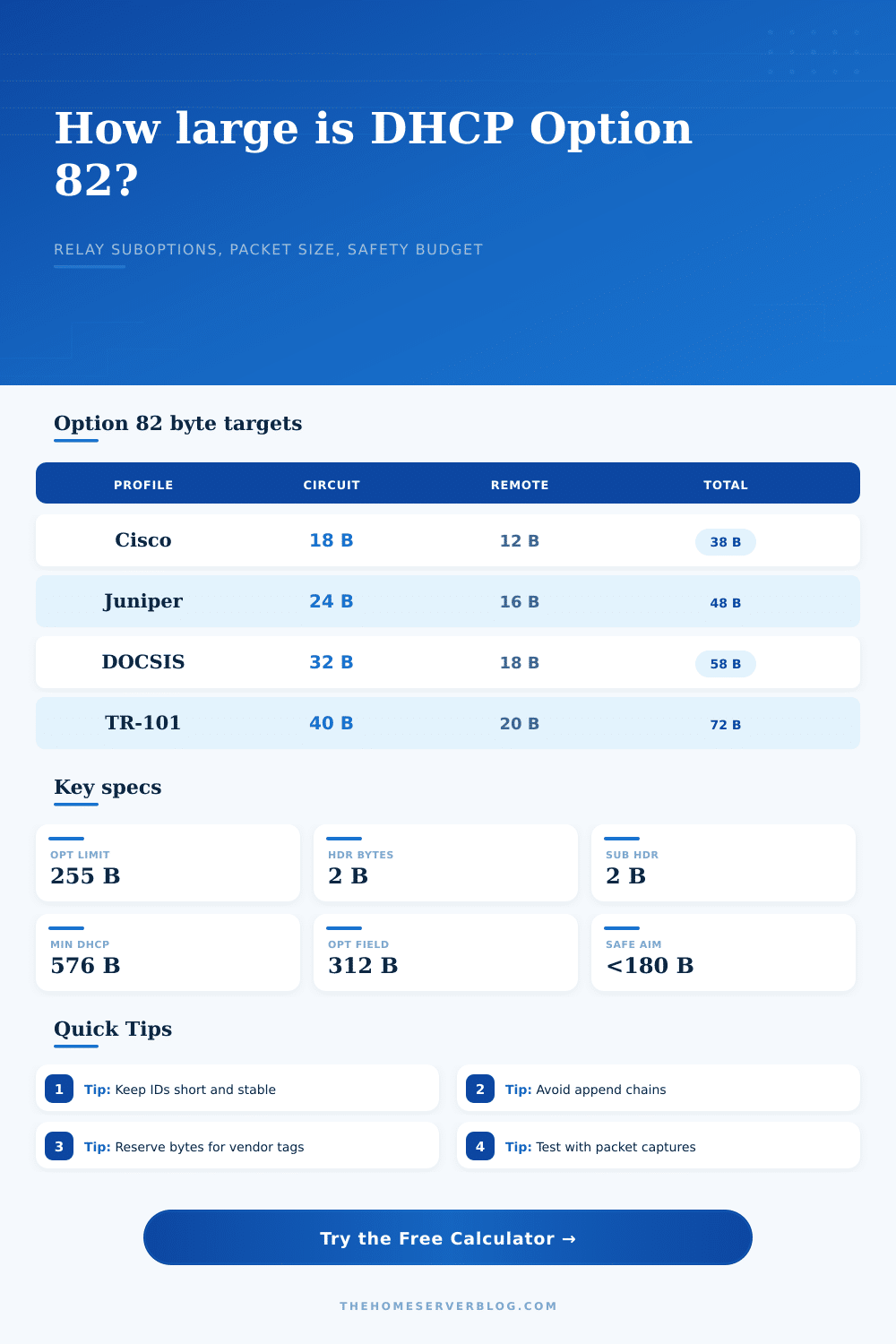
| Option 82 length field | 255 | The DHCP option length is one byte, so total suboption payload cannot exceed 255 bytes. | Stay under 180 bytes where possible. |
| Option code plus length | 2 | The on-wire Option 82 wrapper adds option code 82 and one length byte. | Add 2 bytes to packet totals. |
| Suboption header | 2 each | Every suboption adds one code byte and one length byte before its data. | Count even empty optional tags carefully. |
| DHCP options area | 312 min | Classic clients expect the DHCP option area to fit in the minimum BOOTP vendor field. | Watch PXE and classless-route options. |
| Minimum IP datagram | 576 | IPv4 hosts must handle 576-byte datagrams; larger DHCP packets may still work on modern LANs. | Avoid unnecessary fragmentation. |
| Preset profile | Circuit bytes | Remote bytes | Extra bytes | Typical inserted payload |
|---|---|---|---|---|
| Cisco Catalyst IOS-XE access | 18 | 12 | 0 | 34 data/header bytes, 36 bytes on wire with Option 82 header. |
| Juniper EX/QFX access | 24 | 16 | 0 | 44 data/header bytes, 46 bytes on wire with Option 82 header. |
| FortiGate firewall relay | 16 | 17 | 0 | 37 data/header bytes, 39 bytes on wire with Option 82 header. |
| ISC Kea relay with Subscriber ID | 20 | 14 | 18 | 58 data/header bytes, 60 bytes on wire with Option 82 header. |
| DOCSIS CMTS | 32 | 18 | 4 link selection | 60 data/header bytes, 62 bytes on wire with Option 82 header. |
| TR-101 DSLAM / BNG | 40 | 20 | 10 subscriber | 78 data/header bytes, 80 bytes on wire with Option 82 header. |
| Network scale | Relay pattern | Option 82 goal | Packet concern |
|---|---|---|---|
| Home lab VLAN relay | Router or L3 switch inserts once | Short interface plus VLAN strings under 50 bytes. | Usually safe unless PXE options are also large. |
| Apartment or campus access | Access switch inserts Circuit ID and Remote ID | Stable port names that survive switch replacement. | Use replace or trust policies to prevent duplication. |
| ISP broadband aggregation | DSLAM, OLT, CMTS, or BNG supplies access identity | Enough detail for subscriber selection and policy. | Long strings and vendor tags can approach 255 bytes. |
| Relay chain migration | Old and new relays overlap during cutover | Confirm whether existing Option 82 is dropped, kept, or replaced. | Append behavior can exceed option length quickly. |
That’s the bad news: there’s nothing but silence. You set up new relay agent. Push the config. And you wait for phone to ring. But it never does.
Why? Because something is dropping packets, and they’re doing so in silence. What’s happening? Packets is too big for the network to pass. The DHCP Option 82 size limitation has been hit and your users don’t have any IP address.
Why DHCP Option 82 Packets Fail
I’ve seen this happen far more often than you might think. It almost always comes down to an engineer trusting the default without actualy taking into account what those defaults really mean, such as how many bytes get pushed. It isn’t normaly the relay’s logic that’s at fault; it’s the payload. Each additional identifier you include take up room in a field with a hard cap. A maximum of 255 bytes of data may be carried by option 82. And that’s just the length field and all of its included suboptions, plus the option code itself.
If 255 bytes sounds like a lot, well…it isn’t. You have to subtract what is used by the IP header, other DHCP options, and what must be saved to avoid fragmentation. After that, there realy isn’t much room left.
Unless you use the calculator (above) with your exact relay profile plugged in, you have no idea how many headers to take into consideration when doing math. First, consider what you’re sending: Circuit ID. What’s the name of the interface? What’s the VLAN? If you’re using a Cisco switch, those are likely to be short, maybe 18 bytes for the data portion. If you’re using a Juniper device, its interface names is longer and so will push out closer to 24 bytes. Next, consider Remote ID. Who’s the relay agent, what’s its hostname, or MAC address? That is an easy 12-16 bytes.
Before you’ve sent anything interesting at all, you’re already at 30-40 bytes. And that’s just the address part! Add in the Subscriber ID if you’re doing authentication with it. Add in the Link Selection suboption if you’re routing across multiple subnet. Each of those things adds a two-byte header above the data. Those headers are what kill you silently. Without adding anything functional, they eat your budget. A 5 byte selector becomes 7, a 10 byte string becomes 12 on the wire. It adds up.
When you start chaining relays, you enter the danger zone. Each hop duplicate whatever data was sent in Option 82. In other words, if your design appends Option 82 rather than replaces it, then each hop repeats the entire thing. The first one puts in 40 bytes. The second one looks at those 40 bytes and then appends its own 40 bytes. Now you’re up to 80. Add another hop and now you’re close to 120. You may still be below 255, but you’re burning through room for future growth or even vendor-specific options. That’s pretty inefficient, and most networks can’t afford inefficiency.
On the page, there is a reference table that compares typical profiles. It shows you the difference between a simple access switch and a more complex BNG setup. For example, a DSLAM that complies with TR-101 could require 72 bytes just to describe the access node. From there, you have only 183 bytes left for everything else. Yikes. Tight.
So think about which pieces of information are truly essential to have in order for the DHCP server to correctly assign the appropriate lease. Does the server really care what exact physical port the device is plugged into? Don’t send that. Cut off the fat.
The Option 82 field isn’t the only place where packet size counts. There’s also the fact that whole DHCP packet needs to fall under normal MTU limits. Pushing the options field too far can cause it to fragment. Firewalls drop fragmented DHCP packets and clients often mishandle them as well. Better to send a somewhat sparser Option 82 than one that won’t arrive at all.
To plan for this possibility, the tool has an option to include some planning space as a percentage of your current naming. I suggest 10 percent minimum. Network documentation always creeps up on you in ways you don’t expect. Sometime down the road you’ll add another vendor class. You’ll rename a VLAN. That little bit of breathing room today protects you from an outage tomorrow.
So all of this boils down to a balance between efficiency and identification. You want as much information as possible to identify where a user is but not so much that you blow up the protocol. Before you implement, look at traffic on the wire. What’s the actual byte count? Check with Wireshark. Then go to the calculator and make sure you’re not too far over the edge.
Because if you get the size just right, your silent deployment will stay silent. In a good way. Packets won’t be dropped. It is not broken into fragments. It is just working.