DNS Propagation Time Estimator
Estimate realistic DNS rollout timing from TTL age, authoritative publish delay, delegation cache, DNSSEC DS timing, resolver behavior, and negative caching.
This estimates cache visibility, not domain registration completion. Real results vary by resolver policy, stale serving, DNSSEC validation, and how often clients retry failed lookups.
Estimated DNS Propagation Window
Full Breakdown
| Rollout Goal | Common TTL | Lower Before Change | Practical Use |
|---|---|---|---|
| Emergency A record failover | 60 to 300 seconds | Already low or not possible | Useful for health-check routing and quick origin moves. |
| Planned web server migration | 300 to 900 seconds | One previous high TTL cycle | Best for home lab reverse proxy or VPS cutovers. |
| Mail routing change | 3600 seconds | 12 to 24 hours | MX, SPF, DKIM, and DMARC should overlap during the window. |
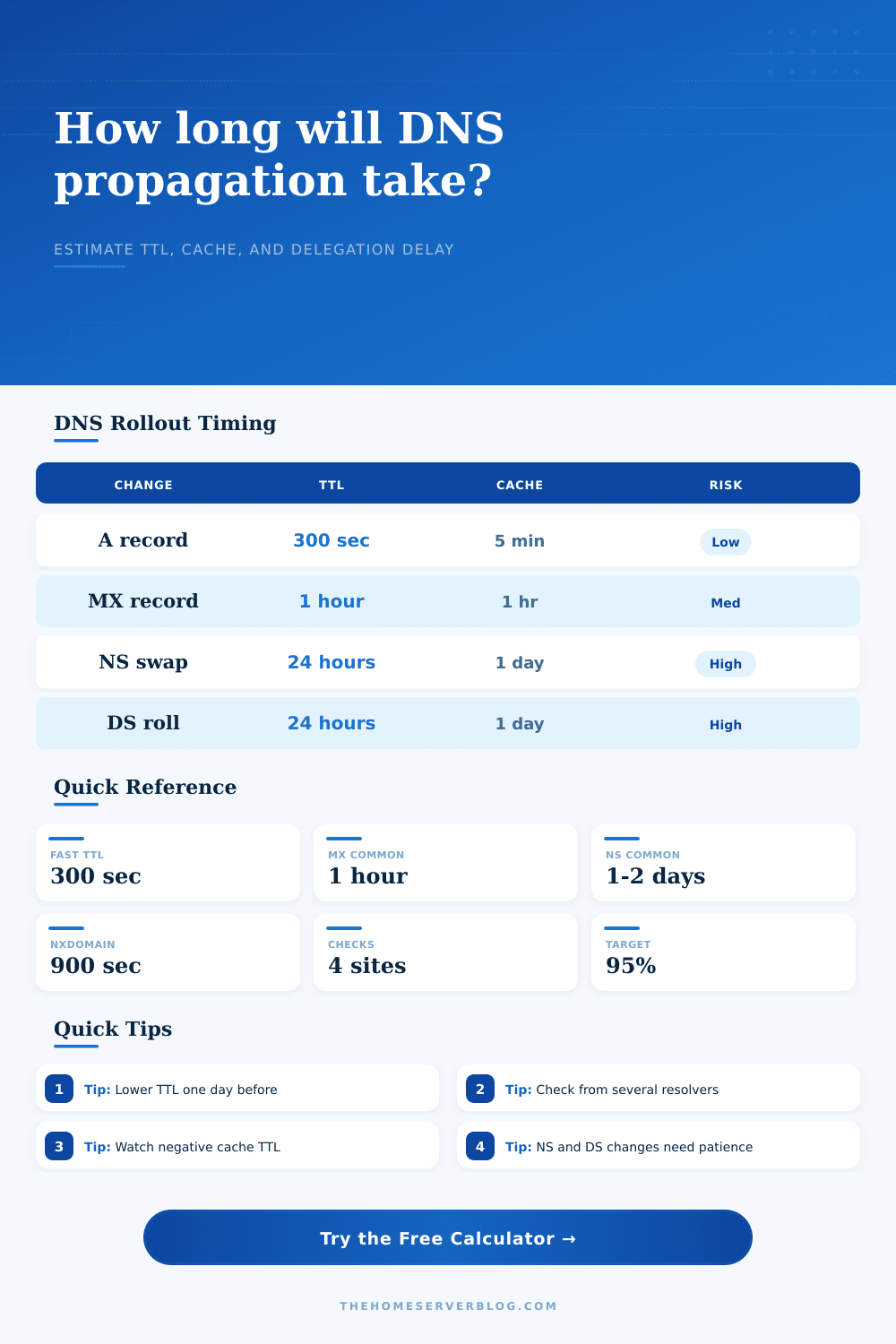
| Nameserver migration | 86400 to 172800 seconds | Two days when possible | Parent registry and recursive caches dominate the timing. |
| DNSSEC DS rollover | 86400 seconds common | One to two parent TTLs | Plan for validation overlap and avoid removing old keys early. |
| Change Type | Main Cache | Usually Visible | Tail Risk |
|---|---|---|---|
| A, AAAA, or CNAME value update | Record TTL | Minutes to a few hours | Low unless clients pin DNS or resolvers serve stale data. |
| New record after NXDOMAIN | SOA negative TTL | Negative TTL plus record TTL | Medium when users tested the name before it existed. |
| MX record migration | MX TTL and sender retry queues | One to four hours | Medium because mail senders retry on their own schedules. |
| NS delegation move | Parent zone NS and glue TTL | One to two days | High if old and new zones differ or glue is stale. |
| DNSSEC DS or DNSKEY change | Parent DS TTL and validator cache | One to two days | High because validation failure can make the zone disappear. |
| Resolver Profile | Cache Pattern | Extra Hold | When to Use in Estimate |
|---|---|---|---|
| Strict RFC TTL honoring | Expires close to published TTL | 0 minutes | Testing with known public resolvers and direct queries. |
| Typical public resolver mix | Mostly TTL-based with some tail | 10 minutes | General web, VPN, and home lab services. |
| Prefetching public resolver | Popular names refreshed early | 5 minutes | High traffic hostnames with stable lookup demand. |
| ISP resolver with sticky cache | Can retain stale records beyond TTL | 60 minutes | Residential broadband audience or regional ISP reports. |
| Enterprise forwarder chain | Multiple internal cache layers | 240 minutes | Office networks, managed devices, or filtered DNS paths. |
| Project | Typical Inputs | Primary Window | Watch Closely |
|---|---|---|---|
| Home reverse proxy IP move | A record, 300 second TTL | 10 to 45 minutes | Clients that cached the old WAN IP. |
| Self-hosted mail to hosted mail | MX plus TXT, 3600 second TTL | 2 to 8 hours | Sender retry queues and SPF overlap. |
| Domain moved to new DNS provider | NS delegation, 24 hour parent TTL | 24 to 48 hours | Old zone parity and glue records. |
| DNSSEC key or DS maintenance | DS TTL, DNSKEY TTL, validator cache | 24 to 72 hours | Removing old keys before validators age out. |
| Dynamic DNS after WAN change | 120 second TTL, provider API update | 5 to 30 minutes | Router update success and stale client sessions. |
The internet breaks, apparently because you changed one IP address in your DNS dashboard. Half of your users hit new server, while the other half get routed to a white screen or an old maintenance page. What gives? Nothing; you’re not doing anything wrong. The global routing system is simply doing what it was designed to do, hoard information to save bandwidth.
The trick is understanding what exactly it’s measuring as you wait for changes to spreadd. People think about propagation as a wave spreading out over a map. It’s not. It’s a countdown timer on thousands of distinct machine. Each machine, including your home ISP, a corporate firewall, etc. Each machine have a copy of your record and an associated timeout. That’s called the Time To Live.
Why DNS Changes Take Time
As long as that timer hasn’t run down, the machine will ignore you; when it does, it’ll go back and ask the source for the answer again. If you decreased that timeout yesterday but updated the record today, youve opened up a window where some people see the future while others sees the past. Once you know your precise constraints, the calculator above do the math for you, saving you the guessing about how all those individual timeouts align with the overall behavior of networks.
And then there’s the negative cache. That’s normaly a silent trap. Resolvers remember if a domain was never there before. Say your domain didn’t exist and once returned an error. The resolver will remember that you don’t exist. It’ll keep remembering it for some time determined by your Start of Authority record (typically 15 mins or more). You could of created that new record right now, but half the world thinks you’re still gone until they’ve reset their own timer. Why do new websites suddenly seem to be invisible? Because the network doesn’t want to ask the same thing twice, so it keep telling everyone that answer for a while.
The other problem is stubborn caches. Enterprise firewalls and some Internet service providers don’t always play nice with these rules; they may cache a page for longer than the time-to-live on an IP address says, or refresh their view of a popular domain before its time is up to make it faster. Because this isn’t uniform, what you never see are stark switches, only a smudged gradient of accessibility. To model this, the tool lets you pick a resolver profile based off how strictly it follows the rules and how unreliable or inconsistent it is, much like your home internet connection. It’s modeling the fact that the first 95 percent will flip in minutes, but the final five percent can takes hours.
That takes some forethought (and patience) to plan for. Drop your timer far in advance, ahead of actually doing the move. Say that your current record shows a twenty-four hour limit, then drop it to several minutes and let that run overnight. Then flip the switch. That gives the world time to forget the old information and accept the new information once we send it out. The worst mistake people make with an infrastructure move here is rushing the changeover. Don’t think that changing your IP will make everyone else change immediately, they don’t.
There’s yet another wrinkle: email servers will try to route emails themselves, based on their schedule. That means even though they update their DNS record within an hour, they may continue to attempt sending to the old address for another four because “that’s a valid reason to wait.” So having your records overlap is essential when making changes. You keep the old server running while the new one take over traffic.
Finally: you have no power over what others choose to cache in their caches. All you have power over is how long they are asked to keep it. There’s nothing wrong with taking time. This isn’t an instant-perfection thing. You just need to know who sees it, when they see it, and why, all within a reasonable window of time. When you realize that the internet is a distributed collection of timers instead of a big on/off switch, the cutover becomes less stressful. You learn to work with the network instead of trying to fight it; you learn its naturaly beat and start flowing with it. Delay isn’t a bug. It’s a feature. And it’s the feature that prevents the web from collapsing under its own weight.