AT&T Data Usage Calculator
Estimate monthly cellular data for AT&T phones, tablets, mobile hotspots, connected laptops, video streaming, cloud sync, gaming, and work calls.
These planning values use common mobile-data estimates so the calculator can translate real activities into a billing-cycle projection.
| Activity | Planning Rate | Formula Use | Typical Driver |
|---|---|---|---|
| Web, email, maps, messaging | 0.06 GB per hour | Hours per day times 0.06 | Images, attachments, map tiles |
| Music or podcast streaming | 0.07 GB per hour | Hours per day times 0.07 | Audio quality and caching |
| Social video and short clips | 0.18 GB per hour | Hours per day times 0.18 | Autoplay and upload bursts |
| Online gaming | 0.05 GB per hour | Hours per day times 0.05 | Game updates excluded |
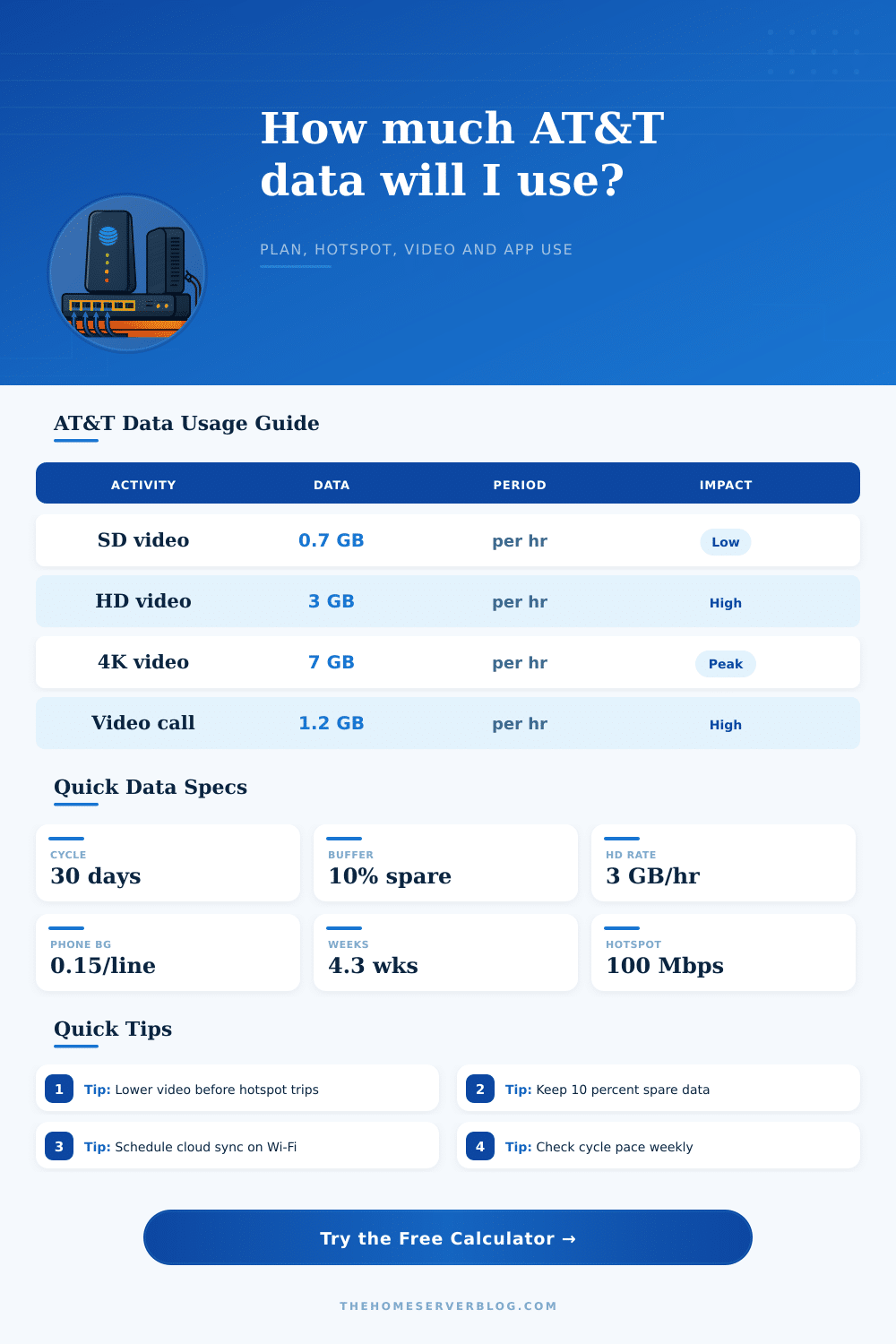
| Video conference | 1.2 GB per hour | Hours per day times 1.2 | HD camera, screen share |
| Video Mode | GB per Hour | Estimated Mbps | Best Planning Use |
|---|---|---|---|
| Mobile saver or adaptive low | 0.35 GB | 1 Mbps | Long trips, low data caps |
| SD 480p | 0.70 GB | 3 Mbps | Phone screens and casual viewing |
| HD 1080p | 3.00 GB | 15 Mbps | Tablet, laptop, or TV hotspot use |
| High bitrate HD | 4.50 GB | 25 Mbps | Sports, high motion, large displays |
| 4K UHD | 7.00 GB | 40 Mbps | Short sessions only on capped plans |
| Use Case | Monthly Allowance | Daily Average | Practical Watch Point |
|---|---|---|---|
| Light phone line | 5 GB | 0.17 GB per day | Avoid daily video streaming |
| Moderate phone user | 15 GB | 0.50 GB per day | Social autoplay can dominate |
| Shared family bucket | 50 GB | 1.67 GB per day | Track each active line |
| Hotspot-heavy month | 100 GB | 3.33 GB per day | HD laptop video burns fast |
| Home internet backup | 150 GB | 5.00 GB per day | Disable cloud sync during failover |
For unlimited plans, enter the high-speed or hotspot amount you want to preserve; the calculator reports when usage would pass that planning line.
| Scenario | Devices | Likely Monthly Use | Main Risk |
|---|---|---|---|
| Single phone, mostly Wi-Fi | 1 phone | 3 to 8 GB | Travel days without Wi-Fi |
| Two phones with social video | 2 phones | 15 to 35 GB | Autoplay and uploads |
| Student laptop hotspot | Phone plus laptop | 40 to 90 GB | Class calls and downloads |
| RV weekend streaming | Hotspot plus tablet | 60 to 130 GB | HD video at night |
| Backup internet for remote work | Router plus laptop | 80 to 180 GB | Cloud sync and meetings |
The AT&T data usage calculator is a tool that will help a person to calculate how much data they will use during the billing cycle. Many people experiences a reduction in the data speeds that their plans offer to them due to the fact that they have used too much data during that current billing cycle. The AT&T data usage calculator will allow these individual to avoid the situation of using too much data during there current billing cycle.
To use the AT&T data usage calculator, a person must input several data element. The person must enter the length of the billing cycle into the calculator; a thirty-day billing cycle will contain more hours than a twenty-eight day billing cycle. Additionally, the person must enter the number of days that have passed in the current billing cycle into the calculator, as the calculator must be able to calculate how many days remains in that cycle.
How to Use the AT&T Data Usage Calculator
The number of devices that are connected to the data plan must be entered, as each device will use some amount of data for various task. Finally, a person use a mobile hotspot will enter the number of days, as the data used by a laptop utilizing a hotspot will be more than the mobile data that the person uses on their mobile phone. The most important information to enter into the AT&T data usage calculator is information regarding a persons activity level.
Video streaming is one of the major use of data, and the amount of video streaming will impact how much data is used. Additionally, social media clip and music streaming will use some of the data plan, but not as much as video streaming. Work-related video calls will use some of the data plan, and high-definition video calls may utilize more data than clip video.
Additionally, information regarding the use of cloud backup information for phones or computers will use some of the data, as will automatically updating the applications on those devices. Finally, the calculator will build a buffer for these unexpected data use into the projection for data use. After a person enters their information into the AT&T data usage calculator, there will be several different outputs from that device.
The projected cycle use will calculate the total amount of data that a person will use if they maintain their current data-consuming activities for the remainder of the current billing cycle. The cushion figure will project how much data will remain after a person uses data at their current rate until they reach the high-speed data limit. The remaining daily target will calculate how much data a person can use each day within the data limit for that plan.
Finally, the hotspot load will calculate how much data devices sharing the same hotspot are using. Each of these output will act as an early warning system for each individual regarding their data plan. The AT&T data usage calculator also includes reference table to help each individual to use the calculator more easy.
One table includes information regarding the amount of data that individuals will use based off the number of hours of video watching. Additionally, another table includes information regarding various equipment and the amount of data that those device may use while streaming videos using those devices. These tables will help individuals to more accurately enter their information into the calculator, which will help to ensure the accuracy of the data that the calculator provides.
In some case, the information from the calculator may not match the actual data that is used by individuals. For instance, if a person uses their data plan to navigate to various location during a road trip, they may use more data than they had calculated. Additionally, if a person has a new phone that must download its information from the cloud to use that device, the data may again be higher than that which is calculate by the calculator.
However, the calculator does account for these scenarios; it includes the ability to enter information about road trips or data for high-use devices into the calculator. However, if a person change their data use, the data limit may need to be monitored more closely. There are a variety of ways in which a person can manage their data use.
For instance, if the remaining daily target for that individual is lower than they would like to provide for that individual, a variety of change can be made. A person can lower the high-quality video settings for a persons device. The cloud backup for those devices can be assigned to utilize the Wi-Fi network for that device rather than the mobile data.
Additionally, the automatic updates for those application can be paused. Each of these alterations will reduce the amount of data that those device uses throughout that month. Finally, another management of the data plan is to use the hotspot load output of the calculator to determine which device are using the most data from the hotspot; only those device that can handle less data can be allowed to use the hotspot to reduce the possibility of exhaustion of the devices data limit.