Cassandra Replication Factor Calculator
Plan NetworkTopologyStrategy replication, local and global quorum math, storage multiplier, compaction headroom, and practical node failure tolerance before changing a Cassandra keyspace.
Cassandra replication plan
Storage and capacity
Failure tolerance and quorum
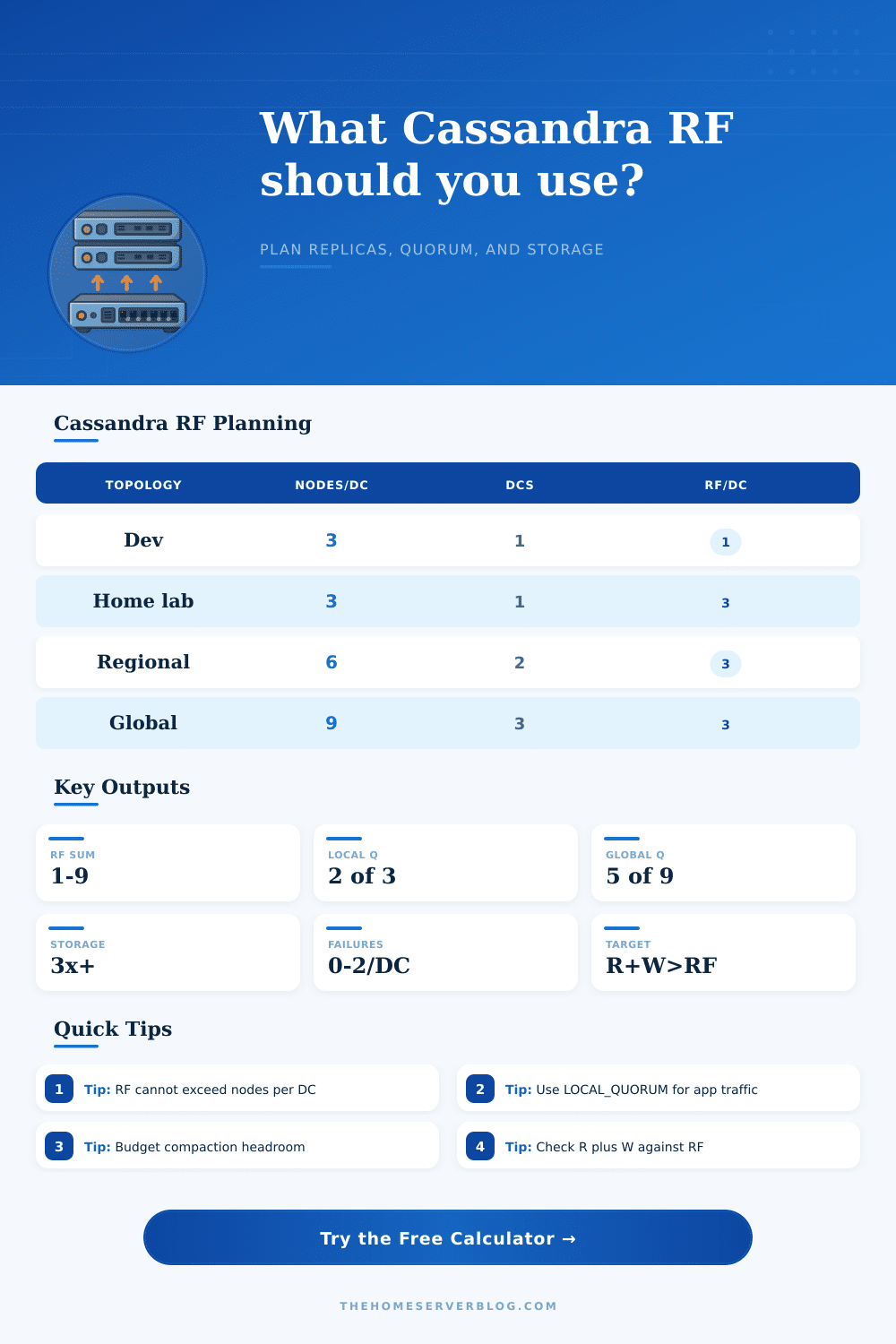
Three replicas per DC allow local quorum reads and writes to survive one replica loss for a partition.
LOCAL_QUORUM asks a majority of replicas in the local data center, avoiding cross-DC latency for normal app traffic.
For a single replica set, read acknowledgements plus write acknowledgements greater than RF gives overlap.
Leveled, size-tiered, and time-window compaction all need free disk during SSTable rewrite and streaming events.
| Consistency level | Acknowledgements | Typical use | Availability tradeoff |
|---|---|---|---|
| ANY | Hint accepted, no live replica required for write | Last-resort write availability | Weakest immediate durability and read visibility |
| ONE or LOCAL_ONE | One replica, optionally in the local DC | Low latency counters, caches, read-heavy data | May read stale data after recent writes |
| LOCAL_QUORUM | floor(RF per DC / 2) + 1 in local DC | Most multi-DC application reads and writes | Survives fewer local replica failures than ONE |
| QUORUM | floor(total RF across all DCs / 2) + 1 | Single-region clusters or explicit global quorum | Can add cross-DC latency in multi-DC designs |
| EACH_QUORUM | Local quorum in every DC | Rare strict multi-DC write acknowledgement | One unhealthy DC can block the operation |
| ALL | Every replica must answer | Special maintenance or verification flows | Lowest availability; one replica outage fails |
| Topology | Recommended RF | Suggested consistency | Planning note |
|---|---|---|---|
| Single node dev | RF 1 | ONE | Only for development; there is no replica redundancy. |
| 3 node single DC | RF 3 | LOCAL_QUORUM or QUORUM | Classic small production shape; every partition has three copies. |
| 6+ node single DC | RF 3 | LOCAL_QUORUM | More nodes increase capacity and distribution, not RF by default. |
| Two active DCs | RF 3 per DC | LOCAL_QUORUM | Use local consistency for app traffic and var Cassandra replicate across DCs. |
| Three global DCs | RF 3 per DC | LOCAL_QUORUM | Global QUORUM is stricter but may turn latency into an application dependency. |
| RF per DC | DC count | Replica multiplier | With 30% compaction |
|---|---|---|---|
| 1 | 1 | 1x | 1.3x logical data |
| 3 | 1 | 3x | 3.9x logical data |
| 3 | 2 | 6x | 7.8x logical data |
| 3 | 3 | 9x | 11.7x logical data |
| 5 | 2 | 10x | 13x logical data |
You have a dataset that matters, and you’re about to watch it grow at a rate that exceeds your disk budget. Here’s where Cassandra replication starts getting tricky: you want speed, but you also want redundancy. Before touching a production cluster, you need the ability to turn abstract topology choices into concrete availability guarantees and storage costs. With the calculator, it stops you from guessing.
The issue comes from the fact that copying data isn’t free. When you’re replicating data across multiple data centers with higher replication factors, you also multiply amount of storage required. With a single gigabyte of data replicated at a factor of three in two data center, you’re now looking at six gigabytes of raw storage just to hold all the replicas.
How to Plan Your Cassandra Storage and Speed
This assumes that Cassandra doesn’t store your stuff on disk like this. And then there’s the unseen: compaction. Because Cassandra strives to maintain good read performance, it rewrites data across segments as data builds up. But it can only do this if it has enough free disk space to merge old and new data into new SSTables. Run out of space on your disks (because you naively calculated size based off replica bytes) and compaction will grind to a halt.
To account for this, the tool allows you to specify a headroom percentage. Engineers typically target something like 30%+ headroom. At first glance, it might seem wasteful. However, it’s a kind of insurance policy against the operational risk of experiencing peak write load. If your cluster is too stuffed, it’s going to get sluggish and start timing out.
And then there’s the math: How consistent do you need? Do you need multiple reads and/or writes to recieve an acknowledgement that a replica was updated? Common wisdom suggests using a local quorum for multi-data-center deployments. This avoids latency cost of sending each request across the ocean while maintaining a majority agreement between locally-copied data. By doing this you’re trading off speed against strict global consistency by keeping traffic inside one region.
That local quorum option is represented by the ‘consistency’ selector. Based on your replication factor selection, the calculator will tell you just how many acks you’ll need to receive before it considers a read or write successful. With a strong consistency guarantee, you’ll notice that sum of your write quorum + read quorum cannot exceed overall replication factor. Overlapping subsets of replicas guarantee that no stale data can sneak past.
Then there’s another misconception about failure tolerance. You may think that because I have three copies, then I will always be okay even if I lose three nodes. Nope. You’ll be okay if you lose one or two as long as you’ve got enough left over to meet your quorum for each partition. What happens when you lose all three copies of some particular row? That row won’t be available, no matter how many other nodes is up in the cluster.
Why does this matter? Replication factor and number of nodes are not linked. Having more nodes does not always mean more fault-tolerance because replicas gets spread further apart. If you lose an entire rack or there’s some other kind of single hardware event, then all those replicas is gone, but statistically it’s less probable that they all dissapears.
And tweaking these configs is never simply a matter of flipping a switch. This is a logistical operation. For example, if you raise the replication factor, Cassandra will not magically clone copies of your data onto new nodes. Instead, you must run repairs to ensure the new replicas actualy receive the data they are supposed to hold. Failing to do so gives you a false sense of confidence in your cluster.
The tool describes typical configurations like this, including their tradeoffs, from local dev boxes to clusters spread around the globe. This isn’t about maximizing any one number. This is about getting your disk capacity, consistency levels, and replica count aligned to match your true business risk. Are you okay with slightly slower reads because you need higher durability, or do you want every read to be low latency at all costs? Plug in the numbers that answer those questions. Start with the physical limits of your hardware, then allow the availability requirements to influence the rest. It’s a balance, but it’s a balance you could of measured prior to committing. Size for compaction and growth, and then you sleep better at night, confident that the cluster won’t choke under spike traffic.