Committed Information Rate Calculator
Estimate CIR utilization, token bucket timing, burst capacity, peak rate behavior, and dropped or delayed traffic for WAN QoS policies.
⚙WAN/QoS Presets
📋Traffic Contract Inputs
CIR Calculation Results
💡QoS Metric Snapshot
📊WAN Preset Reference
| Preset | CIR | CBS / EBS | Typical Use |
|---|---|---|---|
| Metro Ethernet 100M | 100 Mbps | 625 KB / 625 KB | Office internet edge or carrier Ethernet handoff |
| MPLS Branch 20M | 20 Mbps | 250 KB / 250 KB | Branch WAN with data and voice classes |
| SD-WAN Cable 300M | 300 Mbps | 1875 KB / 937 KB | Broadband underlay shaped below modem rate |
| LTE Backup 25M | 25 Mbps | 156 KB / 312 KB | Cellular backup with bursty throughput |
| Voice VLAN 10M | 10 Mbps | 64 KB / 32 KB | Low-latency queue for RTP and signaling |
| Cloud VPN 200M | 200 Mbps | 1250 KB / 1250 KB | IPsec or WireGuard tunnel toward cloud workloads |
| Remote Site 50M | 50 Mbps | 312 KB / 312 KB | Small site with mixed SaaS, file, and admin traffic |
| Data Center 1G | 1000 Mbps | 3125 KB / 3125 KB | Core WAN or large hosted environment |
| Retail POS 5M | 5 Mbps | 32 KB / 32 KB | Payment, inventory, and low-rate telemetry traffic |
| Campus Guest 150M | 150 Mbps | 937 KB / 468 KB | Guest internet service shaped away from production |
🧮Token Bucket Sizing Table
| Traffic Class | Common Tc | CBS Formula | Practical Note |
|---|---|---|---|
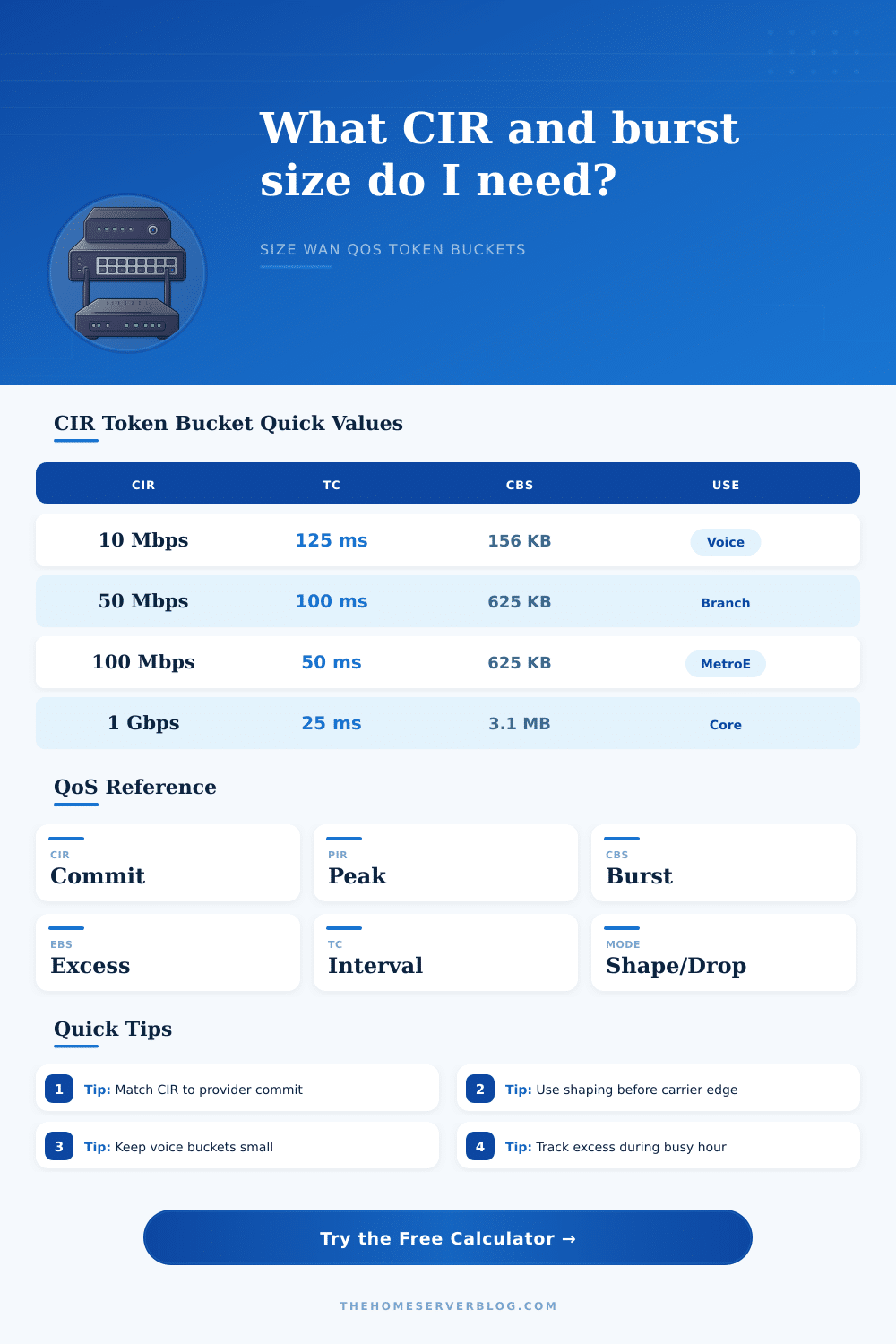
| Voice / Real Time | 10–25 ms | CIR × Tc / 8 | Small buckets reduce jitter and queue bursts. |
| Interactive Video | 25–50 ms | CIR × Tc / 8 | Moderate bursts help adaptive video without long delay. |
| Business Data | 50–125 ms | CIR × Tc / 8 | Balanced default for SaaS and file access. |
| Backup / Bulk | 100–250 ms | CIR × Tc / 8 | Larger buckets smooth big transfers but can add delay. |
| Wireless WAN | 50–200 ms | CIR × Tc / 8 | Use measured service behavior because radio rate varies. |
⚖QoS / CIR Comparison Grid
📐Conversions And Formulas
| Metric | Formula | Example | Use In Calculator |
|---|---|---|---|
| CBS from interval | CIR Mbps × Tc ms × 125 | 100 Mbps × 50 ms = 625 KB | Compares entered CBS with expected bucket size. |
| Tc from CBS | CBS KB / (CIR Mbps × 125) | 625 KB / 12500 = 0.05 s | Shows the implied token bucket interval. |
| Excess Mbps | Offered Mbps − CIR Mbps | 125 − 100 = 25 Mbps | Estimates above-contract load. |
| Traffic volume | Mbps × seconds / 8 | 25 Mbps for 900 s = 2812.5 MB | Converts dropped or queued bits to MB. |
| Overhead adjusted | Mbps × (1 + overhead) | 100 Mbps + 5% = 105 Mbps | Applies tunnel and framing headroom. |
🛠Practical CIR Tips
If you try to download a big file while doing a video conference and find it’s not going well over a one gigabit connection, you might get frustrated. In most cases, however, it won’t be because your line isn’t fast enough. It’ll be because the network doesn’t give priority to some of those data packets.
That brings us to what’s known as the committed information rate (CIR), the minimum level of service that your provider must provide under any circumstances. That’s your contractually guaranteed speed, regardless of how congested the network happens to be at that time. Everything beyond that is gravy, and in many cases, gravy means there’s no gravy left if the network’s busy.
What is Committed Information Rate?
To understand this number, you need to get beyond what providers say about their service. They will emphasize the “peak” information rate. However, the point of having a CIR is to ensure you have enough bandwidth for clear voice over IP calls while back-up teams are uploading large files to the cloud. Anything above your committed rate is something the network has to handle.
How does it do that? It can either shapes the traffic (store it in a buffer and release it at a slower rate) or it can police the traffic (drop any packets that exceed the limit). Traffic shaping preserves the integrity of your data at the expense of adding delay. Traffic policing saves on delay but risks losing some data. Pick your poison, depending on your specific applications.
They do so using token buckets: virtual containers which fill at a consistent speed and empty as traffic exits. The size of the container defines what kind of “bursty” traffic will be allowed until it reaches its limit. For example, a small token bucket strictly regulates packet timing, ensuring low-latency for voice calls. On the other hand, a large one lets big transfers surge in without hindrance but runs the risk of delaying them enough to cause timeouts on sensitive protocols.
To put it simply, you need to match the bucket size with your data’s requirements. Voice calls require predictable latency more different than throughput. Backup jobs require predictable throughput more than latency. Trying to serve both masters optimally almost always ends up failing to serve either master well.
Put your expected offered traffic into the calculator and it will show you how much of it doesn’t fit inside your safety net. How much do you have at risk of being dropped or shaped? For instance if you monitor your window and see a constant flow of excess traffic then you’re probably oversubscribed. It’s time to renegotiate an increased CIR with your provider or get really strict about internal prioritization.
The table on the page lists those standards based off application class. As you can see, voice traffic has a much smaller token interval than bulk data traffic. Because of this small window, there isn’t enough time for jitter to build up in the queue. Sounds like nothing, but if you’ve ever been on a call where the video freezes because a packet was dropped, you know why it makes a difference.
You have to account for protocol overhead. Each packet adds bytes due to ethernet frames and IP headers. It also adds bytes when tunneling through encryption tunnels. Size your CIR based only on the raw payload and don’t account for all that extra data and your effective throughput won’t meet expectations. A five percent headroom is inexpensive protection from those hidden costs.
You must accept limits in WAN design. If you want zero latency, then you cannot also have infinite burst capacity. If you want to perfectly shape all traffic with no delay at all, then you will add queuing delays that will disrupt TCP connections. Your objective is never to eliminate unwanted traffic completely, but rather control it so that bulk data transfers eventually get done, while still keeping the critical apps running smoothly.
So when you see the usage meter go full, know that red doesn’t necessarily mean you’ve failed; just that you’re pushing up against your contract limits. You should of known where those limits are, so you won’t crash into them.