CPU Headroom Calculator
Estimate safe CPU reserve for home servers, VM hosts, NAS workloads, transcodes, CI jobs, and short burst load.
CPU reserve estimate
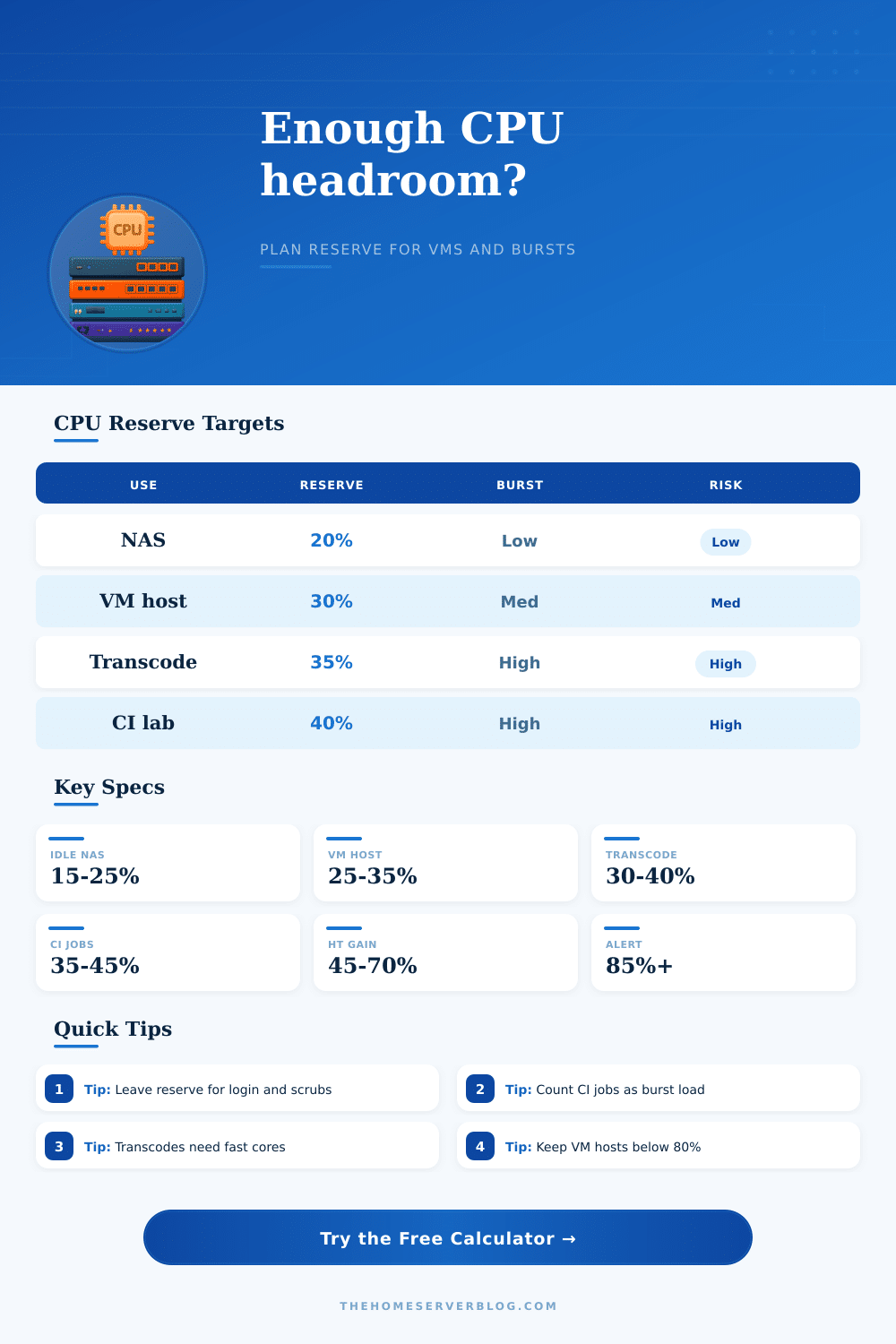
| Reserve target | Best fit | Typical trigger | Practical note |
|---|---|---|---|
| 15% to 20% | Quiet NAS, backup box, light containers | Scrub, rsync, cloud sync | Enough for admin tasks if the server is not a VM host. |
| 25% to 30% | Mixed NAS and VM host | Snapshots, package updates, web apps | Good default when several services share one CPU. |
| 30% to 35% | Media server or NVR with bursts | Transcodes, motion analysis, thumbnail jobs | Protects playback and storage response during spikes. |
| 35% to 45% | CI runner, lab cluster, build node | Parallel tests, image builds, compression | Higher reserve keeps interactive VMs usable under builds. |
| CPU class | Planning behavior | Headroom strength | Watch item |
|---|---|---|---|
| Atom or Celeron NAS | Great idle efficiency, limited burst score | Light containers and file serving | Scrubs plus transcodes can saturate quickly. |
| Intel N100 or N305 | Strong mini-server efficiency, no SMT on many chips | NAS, router, small VM host | Concurrent builds consume cores directly. |
| Ryzen APU or Core i5 | High single-thread speed and useful SMT | Mixed VMs, apps, media library jobs | Cooling limits matter in tiny cases. |
| Xeon D, EPYC, dual socket | Many threads with steadier sustained load | Dense VMs, CI, lab clusters | Old platforms may lose per-core speed. |
| Burst workload | Light estimate | Heavy estimate | Why it matters |
|---|---|---|---|
| 1080p hardware-assisted transcode | 0.3 to 0.6 effective cores | 0.8 to 1.0 effective cores | CPU still handles audio, subtitles, and container work. |
| 1080p software transcode | 1.0 to 1.4 effective cores | 1.6 to 2.2 effective cores | Playback can stutter if reserve disappears. |
| CI test job | 0.8 to 1.2 effective cores | 1.8 to 2.6 effective cores | Compilers and test suites scale into every free core. |
| NAS scrub or parity check | 0.5 to 1.0 effective cores | 1.5 to 3.0 effective cores | Storage tasks add I/O wait and CPU checksum work. |
| Common build | Example CPU | Safe reserve | Healthy load target |
|---|---|---|---|
| 2-bay NAS with apps | 4 cores, no SMT | 20% | Keep bursts below about 75% adjusted load. |
| Mini Proxmox host | 8 cores, 16 threads | 30% | Keep run queue low during backups and updates. |
| Plex and storage server | 6 cores, 12 threads | 35% | Leave space for transcodes and metadata jobs. |
| CI worker node | 12 cores, 24 threads | 40% | Throttle job slots before interactive VMs slow down. |
You built a home server to have control. You can run your own media library and NAS, or perhaps a few VMs for playing with Kubernetes or running CI pipelines. It’s beautiful, right up to Tuesday night. Your Github runner runs a test suite, Plex decides to transcode that 4K stream, and a scrub starts in the background. Everything grind to a halt as the fan curve ratchets up. That’s what I call the headroom problem.
Most folks size their servers based on average load, not peak chaos. After inputting your workload mix, thread settings and core count, the calculator do the rest of the math for you. No more guesswork about how many cycles is left after the build job. Will this snapshot storm overwhelm me? That’s the trick.
Solve the Home Server Headroom Problem
Raw GHz don’t tell the whole story of CPU capacity. Effective Cores matter. It is not just the number that are “active” at any given moment, but the number that can works together on more than one task at the same time. Simultaneous Multithreading helps. But it only makes each core worth about half of another one. For sustained heavy loads, think of each physical core as being equal to one unit, and each SMT thread as being equal to maybe 1/2 of a unit. Why? Because background services don’t wait around while you gets done with your compile job.
To begin, look at your base load. Is it 10 percent of your server’s capacity? Great! You think you’re OK then, right? Wrong: Idle isn’t reserve; reserve is safe. What you’re realy interested in is how much reserve you want for the actual workload you run; so the tool prompts you for that (based off the load you’re already seeing).
Do you have a Proxmox host with five virtual machine and also a backup agent? That require more buffer than a quiet file server. Are you running a bunch of containers for your home automation stuff? Those little processes can add up… especially when they all want to update simultaneously. That’s where the vCPU allocation input comes in. It forces you to recognize that resources you assign are resources you commit, whether or not they happens to be busy right this second.
Typically when a server slows down it’s because of transcoding. The heavy lifting gets offloaded to a hardware block on the chip so it has more space for what you’re doing. Software encoding, however, eats up cores for breakfast. Mix the two together? The calculator account for that pressure. You likely want your shell to stay responsive and have smooth playback. I certainly don’t want my directory listings to take three seconds to come back because the scheduler is duking it out for thread priority between a directory listing and a video stream.
On CI jobs they’re a whole other beast. By their very nature they are bursty. Your CPU can spike up to 100 percent for twenty minutes and then drop down to nothing. This is why duration of the burst is important to model. It’s much easier on the card to handle a short spike as opposed to a longer drag. If your builds runs for hours at a time, you’ll need extra room. This prevents throttling and keeps the rest of your system usable. And that’s where those tradeoff tables on the page come in.
Why will a dual-socket Xeon be denser then an equivalent single-chip Ryzen APU? They are roughly similar in their single core performance, but one will have twice the number of sockets and thus twice the total throughput. Scheduler efficiency matter too. Older platforms can be slowed down by thread scheduling overhead, whereas a moddern chip provides the same amount of usable performance with fewer physical cores.
The reason for most server failure? It’s not a hardware failure; it’s a planning failure. You bought the right box but you didn’t plan for the collision of duties. Have at least 30 percent reserve for mixed workloads. Don’t let your batch jobs starve out your interactive VMs. Once you quit ignoring the overlap, the math is easy.
When you leave your server alone in the corner, it’ll respond with what it does best: silence and speed. That’s exactly how it should of behave.