ECC Key Equivalent Strength Calculator
Compare elliptic-curve keys, RSA modulus sizes, symmetric encryption, hash output, and deployment horizon in one NIST-style strength view.
📌Real Crypto Profile Presets
🔧Key Strength Inputs
Strength Comparison Results
📊Live Profile Summary
📚NIST-Style Strength Comparison Grid
| Security Strength | ECC Examples | RSA / DSA / DH | Symmetric Example | Typical Classification |
|---|---|---|---|---|
| 80 bits | P-160 to P-192 era | 1024-bit finite-field / RSA | 2TDEA legacy class | Deprecated for new designs |
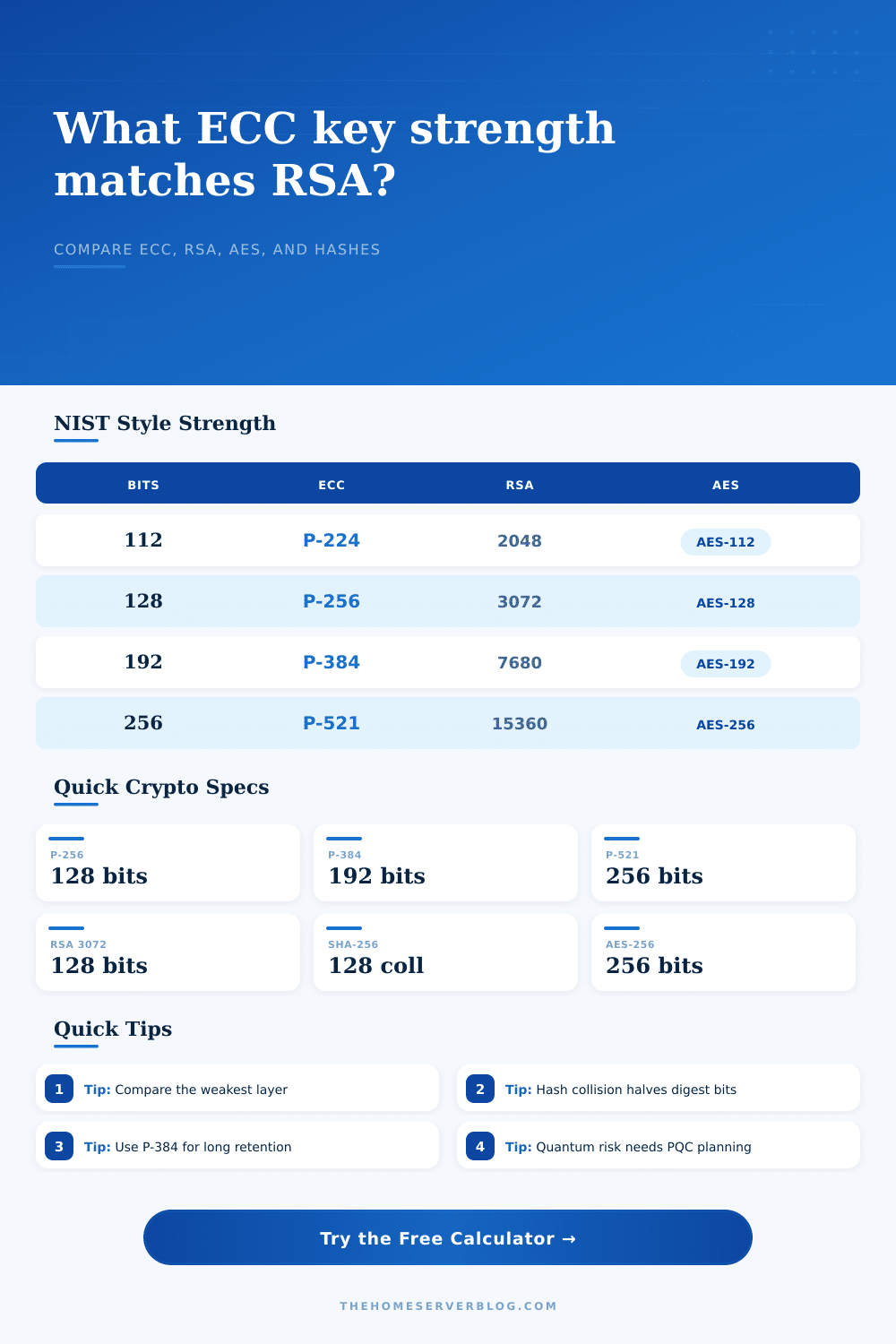
| 112 bits | P-224 / B-233 class | 2048-bit RSA / finite-field | 3TDEA or AES-112 class | Minimum modern baseline |
| 128 bits | P-256, X25519, Ed25519, secp256k1 | 3072-bit RSA / finite-field | AES-128 / ChaCha20 with 128-bit target | Standard production target |
| 192 bits | P-384 / BrainpoolP384r1 | 7680-bit RSA / finite-field | AES-192 | High assurance or long-lived secrets |
| 256 bits | P-521 / BrainpoolP512r1 class | 15360-bit RSA / finite-field | AES-256 / ChaCha20-256 key size | Top classical security bracket |
🔗ECC Curve Reference Table
| Curve or Family | Common Key Size | Approx Strength | Common Use | Calculator Note |
|---|---|---|---|---|
| NIST P-224 | 224 bits | 112 bits | Older constrained profiles | Meets only the lower modern bracket |
| NIST P-256 | 256 bits | 128 bits | TLS, JWT ES256, certificates | Broad interoperability |
| X25519 / Ed25519 | 255 bits | 128 bits | SSH, WireGuard, modern key exchange | Fast 128-bit class choice |
| secp256k1 | 256 bits | 128 bits | Bitcoin and related signatures | Similar strength bracket, different ecosystem |
| NIST P-384 | 384 bits | 192 bits | High assurance TLS and signing | Useful when 128 bits feels tight |
| NIST P-521 | 521 bits | 256 bits | Maximum classical ECC bracket | Often slower and less universally needed |
🗝RSA and Symmetric Equivalence Table
| Target Bits | Closest ECC | Minimum RSA | Symmetric Key | Hash Collision Pair |
|---|---|---|---|---|
| 112 | P-224 | RSA-2048 | AES-112 class | SHA-224 collision ~= 112 |
| 128 | P-256 / X25519 | RSA-3072 | AES-128 | SHA-256 collision ~= 128 |
| 192 | P-384 | RSA-7680 | AES-192 | SHA-384 collision ~= 192 |
| 256 | P-521 | RSA-15360 | AES-256 | SHA-512 collision ~= 256 |
🧪Preset Profile Reference
| Preset | ECC / Signature Layer | RSA Compare | Symmetric Layer | Hash Rule |
|---|---|---|---|---|
| TLS 1.3 ECDHE P-256 | P-256 key agreement | RSA-3072 comparison | AES-128 class | SHA-256 collision class |
| OpenSSH Ed25519 | Ed25519 identity signature | RSA-3072 comparison | ChaCha20/AES-128 session class | SHA-256 style transcript class |
| WireGuard Curve25519 | X25519 key agreement | RSA-3072 comparison | ChaCha20-Poly1305 | BLAKE2s/HASH role approximated |
| FIPS P-384 Suite | P-384 signing or agreement | RSA-7680 comparison | AES-192 or AES-256 | SHA-384 collision class |
| Long Archive P-521 | P-521 signing or wrapping | RSA-15360 comparison | AES-256 | SHA-512 collision class |
💡Calculation Tips
When you see these numbers in encryption specs, they seem like they’re all alike, but they aren’t equal in strength. You might have a cert with P-256, or maybe a legacy server wants an RSA-2048 certificate. Those numbers look close, but they is referring to two different mathematical problems. What does “ECC 128 bits” mean? It is not the same thing as “RSA 128 bits.” Elliptic curve math doesn’t scale the same way that the RSA integer factorization problem do. A 256-bit ECC key are about the same as a 3,072-bit RSA key. That is a massive difference in key size for roughly the same level of protection. That’s a massive difference in key length for the same degree of security.
Your TLS handshakes will be complete quicker. Your database entries will fit into fewer bytes. Less CPU for your server to verify signatures. And this is where choosing the right curve for your needs makes it easier.
How to Choose the Right Encryption Key
After you put in your parameters, the calculator does the comparison work for you, and you don’t have to remember any more NIST brackets. But you do have to know what those inputs are. First, pick a curve family. For most web servers today, this is almost always going to be P-256 or X25519. These curves offer 128 bits of security, which means they’re good enough for practically all uses at the moment. Go with P-384 if you need greater assurance. At 192 bits of strength, it’s slower but it’ll buy you some extra time against advances in computing power. This selection gets mapped into its corresponding RSA number for you so you can get an idea of the trade-off. You’ll notice that P-521 tends to be overkill for personal projects. It corresponds to RSA-15,360, a modulus too large for most practical use in real-world protocols.
A system is only as strong as its weakest link. If you use a perfect P-384 key to sign something, but you hash it using SHA-256, you’re limited to 128 bits of security. Why? Because the hash digest size cuts the collision resistance in half. Many folks forget this detail. They’ll get hung up on signature algorithm and not think about the hash function. That’s what the calculator makes you do. It takes all parts of the stack into account: the key agreement, the signature, the symmetric encryption and the hash output. Then it tells you where the gap is. So if your hash role is set to collision resistance, does your digest size match your intended strength? Does it flag that it’s too short? In other words, it provides a sanity check so you don’t build a secure system around a weak component.
Time is another important point about encryption. If you want something encrypted so it stays secret for 10 years, a secure crypto key now might only last for five years. That’s where the deploy life input comes into play. It factors in the change and provides a margin based on how long you anticipate keeping secrets. Are you archiving state secrets? Need a bigger margin. Securing a one-hour chat session? Tighten up the margin. This is where the guess about what an attacker can do helps too. How much of a threat are you protecting against, a nation-state or a more casual attacker? Based off those assumptions, the tool will adjust the effective strength to match. It doesn’t predict the future, but it points out the risk.
But quantum computing poses its own problem. Neither RSA nor ECC is immune to a quantum attack. Both will be broken by Shor’s algorithm. There is a quantum planning signal in the calculator. This isn’t meant as a total solution. Rather, it flags where you might want to plan for post-quantum cryptography. In most home labs, that’s going to be a monitoring scenario. On important archives, it’s something you need to be thinking about urgently. It’s not supposed to cause anyone to freak out. But rather to understand where they are at today. How can you move to post-quantum standards without knowing your starting point?
For everything else: Use P-256 (or X25519) for most things. For crypto, that means P-256 (or X25519) for everything that’s reasonable. It is fast. It is widely implemented. It is good enough for the next ten years. Only switch to P-384 if you have some reason why you need stronger or longer-term assurance.
The numbers in the calculator are a guide, not a guarantee. Don’t do RSA unless you have no choice due to legacy systems. It is slow. It is bulky. Make sure your hash matches your key strength. And remember, even a great key won’t save you if you’re sloppy on passwords. The numbers in the calculator aren’t gospel; they tell you how things fit together to help you cobble together a reasonable security plan. You pick what works for you. You don’t pick stuff whose strength doesn’t match up, which will give you the illusion of being secure when really you’re screwed.
It’s all about balance. You want as much security as needed to protect against the threat but not more than what breaks the thing. The calculator draws a line. Follow it.