Ethernet Frame Size Calculator
Estimate Ethernet frame size from payload, MTU, VLAN tags, QinQ, MPLS labels, padding, FCS, preamble, inter-frame gap, PHY coding, packet rate, and target throughput.
Formula Breakdown
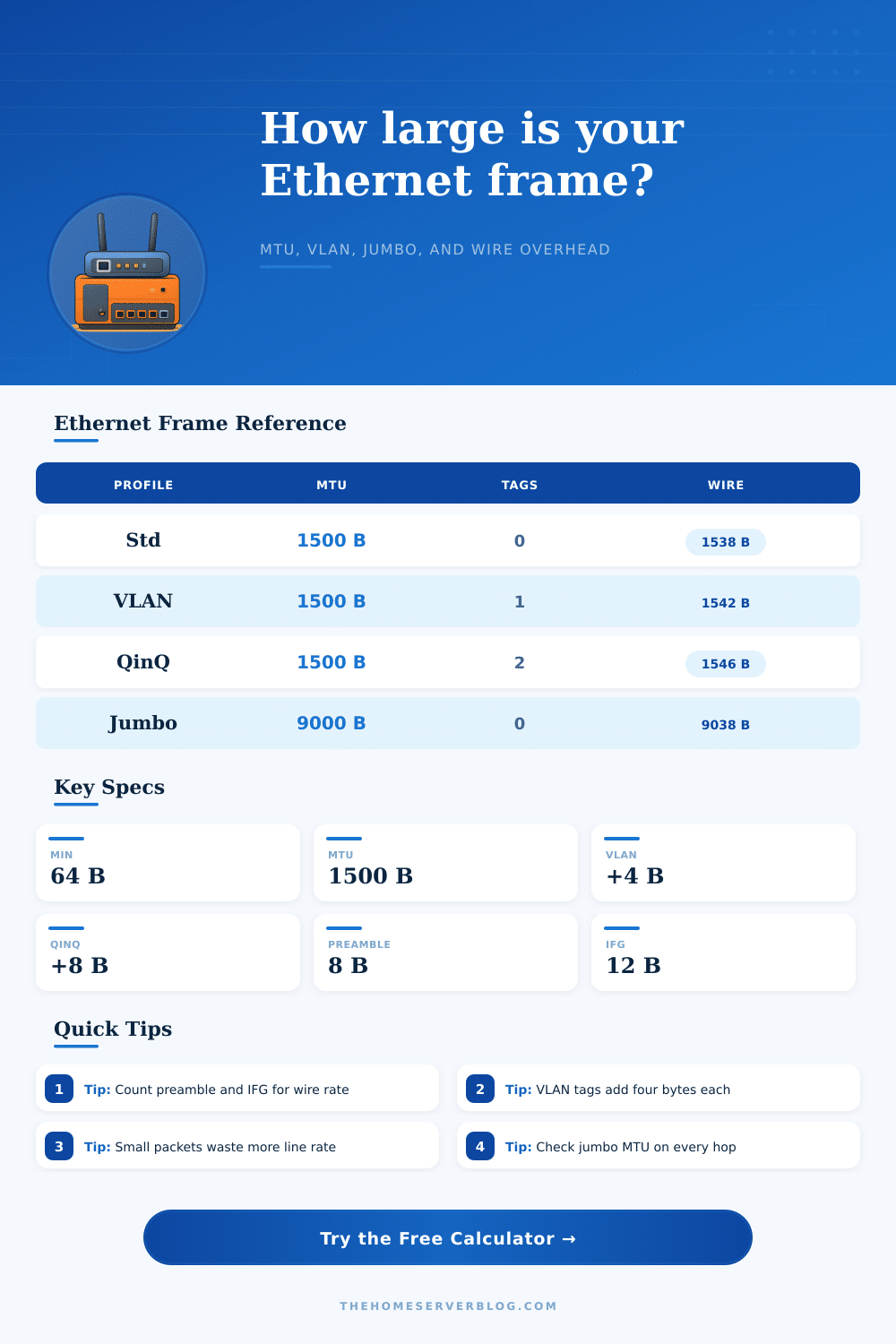
| Frame profile | Payload / MTU | MAC frame size | Wire bytes with preamble and IFG |
|---|---|---|---|
| Minimum Ethernet frame | 46-byte payload after padding | 64 bytes including FCS | 84 bytes on the wire |
| Standard Ethernet II | 1500-byte MTU | 1518 bytes including FCS | 1538 bytes on the wire |
| 802.1Q tagged Ethernet | 1500-byte MTU | 1522 bytes including FCS | 1542 bytes on the wire |
| QinQ double-tag Ethernet | 1500-byte MTU | 1526 bytes including FCS | 1546 bytes on the wire |
| Jumbo Ethernet example | 9000-byte MTU | 9018 bytes including FCS | 9038 bytes on the wire |
| Overhead item | Bytes | Where it sits | Planning note |
|---|---|---|---|
| Destination MAC plus source MAC | 12 | Start of every Ethernet frame | Always present for Ethernet II and tagged Ethernet frames. |
| EtherType or length field | 2 | After source MAC or VLAN tags | Indicates payload protocol such as IPv4, IPv6, ARP, or length. |
| 802.1Q or 802.1ad tag | 4 each | Between source MAC and EtherType | Count one tag for VLAN trunks and two tags for common QinQ services. |
| MPLS label shim | 4 each | After Ethernet header before payload | Carrier and lab transport paths may carry one or more labels. |
| Frame check sequence | 4 | End of MAC frame | Included for wire rate but usually not shown by normal NIC captures. |
| Preamble, SFD, and IFG | 20 | Layer 1 timing | Not part of MAC frame, but it consumes physical link time. |
| Project size | Common packet shape | Important result | Practical limit to check |
|---|---|---|---|
| Home office switch trunk | 1500 MTU with one VLAN tag | 1542 wire bytes per full-size packet | Confirm switch counters and captures include or hide FCS consistently. |
| NAS or hypervisor storage VLAN | 9000 MTU jumbo frames | High payload efficiency near 99 percent before coding | Every NIC, vSwitch, switch port, and routed hop needs matching MTU. |
| VoIP or telemetry stream | Small payloads at steady pps | Lower efficiency because fixed Ethernet overhead dominates | Size uplinks by packet rate and wire bytes, not only codec bitrate. |
| Metro Ethernet hand-off | 1500 MTU with QinQ | 1546 wire bytes before PHY coding allowance | Provider NNI and CPE ports need room for service tags. |
| Formula | Expression | Used for | Interpretation |
|---|---|---|---|
| MAC frame bytes | max(64, header + payload + FCS) | Switch and NIC frame size | Padding is added when the frame would be below the 64-byte minimum. |
| Wire bytes | MAC frame + preamble + IFG | Line-rate bandwidth | Full-size 1500 MTU Ethernet II becomes 1538 bytes on the wire. |
| Payload efficiency | payload / wire bytes | Useful throughput share | Jumbo frames improve efficiency, while small frames lower it sharply. |
| Bandwidth at pps | wire bytes x 8 x pps | Traffic generator and uplink sizing | Add design buffer when packet size distribution is not fixed. |
This calculator is for network planning and lab validation. Exact device counters can differ by vendor because some interfaces report payload bytes, MAC frame bytes, or line-rate bytes.
When you begin to size a network, one of the first considerations are the frame size of the network. The frame size is a critical component of network planning. The frame size change based off the components that is included within that frame.
For example, the addition of payloads, tags, and labels to that frame increases the size of the frame. Furthermore, as you must consider how the size of the frame can affect the link to which that network is connect, you must also consider how the frame size may change as the frame travels through the network. Frames that are transferred over Ethernet has a minimum size of 64 bytes.
Why Frame Size Matters in Networks
The 64-byte size is required for Ethernet to provide a collision window on the shared coaxial cable that were utilized in older versions of the standard. Many moddern networks do not require the use of collision windows, as most modern networks use switched connection and full duplex link. As a result, many modern networks still use the 64-byte minimum frame size rule.
Furthermore, if a frame is smaller than 64 bytes, the network will add padding to that frame to bring the size of the frame to at least 64 bytes. Thus, a small packet of data will use the same amount of space on the link as an 64-byte frame. The size of the payload of a frame does not correspond to the number of bytes that will move along the link.
For example, every frame has eight bytes of preamble and start frame delimiter that precede the frame, but that frame is followed by twelve bytes of inter-frame gap. These twenty bytes are invisible to the software that is monitoring the link, but those twenty bytes are present on the link itself. Thus, if you calculate the size of the payload of a frame without these twenty bytes, the utilization of that link will be calculated as lower then it actualy will be.
Various types of tag can be included within the frame that is transferred between network devices. For instance, VLAN tags add four bytes to the frame. If the frame include a double VLAN tag, eight bytes will be added to the frame.
Furthermore, MPLS labels can add more bytes to that frame. Thus, these tags and labels create header overhead, reducing the amount of payload that can pass through the link. By entering the number of VLAN tags, MPLS labels, and other components into the calculator, you can determine the total header overhead.
Furthermore, the calculator will report how much payload is passing through the link relative to that total header overhead. Frames with a smaller amount of payload relative to the size of the frame are less efficient than frames that has a larger payload size. For example, a 64-byte frame utilizes the same amount of data for the preamble, inter-frame gap, and minimum transmission time as a frame with a large payload.
Thus, a stream of 64-byte frames can fill a link very quick. Furthermore, it is important to consider the number of frames per second that pass through a link, rather than the rate of data in Megabits per second. Frames that contain more than 1500 bytes of data is referred to as jumbo frames.
The use of jumbo frames can increase the efficiency of links that transmit storage and virtualization traffic. However, jumbo frames will only work if every device in the network support the same size jumbo frames. For example, if any device in the network path do not support jumbo frames, the frames will either be fragmented at that device, or they will be silently drop.
Thus, reference tables can be used that detail the frame size for both standard frames and jumbo frames. Furthermore, by using these tables, network engineers can ensure that the network supports the jumbo frames that each device will use. The physical layer on which the network operate has the potential to add additional overhead to the link.
For instance, on 10G links and faster, 64b/66b coding is used. This coding scheme does not impact the frame itself, but it does reduce the amount of link that can be used to transfer data. Thus, this coding overhead should be considered in the calculation of the total capacity that the uplink with expensive connection cost can support.
The size of the frames that pass through the link and by the rate at which those frames travels determines the sizing of buffers along the link. Furthermore, buffers must be sized appropriately to ensure that frames are not dropped along the link. For example, if a burst of frames arrives at a switch or NIC faster than the rate at which those frames are normally transferred, the queue for that switch or NIC will be filled.
Thus, if you enter the burst size and a safety margin for transfer error into the calculator, the calculator can calculate the amount of memory that is required by the switch or NIC. Furthermore, this type of estimate will be more accurate than calculating the size of the buffers based solely upon the size of the payload for each frame. The frame size that you consider for your network should be considered for the entire network path, not just the device with that frame size setting.
Every component of the frame travels from one end of the network to the other end of that network. Thus, by considering the entire path that the frame will take, you can ensure that the size of the frames that you use will be able to fit the link that you intend to use.