FTP Transfer Speed Calculator
Estimate FTP, FTPS, and SFTP transfer time from file size, link speed, TCP efficiency, RTT/window limits, protocol overhead, retries, streams, and the available transfer window.
Transfer breakdown
| Protocol | Typical overhead | Best use | Calculation note |
|---|---|---|---|
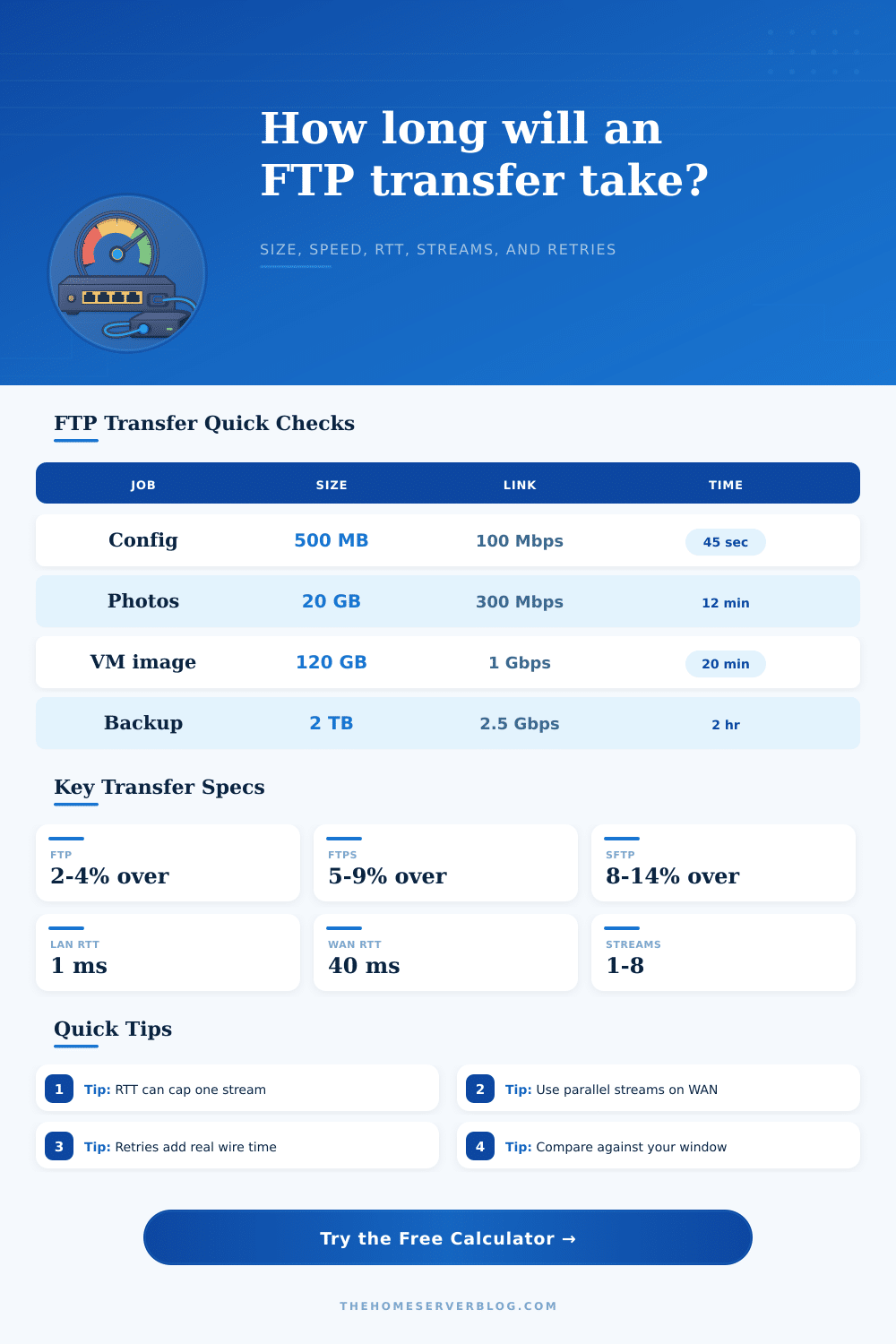
| Plain FTP | 2% to 4% | Trusted LAN appliance jobs | Usually link or disk limited |
| FTPS explicit TLS | 5% to 9% | Secure FTP with classic clients | TLS and command channel add load |
| SFTP over SSH | 8% to 14% | Remote admin, backups, firewalls | SSH ciphers and windowing matter |
| SCP legacy copy | 7% to 13% | Simple one-shot copies | Often single-stream limited |
| Rsync over SSH | 10% to 18% | Incremental backup sets | Checksum work can reduce rate |
| RTT path | Example RTT | 16 MB single stream cap | Practical adjustment |
|---|---|---|---|
| Same switch or VLAN | 0.2 to 1 ms | Very high | Disk, CPU, and link dominate |
| Home to nearby VPS | 10 to 25 ms | 5.1 to 12.8 Gbps | Usually fine with one stream |
| Cross-country WAN | 50 to 80 ms | 1.6 to 2.6 Gbps | Use more streams for fast links |
| Intercontinental | 120 to 180 ms | 711 to 1067 Mbps | Tune window or parallel streams |
| Satellite or VPN chain | 250 to 650 ms | 197 to 512 Mbps | Window ceiling is often visible |
| Project size | Common payload | Link planning value | Transfer note |
|---|---|---|---|
| Router config export | 25 to 500 MB | 100 Mbps | Overhead is small; login time may dominate |
| Photo folder upload | 10 to 80 GB | 300 Mbps | Many small files reduce effective rate |
| VM image migration | 40 to 250 GB | 1 Gbps | Large files usually reach steadier throughput |
| NAS offsite backup | 500 GB to 8 TB | 1 to 2.5 Gbps | Retries and window limits change the schedule |
| Parallel streams | Where it helps | Where it hurts | Starting point |
|---|---|---|---|
| 1 stream | LAN and simple single files | High RTT fast WAN paths | Default for appliances |
| 2 streams | Moderate RTT VPN links | Small CPU-bound boxes | Low-risk WAN test |
| 4 streams | Offsite backup over fiber | Busy NAS disks | Good SFTP baseline |
| 8 streams | Large multi-file copies | Rate-limited servers | Use only after testing |
An FTP transfer speed calculator is a tool that will allow you to calculate the length of time that it will take for your files to be transferred. Many individuals attempts to calculate the length of time that a file will be transferred by dividing the size of the file by the link speed. However, this calculation often fails to produce the correct time estimates for the transfer of files.
A file transfer calculator accounts for the different variables that affects the rate at which files are transferred over a network link. The first two variables that an FTP transfer calculator will require you to input are the size of the file that is to be transferred and the link speed to the file. Additionally, the FTP transfer calculator will require you to input the Round Trip Time (RTT) latency between the originating computer and the computer to which the file is to be transferred.
How an FTP Speed Calculator Works
The RTT latency is important in that the Transmission Control Protocol (TCP) only allows for a certain amount of data to be sent between the two computers before it must receive an acknowledgment of that transferred data. With low latency, such as is typically experienced on a local area network (LAN), high rates of data can be sent. With high latency, such as may exist between two computers that are connected through a long distance or satellite link, the TCP protocol may have to “idle” for extended periods of time between the sending of data and the receiving of acknowledgments of those sent data packets.
Another variable that the FTP transfer calculator must account for is the protocol that will be used to transfer the files. Different protocols has different levels of overhead associated with them. For instance, FTP has the least amount of overhead associated with it, but does not provide encryption of the transferred files.
FTPS employs encryption of the files through the use of TLS, which introduces additional processing time requirements for the protocol. Similarly, SFTP is implemented over the SSH protocol, which also introduces additional processing time requirements for the protocol. Another factor that the FTP transfer calculator considers is the efficiency percentage of each protocol.
Data can never reach the maximum theoretical transfer speed due to various factors, such as disk speed, processing power of the computers, background data traffic, and lost data packets. In addition to these factors, another allowance that is made within the FTP transfer calculator is for data packets to be retransmitted in the case that they become lost in the data packet transfer. An allowance for retransmission within the calculator will allow it to provide an updated time estimate for the data transfer.
The transfer window within the FTP transfer calculator can allow you to project the length of time that the files will be transferred at the calculated speeds. If the calculator calculates the length of time that is beyond the time available to perform the data transfer, it may be necessary to either increase the number of data streams, the size of the TCP window, or to utilize a faster link between the two computers. However, if the length of time calculated by the FTP transfer calculator is within the time available to the users, it may be possible to utilize a different protocol or utilize a link at a slower transfer rate.
The number of files that will be transferred also has the potential to affect the rate at which files are transferred. Files of a small size require additional processing time to open and close the files, thus increasing the percentage of data that is spent on performing these actions rather than on transferring data. Files of a large size can be transferred at the speeds calculated by the calculator.
However, a folder containing numerous small files may experience a decrease in the effective rate at which the files can be transferred. Thus, the FTP transfer calculator may also permit the user to input the total size of a folder that is to be transferred. The contention of the link can impact the data transfer speeds, but cannot be accounted for in the FTP transfer calculator.
For instance, links may be fast during off-hours, but may become slow during the daytime hours due to the contention of those links with other users. Thus, while the FTP calculator may provide an estimate of the speed of the link that is to be used, it must also calculate whether or not that link will be shared by numerous other users. Two tables are often included within the FTP transfer calculator.
One table details the impact of different protocols on the percentage of overhead of the protocol. The other table details how the throughput of a single data stream may decrease as the RTT latency between the computers increases. These tables help to provide users with an understanding of the estimate that the calculator provided.
It is common for individuals to believe that the link speed should be increased in order to increase data transfer speeds. However, the main limiting factor in many instances is actualy created by the latency and the size of the TCP window. Increasing the number of data streams or the receive buffer size for the computers can often provide more improvements to the data transfer rate than can be made by increasing the link speed between the two computers.
These parameters are detailed within the calculator next to the link speed. By using the FTP transfer calculator, it is possible to treat the length of time for data transfers as a known variable. Thus, the FTP transfer calculator can be used to tell a colleague of the estimated time at which a job will be completed.
Additionally, the calculator can be used to explain the changes that will be made to a network to allow it to complete the job within the time required to complete the job.