GRE MTU Calculator
Calculate GRE tunnel MTU, recommended TCP MSS clamp, encapsulated packet size, and headroom before a home lab or WAN path starts fragmenting traffic.
| Component | Bytes | Subtracted From MTU | Where It Appears | Planning Note |
|---|---|---|---|---|
| Outer IPv4 header | 20 | Yes | Every GRE tunnel over IPv4 | Basic 1500 path leaves 1480 before GRE. |
| Outer IPv6 header | 40 | Yes | GRE over IPv6 underlay | Consumes 20 more bytes than IPv4 underlay. |
| GRE base header | 4 | Yes | All GRE packets | Protocol type and flags are always present. |
| GRE key field | 4 | Yes | Keyed GRE, mGRE, policy separation | Common in DMVPN and multi-tenant lab tunnels. |
| GRE sequence field | 4 | Yes | Ordered delivery or diagnostics | Rare in simple home lab tunnels. |
| GRE checksum field | 4 | Yes | Checksum-enabled tunnels | Useful for validation, but adds overhead. |
| PPPoE access layer | 8 | If not already in path MTU | DSL or PPPoE fiber access | Often represented as a 1492-byte path MTU. |
| ESP and NAT-T | 50 to 90 | Yes when GRE is inside IPsec | IPsec-protected GRE WAN | Padding and algorithms change the exact number. |
| Platform / Network | GRE Style | Useful MTU Setting | Typical Spec Concern | Operational Check |
|---|---|---|---|---|
| Cisco IOS / IOS XE | tunnel mode gre ip | Interface MTU or ip mtu | DMVPN adds key and NHRP design needs. | Clamp TCP MSS on tunnel interface. |
| VyOS or FRR router | GRE or GRE-key | Interface MTU plus MSS clamp | Policy routing and firewall zones can hide drops. | Probe with DF from both tunnel endpoints. |
| Linux iproute2 | ip tunnel add mode gre | Link MTU on gre interface | Offload features may mask packet captures. | Check ip link and tracepath results. |
| MikroTik RouterOS | GRE or EoIP | Actual MTU and L2 MTU fields | EoIP carries Ethernet-like payloads. | Confirm bridge and physical port L2 MTU. |
| Juniper SRX / vSRX | gr interface | Family inet MTU | Security policy and zone inspection matter. | Test across the security zone path. |
| Cloud virtual router | Vendor GRE attachment | Provider tunnel MTU limit | Cloud edge may enforce a lower ceiling. | Use provider docs and packet probes. |
| Scenario | Path MTU | GRE Overhead | Safe Inner MTU | IPv4 TCP MSS |
|---|---|---|---|---|
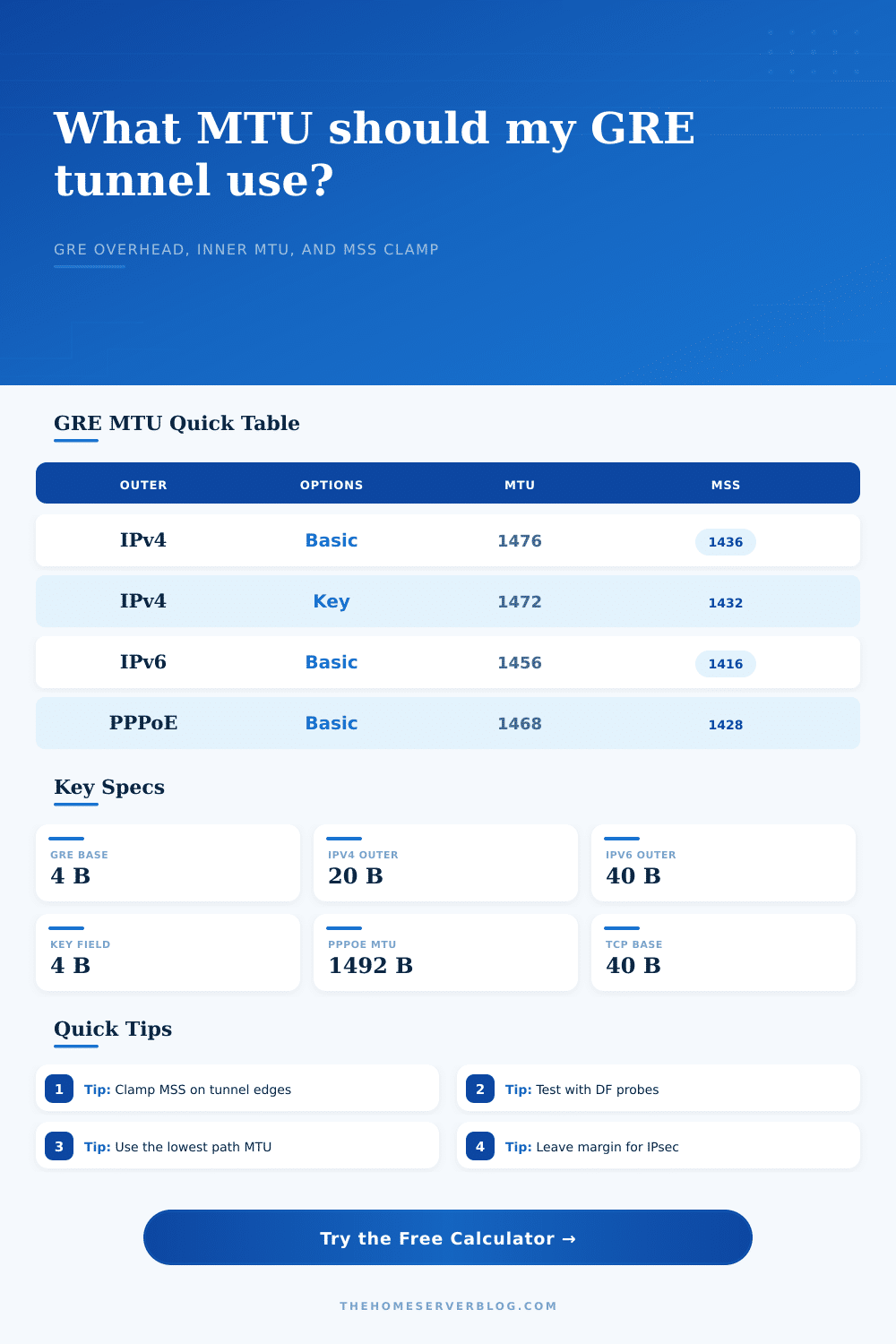
| Basic GRE over Ethernet IPv4 | 1500 | 24 | 1476 | 1436 |
| Keyed GRE over Ethernet IPv4 | 1500 | 28 | 1472 | 1432 |
| GRE key plus sequence | 1500 | 32 | 1468 | 1428 |
| Basic GRE over IPv6 | 1500 | 44 | 1456 | 1416 |
| PPPoE access plus basic GRE | 1492 | 24 | 1468 | 1428 |
| GRE inside IPsec allowance | 1500 | 94 | 1406 | 1366 |
| GRE over jumbo 9000 IPv4 | 9000 | 24 | 8976 | 8936 |
| Project | Typical Devices | Planning MTU | Secondary Result | Best Use |
|---|---|---|---|---|
| Two-site home lab | 2 routers, 2 switches | 1476 | MSS 1436 | Static GRE route testing. |
| DMVPN practice pod | 1 hub, 3 spokes | 1472 | MSS 1432 | NHRP, mGRE, and keyed profiles. |
| PPPoE branch tunnel | 2 routers | 1468 | MSS 1428 | Residential fiber or DSL handoff. |
| GRETAP bridge lab | 2 Linux hosts | 1458 | Bridge check | L2 adjacency experiments. |
| IPsec-protected GRE WAN | 2 firewalls | 1360 to 1410 | MSS 1320+ | Encrypted routing overlays. |
| Jumbo storage overlay | 2 hosts, 1 switch pair | 8976 | MSS 8936 | Lab-only backup or replication links. |
If you’ve ever built an overlay network, you’ve probably run into a quiet failure of a GRE tunnel. The tunnel come up just fine. Your routing protocols gets adjacent with each other. You look at your management dashboard… Everything’s green.
Then you try to load a big web page, or send someone a large file. The connection grinds to a halt. Packets aren’t being dropped by the firewall. There isn’t a routing black hole anywhere. It’s just that the packets are too big for the path they’re taking.
Understanding MTU Problems in GRE Tunnels
That’s Maximum Transmission Unit, the classic issue with any overlay network build. On paper, it looks like such easy math. But it becomes a puzzle when considering real world overhead.
The baseline is that a normal ethernet frame can carry 1500 bytes of payload. When you wrap that in a GRE header, you’ve added at least four bytes. If you’re doing policy separation using keyed GRE, you’ll have four more bytes. Add an outer IP header (twenty bytes for ipv4; forty bytes for ipv6), and now your 1500-byte packet wants to squeeze itself into a 1472-byte envelope.
And… it doesn’t fit. Time to fragment! Or drop the packet if the don’t fragment bit are on.
The calculator takes into account your specific underlay path mtu, minus all the bytes of overhead you just introduced. It gives you a safe inner MTU value, and also a tcp mss clamp value so you won’t see these failures. Now you should of had an exact understanding of what you’ve added to the top. If you think “oh my tunnel interface is UP so it must be ok”, many admins do, that’s why you should use this.
It accounts for additional bytes like sequence number and checksums inside a GRE packet. People often miss these, and you can even account for optional GRE options, like checksums and sequence numbers. Also, it allows you to account for additional encapsulations (like PPPoE or IPsec ESP) which is very common in a WAN environment. For instance, PPPoE cuts the MTU down to 1492 bytes before adding the GRE header. And if you don’t know that, your tunnel will not work across any path that passes through a fiber or DSL access link.
The page has a reference table showing what happens with every combination of headers. Remember that Path MTU Discovery involves more than just a simple number of bytes. The protocol will send out probe packets and listen for ICMP errors so it can handle all this stuff without user intervention.
In theory, this is great. In practice, many corporate security appliances and even some home firewalls will block these ICMP messages. If your firewall blocks PMTUD and your TCP connection encounter a smaller MTU, then it’ll simply hang until its timeout. Having a static MSS clamp is useful here. It forces the TCP header to advertise a smaller maximum segment size, which ensures the resulting packets will be small enough to fit within the tunnel.
Every hop matter and every header counts along the path. This is where the safety margin comes into play on the calculator. Add 16-40 bytes as a safety margin because who knows what kind of other overhead there may be? There might also be some future change in the path. So you give up a little bit of theoretical throughput and get the assurance that your tunnel won’t drop large packets.
In the lab, you can go all out and run with no room for error. But in production, that margin tells the difference between a reliable WAN link and one that needs constant tweaking.
When it comes to selecting an MTU, the math isn’t everything. Every header counts; every hop matters. Knowing the whole route from end-to-end brings the understanding. That’s what the tool does, makes the math easy. But then there’s the insight into why the numbers is getting smaller. When you see the MSS clamp shrink from 1460 to 1360, you’re not losing performance. You’re buying resilience.
The packet size are going down but it’s going to get through. There’s nothing worse on a network than having a packet fragment that never makes it through. That’s what a stall is. On a VPN tunnel, the interface stays up, but the data doesn’t flow. Even when the tunnel goes up, the silent stall can still occur due to MTU issues.