Internet Speed Calculator Mbps
Convert Mbps into real MB/s, download time, upload time, stream capacity, and peak home network headroom.
⚙Mbps presets
📶Speed, transfer, and usage inputs
Decimal matches ISP speed math; binary matches many operating system file sizes.
The calculator converts megabits per second into megabytes per second, applies access link limits and overhead, then compares the remaining capacity against real home workloads.
🖧Equipment spec grid
📊Mbps to MB/s conversion table
| Internet speed | Decimal MB/s | 10 GB download | Practical note |
|---|---|---|---|
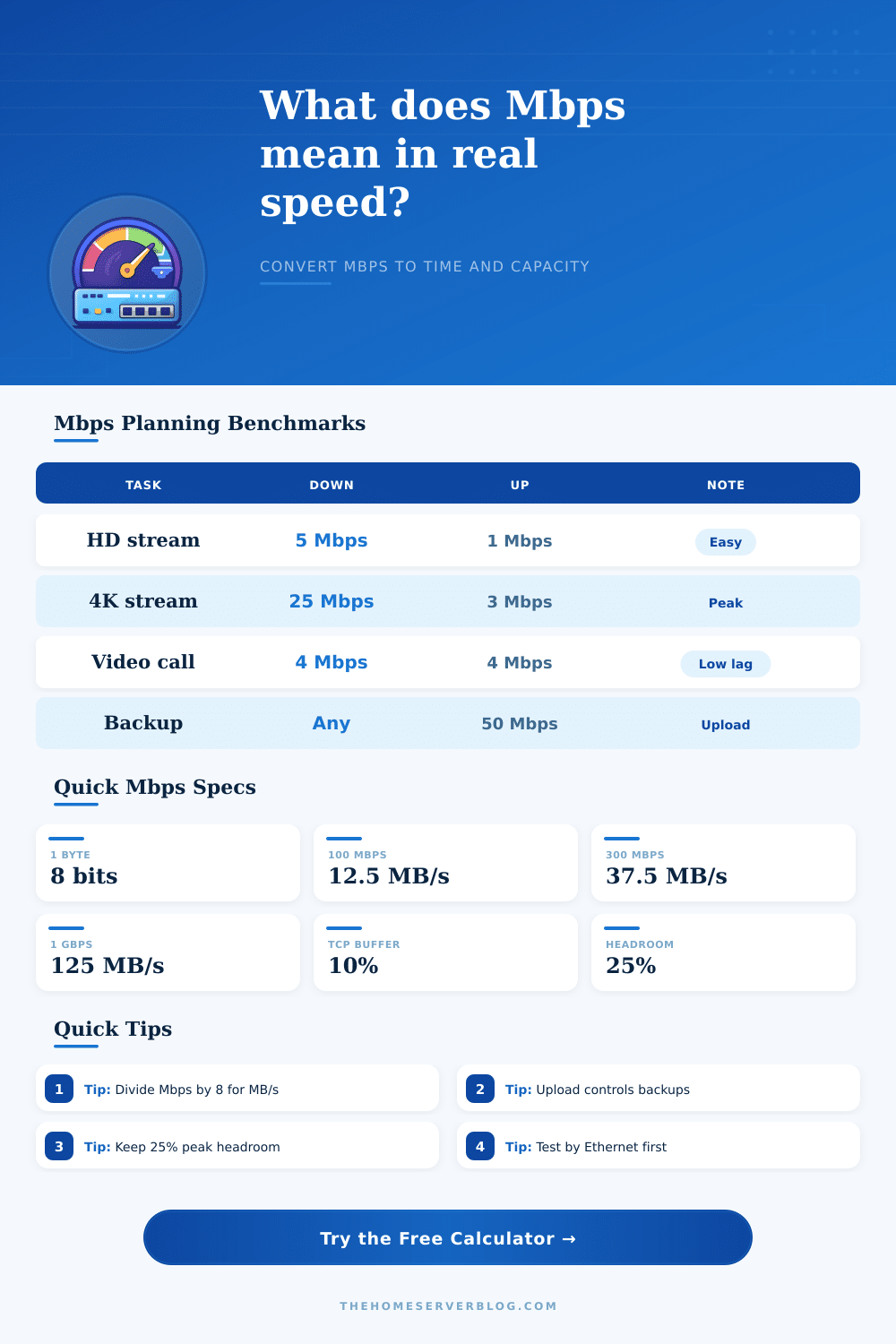
| 25 Mbps | 3.13 MB/s | About 53 minutes | Enough for one 4K stream, slow for large game downloads |
| 100 Mbps | 12.5 MB/s | About 13 minutes | Solid entry speed, but upload may still be low on cable |
| 300 Mbps | 37.5 MB/s | About 4.4 minutes | Comfortable for families if Wi-Fi coverage is strong |
| 500 Mbps | 62.5 MB/s | About 2.7 minutes | Often limited by older Wi-Fi clients before the ISP link |
| 940 Mbps | 117.5 MB/s | About 1.4 minutes | Typical real maximum of a 1 GbE Ethernet client |
| 2350 Mbps | 293.75 MB/s | About 34 seconds | Useful only when WAN, router, switch, and client are multi-gig |
🌐Access link capacity table
| Configuration | Calculator cap | Metric equivalent | Common bottleneck |
|---|---|---|---|
| WAN speed test result | No local cap | Uses input Mbps | ISP, modem, router CPU, or remote test server |
| 100 Mbps Fast Ethernet | 94 Mbps | 11.75 MB/s | Old switch ports, TV boxes, powerline adapters |
| 1 GbE wired client | 940 Mbps | 117.5 MB/s | Standard Ethernet framing and TCP/IP overhead |
| 2.5 GbE wired client | 2350 Mbps | 293.75 MB/s | Router WAN port, switch uplink, or storage write speed |
| Wi-Fi 5 AC client | 420 Mbps | 52.5 MB/s | Signal level, channel width, and client antenna count |
| Wi-Fi 6 AX client | 650 Mbps | 81.25 MB/s | Distance, interference, and airtime from other devices |
| Wi-Fi 6E near AP | 900 Mbps | 112.5 MB/s | 6 GHz range and whether every hop is wired |
| Wireless mesh hop | 260 Mbps | 32.5 MB/s | Shared wireless backhaul and neighbor interference |
📈Workload Mbps reference table
| Workload | Download Mbps | Upload Mbps | Planning detail |
|---|---|---|---|
| Light browsing device | 1 to 3 Mbps | 0.3 to 1 Mbps | Traffic is bursty, so average load is lower than peak bursts |
| HD streaming device | 5 to 8 Mbps | Minimal | Two or three TVs can matter more than many idle phones |
| 4K streaming device | 20 to 25 Mbps | Minimal | Use 25 Mbps as a comfortable high-bitrate planning number |
| HD video meeting | 3 to 4 Mbps | 3 to 4 Mbps | Latency and jitter decide call quality once bandwidth is enough |
| Remote Plex stream | Local download | 8 to 40 Mbps | Server upload speed controls remote playback quality |
| Cloud backup | Minimal | Volume divided by window | Large backups should be scheduled around calls and gaming |
| Game or OS download | 50 to 1000 Mbps | Low | CDN limits, disk writes, and launcher checks can cap speed |
| Home VPN session | 5 to 100 Mbps | 5 to 100 Mbps | Encryption throughput may be lower than raw WAN speed |
🧮Common Mbps planning scenarios
| Scenario | Typical Mbps | Primary result to watch | Secondary result to watch |
|---|---|---|---|
| Starter 100/10 cable plan | 100 down, 10 up | Upload backup time | Video call headroom during cloud sync |
| Family 300/20 cable plan | 300 down, 20 up | Peak download demand | Asymmetric upload capacity |
| Symmetric 500 fiber | 500 down, 500 up | Upload comfort | Whether Wi-Fi caps the client |
| Gigabit home lab | 940 usable wired | MB/s conversion | Storage write speed and router throughput |
| 2.5 GbE workstation | 2350 usable wired | Local access cap | Multi-gig switch and WAN port support |
| Mesh Wi-Fi room | 150 to 300 usable | Client bottleneck | Backhaul airtime shared with devices |
| Remote media server | 20 to 100 upload | Upload MB/s | Streams before congestion |
| Work from home VPN | 50 to 500 symmetric | Latency adjusted status | Calls plus backup overlap |
💡Mbps calculation tips
Often, the advertised speed for internet plans is significantly differ from the actual speed that people experience with their internet connection. There are a few different reason for the difference between advertised and actual internet speeds. One reason is that the advertised internet speeds use different unit to represent the data throughput as the actual speeds.
Internet speeds are advertised in megabits per second (Mbps), but the data that people download and stream in videos is in megabyte per second (MBps). Because megabits are smaller units than megabytes, the advertised speed will be significantly more high than the actual speed in megabytes per second. Thus, people must understand that the advertised internet speed does not represent the actual data speed that will reach they devices.
Why Your Internet Speed Is Different From the Advertised Speed
Another reason that the actual internet speed may be less than the advertised speed is due to many factor that reduce internet speed. The internet speed can be less than advertised due to the router that is use for the connection to the internet, the signal strength of the Wi-Fi connection, and the protocols that data uses to travel from one device to another over the internet. Each component of the internet connection setup use a portion of the total internet speed that is offered to each device.
Additionally, each device connected to the internet uses a portion of the total speed that is offered to the network. The more device connected to the internet, the less internet speed remains for each device. A speed calculator can help with determining the actual speed of the internet.
By entering the download and upload speeds for the internet into the calculator, the calculator can show the actual internet speed that will reach the devices in the household. By adjusting the overhead value in the calculator, individuals can determine how devices like a virtual private network (VPN) or an wireless access point will affect the speed of the internet. The headroom percentage can also be adjusted in the calculator to determine whether the internet plan has sufficient speed for the devices in the household.
Another parameter that can be viewed with the speed calculator is the upload and download speeds of the internet. Many individuals focus on the download speed of the internet as it is the measure of the internet that seems to move the most fastest for the users. However, the upload speed of the internet is also necessary for processes such as backing up computers to the cloud or streaming security camera footage from the home.
If the upload speed is too low, the process of backing up computers will take longer than expected, and the security camera may not successfully stream video footage of the property from the home. By viewing the individual speeds of the internet with the calculator, individuals can determine that their internet plan provide enough speed for the number of tasks that they perform at home. The number of devices in the home that are using the internet impacts the internet speed that each device receive.
The average amount of data that each device downloads also impacts the internet speed. Many devices are downloading information at different times from the internet. The total amount of data that all devices in the home download is a significant portion of the total internet speed.
By entering the average data load of each device and the number of devices in the home into the calculator, the calculator can provide an accurate depiction of whether the internet plan has enough data speed to acommodate all of the devices in the home. Another factor that can be viewed with the internet speed calculator is the number of Mbps that is used by video streaming. Different quality in streaming video use different amounts of internet data speed.
High definition (HD) videos use a relatively low amount of Mbps, but 4K videos use a significantly higher amount of Mbps to stream the videos of high quality. If many individuals in the household is streaming videos of 4K quality at the same time, the total amount of data speed that is required to stream these videos may be higher than what the internet plan provides to the devices. By entering the amount of data speed for video streaming into the calculator, users can determine if the internet plan provide sufficient data speed for all of the video streaming devices in the home.
By using the internet speed calculator, individuals can determine how long it will take to download or upload files of a particular size. By entering the size of a file into the calculator, the calculator can show users the amount of time that will pass while the file is downloading or uploading. This time parameter can help individuals to decide whether they can complete a relatively large game update prior to leaving the house or whether the game update will still be downloading when they return home.
Latency is another parameter of the internet that can be viewed through the calculator. The latency is not the same as the internet speed. Latency is the time that is required for data to move from one device to another over the internet.
High latency means that there is a significant amount of time required for data to move from one location to another. Additionally, high latency create problems for video calls between devices. By factoring the latency into the quality of the internet connection calculation, the calculator can present a rating of the quality of the internet connection for the specific needs of the devices in the household.
Before individuals subscribe to an internet service provider (ISP) for a specific plan or add additional devices to the household, it is beneficial to run the calculations that are provided within the speed calculator. By understanding how each of these factor impacts the speed of the internet connection, individuals will be able to better understand the actual speed of their internet when it is connected to the devices in their home. By using this calculator, individuals have a better understanding of their internet connection than if they only viewed the advertised internet speed of the plan that they are considering.