🌐 IP Address Calculator
Calculate subnets, CIDR blocks, host ranges, wildcard masks & network addresses
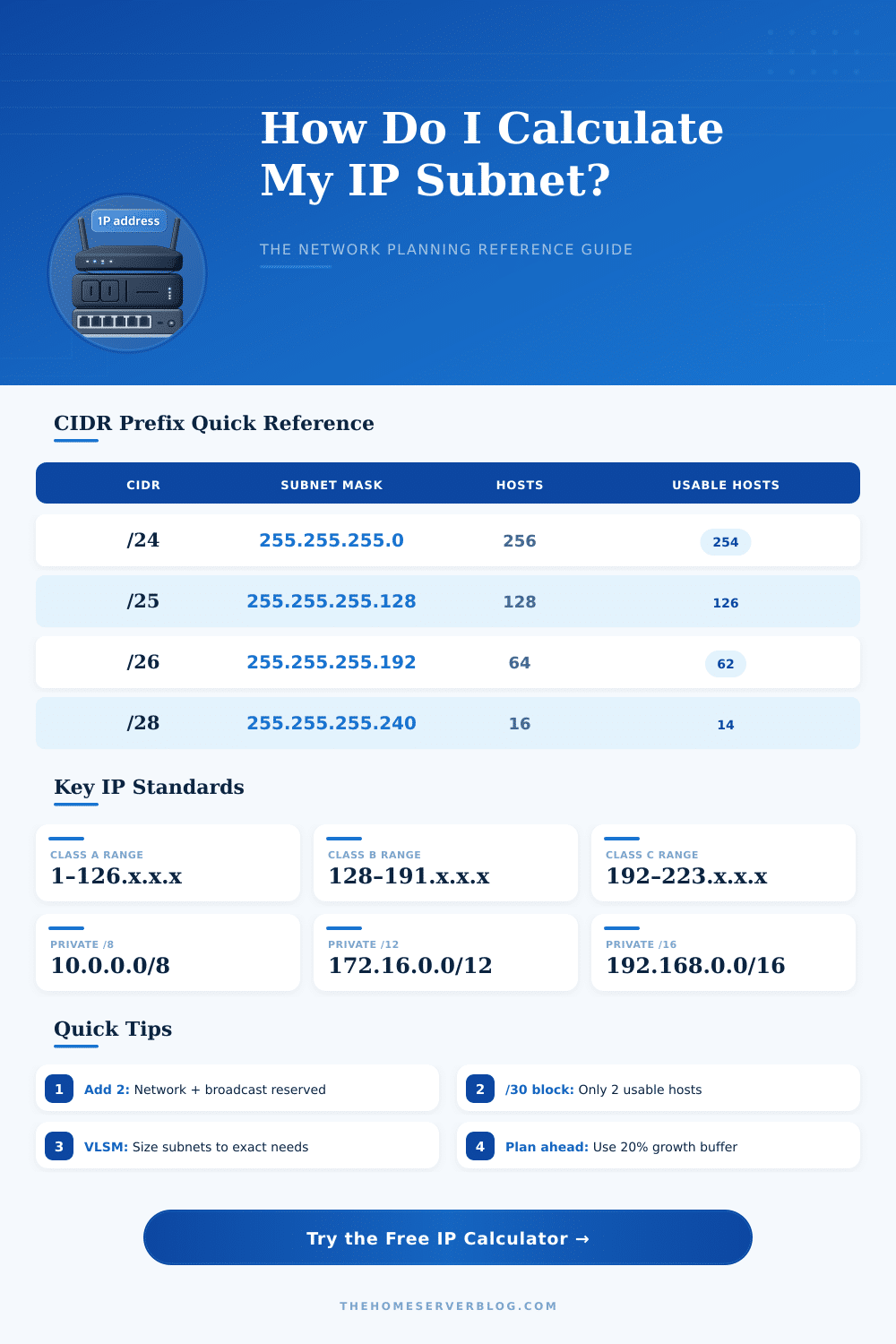
| CIDR | Subnet Mask | Total IPs | Usable Hosts | Block Size | Common Use |
|---|---|---|---|---|---|
| /8 | 255.0.0.0 | 16,777,216 | 16,777,214 | 16M | Large ISP / Class A |
| /12 | 255.240.0.0 | 1,048,576 | 1,048,574 | 1M | Private B (172.16) |
| /16 | 255.255.0.0 | 65,536 | 65,534 | 64K | Campus Network |
| /20 | 255.255.240.0 | 4,096 | 4,094 | 4K | Large Office |
| /22 | 255.255.252.0 | 1,024 | 1,022 | 1K | Medium Office |
| /23 | 255.255.254.0 | 512 | 510 | 512 | Small Office |
| /24 | 255.255.255.0 | 256 | 254 | 256 | Home / SOHO |
| /25 | 255.255.255.128 | 128 | 126 | 128 | Guest WiFi |
| /26 | 255.255.255.192 | 64 | 62 | 64 | IoT Segment |
| /27 | 255.255.255.224 | 32 | 30 | 32 | Small VLAN |
| /28 | 255.255.255.240 | 16 | 14 | 16 | Micro Segment |
| /29 | 255.255.255.248 | 8 | 6 | 8 | Server Cluster |
| /30 | 255.255.255.252 | 4 | 2 | 4 | Point-to-Point |
| /31 | 255.255.255.254 | 2 | 2* | 2 | P2P (RFC 3021) |
| /32 | 255.255.255.255 | 1 | 1 | 1 | Host Route |
* /31 uses both addresses as per RFC 3021 for point-to-point links
| Class | Range | CIDR Block | Total IPs | Typical Use |
|---|---|---|---|---|
| Class A Private | 10.0.0.0 – 10.255.255.255 | 10.0.0.0/8 | 16,777,216 | Large enterprise, data center |
| Class B Private | 172.16.0.0 – 172.31.255.255 | 172.16.0.0/12 | 1,048,576 | Medium enterprise |
| Class C Private | 192.168.0.0 – 192.168.255.255 | 192.168.0.0/16 | 65,536 | Home, SOHO, lab |
| Loopback | 127.0.0.0 – 127.255.255.255 | 127.0.0.0/8 | 16,777,216 | Local host only |
| Link-Local | 169.254.0.0 – 169.254.255.255 | 169.254.0.0/16 | 65,536 | APIPA (no DHCP) |
| Multicast | 224.0.0.0 – 239.255.255.255 | 224.0.0.0/4 | 268,435,456 | Streaming, routing protocols |
| Project | Hosts Needed | Recommended CIDR | Usable Hosts | Spare Capacity |
|---|---|---|---|---|
| Single Home Lab | 10–25 | /27 | 30 | 5–20 spare |
| Home Network | 25–50 | /24 | 254 | 200+ spare |
| Small Office | 50–100 | /25 | 126 | 26–76 spare |
| Medium Office | 100–250 | /24 | 254 | 4–154 spare |
| Proxmox 3-Node | 15–30 VMs | /27 | 30 | 0–15 spare |
| IoT Segment | 20–50 | /26 | 62 | 12–42 spare |
| Guest WiFi | 30–60 | /25 | 126 | 66–96 spare |
| Data Center Rack | 250–500 | /23 | 510 | 10–260 spare |
IP Address is a unique number that one gives to every device that connects to the net. It works like a rule that helps the devices talk to each other. Without that address the internet would not manage to identify the various computers, routers and pages.
Various devices, for instance phones, laptops, desktops and routers, all own IP Addresses.
What is an IP Address?
IP stands for Internet Protocol. It forms the basic layer for talking in networks that use pages, chat programs, live video and audio. One does not code an IP Address forever in the device.
It can change all along the time so one calls it a logical address instead of a lasting one.
In an IP Address hides two parts really. One of them is the network identifier, while the second is the host identifier. One calls subnet-mask that tool, that points to the routers, where the network section ends and the host starts.
The number after the slash, for instance /16, shows that 16 bits are used for the network part, and the rest for the hosts.
One gives a public IP Address to a device that directly will access the internet. That address is unique through the hole world of the net and it is assigned by the Internet Service Provider. On the other hand, a private IP Address works only for devices in the same local net.
It can look like 192.168.1.2. Imagine it as an internal letter in an office. You deliver something to the office itself, that is the router, and here one decides, to which desk it goes.
Two versions exist for IP handling. IPv4 uses numbers like 192.0.2.1, while IPv6 uses longer formats, for instance 2001:db8::42. Probably IPv6 slowly will replace IPv4, although that change moved very slowly.
IP Addresses do two main tasks: identify the network entry spot and give info about place. Thanks to them websites and programs can send data exactly to the right device. Your public IP comes from your ISP and can reveal basic local info, like country, city or the used provider.
Even so, an IP Address mainly shows the ISP, that manages a certain group of addresses, not a real person. It is possible to guess the general city or region from it, but not the exact home address.
In Windows, if you type “ipconfig” in the terminal, it shows the local IP. For Mac or Linux the command is “ifconfig“. If a device does not manage to receive a good address, it usually picks one that starts with 169.254; that is a link-local address.
Usually that means that somethingfailed with the network link.
Using a VPN, you can mask your IP Address and protect the online activity against outside parties. Some services offer a fixed IP, that stays the same and helps to skip CAPTCHAs or reach services on servers.